
RONGJI 4Core 1+32GB
RONGJI Car Radio Stereo User Manual
Model: 4Core 1+32GB
For Honda Accord 10 (2018-2021)
Product Overview
The RONGJI Car Radio Stereo is an advanced in-dash navigation and entertainment system designed for the Honda Accord 10 (2018-2021) models. This unit features a 10.1-inch IPS Touch Screen with a resolution of 1280x720, running on Android 13 OS. It integrates seamlessly with your vehicle's existing systems, offering a range of functionalities including GPS navigation, multimedia playback, and smartphone connectivity.
Key features include built-in Wireless Car-Play and Android Auto, Bluetooth for hands-free calling and music, FM/RDS radio, and Wi-Fi connectivity. The system also supports steering wheel controls and offers a split-screen function for enhanced usability.
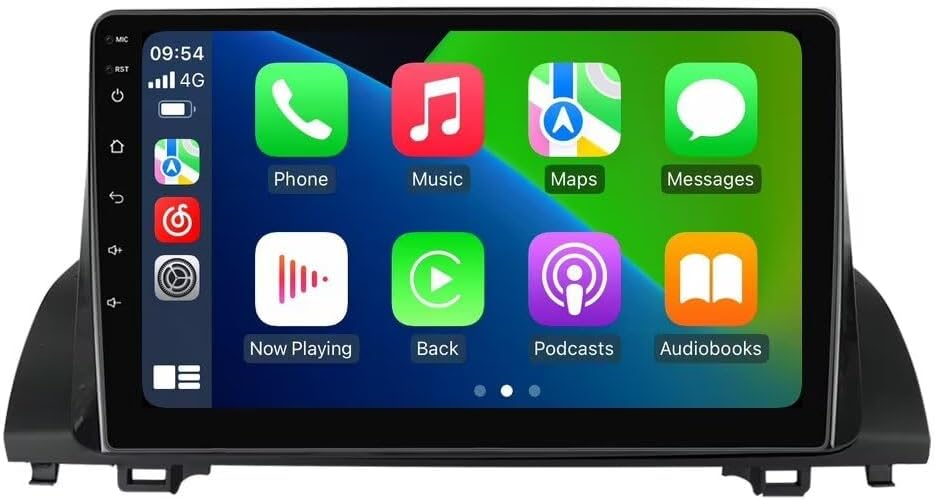
Image: The RONGJI Car Radio Stereo displaying its Car-Play interface.
Setup and Installation
Package Contents
Before beginning installation, please verify that all components are present in the package:
- Main Head Unit (Machine)
- Power Cable
- RCA Cable
- Reversing Camera Cable (Camera not included)
- USB Cable
- Microphone (MIC)
- GPS Antenna
- Plug-and-Play Installation Kit

Image: Detailed view of all components included in the RONGJI Car Radio Stereo package.
Vehicle Compatibility
This head unit is specifically designed for Honda Accord 10 models from 2018 to 2021. To ensure compatibility with your specific vehicle's dashboard configuration, it is crucial to compare your car's center console with the provided images. Some dashboard layouts may not be compatible.

Image: Visual guide for checking dashboard compatibility. The top image shows a compatible dashboard with physical buttons, while the bottom image shows an incompatible dashboard with touch-sensitive controls.
For confirmation, you may send a photo of your vehicle's center console to customer support for verification.
Installation Process
The RONGJI Car Radio Stereo is designed for plug-and-play installation. While the kit includes all necessary components for a straightforward setup, professional installation is recommended if you are unfamiliar with car audio system wiring or dashboard disassembly. Ensure the vehicle's power is disconnected before beginning installation.

Image: A side-by-side comparison showing the original car radio setup ("Before installation") and the RONGJI Car Radio Stereo installed in the dashboard ("After installation").
Operating Instructions
Basic Operation
The unit operates on Android 13, providing a familiar and intuitive user interface. Navigate through menus and applications using the 10.1-inch IPS capacitive touch screen. The high resolution (1280x720) ensures clear visuals.
Smartphone Integration (Car-Play & Android Auto)
The head unit features built-in Car-Play and Android Auto for seamless smartphone integration. Both wired and wireless connections are supported. For wired connections, use your original phone cable.
- Wireless Connectivity: Connect your smartphone via Bluetooth for wireless Car-Play or Android Auto.
- Wired Connectivity: For optimal performance and charging, connect your phone using a USB cable.
This feature allows access to navigation, music, calls, and other compatible applications directly from the head unit's display, enhancing safety and convenience while driving.

Image: Illustration of Car-Play and Android Auto interfaces, highlighting wired and wireless connection options.
Bluetooth Functionality
The integrated Bluetooth module supports hands-free calling and audio streaming. Pair your phone to make and receive calls directly through the head unit and play music from your device. The unit includes a built-in microphone and supports an external microphone for clear communication.

Image: Demonstrates the Bluetooth phonebook and calling interface, alongside the FM RDS radio display.
GPS Navigation
Equipped with a built-in GPS module and an external GPS antenna, the unit provides reliable navigation. You can use online mapping services via Wi-Fi or download offline maps for use in areas without mobile signal. The system supports GPS, GLONASS, and BDS for accurate positioning.

Image: Visual representation of GPS navigation with real-time traffic display and Wi-Fi connectivity for online content.
Wi-Fi Connectivity
The built-in Wi-Fi receiver allows connection to Wi-Fi networks or mobile hotspots. This enables downloading applications, streaming online content, and accessing real-time traffic updates for navigation.
Steering Wheel Control (SWC)
The unit supports your vehicle's existing steering wheel controls, allowing you to manage audio playback, answer calls, and navigate without taking your hands off the wheel. This feature works with digital SWC systems.
Image: Depicts the split-screen functionality showing two applications simultaneously, and an illustration of steering wheel controls.
Split Screen Function
Enhance multitasking with the split-screen feature, allowing two applications to be displayed simultaneously on the 10.1-inch screen. For example, you can view navigation maps while controlling music playback.
Rear View Camera Support
The unit supports connection to a rear view camera (camera not included). This feature provides a clear view of the area behind your vehicle when reversing, enhancing safety.
Maintenance
To ensure the longevity and optimal performance of your RONGJI Car Radio Stereo, follow these maintenance guidelines:
- Cleaning: Use a soft, dry cloth to clean the screen and exterior. Avoid abrasive cleaners or solvents that could damage the display or finish.
- Temperature: Avoid exposing the unit to extreme temperatures, both hot and cold, as this can affect electronic components.
- Connections: Periodically check all cable connections to ensure they are secure and free from corrosion.
- Software Updates: Keep the system software updated to benefit from performance improvements and new features. Check the manufacturer's website or system settings for available updates.
Troubleshooting
If you encounter issues with your RONGJI Car Radio Stereo, try the following basic troubleshooting steps:
- No Power: Check all power connections. Ensure the vehicle's ignition is on.
- No Sound: Verify volume settings. Check speaker connections. Ensure the correct audio source is selected.
- Touch Screen Unresponsive: Try restarting the unit. Ensure the screen is clean and free of debris.
- GPS Signal Issues: Ensure the GPS antenna is properly installed and has a clear view of the sky.
- Bluetooth Pairing Issues: Ensure Bluetooth is enabled on both the head unit and your phone. Delete previous pairings and try re-pairing.
- System Lag/Freezing: Restart the unit. Close unnecessary background applications.
For persistent issues or complex problems, please contact customer support for assistance.
Specifications
| Feature | Detail |
|---|---|
| Operating System | Android 13.0 |
| CPU | 4 Core |
| RAM | 1GB |
| ROM | 32GB |
| Display Size | 10.1 Inches |
| Resolution | 1280 x 720 IPS |
| Connectivity Technology | Bluetooth, Wi-Fi |
| Special Features | Touchscreen, Built-in Car-Play & Android Auto (Wired/Wireless), GPS Navigation, Steering Wheel Control, Split Screen, FM&RDS Radio, Rear View Camera Support |
| Audio Output Mode | Stereo |
| Mounting Type | Dashboard Mount |
| Included Components | Plug-and-Play Installation Kit |
| Manufacturer | Shenzhen Rongji Electronics Co., Ltd |
| Country of Origin | China |
Warranty and Support
Warranty Information
This RONGJI Car Radio Stereo comes with a 1-year warranty from the date of purchase. This warranty covers manufacturing defects and malfunctions under normal use. Please retain your proof of purchase for warranty claims.
For detailed warranty terms and conditions, please refer to the documentation included with your product or contact customer support.
Customer Support
RONGJI is committed to providing professional technical support for its products. If you have any questions regarding installation, operation, or troubleshooting, please do not hesitate to contact our support team.

Image: Our dedicated customer service team is ready to assist you.
Email: Rongji08@outlook.com
Please allow up to 24 hours for a response.
Ask a question about this manual
Ask about setup, troubleshooting, compatibility, parts, safety, or missing instructions. Manuals+ will review the question and use this page’s manual context to help answer it.