
Introduction
This manual provides comprehensive instructions for the installation, operation, and maintenance of the DEfrat EKEPC2 EVSE Protocol Controller. This device is designed to manage the charging process for Electric Vehicles (EVs) by ensuring proper communication and safety protocols between the EV and the charging station. It supports 32A AC 240V charging applications.
Safety Information
Please read all safety warnings and instructions carefully before installing or operating the DEfrat EKEPC2 controller. Failure to follow these instructions may result in electric shock, fire, or serious injury.
- Installation must be performed by a qualified electrician in accordance with all local and national electrical codes.
- Ensure the main power supply is disconnected before performing any installation, wiring, or maintenance.
- Do not operate the controller if it appears damaged or has been exposed to moisture.
- Verify correct voltage and current ratings before connecting to the power supply and EV charging system.
- The device has an International Protection Rating of IP67, indicating protection against dust ingress and temporary immersion in water. However, proper enclosure and installation are crucial for long-term protection.
Product Overview
The DEfrat EKEPC2 is an EVSE Protocol Controller designed for integration into EV charging stations. It facilitates the communication between the charging station and the electric vehicle, ensuring a safe and efficient charging process.

Figure 1: DEfrat EKEPC2 EVSE Protocol Controller shown with an example EV charger setup.
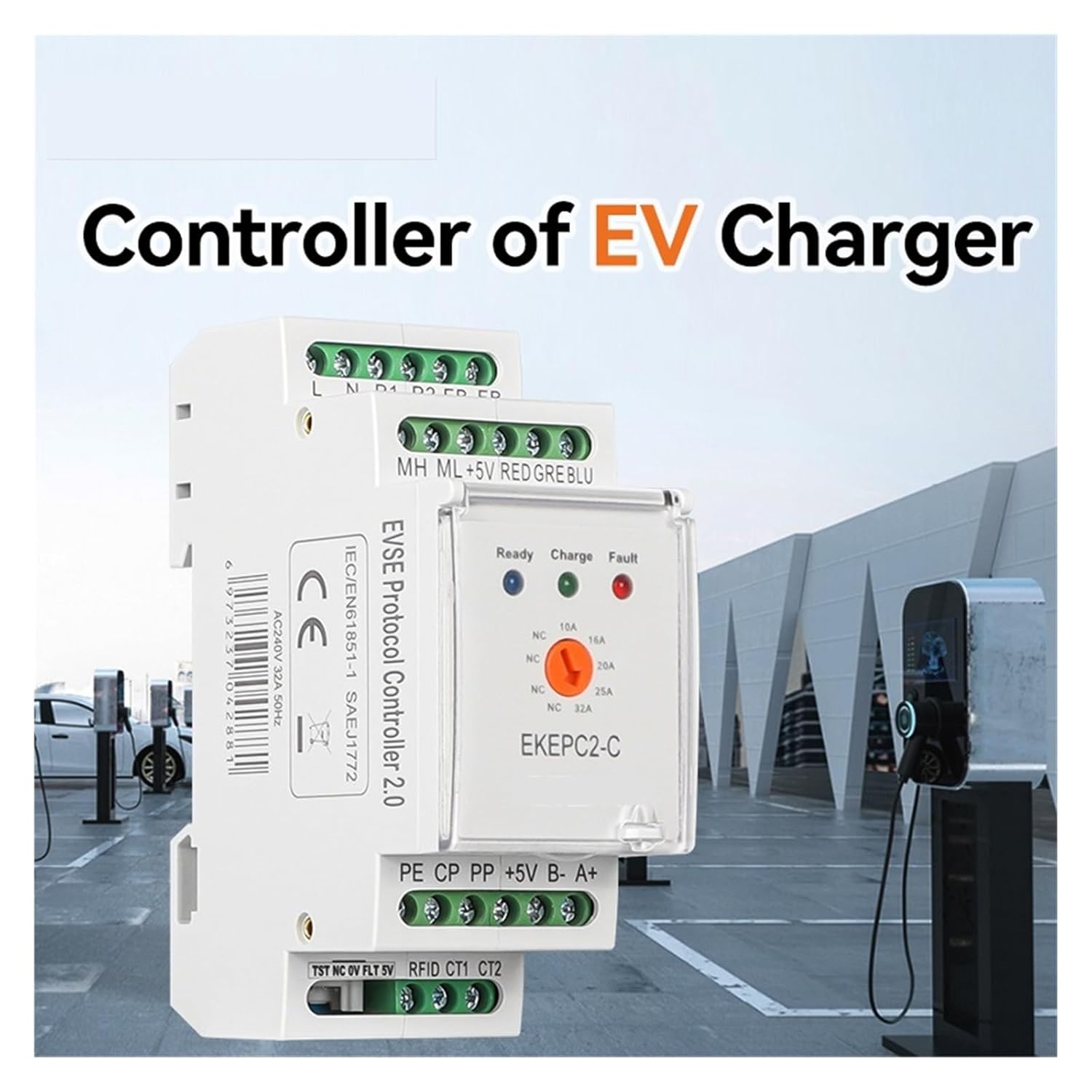
Figure 2: The DEfrat EKEPC2 controller, highlighting its role as the core component for EV charger control.
Component Identification

Figure 3: Detailed view of the DEfrat EKEPC2 controller with key components labeled.
- Fastening screws: For securing the unit.
- Rail installation: Designed for DIN rail mounting.
- Executive standard: IEC/EN61851-1 SAEJ1772 compliance.
- Product name: EVSE Protocol Controller 2.0.
- Flame retardant enclosure: For enhanced safety.
- Dust-proof transparent cover: Protects indicators and settings.
- Indicator light: Displays Ready, Charge, and Fault status.
- Status Parameter: Current selection (10A, 16A, 20A, 32A).
- Product number: EKEPC2-C.
- Brand LOGO: DEfrat.
- Ground terminal: PE connection point.
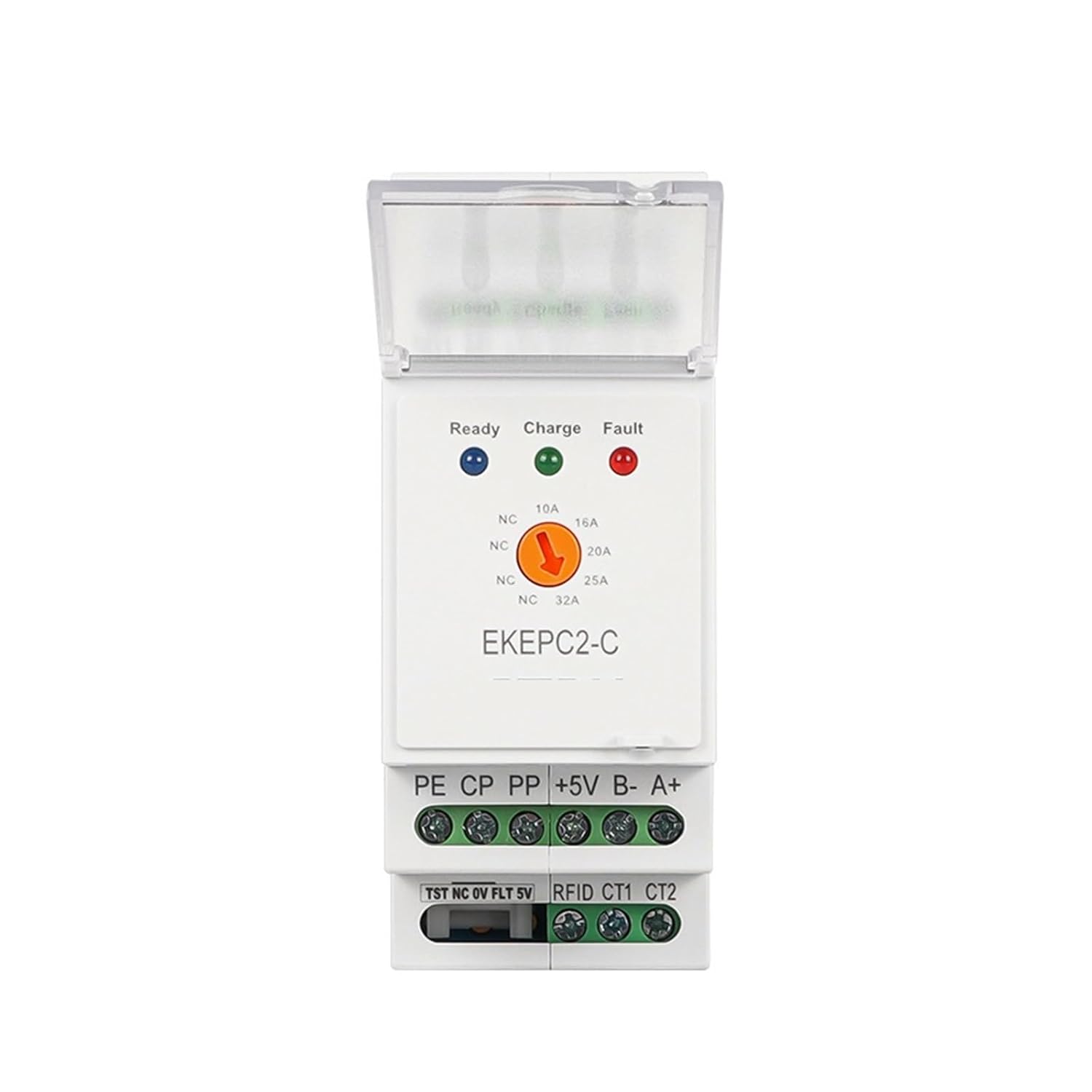
Figure 4: Front panel of the EKEPC2 controller showing status indicators and current selection options.

Figure 5: Side view of the EKEPC2 controller, illustrating its design for DIN rail installation.
Typical Application

Figure 6: Example of the DEfrat EKEPC2 controller integrated into an EV charging station alongside an RCCB (Residual Current Circuit Breaker) and Contactor.
Setup and Installation
The DEfrat EKEPC2 controller is designed for DIN rail mounting within an appropriate electrical enclosure. Ensure all connections are secure and comply with electrical safety standards.
Wiring Connections
Refer to Figure 3 for terminal identification. The main connections include:
- L, N: Line and Neutral power input (240V AC).
- PE: Protective Earth ground connection.
- CP (Control Pilot): Communication line with the EV.
- PP (Proximity Pilot): Detects cable connection and current capacity.
- +5V, B-, A+: Power supply and communication lines for external modules (e.g., RFID reader).
- TST, NC, OV, FLT, 5V, RFID, CT1, CT2: Additional control and sensor inputs/outputs.
Ensure all wiring is correctly sized for 32A AC 240V operation and properly insulated. Use screw terminals for secure connections.
Operating Instructions
Once installed and powered, the DEfrat EKEPC2 operates automatically to manage the EV charging process. The front panel indicators provide status feedback.
Status Indicators (Refer to Figure 4)
- Ready (Green LED): Indicates the controller is powered on and ready to initiate a charging session.
- Charge (Green LED): Illuminates when an EV is connected and actively charging.
- Fault (Red LED): Indicates an error or malfunction in the charging system. Refer to the Troubleshooting section.
Current Selection
The controller allows for selection of maximum charging current: 10A, 16A, 20A, or 32A. This setting is typically configured during installation based on the charging station's capacity and local electrical regulations. The control method for this selection is via touch, likely through a button or switch under the transparent cover.
Maintenance
The DEfrat EKEPC2 controller is designed for reliable, long-term operation with minimal maintenance. However, periodic checks are recommended to ensure optimal performance and safety.
- Visual Inspection: Periodically inspect the controller and its wiring for any signs of damage, loose connections, or overheating.
- Cleaning: Keep the unit free from dust and debris. The transparent cover helps protect the internal components. Use a soft, dry cloth for cleaning. Do not use abrasive cleaners or solvents.
- Environmental Conditions: Ensure the operating environment remains within specified temperature and humidity ranges.
Always disconnect power before performing any maintenance or cleaning.
Troubleshooting
If the DEfrat EKEPC2 controller experiences issues, refer to the following common problems and solutions:
| Problem | Possible Cause | Solution |
|---|---|---|
| Fault LED is illuminated (Red) |
|
|
| No indicators lit |
|
|
| EV not charging |
|
|
Specifications
| Parameter | Value |
|---|---|
| Model Number | EKEPC2-C |
| Operating Voltage | 240 Volts AC |
| Maximum Current | 32 Amps |
| Connectivity Protocol | X-10 (Note: This may refer to an internal communication protocol, not necessarily home automation X-10.) |
| Operation Mode | Automatic |
| Connector Type | Plug In (Refers to the overall system, not the controller itself) |
| Circuit Type | 1-way |
| Actuator Type | Push Button (For current selection) |
| International Protection Rating | IP67 |
| Control Method | Touch |
| Terminal Type | Screw |
| Approximate Dimensions (L x W x H) | 1.18 x 0.79 x 0.39 inches (Package dimensions, indicative of compact size) |
| Approximate Weight | 10.58 ounces |
Note: Specifications are subject to change without notice.
Warranty and Support
For warranty information and technical support, please contact DEfrat customer service through the retailer where the product was purchased or refer to the official DEfrat website. Keep your purchase receipt as proof of purchase.
For additional resources and frequently asked questions, visit the DEfrat support page.