
Camii Smart birdhouse-1
Camii Smart Birdhouse Camera User Manual
Model: Smart birdhouse-1
Introduction
Thank you for choosing the Camii Smart Birdhouse Camera. This innovative product allows you to observe bird nesting and hatching activities in real-time from your smartphone. Featuring a 5MP HD camera with color night vision, motion detection, and solar power, this birdhouse provides a safe and comfortable environment for birds while offering an immersive bird-watching experience for you and your family. This manual provides detailed instructions for the proper setup, operation, and maintenance of your new birdhouse camera.

Image: The Camii Smart Birdhouse Camera, showcasing its wooden construction, integrated camera, solar panel, and a smartphone displaying a live view of bird activity inside the birdhouse.
Safety Information
- Ensure the birdhouse is mounted securely to prevent falling, which could cause injury or damage.
- Keep all components, especially the camera and solar panel, away from extreme temperatures and direct water immersion. The product is IP66 weatherproof, but not submersible.
- Do not attempt to disassemble or repair the camera or solar panel yourself. Refer to qualified service personnel.
- Use only the provided accessories or those recommended by Camii to avoid damage or malfunction.
- Keep out of reach of small children and pets to prevent accidental ingestion of small parts.
- When handling the solar panel, avoid scratching the surface to maintain charging efficiency.
Package Contents
Please check the package carefully to ensure all items are present and in good condition:
- Camii Smart Birdhouse (Cedar Wood)
- 5MP HD Birdhouse Camera
- Solar Panel (with mounting bracket)
- 32GB SD Card (pre-installed or included separately)
- Mounting Screws and Anchors
- USB Charging Cable
- User Manual (this document)

Image: A visual representation of the main components included with the Camii Smart Birdhouse Camera, showing the birdhouse, camera, and solar panel, along with the product packaging.
Product Overview
Familiarize yourself with the key features and components of your Camii Smart Birdhouse Camera:
- Birdhouse Structure: Made from eco-friendly cedar wood with a reinforced shell and IP66 weatherproof rating. Features three customized holes and a metal guard at the entrance.
- 5MP HD Camera: Provides clear video, supports color night vision, and has a 110° adjustable viewing angle.
- Solar Panel: Provides continuous power to the camera, reducing the need for manual charging.
- Motion Detection: Triggers recording and sends real-time notifications to your phone when activity is detected.
- 32GB SD Card: For local storage of recordings. Cloud storage is also available (3-day recording loop, lifetime trial).
- Two-Way Audio: Allows for communication (if applicable, though less relevant for a birdhouse). Note: The product description mentions "Two-Way Audio" but its utility for a birdhouse is limited.
- 2.4GHz Wi-Fi Support: Connects the camera to your home network for remote viewing.

Image: An illustrative diagram highlighting the key features of the Camii Smart Birdhouse Camera, including its solar power capability, 5MP HD camera, waterproof design, and smart functionalities like motion detection and app control.
Setup Guide
1. Initial Camera Charging
Before first use, fully charge the camera's internal battery using the provided USB cable. Connect the USB cable to the camera's charging port and a standard USB power adapter (not included). The charging indicator light will show status (refer to camera's specific LED indicator guide if available).
2. Birdhouse Mounting
Choose a suitable location for the birdhouse, ideally on a tree or post, away from direct human disturbance but within range of your 2.4GHz Wi-Fi network. Ensure the location allows the solar panel to receive ample direct sunlight throughout the day.
- Position the birdhouse at a desired height, ensuring it is stable.
- Mark the drilling points for the mounting screws on the tree or post.
- Drill pilot holes if necessary.
- Securely attach the birdhouse using the provided mounting screws.

Image: The Camii Smart Birdhouse Camera securely mounted on a tree trunk, demonstrating its outdoor placement and integration with a mobile application for monitoring.
3. Camera Installation and Solar Panel Connection
- Open the access panel on the birdhouse to reveal the camera compartment.
- Insert the fully charged camera into its designated slot within the birdhouse. Ensure the lens is facing the entrance hole.
- Connect the solar panel cable to the camera's power input port.
- Mount the solar panel in a position where it receives maximum direct sunlight throughout the day. Adjust its angle for optimal exposure.
- Close and secure the birdhouse access panel.
4. App Download and Wi-Fi Connection
The Camii Smart Birdhouse Camera operates via a dedicated mobile application. Search for "Camii Nest" or the specified app name in your device's app store (iOS/Android) and install it.
- Open the installed app and create a new account or log in.
- Follow the in-app instructions to add a new device. This typically involves scanning a QR code on the camera or manually selecting the device type.
- When prompted, connect the camera to your 2.4GHz Wi-Fi network. Ensure your smartphone is also connected to the same 2.4GHz network during setup.
- Once connected, the camera's status indicator will confirm successful pairing (refer to camera's specific LED indicator guide).
- Adjust the camera's viewing angle (110° adjustable) via the app to ensure optimal coverage of the birdhouse interior.
Operating Instructions
1. Live Viewing
Open the Camii app and select your birdhouse camera from the device list. You will see a live video feed from inside the birdhouse. This allows you to observe birds in real-time.
2. Motion Detection and Notifications
The camera is equipped with motion detection to capture significant events. When motion is detected (e.g., a bird entering or leaving), the camera will automatically record and send a real-time notification to your smartphone.
- Enabling/Disabling Notifications: Access the camera settings within the app to turn motion detection alerts on or off.
- Adjusting Sensitivity: Some cameras allow you to adjust the motion detection sensitivity to reduce false alarms.

Image: A smartphone displaying a "Motion Alert" notification from the Camii Nest app, indicating that a baby bird has emerged from its nest, with a preview image of the nest.
3. Recording and Playback
Recordings are saved to the included 32GB SD card and can also be stored in the cloud (lifetime trial for 3-day recording loop).
- Manual Recording: While in live view, you can manually initiate recording by tapping the record button in the app.
- Accessing Playback: Navigate to the "Playback" or "History" section in the app to view past recordings from the SD card or cloud storage.

Image: The Camii Smart Birdhouse Camera installed on a tree, with a smartphone displaying the app's interface for monitoring bird activity, including options for live view, card playback, and cloud storage playback. Surrounding images show various stages of bird nesting, from eggs to hatchlings.
4. Color Night Vision
The 5MP camera provides clear images even in low-light conditions, offering full-color night vision to ensure you don't miss any nocturnal bird activity.
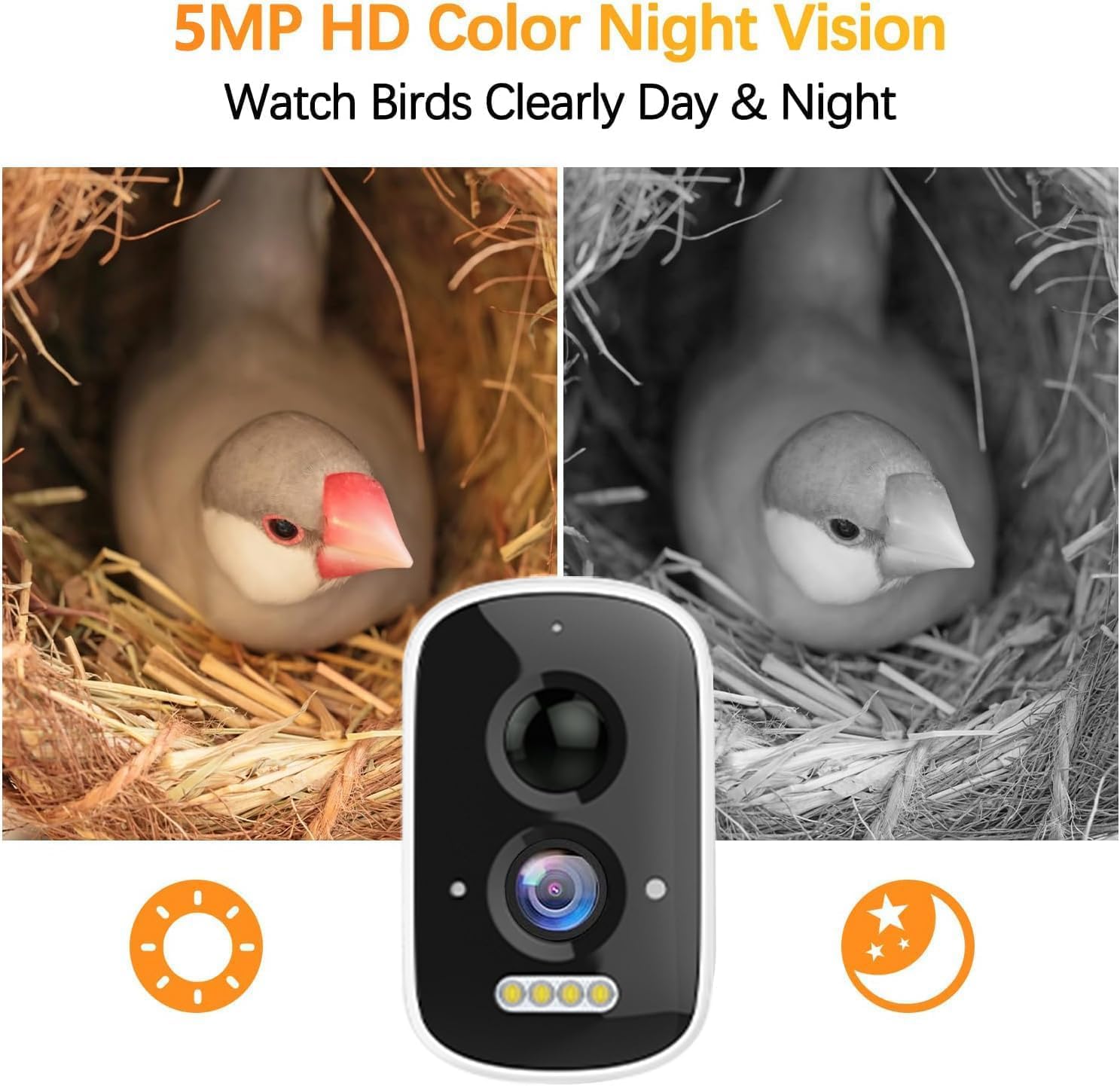
Image: A split image demonstrating the 5MP HD Color Night Vision capability, showing a bird in its nest under normal lighting (left) and in low-light conditions with clear color night vision (right), alongside the camera module.
Maintenance
1. Birdhouse Cleaning
Regular cleaning of the birdhouse is essential for the health and safety of the birds. It is recommended to clean the birdhouse after each nesting season or if it appears soiled.
- Ensure no birds are currently nesting inside before cleaning.
- Carefully open the birdhouse access panel and remove the camera.
- Remove old nesting materials.
- Clean the interior with warm water and a mild, bird-safe disinfectant (avoid harsh chemicals). Rinse thoroughly.
- Allow the birdhouse to dry completely before re-installing the camera and closing the panel.
2. Solar Panel Care
To ensure optimal charging efficiency, keep the solar panel clean and free from obstructions.
- Periodically wipe the surface of the solar panel with a soft, damp cloth to remove dust, dirt, or bird droppings.
- Ensure no leaves, branches, or other debris are blocking sunlight from reaching the panel.

Image: The Camii Smart Birdhouse Camera shown outdoors in rainy conditions, emphasizing its IP65 weatherproof design and the two charging methods: solar panel and internal battery.
3. SD Card Management
The 32GB SD card will automatically overwrite older recordings when full. If you wish to save specific footage, download it to your device or utilize the cloud storage feature.
- To manually format the SD card, access the camera settings in the app. This will erase all recordings on the card.
Troubleshooting
| Problem | Possible Cause | Solution |
|---|---|---|
| Camera not connecting to Wi-Fi. | Incorrect Wi-Fi password; Camera too far from router; Only supports 2.4GHz Wi-Fi. | Double-check password. Move camera closer to router. Ensure your router is broadcasting a 2.4GHz network and connect to it. |
| No live video feed. | Camera offline; Low battery; Internet connection issue. | Check camera's power and Wi-Fi connection. Recharge camera if battery is low. Verify your home internet is working. |
| No motion detection notifications. | Notifications disabled in app/phone settings; Motion detection sensitivity too low. | Enable notifications in the Camii app and your phone's system settings. Increase motion detection sensitivity in app settings. |
| Solar panel not charging effectively. | Panel is dirty; Insufficient direct sunlight; Panel angle is incorrect. | Clean the solar panel surface. Relocate the birdhouse or adjust the panel's angle to maximize direct sunlight exposure. |
| Recordings not saving to SD card. | SD card full; SD card corrupted; SD card not inserted correctly. | Check SD card status in app. Format the SD card via the app. Reinsert the SD card. |
Specifications
- Model Name: Smart birdhouse-1
- Item Model Number: C-Bird House
- Camera Resolution: 5MP HD
- Night Vision: Color Night Vision
- Viewing Angle: 110° Adjustable
- Connectivity: 2.4GHz Wi-Fi only
- Power Source: Solar Powered, 2 Lithium Ion batteries (included)
- Storage: 32GB SD Card (included), Cloud Storage (3-Day Recording Loop, Lifetime Trial)
- Material: Eco-friendly Cedar Wood
- Weatherproof Rating: IP66
- Item Dimensions (LxWxH): 5.71 x 6.1 x 12.2 inches
- Item Weight: 4 Pounds
Warranty and Support
Camii products are designed for durability and performance. For warranty information, technical support, or any questions regarding your Smart Birdhouse Camera, please contact Camii customer service through the contact information provided on the product packaging or the official Camii website. Please have your model number (Smart birdhouse-1) and purchase date ready when contacting support.
We are committed to providing excellent support and ensuring your satisfaction with our products.