
1. Introduction
This manual provides comprehensive instructions for the safe and effective use of your Philips PPM2702 Eye Mask Massager. Please read this manual thoroughly before operating the device and retain it for future reference. The Philips PPM2702 is designed to provide a relaxing eye massage experience with features such as 3D airbag massage, heat compress, and bone conduction music.
2. Safety Information
Before using the Philips PPM2702 Eye Mask Massager, please observe the following safety precautions:
- Do not use if you have eye conditions such as glaucoma, cataracts, retinal detachment, or have recently undergone eye surgery.
- Consult a physician before use if you have any pre-existing medical conditions, especially those affecting the eyes or head.
- Keep the device away from water and high humidity.
- Do not disassemble or attempt to repair the device yourself. Contact authorized service personnel.
- Ensure the charging cable is undamaged and used with a compatible power source.
- Discontinue use immediately if you experience any discomfort, pain, or adverse reactions.
- This device is not intended for use by children or individuals with reduced physical, sensory, or mental capabilities without supervision.
3. Package Contents
Upon opening the package, verify that all items are present:
- Philips PPM2702 Eye Mask Massager
- Charging Cable (USB)
- User Manual (this document)
4. Product Overview
The Philips PPM2702 Eye Mask Massager integrates advanced technology for eye relaxation. Key components include:
- Main Unit: Houses the massage mechanisms, heating elements, and control electronics.
- Adjustable Strap: For securing the massager comfortably on the head.
- Control Buttons: For power, mode selection, and music control.
- Charging Port: For connecting the USB charging cable.
- Bone Conduction Speakers: Integrated for audio playback.

Image 4.1: Philips PPM2702 Eye Mask Massager. The inset shows the internal heating elements around the eye area.
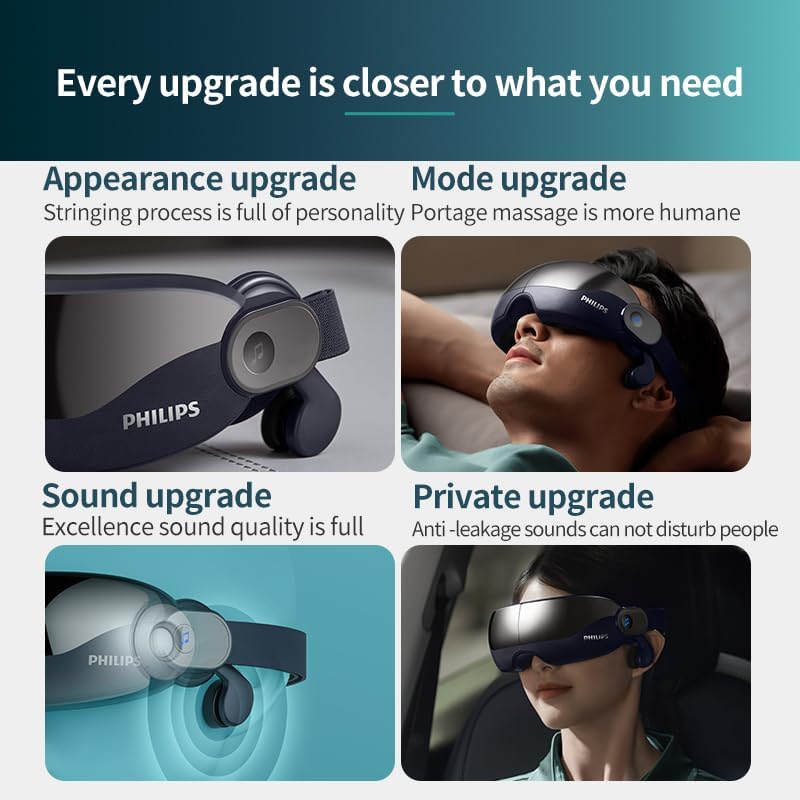
Image 4.2: A user wearing the Philips PPM2702 Eye Mask Massager, illustrating the integrated sound effect and massage capabilities.
5. Setup
5.1 Charging the Device
- Connect the provided USB charging cable to the charging port on the massager.
- Plug the other end of the USB cable into a compatible USB power adapter (not included) or a computer's USB port.
- The indicator light will show the charging status. A full charge typically takes [X] hours (Specific charging time not provided in input, user should refer to product packaging or official Philips documentation for exact time).
- Once fully charged, disconnect the charging cable.
5.2 Wearing the Massager
- Unfold the massager if it is in its folded state.
- Place the eye mask over your eyes, ensuring the visual window design aligns comfortably.
- Adjust the elastic strap to achieve a snug yet comfortable fit. The strap tightness is adjustable for various head sizes.
- Ensure the bone conduction speakers are positioned near your temples for optimal sound experience. These are angle adjustable and telescoping.
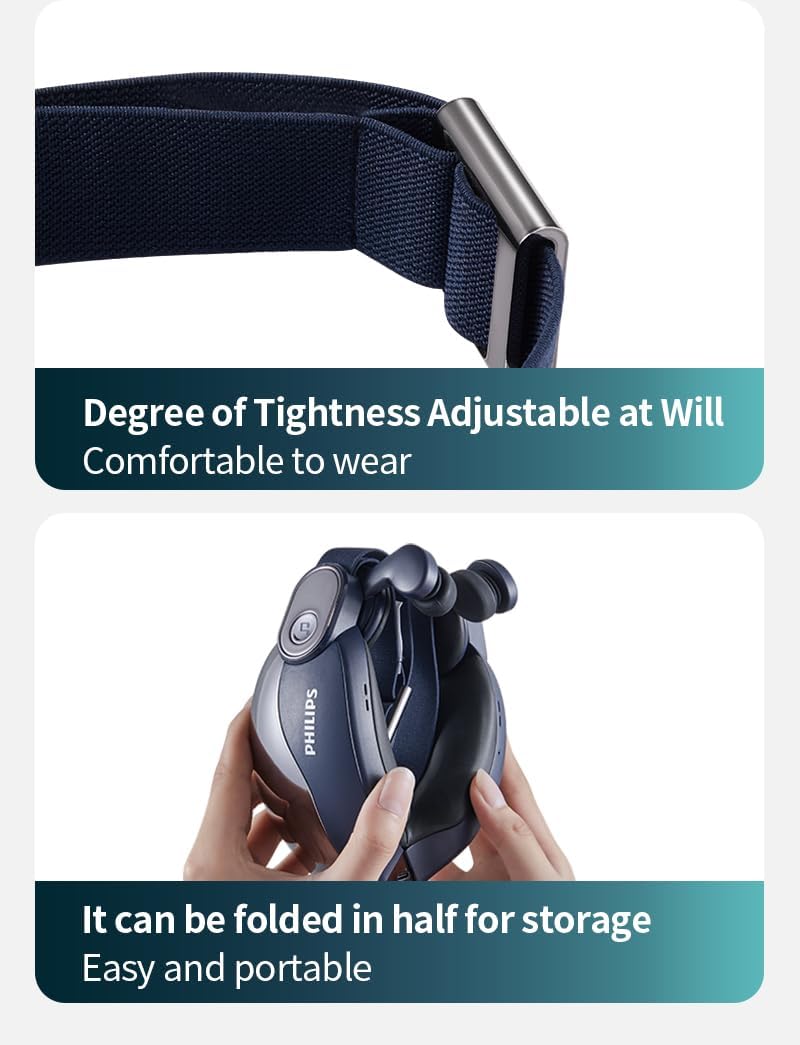
Image 5.1: The adjustable strap for comfortable wear and the foldable design for easy storage of the Philips PPM2702.
6. Operating Instructions
The Philips PPM2702 features intuitive controls and multiple modes for a personalized experience.
6.1 Power On/Off
- To power on: Press and hold the Power button for 2 seconds.
- To power off: Press and hold the Power button for 2 seconds.
6.2 Mode Selection
The device offers 5 smart modes:
- Eye Beauty Mode: Focuses on gentle massage for eye area revitalization.
- Eye Care Mode: Comprehensive massage and heat for daily eye relief.
- Sleep Aid Mode: Soothing massage and music to promote relaxation before sleep.
- Warming Mode: Primarily uses the 42°C hot compress function.
- Music Mode: Focuses on bone conduction music playback.
To switch modes: Press the Mode button briefly to cycle through the available modes.

Image 6.1: Illustration of the independent side airbags targeting the temples for comprehensive eye area care.

Image 6.2: The 3D hollowed-out visual design of the massager, which prevents direct eyeball pressure and maintains line of sight.
6.3 Heat Compress Function
The device features a 42°C precise hot compress. To turn on/off the warm compress, double-click the designated button (refer to device controls for exact button). This function promotes blood circulation and helps relieve dryness and fatigue.
6.4 Bone Conduction Music & Bluetooth Connectivity
The PPM2702 includes an integrated bone conduction music system for an immersive audio experience without covering your ears.
- Pairing: To search for a new device, press and hold the music control button for 2 seconds. Enable Bluetooth on your smartphone or audio device and select "Philips PPM2702" from the list of available devices.
- Music Playback: Once paired, you can play music from your connected device.
- Control Music:
- Switch to next song: Press the music control button.
- Turn on/off music: Double-click the music control button.

Image 6.3: The anti-leakage sound design of the bone conduction speakers, ensuring privacy and minimal disturbance to others.

Image 6.4: Detail of the angle-adjustable and telescoping bone conduction speakers, designed for optimal fit and sound delivery.
6.5 Shortcut Keys and Voice Prompts
The device features shortcut keys and voice prompts for ease of use, even with eyes closed.
| Action | Function |
|---|---|
| Press and hold button for 2 seconds | Power on/off |
| Press and hold button for 2 seconds | Search for a new Bluetooth device |
| Press button | Switch modes |
| Press button | Switch to the next song |
| Double click button | Turn on/off the music |
| Double click button | Turn on/off the warm compress |
7. Maintenance
7.1 Cleaning
- Ensure the device is powered off and disconnected from the charger before cleaning.
- Wipe the exterior of the massager with a soft, slightly damp cloth.
- For the nano-silicone leather lining, use a gentle, non-abrasive cleaner if necessary, and wipe dry immediately.
- Do not use harsh chemicals, abrasive cleaners, or immerse the device in water.
7.2 Storage
- Store the massager in a cool, dry place away from direct sunlight and extreme temperatures.
- The device is foldable for compact storage and portability.
8. Troubleshooting
If you encounter issues with your Philips PPM2702, refer to the following common problems and solutions:
| Problem | Possible Cause | Solution |
|---|---|---|
| Device does not power on. | Low battery or no charge. | Charge the device fully. Ensure the charging cable and adapter are working correctly. |
| No massage function. | Incorrect mode selected or device malfunction. | Ensure a massage mode (e.g., Eye Beauty, Eye Care, Sleep Aid) is selected. If the issue persists, contact customer support. |
| No heat compress. | Heat function not activated or Warming Mode not selected. | Double-click the designated button to activate the warm compress, or select Warming Mode. Allow a few minutes for the heat to build up. |
| Bluetooth pairing fails. | Device not in pairing mode, Bluetooth off on source device, or too far apart. | Ensure the massager is in pairing mode (press and hold music button for 2 seconds). Check Bluetooth settings on your phone/device. Keep devices within close range. |
| No sound from bone conduction speakers. | Music off, volume too low, or not properly paired. | Double-click the music button to ensure music is on. Adjust volume on your connected device. Re-pair Bluetooth if necessary. |
| Discomfort during use. | Improper fit or sensitive skin. | Adjust the strap for a comfortable fit. If discomfort persists, discontinue use and consult a physician. |
9. Specifications
Technical details for the Philips PPM2702 Eye Mask Massager:
- Model Number: PPM2702
- Brand: Philips
- Target Use Body Part: Eye
- Power Source: Battery operated
- Material: Polyvinyl Chloride, Nano-Silicone Leather Lining
- Item Weight: 100 Grams
- Product Dimensions (L x W x H): 21.5 x 11.4 x 8 cm
- Heat Compress Temperature: 42°C
- Special Features: 3D Airbag Massage, Bone Conduction Music, Foldable Design, Bluetooth Connectivity, Visual Window Design
- Color: Dark Blue with Glossy Black
- Manufacturer: Philips
- Date First Available: 16 July 2025
10. Warranty and Support
For warranty information and customer support, please refer to the official Philips website or contact your local Philips service center. Keep your proof of purchase for warranty claims.
Philips Official Website: www.philips.com