
Introduction
This manual provides detailed instructions for the installation, use, and maintenance of your Varghesyla replacement TV stand legs. Please read this manual carefully before installation to ensure proper setup and safe operation. This product is designed to provide a stable tabletop mounting solution for compatible RCA television models.
Compatibility
These replacement TV stand legs are specifically designed for the following RCA TV models. Please verify your TV model number before proceeding with installation.
| Screen Size | Compatible Models |
|---|---|
| 32" | RLED3221-D, RTR3260-B-US, RTR3260-US, RTR3260-W, RLDEDV3255 |
| 39" | PLED3996A-E |
| 43" | RTRU4327-US, RTR4360-US |
| 50" | E4SW5017RKU, RLDED5098, RLDED5098-B, RLDED5098-B-UHD |
| 55" | RTU5540, RTU5540-D, RTU5540-B, RTRU5527 |
| 60" | RTU6050 |
Note: The TV legs are only suitable for the listed TV models. Please check your TV model before purchasing or installing.
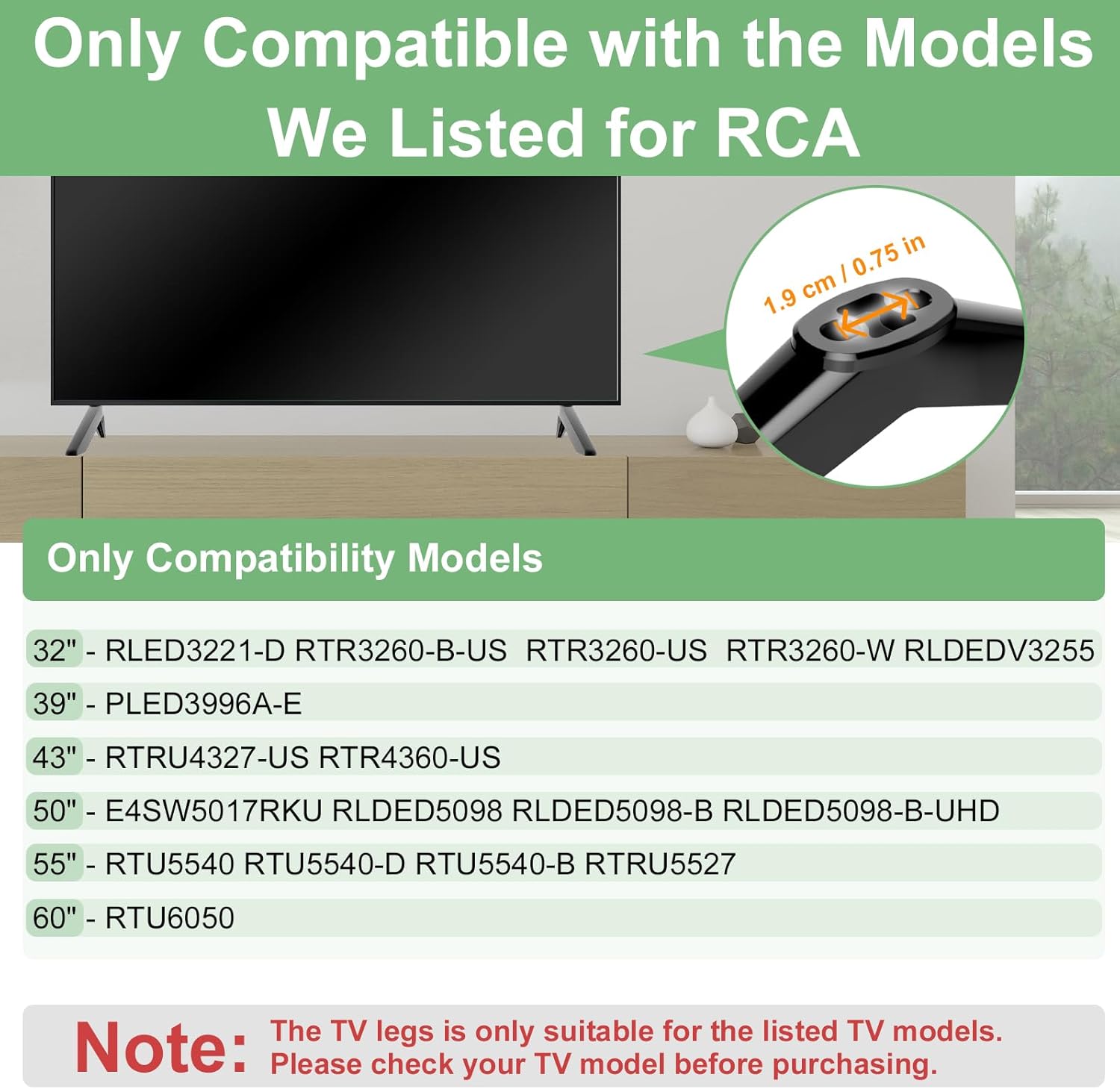
This image illustrates the compatibility of the TV stand legs with various RCA TV models, categorized by screen size, and highlights the importance of checking your TV model.
Package Contents
Please ensure all items are present before beginning installation:
- 2 x TV Stand Legs
- 1 x Screws Set (various sizes for compatibility)
- 1 x Instruction Manual (this document)

This image displays the complete set of components included in the package: two TV stand legs, a variety of screws, and washers.
Setup and Installation
Follow these steps for a simple and secure installation of your TV stand legs. No wall drilling is required.
- Prepare the TV: Carefully place your television screen-down on a soft, clean surface to prevent scratches. Ensure the surface is stable and large enough to support the TV.
- Identify Mounting Holes: Locate the mounting holes on the bottom rear of your TV. These are typically threaded holes designed for stand legs or wall mounts.
- Attach the Legs: Align each TV stand leg with the corresponding mounting holes on the TV. The legs are designed to fit securely.
- Secure with Screws: Select the appropriate screws from the provided set that fit your TV's mounting holes. Insert the screws and tighten them firmly with a screwdriver. Do not overtighten, as this may damage the TV or the legs.
- Apply Anti-slip Pads: Attach the 4mm anti-slip pads to the bottom of each TV stand leg. These pads prevent slippage and protect your furniture surface from scratches.
- Position the TV: Carefully lift the TV with the attached legs and place it on your desired flat, stable surface. Ensure the TV is level and stable before releasing it.

This image demonstrates the straightforward installation process, emphasizing that no wall drilling is necessary for setup.
Product Features and Specifications
- Material: High-quality Acrylonitrile Butadiene Styrene (ABS)
- Thickness: 4.7 mm for enhanced durability and stability
- Anti-slip Pads: Integrated 4mm anti-slip pads to prevent movement and protect surfaces
- Mounting Type: Tabletop Mount
- Color: Black
- Item Weight: Approximately 6.4 ounces (total for both legs)
- Product Dimensions: Approximately 0.99 x 0.99 x 1 inches (per leg, specific dimensions may vary slightly)

This image demonstrates the robust 4.7mm thickness of the stand legs, contributing to their durability.

This image highlights the 4mm anti-slip pad feature, designed to protect surfaces and enhance stability.
Operating Considerations
While TV stand legs do not have active "operation," proper placement is key for optimal viewing and safety:
- Stable Surface: Always place the TV on a flat, level, and sturdy surface that can safely support the weight of the television and the stand.
- Ventilation: Ensure adequate airflow around the TV to prevent overheating. Do not block ventilation openings.
- Cable Management: Route cables neatly to prevent tripping hazards and maintain a clean setup.

This image illustrates the adaptability of the TV stand legs for various room settings, such as a living room or bedroom.
Maintenance
To ensure the longevity and appearance of your TV stand legs:
- Cleaning: Wipe the legs with a soft, dry cloth. For stubborn marks, a slightly damp cloth with mild soap can be used, followed by drying. Avoid harsh chemicals or abrasive cleaners.
- Inspection: Periodically check the screws to ensure they remain tight. Loose screws can compromise stability.
- Environmental Conditions: Avoid exposing the legs to extreme temperatures or direct sunlight for prolonged periods, which could affect the material.
Troubleshooting
If you encounter issues during or after installation, consider the following:
- Legs do not fit:
- Double-check your TV model against the compatibility list in this manual.
- Ensure you are aligning the legs correctly with the TV's mounting holes.
- TV feels unstable:
- Verify that all screws are securely tightened.
- Ensure the TV is placed on a completely flat and stable surface.
- Confirm the anti-slip pads are properly attached to the bottom of the legs.
- Screws do not fit:
- The package includes a variety of screw sizes. Try different screws from the set to find the correct fit for your TV's mounting holes.
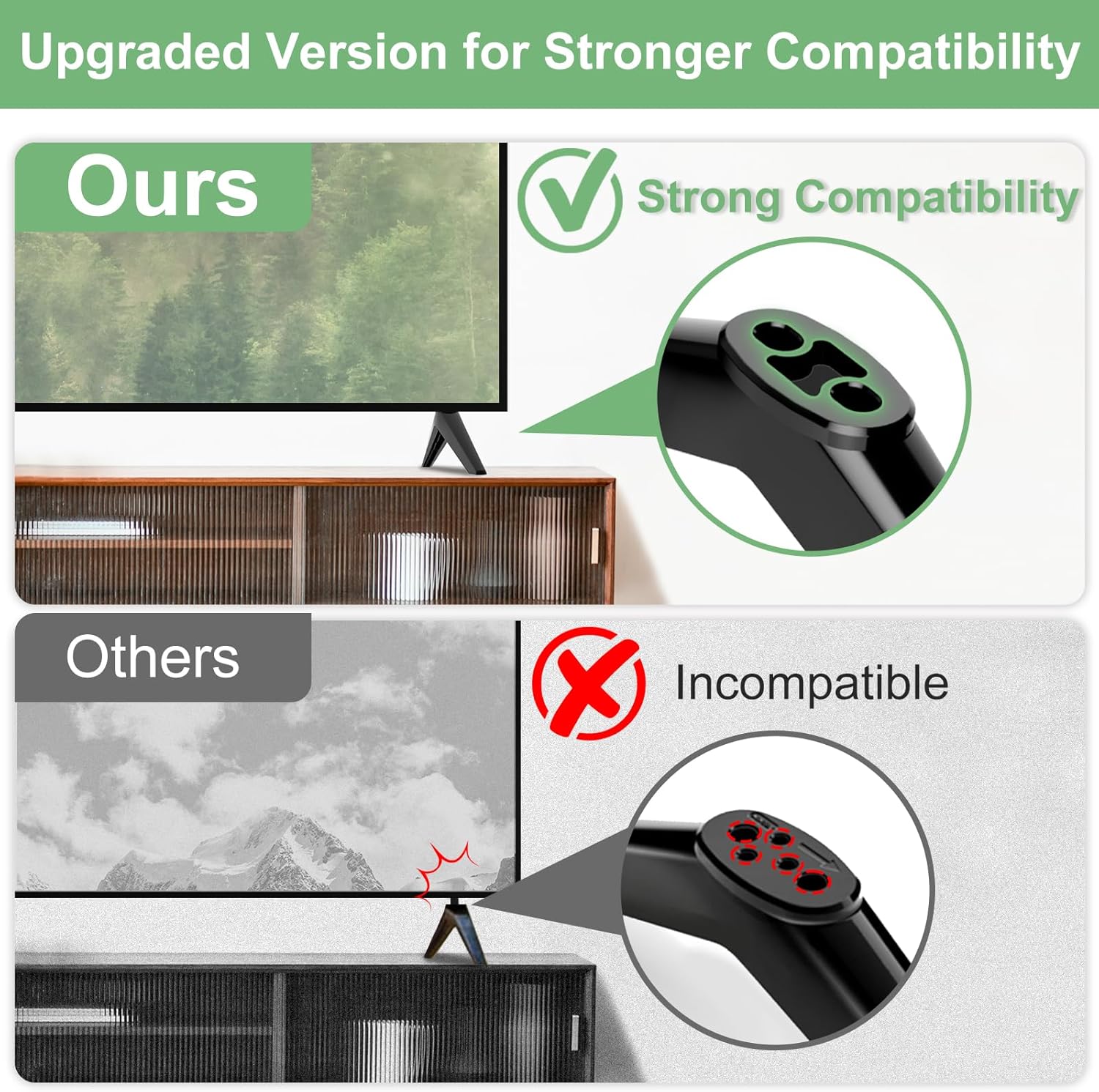
This image illustrates the importance of compatibility, showing how Varghesyla legs are designed for a secure fit compared to potentially incompatible alternatives.
Warranty Information
This Varghesyla product is covered by a 90-day warranty from the date of purchase. This warranty covers manufacturing defects and material flaws under normal use. It does not cover damage resulting from improper installation, misuse, accidents, or unauthorized modifications. Please retain your proof of purchase for warranty claims.
Customer Support
For further assistance, questions, or concerns regarding your Varghesyla TV stand legs, please contact our customer support team. Refer to your purchase documentation for specific contact details or visit the Varghesyla brand store on Amazon: