Introduction
This manual provides comprehensive instructions for the installation, operation, and maintenance of your BOSS Audio Systems 616UAB In-Dash Mech-Less Digital Media Receiver and CH6530B 6.5-inch 3-Way Car Speakers. This system is designed to enhance your vehicle's audio experience with digital music playback, Bluetooth connectivity, and powerful sound output.
The 616UAB receiver offers versatile audio input options including Auxiliary Input and USB ports, along with AM/FM radio. Its Bluetooth technology enables hands-free calling and wireless music streaming from your smartphone or other compatible devices. Paired with four full-range CH6530B speakers, this system delivers clear and dynamic audio.

Figure 1: BOSS Audio Systems 616UAB Receiver and CH6530B Speakers Kit.
Key Features
- Next Generation 616UAB: Features dimmable illumination for buttons and LCD display, updated dancing LED lights, and an added mute function for enhanced user experience.
- Bluetooth Connectivity: Allows for hands-free calling with a built-in microphone and wireless audio streaming from music apps like Spotify and Pandora.
- Versatile Audio Inputs: Includes Auxiliary Input and USB ports for connecting smartphones, MP3 players, and other devices.
- AM/FM Radio: Integrated tuner for traditional radio listening.
- Preset Built-in EQ: Adjust sound styles to your preference.
- CH6530B Speaker Design: 6.5-inch 3-Way speakers with durable polyurethane cones for resilient and long-lasting sound performance.
- Compact Receiver Size: Designed for easy installation in various vehicle dashboards.
Setup and Installation
Proper installation is crucial for optimal performance and safety. It is strongly recommended to have this product professionally installed by a qualified technician.
Receiver Dimensions

Figure 2: Receiver dimensions for installation. Installation Width: 7.13" (181mm), Installation Height: 2.0", Height with Trim: 2.28" (58mm), Width with Trim: 7.94" (202mm), Installation Depth: 2.63" (67mm), Overall Depth: 3.94" (100mm).
Before installation, ensure that the dimensions of the 616UAB receiver are compatible with your vehicle's dashboard opening. Refer to Figure 2 for detailed measurements.
Wiring Connections

Figure 3: Rear panel connections of the 616UAB receiver. Includes Radio Antenna input, Audio Output (RCA), ISO Connector, and Fuse.
Connect the receiver to your vehicle's power supply, speakers, and antenna using the appropriate wiring harness. Ensure all connections are secure and correctly polarized to prevent damage. The rear panel (Figure 3) illustrates the various connection points.
- Radio Antenna: Connect your vehicle's antenna cable.
- Audio Output (RCA): For connecting external amplifiers or subwoofers.
- ISO Connector: Standard connector for power and speaker wiring.
- Fuse: Protects the unit from power surges. Ensure the correct fuse rating is used.
Speaker Installation
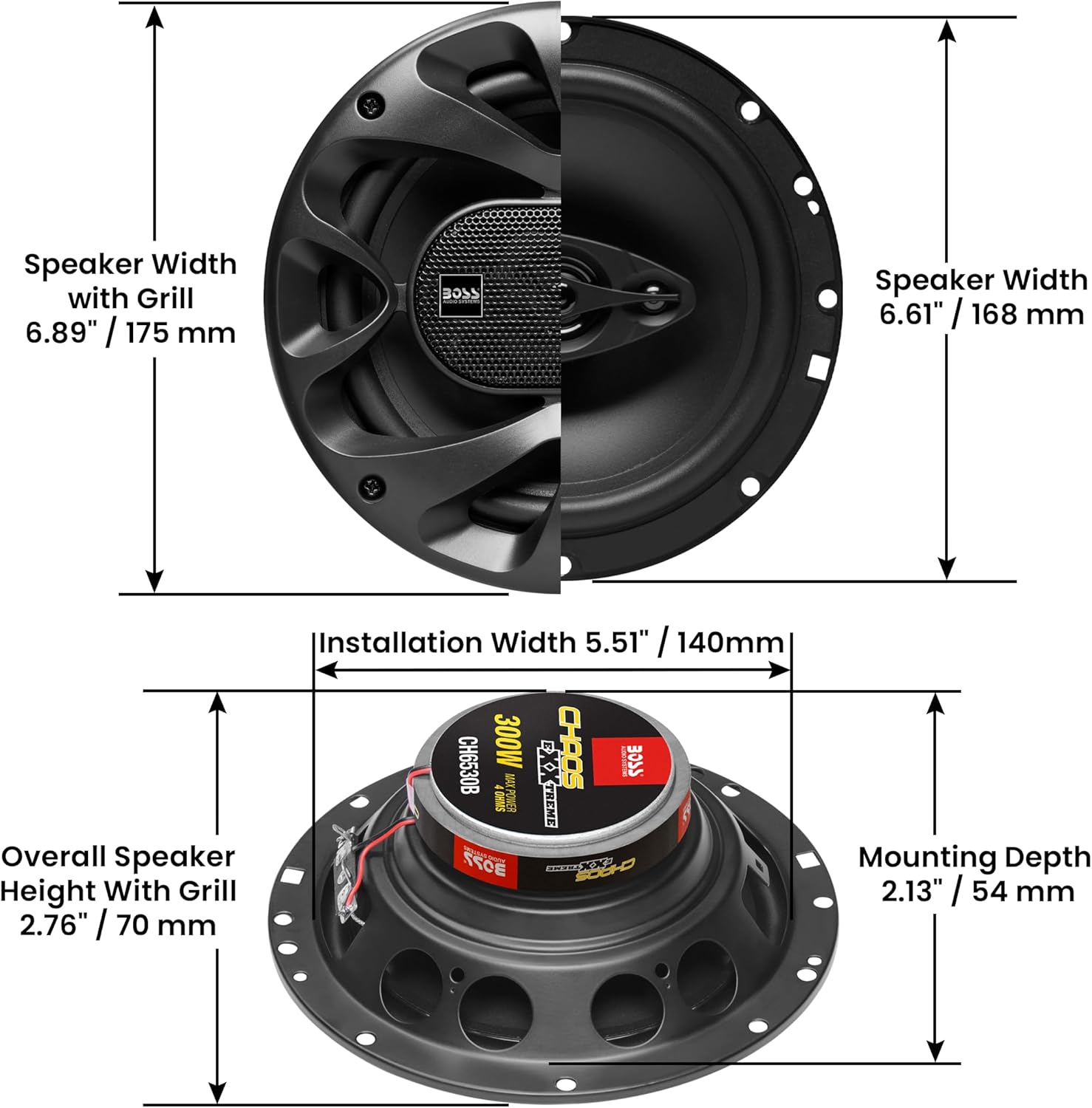
Figure 4: Speaker dimensions for installation. Speaker Width with Grill: 6.89" (175mm), Speaker Width: 6.61" (168mm), Installation Width: 5.51" (140mm), Overall Speaker Height With Grill: 2.76" (70mm), Mounting Depth: 2.13" (54mm).
The CH6530B speakers are designed for easy integration into standard 6.5-inch speaker openings. Refer to Figure 4 for detailed speaker dimensions and mounting depth requirements. Ensure proper wiring polarity when connecting speakers to the receiver or amplifier.
Operating Instructions
This section details the basic operation of your 616UAB receiver.
Front Panel Controls

Figure 5: Front panel controls of the 616UAB receiver. Key controls include Answer/Band, Previous/Reverse, Push To Talk, Illuminated Knob (Volume/Select), Source/Power, Microphone, Dancing LED Lights, Dimmable Illuminated Buttons, Instant Mute Button, AUX input, and USB port.
- Source/Power Button: Press to turn the unit on/off. Press briefly to cycle through audio sources (FM, AM, Bluetooth, USB, AUX).
- Illuminated Knob: Rotate to adjust volume. Press to select menu options or activate functions.
- Answer/Band Button: In Bluetooth mode, press to answer/end calls. In radio mode, press to switch between FM/AM bands.
- Previous/Reverse & Next/Fast Forward Buttons: Navigate tracks in media playback or tune radio stations.
- Push To Talk Button: Activates voice assistant on connected smartphone (if supported).
- Instant Mute Button: Quickly mutes audio output.
- AUX Input: Connect external audio devices via a 3.5mm jack.
- USB Port: Connect USB drives for media playback or charging compatible devices.
- Bluetooth: The unit automatically enters Bluetooth pairing mode when selected as a source. Search for "BOSS 616UAB" on your device.
Bluetooth Operation
- Ensure Bluetooth is enabled on your mobile device.
- Select "Bluetooth" as the source on the 616UAB receiver.
- On your mobile device, search for available Bluetooth devices and select "BOSS 616UAB".
- Once paired, you can stream audio and make/receive calls hands-free.
Maintenance
Regular maintenance ensures the longevity and optimal performance of your BOSS Audio Systems.
- Cleaning: Use a soft, dry cloth to clean the unit's exterior. For stubborn dirt, a slightly damp cloth may be used, followed by a dry cloth. Avoid abrasive cleaners or solvents.
- Connections: Periodically check all wiring connections for tightness and corrosion. Loose connections can lead to poor sound quality or intermittent operation.
- Fuse Replacement: If the unit does not power on, check the fuse located at the rear of the unit (refer to Figure 3). Replace with a fuse of the exact same rating only.
- Speaker Care: Keep speakers free from dust and debris. Avoid exposing them to excessive moisture or direct sunlight for prolonged periods.
Troubleshooting
This section addresses common issues you might encounter. For more complex problems, contact professional support.
| Problem | Possible Cause | Solution |
|---|---|---|
| No Power | Blown fuse; Incorrect wiring; Vehicle battery issue. | Check and replace fuse (if necessary). Verify power and ground connections. Check vehicle battery. |
| No Sound Output | Volume too low; Mute function active; Incorrect source selected; Speaker wiring issues. | Increase volume. Deactivate mute. Select correct audio source. Check speaker connections and polarity. |
| Bluetooth Not Connecting | Bluetooth not enabled on device; Unit not in pairing mode; Interference. | Ensure Bluetooth is on your device. Select Bluetooth source on receiver. Try restarting both devices. Move closer to the unit. |
| Poor Radio Reception | Antenna not connected; Weak signal area; Damaged antenna. | Check antenna connection. Try tuning to a stronger station. Inspect antenna for damage. |
Specifications
616UAB Receiver
- Model Number: 616UAB
- Connectivity Technology: Auxiliary, Bluetooth, USB
- Controller Type: Push Button
- Special Feature: Spotify compatible
- Compatible Devices: Smartphone
- Connector Type: 3.5mm Jack, USB
- Audio Output Mode: Stereo
- Surround Sound Channel Configuration: 2.0
- Color: Black
- Product Dimensions: 2.13"D x 6.63"W x 2.38"H
CH6530B Speakers
- Speaker Type: 6.5-inch 3-Way Full Range
- Cone Material: Polyurethane
- Impedance: 4 Ohms
- Frequency Response: 100 Hz to 18 kHz
- Sensitivity: 90 dB
- Dimensions: 6.63" x 6.63" x 2.38" (per speaker)
- Mounting Depth: 2.13"
- Mounting Hole: 5.5"
- Weight: 2.5 Lbs. (for 4 units)
Warranty and Support
BOSS Audio Systems provides a powerful 3-year platinum online dealer warranty for this product, provided the purchase is made through Amazon.com.
For technical support, warranty claims, or further assistance, please visit the official BOSS Audio Systems store on Amazon or contact their customer service directly.