
MPF Products A1763
MPF Products 90mAh High-Capacity Battery Replacement for Beats by Dr. Dre Beats X A1763 Wireless Earbud Headphones - Instruction Manual
Model: A1763 | Part Numbers: A1773, YU10448-16022
1. Product Overview
This manual provides instructions for the installation and care of the MPF Products 90mAh high-capacity replacement battery. This battery is designed to replace the original A1773 or YU10448-16022 battery in compatible Beats by Dr. Dre Beats X A1763 wireless earbud headphones.
2. Compatibility
This replacement battery is compatible with the following wireless headphone models and part numbers:
- Headphone Models: Beats by Dr. Dre Beats X, Beats X, A1763, MLYE2LL/A, MR3L2LL/A, MNLV2LL/A, MLYG2LL/A
- Battery Part Numbers: A1773, YU10448-16022
3. Package Contents
- 1 x MPF Products 90mAh High-Capacity Replacement Battery
- Installation Tools (as pictured)
Note: A soldering iron is not included and may be required for installation.

Figure 1: MPF Products 90mAh High-Capacity Battery Replacement with included installation tools.
4. Specifications
| Feature | Specification |
|---|---|
| Battery Capacity | 90 mAh |
| Voltage | 3.7V (3.8V) |
| Watt-hours | 0.33Wh |
| Battery Cell Composition | Lithium Polymer |
| Item Weight | 0.2 ounces |
| Package Dimensions | 3.5 x 1.5 x 1 inches |
5. Setup and Installation
Replacing the battery in Beats X A1763 headphones requires technical skill and specialized tools, including a soldering iron (not included). Due to the delicate nature of electronic components and the potential for damage, professional installation is highly recommended.
If you choose to proceed with self-installation, please follow these general guidelines:
- Gather Tools: Ensure you have all necessary tools, including the provided installation tools, a precision screwdriver set, and a soldering iron with appropriate solder.
- Disassembly: Carefully disassemble your Beats X headphones to access the existing battery. Refer to specific disassembly guides for your headphone model, which can often be found online.
- Disconnect Old Battery: Gently disconnect the old battery, paying close attention to the wiring and connection points. Desoldering may be required.
- Install New Battery: Connect the new MPF Products battery, ensuring correct polarity and secure connections. Soldering may be required to attach the new battery leads.
- Reassembly: Carefully reassemble the headphones, ensuring all components are correctly seated and no wires are pinched.
- Initial Charge: After reassembly, fully charge the new battery before its first use.
Important Note:
- Battery replacement in small electronic devices can be complex and may void your original headphone warranty.
- A customer review indicates that this product may be too large to fit into the BeatsX battery enclosure. Please verify dimensions before attempting installation.
- Improper installation can lead to damage to your headphones or the battery, and may pose a safety risk.
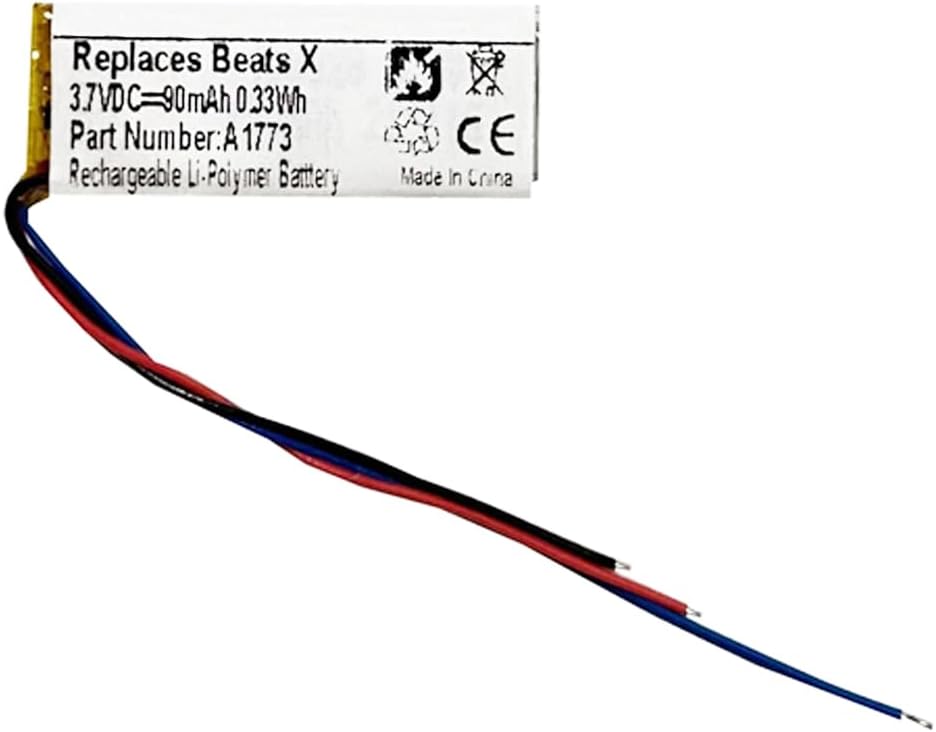

Figure 2: Close-up views of the MPF Products 90mAh High-Capacity Battery.
6. Operating Instructions (Post-Installation)
Once the new battery is successfully installed and fully charged, your Beats X headphones should operate as usual. Refer to your original Beats X instruction manual for specific operating procedures, including:
- Powering On/Off
- Bluetooth Pairing
- Volume Control
- Call Management
- Music Playback Controls
7. Maintenance
To maximize the lifespan and performance of your new Lithium Polymer battery:
- Regular Charging: Avoid completely draining the battery frequently. Charge it regularly, even if not fully depleted.
- Avoid Extreme Temperatures: Do not expose the headphones or battery to extreme heat or cold, as this can degrade battery performance and lifespan.
- Use Appropriate Charger: Always use a compatible charger for your Beats X headphones.
- Storage: If storing the headphones for an extended period, charge the battery to about 50% and store in a cool, dry place.
8. Troubleshooting
- Battery Does Not Fit: A customer review indicates that the product may be too large to fit into the BeatsX battery enclosure. Please double-check the dimensions of your headphone's battery compartment against the replacement battery's dimensions before attempting installation. If it does not fit, contact customer support for assistance.
- Headphones Not Powering On: Ensure the battery is correctly installed and fully charged. Verify all connections, especially soldered points, are secure.
- Short Battery Life: Ensure the battery has been fully charged. Check for any background processes or settings on your connected device that might be draining power.
- Charging Issues: Verify the charging cable and power adapter are functioning correctly. Ensure the charging port on the headphones is clean and free of debris.
If issues persist after troubleshooting, please contact MPF Products customer support.
9. Warranty and Support
This MPF Products battery replacement comes with a 1 Year Replacement Warranty.
For warranty claims, technical support, or any questions regarding your product, please contact MPF Products directly. MPF Products is a Registered Trademark.
Seller: MPFProducts
Seller ID: A1Q9Q1EHB0XK1A
For further assistance, please visit the seller's page on Amazon or contact them through the Amazon platform.