
1. Introduction and Overview
This manual provides instructions for the Sarpaws FW1 Automatic Cat Feeder and Water Dispenser. This integrated system is designed to provide scheduled meals and continuous fresh water for your pets, ensuring their well-being even when you are away. It features programmable feeding times, adjustable portion sizes, a voice recording function, and a reliable power outage backup system.

Image 1.1: The Sarpaws FW1 Automatic Cat Feeder and Water Dispenser, showing the feeder unit with a food bowl and the separate water fountain unit.

Image 1.2: Overview of the Sarpaws Automatic Pet Feeder and Water Fountain, highlighting key features such as 3L capacity, 2L water capacity, timed schedule, 5-stage filtration, dual power supply, voice recorder, and ultra-quiet pump.
2. Product Features
- Programmable Feeding: Set up to 4 daily meals with adjustable portion sizes to meet your pet's dietary needs.
- 10-Second Voice Recorder: Record a personalized message to call your pet to meals, enhancing their feeding experience.
- Secure Locking Lid & Desiccant Box: The double-lock design and integrated desiccant bag keep dry food fresh and crunchy, preventing spills and moisture.
- Dual Power Supply: Operates via power adapter or backup batteries (not included) to ensure continuous feeding during power outages.
- Large Capacity: The feeder has a 3-liter capacity, suitable for small to medium-sized pets, providing food for up to 15 days. The water dispenser has a 2-liter capacity.
- Continuous Water Flow: The water fountain provides a steady, oxygenated flow of fresh water, encouraging pets to drink more.
- Easy to Clean: Components are designed for easy disassembly and hand washing.

Image 2.1: Illustration of the 3-liter feeder capacity and 2-liter water fountain capacity, indicating suitability for various pet sizes and feeding durations.
3. Package Contents
Please check the package contents upon unboxing to ensure all items are present:
- Automatic Cat Feeder Unit (FW1)
- Cat Water Fountain Unit
- Stainless Steel Food Bowl
- Power Adapter
- Desiccant Bag (pre-installed or separate)
- User Manual
4. Setup Guide
4.1 Feeder Setup
- Unpack: Carefully remove all components from the packaging.
- Place Desiccant Bag: Open the lid of the feeder. If not already installed, place the desiccant bag into its designated compartment within the lid to maintain food freshness. Close the lid securely using the locking mechanism.
- Fill Food Reservoir: Open the top lid and pour dry pet food into the reservoir. Ensure the food is suitable for automatic feeders (kibble size should be appropriate to prevent jamming).
- Attach Food Bowl: Place the stainless steel food bowl into the designated slot at the base of the feeder.
- Power Connection: Connect the power adapter to the feeder and plug it into a wall outlet. For backup power, install 3 D-cell batteries (not included) into the battery compartment at the bottom of the feeder.
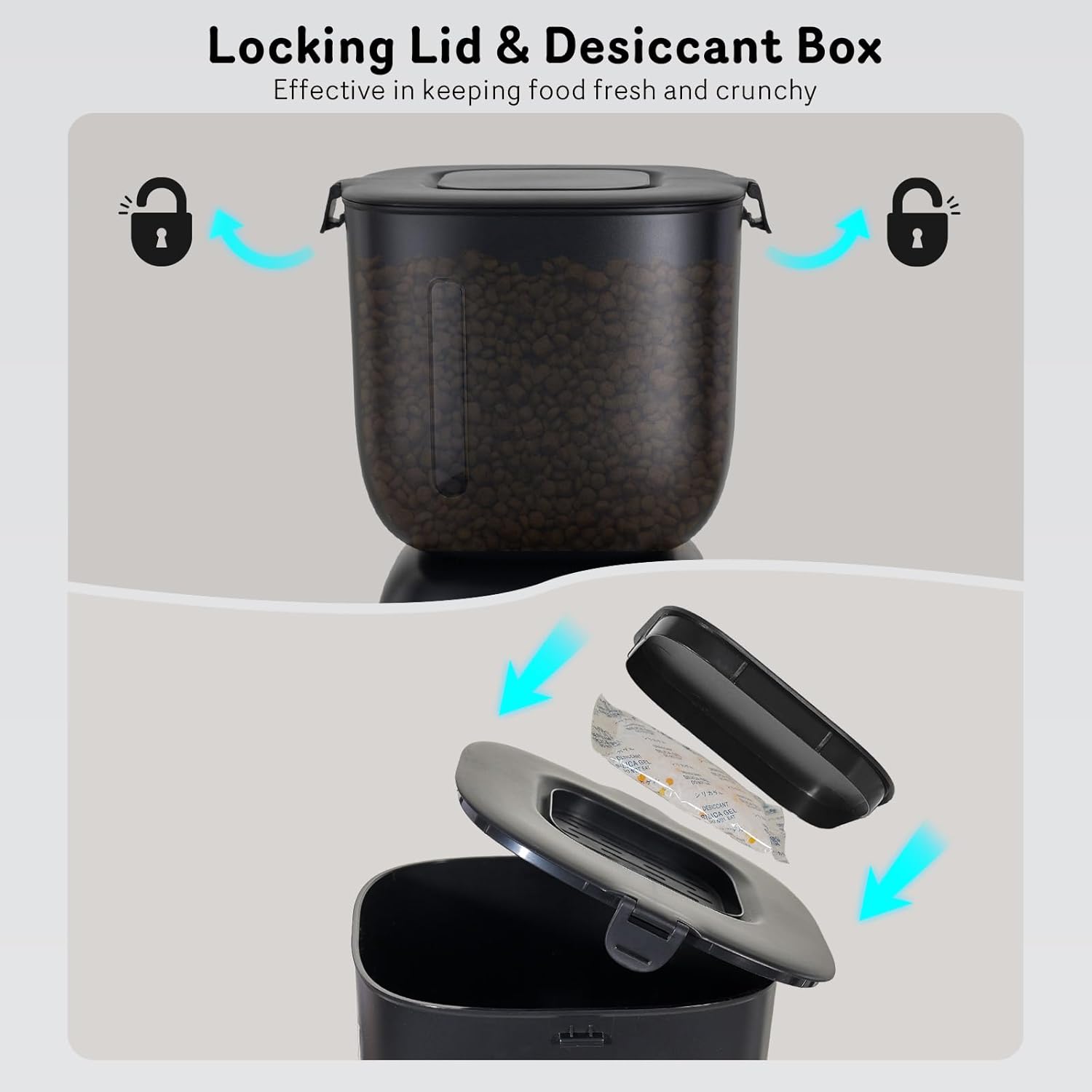
Image 4.1: Diagram illustrating the secure locking lid and the placement of the desiccant bag to keep pet food fresh and crunchy.
4.2 Water Fountain Setup
- Assemble Fountain: Follow the specific instructions provided with the water fountain for assembly, including pump and filter installation.
- Fill Water Reservoir: Fill the water fountain reservoir with clean water up to the maximum fill line.
- Power Connection: Connect the water fountain's power cable and plug it into a wall outlet.
5. Operating Instructions
5.1 Setting Feeding Schedule and Portions
The feeder allows for precise control over meal times and quantities. Refer to the control panel on the feeder for programming buttons (e.g., SET, UP, DOWN, FEED). Consult the detailed programming guide in the separate quick start guide for specific button sequences.
- Set Current Time: Ensure the feeder's internal clock is set to the correct current time.
- Program Meals: Use the programming buttons to set up to 4 daily meal times.
- Adjust Portions: For each meal, specify the number of portions to be dispensed. One portion typically corresponds to 8-10 grams of dry food.

Image 5.1: A cat eating from the Sarpaws automatic feeder, with an overlay graphic demonstrating a sample feeding schedule and portion adjustments for four daily meals.

Image 5.2: A reference table for calculating appropriate food portions based on cat weight and activity level, showing daily intake in grams and corresponding cup measurements.
5.2 Voice Recording Function
The feeder includes a 10-second voice recorder to personalize meal calls for your pet.
- Record Message: Press and hold the record button (usually marked with a microphone icon) on the control panel. Speak your message clearly within 10 seconds. Release the button to save.
- Playback: Press the playback button (often a play icon) to listen to your recorded message.
- Automatic Playback: The recorded message will play automatically before each scheduled meal.

Image 5.3: An illustration of a cat responding to a personalized voice message from the automatic feeder, with a speech bubble indicating the message "Hey, baby, it's time to eat!!".
5.3 Power Outage Backup
The feeder is equipped with a battery backup system to ensure uninterrupted feeding during power failures.
- If D-cell batteries are installed, the feeder will automatically switch to battery power if the main power supply is interrupted.
- The feeder will continue to dispense meals according to the programmed schedule.
- Ensure batteries are fresh and correctly installed for reliable backup operation.

Image 5.4: Visual representation of the automatic feeder operating with both wall power and battery backup, indicating continued functionality during a power outage.
5.4 Water Fountain Operation
The water fountain provides a continuous flow of fresh water.
- Once plugged in and filled with water, the fountain will begin circulating water.
- The continuous flow helps to oxygenate the water, making it more appealing to pets and promoting hydration.
- Monitor the water level regularly and refill as needed.

Image 5.5: Depiction of the water fountain providing a steady, non-stop flow, with examples of a 'flower waterfall' and 'gentle waterfall' to increase oxygenation for hydration.
6. Maintenance
Regular cleaning and maintenance are essential for the longevity and hygienic operation of your Sarpaws FW1 system.
6.1 Feeder Cleaning
- Disassembly: Unplug the feeder and remove the food bowl. Disassemble the food reservoir and dispensing mechanism as per the quick start guide.
- Washing: All removable parts, including the food bowl and food reservoir, should be hand washed with mild soap and water. Rinse thoroughly.
- Drying: Ensure all parts are completely dry before reassembly to prevent mold or bacterial growth.
- Desiccant Bag: Replace the desiccant bag every 1-2 months, or as indicated by its color change, to maintain optimal food freshness.
6.2 Water Fountain Cleaning
- Disassembly: Unplug the fountain and empty the water. Disassemble the pump, filter tray, and other removable components.
- Washing: Hand wash all parts with mild soap and water. Clean the pump thoroughly, removing any hair or debris.
- Filter Replacement: Replace the water filter according to the manufacturer's recommendations, typically every 2-4 weeks, to ensure clean and fresh water.
- Drying: Ensure all parts are completely dry before reassembly.
7. Troubleshooting
If you encounter issues with your Sarpaws FW1 system, please refer to the following common troubleshooting steps:
- Feeder Not Dispensing Food:
- Check if the feeder is powered on and connected to a power source or if batteries are depleted.
- Ensure the food reservoir is not empty.
- Verify that the food chute is not blocked by kibble. Clean if necessary.
- Confirm that the feeding schedule is correctly programmed.
- Water Fountain Not Flowing:
- Check if the fountain is plugged in and receiving power.
- Ensure the water reservoir has sufficient water.
- Disassemble and clean the pump, as hair or debris can obstruct its operation.
- Check if the filter is clogged and replace if needed.
- Voice Recording Not Playing:
- Ensure the message was recorded successfully. Try re-recording.
- Check the volume settings if applicable.
- Feeder Display Not Working:
- Verify power connection and battery status.
- Try resetting the device by unplugging it and removing batteries for a few minutes, then reconnecting.
If these steps do not resolve the issue, please contact Sarpaws customer support for further assistance.
8. Specifications
| Feature | Specification |
|---|---|
| Model Name | Automatic Feeder FW1 |
| Brand | Sarpaws |
| Feeder Capacity | 3 Liters |
| Water Fountain Capacity | 2 Liters |
| Material | Plastic, Stainless Steel |
| Color | Black |
| Item Weight | 3.08 Pounds (Feeder) |
| Item Dimensions (LxWxH) | 11.5 x 11.5 x 7 inches |
| Power Supply | AC Power Adapter, D-cell Batteries (backup, not included) |
| Voice Recording | 10 seconds |
| Care Instructions | Hand Wash Only |
| Target Species | Cat, Dog (small animals) |
9. Warranty and Support
The Sarpaws FW1 Automatic Cat Feeder and Water Dispenser comes with a 2-year manufacturer's warranty.
For warranty claims, technical support, or any questions regarding the product, please contact Sarpaws customer service. Refer to the contact information provided on the product packaging or the official Sarpaws website.
Please retain your proof of purchase for warranty validation.