
Joy Pebble J0A4216-9K-JP
Joy Pebble 2.6kW Portable Air Conditioner User Manual
Model: J0A4216-9K-JP
1. Introduction
Thank you for choosing the Joy Pebble Portable Air Conditioner. This appliance is designed to provide efficient cooling, dehumidification, and air circulation for your indoor spaces. Please read this manual thoroughly before operation to ensure safe and optimal performance. Keep this manual for future reference.
2. Safety Information
WARNING: To reduce the risk of fire, electric shock, or injury, observe the following:
- Always use a grounded electrical outlet.
- Do not operate the unit with a damaged cord or plug.
- Do not block air inlets or outlets.
- Keep the unit away from water and other liquids.
- Unplug the unit before cleaning or servicing.
- Do not attempt to repair or modify the unit yourself. Contact qualified service personnel.
- Ensure the unit is placed on a flat, stable surface.
3. Package Contents
Verify that all items listed below are included in your package:
- Main Unit (Portable Air Conditioner)
- Remote Control
- Window Panel Kit
- Exhaust Duct
- Duct End A
- Duct End B
- Drain Hose
- Fixing Screws
- Instruction Manual (this document)

This image displays the Joy Pebble Portable Air Conditioner unit alongside its complete set of accessories: a remote control, window panel kit, exhaust duct, and drain hose, illustrating everything included in the package.
4. Setup
4.1 Positioning the Unit
Place the portable air conditioner on a flat, stable surface. Ensure there is at least 20 cm (8 inches) of space around the unit for proper airflow.
4.2 Window Panel Installation
The unit is designed for easy installation without complex construction. It is compatible with both sliding and double-hung windows, with an adjustable window panel height from 65 cm to 125 cm.
- Attach Duct End A to the exhaust duct.
- Connect the exhaust duct to the exhaust port on the back of the main unit.
- Adjust the window panel to fit your window opening. Secure it with the provided fixing screws if necessary.
- Insert Duct End B into the opening of the window panel.
- Ensure all connections are secure to prevent hot air from re-entering the room.

This diagram illustrates the flexible window panel installation, showing its compatibility with both sliding and double-hung windows, and its adjustable height range from 65cm to 125cm to fit different window sizes.
4.3 Mobility
The unit is equipped with casters for easy movement. Simply push or pull the unit to your desired location. An integrated handle is also provided for convenience.
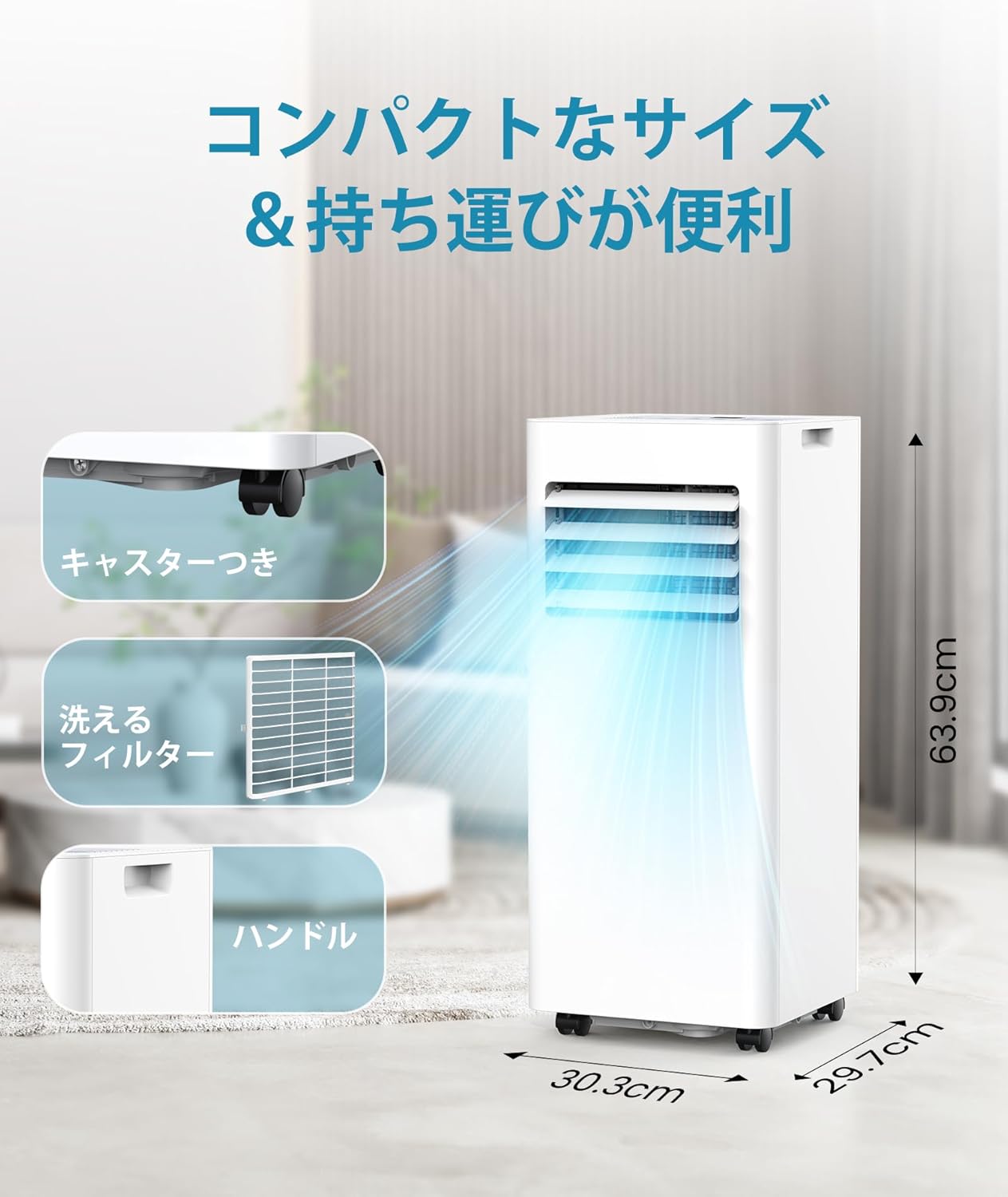
This image emphasizes the compact design and user-friendly features, including its precise dimensions, built-in casters for effortless movement, an easily removable and washable filter for simple maintenance, and a convenient handle for portability.
5. Operating Instructions
5.1 Control Panel and Remote Control
The unit can be operated using the control panel on top of the unit or the included remote control.

A detailed view of the unit's intuitive control panel and the accompanying remote control, demonstrating the various buttons and display for easy operation and setting adjustments.
5.2 Operating Modes
The Joy Pebble Portable Air Conditioner offers three operating modes:
- Cooling Mode: Provides powerful cooling with a 2.6kW capacity, suitable for areas up to 10 tatami mats. Temperature can be set between 16°C and 32°C. Fan speed is adjustable to 2 levels (Strong/Weak).
- Dehumidification Mode: Removes excess moisture from the air, with a capacity of approximately 20 liters per day. In this mode, the unit operates with a non-drain structure, meaning water is evaporated internally. For continuous dehumidification, connect the drain hose.
- Fan Mode: Circulates air without cooling or dehumidifying. Fan speed can be adjusted.

This graphic illustrates the three primary functions of the portable air conditioner: 2.6kW cooling, air circulation (fan mode), and a powerful dehumidification capacity of 24 liters per day.
5.3 Timer Function
The 24-hour timer allows you to set the unit to turn on or off automatically after a specified period (in 1-hour increments). This feature helps save energy and ensures comfort when you need it.
5.4 Sleep Mode
Activate Sleep Mode for quiet operation, with noise levels as low as 53dB, ensuring a peaceful environment for rest. The unit will automatically adjust settings to maintain comfort while minimizing disturbance.
6. Maintenance
6.1 Cleaning the Air Filter
The unit features a washable air filter to maintain air quality and efficiency. It is recommended to clean the filter regularly (e.g., every two weeks or as needed).
- Unplug the unit from the power outlet.
- Locate the air filter cover on the back of the unit and remove it.
- Carefully pull out the air filter.
- Wash the filter with lukewarm water and a mild detergent. Rinse thoroughly.
- Allow the filter to air dry completely before reinserting it.
- Replace the filter cover.
6.2 Drainage
For cooling and fan modes, the unit utilizes a non-drain structure where condensed water is evaporated internally. However, during high humidity or in dehumidification mode, the internal water tank may fill up. The unit will stop operating when the tank is full, and an indicator light will illuminate.
To drain the water:
- Unplug the unit.
- Place a shallow pan or container under the drain port at the bottom rear of the unit.
- Remove the drain plug to allow water to flow out.
- For continuous drainage in dehumidification mode, connect the provided drain hose to the drain port and direct it to a suitable drain.
- Once drained, replace the drain plug securely.
7. Troubleshooting
If you encounter issues with your unit, please refer to the following common problems and solutions:
| Problem | Possible Cause | Solution |
|---|---|---|
| Unit does not turn on. | No power, full water tank, timer active. | Check power connection, drain water tank, check timer settings. |
| Unit is not cooling effectively. | Air filter dirty, exhaust duct not properly installed, room too large, windows/doors open. | Clean air filter, ensure exhaust duct is sealed, close windows/doors, consider room size. |
| Unit is noisy. | Normal operation sound, unit not on a level surface. | Ensure unit is on a flat surface. Some operating noise is normal for portable ACs. |
| Water leakage. | Drain plug loose, drain hose not connected properly. | Check drain plug and hose connections. |
If the problem persists after trying these solutions, please contact customer support.
8. Specifications
| Brand Name | Joy Pebble |
| Model Number | J0A4216-9K-JP |
| Cooling Capacity | 2.6 kW |
| Applicable Area | Up to 10 tatami mats (approx. 16.5 m²) |
| Temperature Setting Range | 16°C - 32°C |
| Fan Speed | 2 levels (Strong/Weak) |
| Dehumidification Capacity | Approx. 20 L/day |
| Operating Noise | Minimum 53 dB |
| Timer | Up to 24 hours |
| Dimensions (D x W x H) | 30.3 x 29.7 x 69.3 cm |
| Weight | 23 kg |
| Power Consumption | 750 W |
| Voltage | 100 V |
| Special Features | Remote control, Casters, Washable filter, Non-drain structure (for cooling/dry), Continuous drainage (for dehumidification) |
9. Warranty and Support
Your Joy Pebble Portable Air Conditioner comes with a 3-year quality warranty from the date of purchase. If you encounter any issues or defects during this period, please do not hesitate to contact our customer support team.
For assistance, please refer to the contact information provided on the product packaging or the official Joy Pebble website. We are committed to providing prompt and reliable support.

This graphic highlights Joy Pebble's commitment to customer support, including a 30-day return/refund guarantee, 3-year quality warranty, and new product replacement for defects or damage.
Ask a question about this manual
Ask about setup, troubleshooting, compatibility, parts, safety, or missing instructions. Manuals+ will review the question and use this page’s manual context to help answer it.