
Introduction
The JOY worker 35-Inch Standing Desk Converter is designed to transform your existing desk into a sit-stand workstation, promoting a healthier and more dynamic work environment. This manual provides essential information for the safe and effective setup, operation, and maintenance of your desk converter.
Safety Information
Please read all safety instructions before assembly and use. Failure to follow these instructions may result in product damage or personal injury.
- Weight Capacity: Do not exceed the recommended weight limits. The top tier supports up to 28.6 lbs (12.97 kg), and the lower keyboard tray supports up to 4.4 lbs.
- Stability: Ensure the desk converter is placed on a stable, flat surface. Avoid placing it near edges where it could tip over.
- Moving Parts: Keep hands and fingers clear of moving parts during height adjustment to prevent pinching or injury.
- Assembly: Follow assembly instructions carefully. Do not use power tools for assembly unless specified, as this may overtighten screws and cause damage.
- Cable Management: Ensure all cables are properly routed and have enough slack to accommodate height adjustments without tension.
Package Contents
Verify that all components are present before beginning assembly. If any parts are missing or damaged, please contact customer support.
- Pre-assembled main desk converter unit
- Removable keyboard tray
- Connection board for keyboard tray
- Screws (E & F) for assembly
- Hex key (if required)
Setup Instructions
The JOY worker Standing Desk Converter requires minimal assembly. Follow these steps to set up your new workstation.
Step 1: Prepare the Main Unit
Place the main desk converter unit upside down on a soft, clean surface to protect it from scratches. Carefully cut any cable ties securing internal components.
Step 2: Install the Connection Board
Align the connection board with the pre-drilled holes on the underside of the main unit. Secure it using Screw F. Ensure it is firmly attached.

Image: Installation steps for the desk converter, highlighting the attachment of the keyboard tray.
Step 3: Attach the Keyboard Tray
Position the removable keyboard tray onto the connection board, aligning the holes. Secure it using Screw E. Ensure the tray is stable and level.

Image: Detailed view of attaching the keyboard tray to the desk converter using screws.
Step 4: Place on Desk
Carefully flip the assembled desk converter upright and place it on your existing desk. Ensure it is centered and stable.
Installation Video
Video: A step-by-step guide demonstrating the installation process of the JOY worker standing desk converter.
Operating Instructions
The JOY worker Standing Desk Converter features a gas spring system for smooth and effortless height adjustments.
Adjusting Height
To raise the desk, simply squeeze the handle located on the side of the unit and gently lift the tabletop to your desired standing height. To lower, squeeze the handle and apply slight downward pressure. The gas spring mechanism will assist in a smooth transition.

Image: A user effortlessly adjusting the desk converter's height, demonstrating the smooth gas spring mechanism.

Image: Visual representation of the gas spring height adjustment, showing minimum 4.9 inches and maximum 19.3 inches.
Dual-Tier Design
The converter features a dual-tier design. The upper tier is for monitors and laptops, while the lower tier provides space for your keyboard and mouse. Both tiers move in sync during height adjustments.

Image: The vertical frame design ensures stable height adjustments without lateral movement.
Operation Video
Video: Demonstration of the dual-tier standing desk converter in action, showcasing its smooth height adjustment.
Features and Specifications
The JOY worker Standing Desk Converter is designed with user convenience and durability in mind.
- Multifunctional Slot: A built-in slot on the top tier provides a convenient space for holding smartphones or tablets.
- Anti-Slip Pads: Equipped with anti-slip pads on the base to ensure stability and prevent movement on your desk surface.
- Keyboard Tray Baffle: The keyboard tray includes a baffle to prevent your keyboard and mouse from sliding off.
- Monitor Mount Compatibility: Reserved holes allow for easy installation of monitor mounts (grommet or clamp installation).
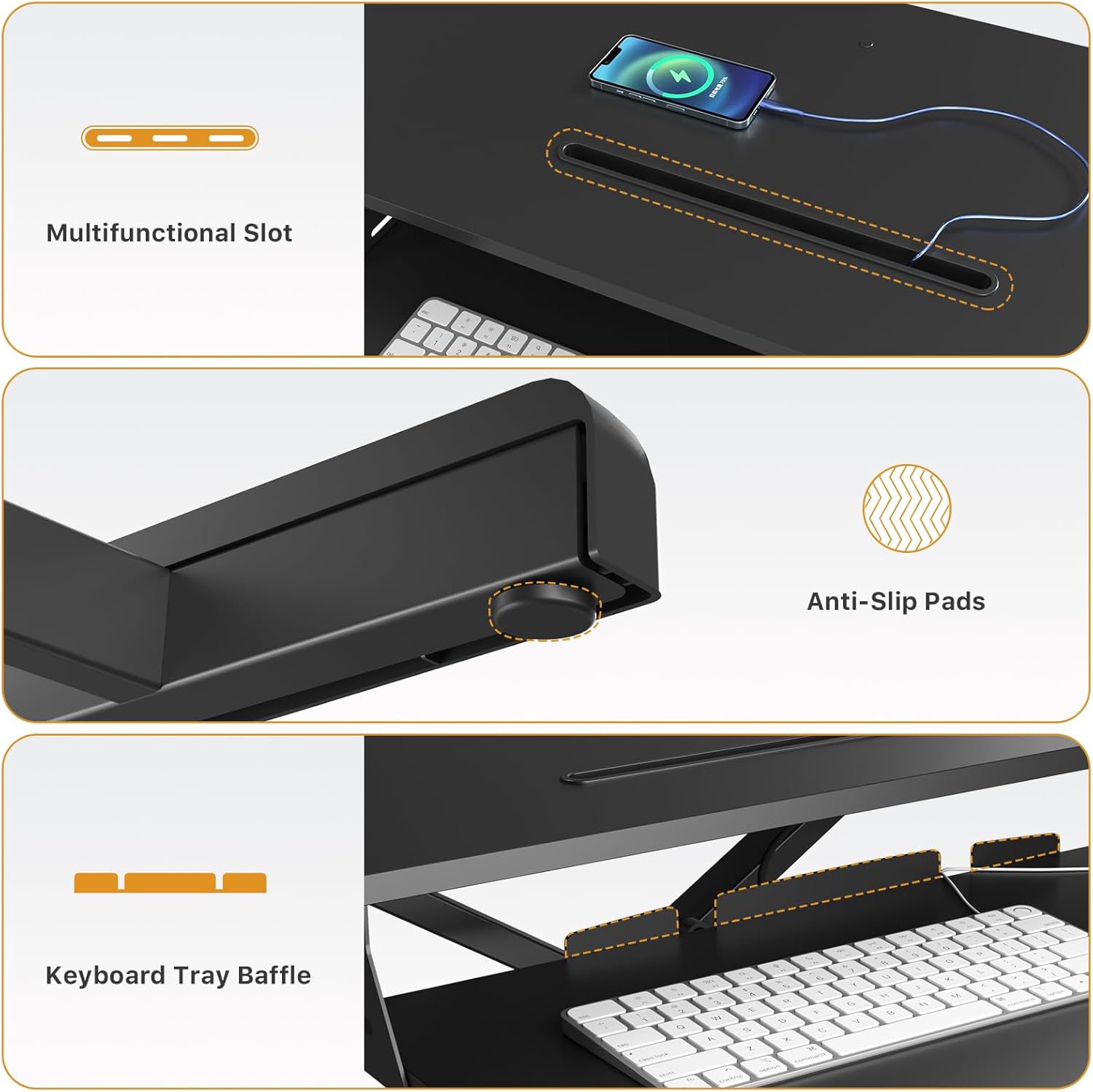
Image: Close-up view of the multifunctional slot, anti-slip pads, and keyboard tray baffle.

Image: Illustration of the reserved holes for monitor mount installation, supporting grommet and clamp options.
Product Specifications
| Feature | Specification |
|---|---|
| Model Number | JW-GSD26H-35PB |
| Product Dimensions (D x W x H) | 34.6"D x 15.7"W x 19.3"H |
| Maximum Height | 19.3 Inches |
| Minimum Height | 4.9 Inches |
| Desktop Load Capacity | 28.6 lbs (12.97 kg) |
| Keyboard Tray Load Capacity | 4.4 lbs |
| Material | Engineered Wood (Particle Board), Steel Frame |
| Color | Black |
| Weight | 26.5 Pounds |
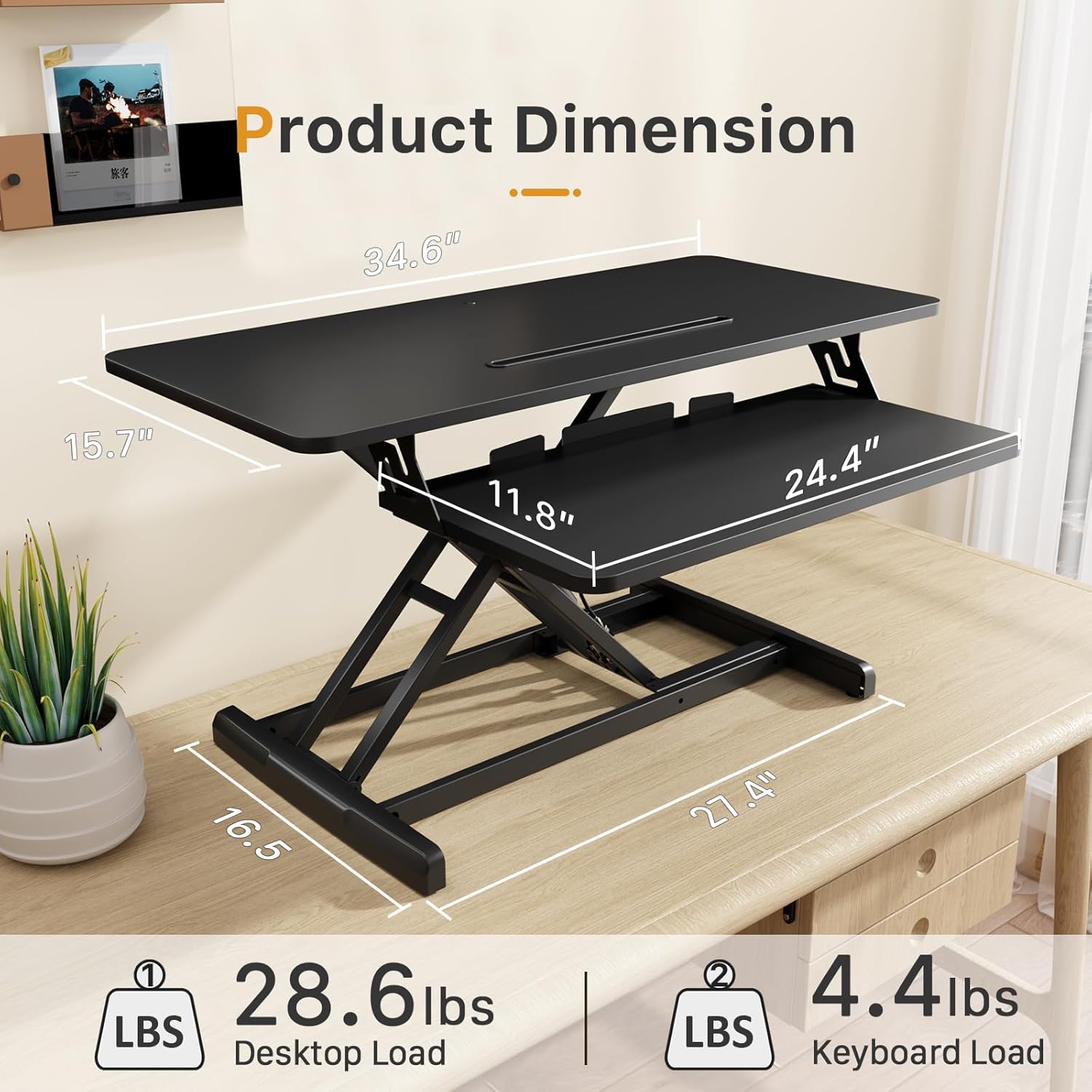
Image: Key product dimensions and load capacities for the desktop and keyboard tray.

Image: Visual guide for compatible desk dimensions, showing the converter's footprint when lowered and raised.
Maintenance
To ensure the longevity and optimal performance of your JOY worker Standing Desk Converter, follow these simple maintenance guidelines:
- Cleaning: Wipe surfaces with a soft, damp cloth. Avoid harsh chemicals or abrasive cleaners that could damage the finish.
- Inspection: Periodically check all screws and connections to ensure they are tight. Retighten if necessary.
- Movement: Keep the gas spring mechanism free from obstructions and debris to ensure smooth operation.
Troubleshooting
If you encounter any issues with your desk converter, please refer to the following common solutions:
- Difficulty Adjusting Height: Ensure the handle is fully squeezed. Check for any obstructions in the lifting mechanism. If the unit feels stiff, ensure it is not overloaded.
- Wobbling: Verify that the desk converter is placed on a flat, stable surface. Check that all assembly screws are securely tightened.
- Keyboard Tray Instability: Ensure the keyboard tray is correctly installed and all screws (E) are tightened.
If problems persist, please contact JOY worker customer support for further assistance.
Warranty and Support
The JOY worker Standing Desk Converter comes with a limited warranty. For specific warranty details, claims, or technical support, please refer to the product packaging or contact JOY worker customer service directly. Keep your purchase receipt for warranty validation.