
1. Introduction
This manual provides instructions for the assembly, operation, and maintenance of your Bstrip Indoor Plant Stand with LED Grow Lights. This 7-tier wooden plant shelf is designed to support indoor plant growth with its integrated 50W (5 x 10W) full spectrum dimmable LED grow light panel. Please read this manual thoroughly before use to ensure proper function and safety.

Image 1.1: Assembled Bstrip Indoor Plant Stand with LED Grow Lights, showcasing its multi-tier design and integrated lighting for various plants.
2. Important Safety Information
Observe the following safety precautions to prevent injury or damage to the product:
- Ensure the product is assembled correctly before placing plants or operating the lights.
- Do not overload the shelves. Refer to specifications for weight limits.
- Keep electrical components away from water to prevent electric shock. The grow lights are water-resistant, but the power adapter and controller are not.
- Use only the provided power adapter.
- Do not attempt to modify or repair the product. Contact customer support for assistance.
- Place the plant stand on a stable, level surface.
- Keep out of reach of children and pets.
3. Packing List
Before assembly, verify that all components listed below are present in the package:

Image 3.1: Visual representation of all components included in the Bstrip Indoor Plant Stand package, such as shelves, poles, grow lights, controller, and assembly hardware.
- Wooden Shelf Panels (various sizes) x 7
- Metal Support Poles (various lengths) x 16 (approx, based on image)
- LED Grow Light Panels x 5
- Grow Light Controller with Power Adapter x 1
- Connection Cables for Grow Lights x 5
- Assembly Hardware (screws, nuts, L-wrench, foot pads)
- Cable Ties x 1 (roll)
4. Setup and Assembly
The Bstrip Indoor Plant Stand is designed for straightforward assembly. No specialized tools are required beyond the included L-wrench.
4.1 Component Overview and Dimensions

Image 4.1: Detailed diagram showing the dimensions of the plant stand and highlighting key features such as MDF material, no-tool assembly, strong load-bearing capacity, and sturdy metal poles.
The stand features MDF material shelves and sturdy metal poles for stability. Each shelf is designed to bear significant weight, as indicated by the 15kg kettlebell example in the image.
4.2 Assembly Steps
- Unpack Components: Carefully remove all parts from the packaging and verify against the packing list.
- Assemble Base: Attach the lowest shelf panel to the base poles using the provided screws and L-wrench. Ensure all connections are secure.
- Build Upright Structure: Connect the next set of metal poles to the assembled base. Then, attach the next shelf panel. Repeat this process for all 7 tiers, ensuring each section is firmly connected.
- Install Grow Lights: The LED grow light panels attach to the underside of the shelves. They typically use magnetic or adhesive mounts for easy installation. Position them centrally under each shelf where plants will be placed.
- Connect Wiring: Connect each grow light panel to the main controller unit using the provided connection cables. Ensure all connections are snug.
- Organize Cables: Use the included cable ties to neatly secure the wiring along the metal poles, preventing tangles and ensuring a tidy appearance.
- Connect Power: Plug the power adapter into the controller, then plug the adapter into a standard electrical outlet.
Note: While assembly is designed to be tool-free for most parts, an L-wrench is provided for securing screws. Follow the visual instructions provided in the product packaging for detailed step-by-step diagrams.
5. Operating Instructions
The Bstrip LED Grow Lights are controlled via an inline remote, offering timing, light mode, and dimming functions.
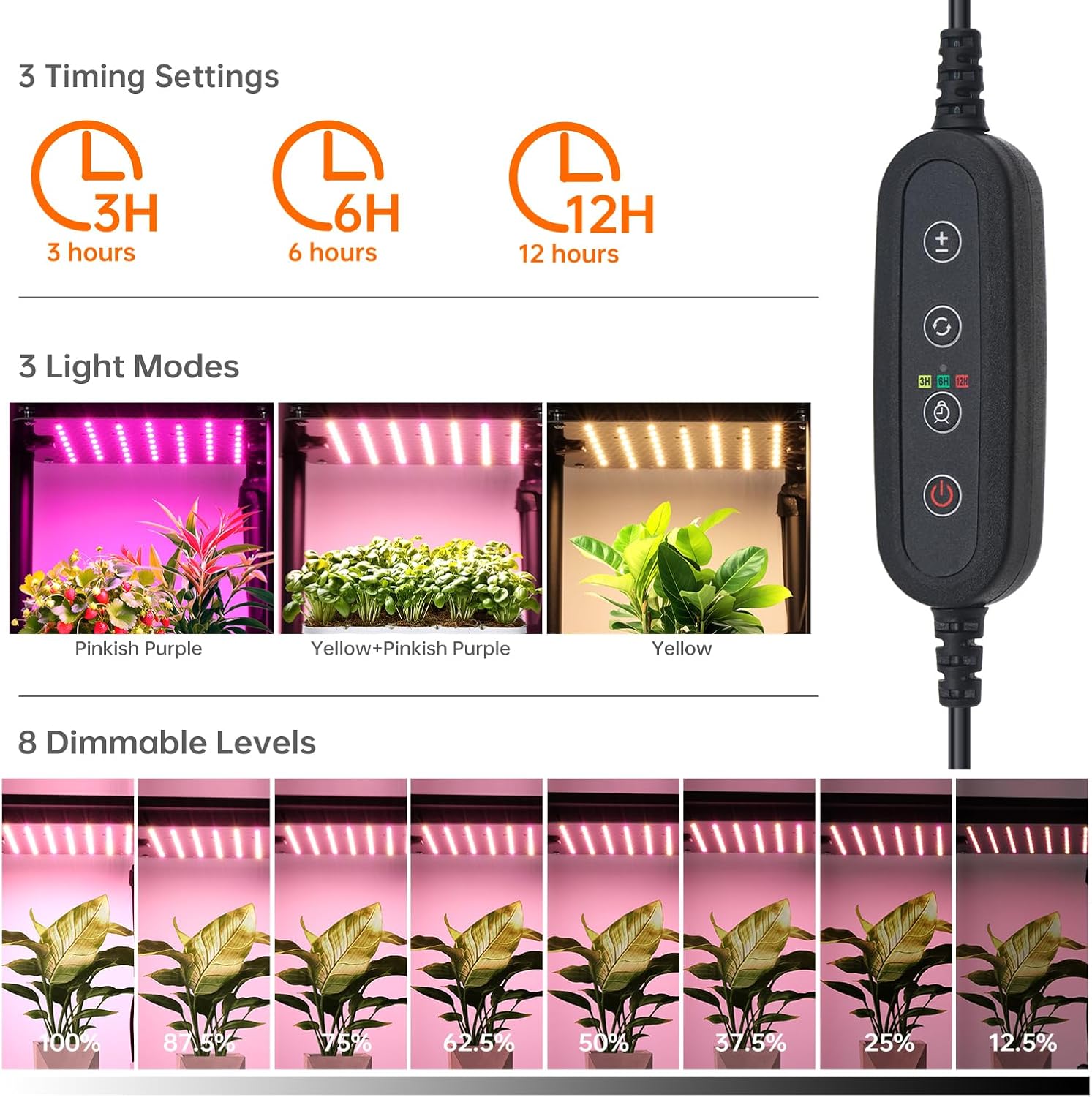
Image 5.1: Close-up of the inline controller, illustrating buttons for power, timer settings (3H, 6H, 12H), light mode selection, and brightness adjustment.
5.1 Controller Functions
- Power Button: Turns the grow lights ON or OFF.
- Timer Button: Cycles through timing settings:
- 3H: Lights will operate for 3 hours and then turn off automatically.
- 6H: Lights will operate for 6 hours and then turn off automatically.
- 12H: Lights will operate for 12 hours and then turn off automatically.
- Light Mode Button: Selects between three distinct light spectrum modes:
- Seedling Mode (Pinkish Purple Light): Optimized for early growth stages.
- Growing Mode (Pinkish Purple + Yellow Light): Suitable for vegetative growth.
- Fruit & Flower Mode (Yellow Light): Ideal for flowering and fruiting stages.
- Brightness Adjustment Buttons (+/-): Adjusts the light intensity through 8 dimmable levels (from 100% down to 12.5%).
5.2 Light Modes and Plant Growth
The three light modes are designed to support different stages of plant development:
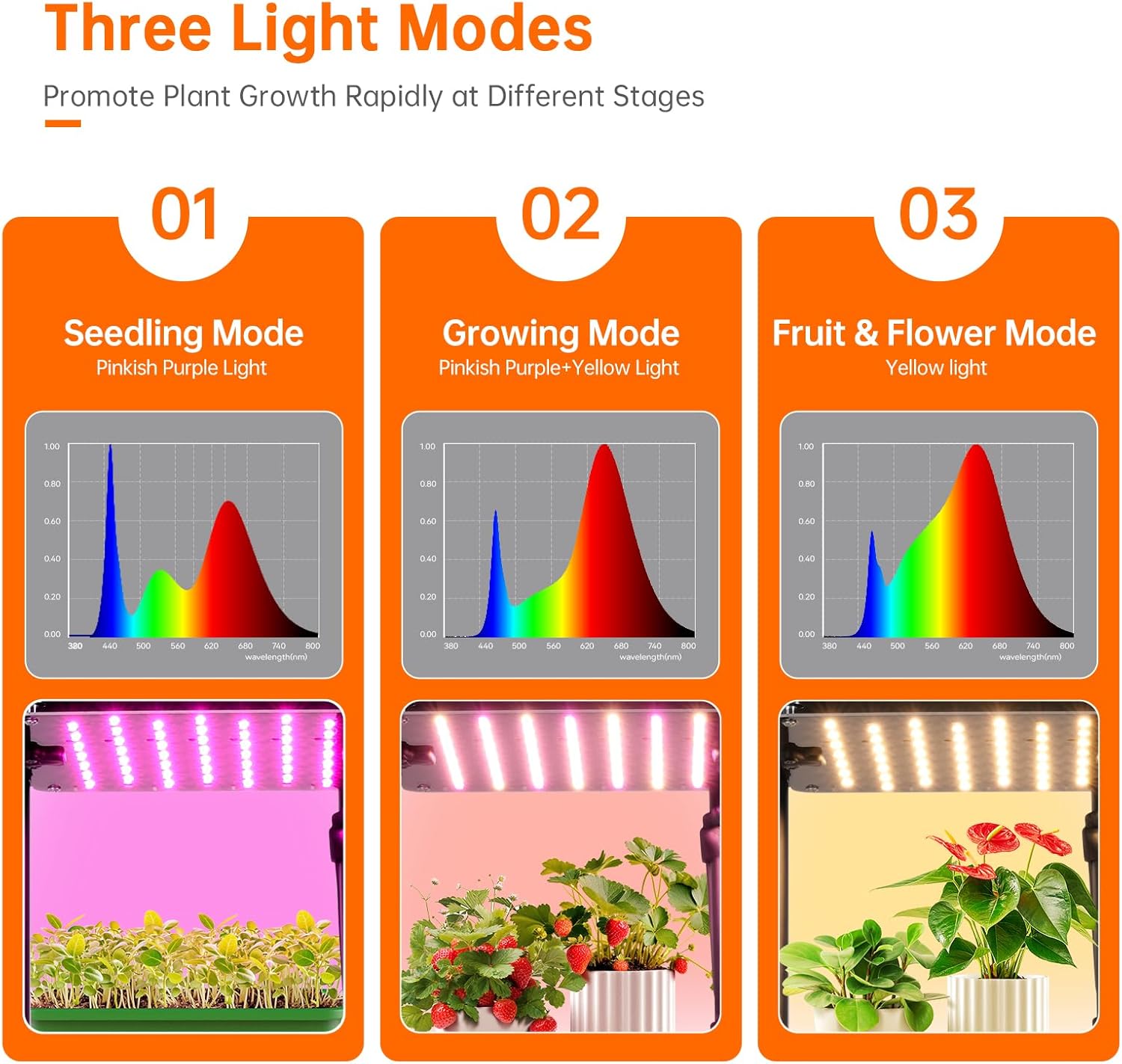
Image 5.2: Illustration of the three distinct light modes (Seedling, Growing, Fruit & Flower) with their respective spectral graphs and visual examples of plants thriving under each mode.
- Seedling Mode (Pinkish Purple): Primarily blue and red wavelengths, crucial for germination and young plant development.
- Growing Mode (Pinkish Purple + Yellow): A balanced spectrum to promote robust vegetative growth, stem strength, and leaf development.
- Fruit & Flower Mode (Yellow): Higher red and far-red wavelengths, encouraging blooming and fruit production.
5.3 Photosynthetic Photon Flux Density (PPFD)
PPFD measures the amount of photosynthetically active radiation (PAR) that falls on a surface per second. The Bstrip LED Grow Lights provide optimal PPFD for various plant needs.

Image 5.3: Diagram illustrating the PPFD values at different distances from the LED grow light panel. For example, at 4 inches, the PPFD is 177 µmol/m²/s, indicating strong light intensity close to the source.
The PPFD values decrease with distance from the light source. Adjust the plant placement or light height to achieve desired light intensity for your specific plants.
6. Maintenance
Regular maintenance ensures the longevity and optimal performance of your plant stand and grow lights.
- Cleaning:
- Wipe down the wooden shelves and metal poles with a soft, damp cloth. Avoid abrasive cleaners.
- Gently clean the LED grow light panels with a dry or slightly damp cloth. Ensure the lights are unplugged before cleaning.
- Do not spray water directly onto the electrical components.
- Inspection: Periodically check all screws and connections to ensure they remain tight and secure.
- Cable Management: Re-secure any loose cables to prevent damage or tripping hazards.
7. Troubleshooting
If you encounter issues with your Bstrip Indoor Plant Stand or LED Grow Lights, refer to the following common problems and solutions:
| Problem | Possible Cause | Solution |
|---|---|---|
| Lights do not turn on. | Power adapter not plugged in; loose connection; faulty power outlet. | Check if the power adapter is securely plugged into the wall and the controller. Ensure all light panel connections are firm. Test the outlet with another device. |
| Lights flicker or dim unexpectedly. | Loose connection; power fluctuation; controller malfunction. | Verify all cable connections. Try plugging into a different outlet. If the issue persists, contact customer support. |
| Timer function is not working. | Incorrect timer setting; power interruption. | Ensure the timer button has been pressed to select 3H, 6H, or 12H. If power was interrupted, reset the timer. |
| Stand feels unstable. | Loose assembly screws; uneven surface. | Tighten all assembly screws. Ensure the stand is placed on a flat, level surface. |
If troubleshooting steps do not resolve the issue, please contact Bstrip customer support for further assistance.
8. Specifications
| Feature | Detail |
|---|---|
| Model Number | INW556606650Ec |
| Brand | Bstrip |
| Dimensions (L x W x H) | 39.88 cm x 23.62 cm x 135.13 cm (approx. 15.7 in x 9.3 in x 53.2 in) |
| Weight | 6.17 kg (approx. 13.6 lbs) |
| Material | MDF, Metal |
| Finish Type | Raw |
| Assembly Required | Yes |
| Grow Light Power | 50W (5 x 10W panels) |
| Light Spectrum | Full Spectrum (3 selectable modes) |
| Dimming Levels | 8 levels |
| Timer Settings | 3H, 6H, 12H (daily cycle) |
| Water Resistance | Grow Light Panels are water-resistant |
9. Warranty Information
Specific warranty details for the Bstrip Indoor Plant Stand with LED Grow Lights are not provided in the product information. Please refer to the retailer's return policy or contact Bstrip customer support for warranty inquiries.
10. Customer Support
For any questions, technical assistance, or to report issues not covered in this manual, please contact Bstrip customer support through the retailer's platform or the official Bstrip website.
Please have your model number (INW556606650Ec) and purchase date available when contacting support.