1. Introduction
This manual provides detailed instructions for the operation and maintenance of your PASNEW Sports Watch. It covers both the digital/analog sports watch and general features of the smartwatch model. Please read this manual thoroughly to ensure proper use and to maximize the lifespan of your watch.

Image 1.1: PASNEW Sports Watch models. This image displays two distinct PASNEW watch models: a modern, rugged smartwatch with a square display showing health metrics, and a classic digital-analog sports watch with a round face and blue accents.
2. Safety Information
- Do not attempt to open the watch case or disassemble the watch.
- Avoid exposing the watch to extreme temperatures (hot or cold) or sudden temperature changes.
- Keep the watch away from strong magnetic fields.
- Clean the watch regularly with a soft, dry cloth. For water-resistant models, a damp cloth can be used, then dry thoroughly.
- Ensure the crown (if applicable) is pushed in completely after setting to maintain water resistance.
3. Digital/Analog Sports Watch Setup and Operation
This section details the functions and settings for the digital/analog sports watch model.
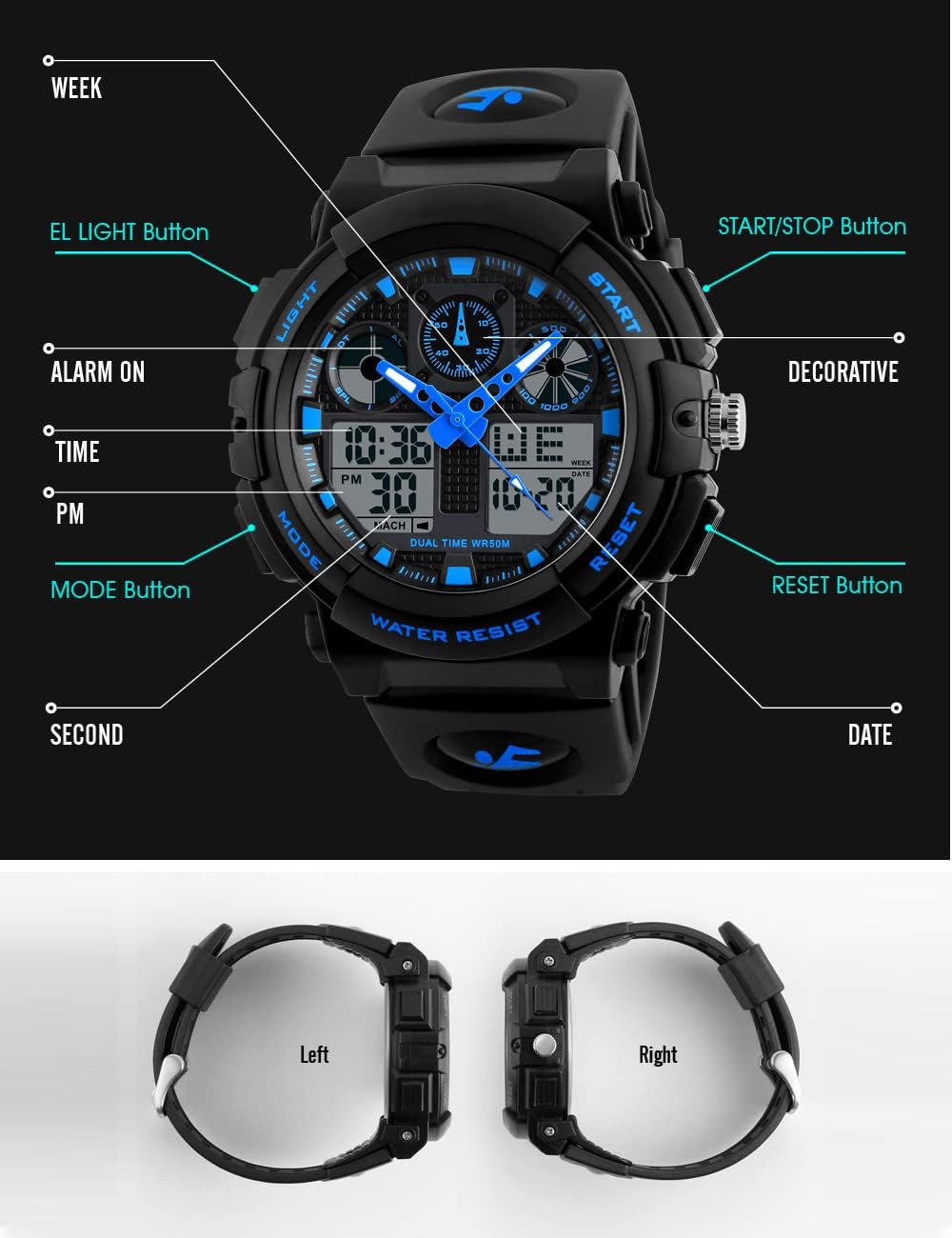
Image 3.1: Digital/Analog Watch Button Functions. This diagram labels the various buttons and display indicators on the digital-analog sports watch, including LIGHT, START/STOP, RESET, MODE, ALARM ON, TIME, PM, SECOND, WEEK, and DATE.
3.1 Button Functions
- LIGHT Button: Activates the EL backlight for illumination.
- MODE Button: Cycles through different modes (Time, Alarm, Stopwatch, Dual Time).
- START/STOP Button: Used to start and stop the stopwatch, or adjust settings in setting mode.
- RESET Button: Used to reset the stopwatch, or confirm settings in setting mode.
3.2 Setting the Time and Date
- In normal time display mode, press the MODE button repeatedly until the seconds begin to flash. This indicates you are in setting mode.
- Press the RESET button to cycle through the settings: Seconds → Hour → Minute → Month → Date → Day of Week.
- Use the START/STOP button to adjust the flashing value.
- Once all settings are correct, press the MODE button to exit setting mode.
3.3 Using the Alarm
- From normal time display, press the MODE button until the alarm time is displayed.
- Press the RESET button to select the hour or minute to set.
- Use the START/STOP button to adjust the flashing value.
- Press the MODE button to exit alarm setting mode.
- To turn the alarm ON/OFF, in alarm display mode, press the START/STOP button. An alarm icon will appear/disappear to indicate its status.
3.4 Using the Stopwatch
- From normal time display, press the MODE button until the stopwatch (00:00:00) is displayed.
- Press the START/STOP button to start the stopwatch.
- Press the START/STOP button again to pause the stopwatch.
- Press the RESET button to reset the stopwatch to zero.
- To record split times, press RESET while the stopwatch is running. The display will show the split time while the stopwatch continues to run in the background. Press RESET again to return to the running stopwatch display.
3.5 EL Light Function
Press the LIGHT button to illuminate the display for a few seconds, making it visible in low-light conditions.
4. Smartwatch Features Overview
This section provides a general overview of features available on the PASNEW smartwatch model.

Image 4.1: Smartwatch Health Data and Basic Functions. This image illustrates the smartwatch's capability to display health data such as heart rate, exercise data, and calorie consumption. It also lists basic functions like 123 sports modes, social app message reminders, smart power saving, and alarm.
4.1 Health Monitoring
- Heart Rate Monitor: The watch can record heart rate using its built-in optical heart rate sensor, providing 24-hour real-time monitoring.
- Blood Pressure Monitor: Provides blood pressure readings.
- Blood Oxygen Monitor: Measures blood oxygen levels.
- Sleep Monitor: Tracks sleep patterns and quality.
- Pedometer: Counts steps taken throughout the day.
- Calorie Consumption: Estimates calories burned based on activity.
4.2 Sports Modes

Image 4.2: Smartwatch Sport Modes and Durability. This image highlights the smartwatch's 123 sport modes, allowing users to track various activities. It also emphasizes the IP68 dustproof and waterproof design, suitable for daily use and exposure to water.
The smartwatch supports 123 different sport modes, allowing for comprehensive tracking of various physical activities. This includes walking, running, cycling, swimming, and many more. The watch provides real-time sports data and adjusts exercise recommendations based on performance.
4.3 Notifications and Other Features
- Call Reminder: Notifies you of incoming calls.
- Information Reminder: Displays messages from social applications.
- Sedentary Reminder: Prompts you to move after periods of inactivity.
- Voice Assistant: Integrated voice control functionality.
- Calculator: Basic calculation tool.
5. Maintenance
5.1 Cleaning Your Watch
- Wipe the watch case and strap regularly with a soft, lint-free cloth.
- For stubborn dirt, slightly dampen the cloth with water and mild soap, then wipe and dry thoroughly.
- Avoid using harsh chemicals, solvents, or abrasive cleaners, as these can damage the watch's finish or seals.
5.2 Water Resistance

Image 5.1: Digital/Analog Watch Water Resistance. This image shows the digital-analog sports watch partially submerged in water, indicating its 50M water resistance suitable for swimming and showering.
- Digital/Analog Sports Watch: This model is 50M Water Resistant. This means it is suitable for showering, swimming, and general water activities. Do not press any buttons while the watch is submerged in water.
- Smartwatch: This model features IP68 Dustproof and Waterproof design. This rating indicates it is protected against dust ingress and can withstand immersion in water up to 1.5 meters for 30 minutes. It is suitable for daily use, washing hands, or getting caught in the rain.
- Avoid exposing any watch to hot water, steam, or sudden temperature changes, as this can compromise the water-resistant seals.
5.3 Battery Care (Smartwatch)

Image 5.2: Smartwatch Battery Life. This image highlights the smartwatch's 380mAh large capacity battery, offering up to 35 days standby time and 5-7 days of typical usage.
- The smartwatch is equipped with a 380mAh battery, offering approximately 5-7 days of typical usage and up to 35 days of standby time.
- Charge the watch using the provided charging cable. Ensure the charging contacts are clean and dry before connecting.
- Avoid overcharging the battery. Disconnect the charger once the watch is fully charged.
6. Troubleshooting
- Watch not displaying time/functions: Check if the battery is depleted. For digital/analog watches, the battery may need replacement. For smartwatches, ensure it is charged.
- Buttons not responding: Ensure the watch is not in a locked mode. If submerged, wait until it is dry before pressing buttons.
- Inaccurate time: For digital/analog watches, reset the time as per Section 3.2. For smartwatches, ensure it is properly synced with your paired device.
- Water ingress: If water appears inside the watch, stop using it immediately and contact customer support. Do not attempt to dry it with heat.
7. Specifications
7.1 Digital/Analog Sports Watch

Image 7.1: Digital/Analog Watch Features Overview. This diagram highlights key features of the digital-analog sports watch, including its PU resin strap, Japanese movement, highly transparent resin glass, PC material shell, stainless steel buckle, and 50M water resistance.
- Movement: Japanese movement (accuracy within seconds per month).
- Case Material: PC material shell (hard and durable).
- Crystal: Highly transparent resin glass (hard and pressure-tolerant).
- Strap Material: PU resin strap (soft, comfortable, and environmentally friendly).
- Buckle: Stainless steel buckle.
- Water Resistance: 50M (suitable for showering, swimming).
- Functions: Double time, Stopwatch, Alarm, Date, EL Light.
7.2 Smartwatch

Image 7.2: Smartwatch Screen and Sensor. This image showcases the smartwatch's 1.83-inch high-definition retina screen for a clear visual experience and its built-in multi-point optical sensor on the back for health monitoring.
- Screen: 1.83-inch high-definition retina screen.
- Sensor: Built-in multi-point optical sensor (for health monitoring).
- Battery Capacity: 380mAh.
- Battery Life: Approximately 5-7 days (typical use), 35 days (standby).
- Water Resistance: IP68 Dustproof and Waterproof.
- Menu Modes: 8 menu modes, supports 10 built-in watch faces + 1 custom watch face + 1 cloud server watch face.
8. Warranty and Support
PASNEW watches are manufactured with attention to quality. For warranty information, technical support, or service inquiries, please refer to the contact information provided at your point of purchase or visit the official PASNEW website. Please retain your proof of purchase for warranty claims.


