
Introduction
This manual provides comprehensive instructions for the safe and efficient use of your freeVoice Car Mobile Phone Holder with 15W Wireless Charging Function. Please read this manual carefully before installation and operation to ensure optimal performance and longevity of the product. This device combines a secure phone mount with a fast wireless charging capability for your vehicle.
Safety Information
- Do not disassemble, repair, or modify the product. Unauthorized modifications may void the warranty and pose safety risks.
- Keep the device away from water, moisture, and extreme temperatures.
- Ensure the charging cable is securely connected to a compatible car charger (not included) with appropriate power output.
- Avoid placing metallic objects or foreign materials on the charging surface, as this may interfere with wireless charging and trigger the Foreign Object Detection (FOD) sensor.
- Do not obstruct your view of the road or vehicle controls when installing the holder.
- Always ensure your phone is securely clamped before driving.
- Use only the provided USB cable or a certified equivalent.
Package Contents
Please check the package for the following items:
- freeVoice Car Mobile Phone Holder with Wireless Charging Function
- Suction Cup Mount
- Ventilation Clip Mount
- USB-C Charging Cable (Charger adapter not included)

Figure 1: Included components: the phone holder, USB-C cable, and both suction cup and ventilation mounts.
Product Overview
The freeVoice Car Mobile Phone Holder is designed to provide a secure mount and efficient wireless charging for your smartphone in the car. It features a 15W fast wireless charging capability, an intelligent chip for optimal alignment, and a Foreign Object Detection (FOD) sensor for safety. The holder also includes an automatic clamping mechanism and a convenient one-click open function.

Figure 2: Front view of the freeVoice Car Mobile Phone Holder.
Setup
1. Attaching the Mount to the Holder
- Unscrew the nut on the back of the phone holder.
- Place the nut over the ball joint of your chosen mount (suction cup or ventilation clip).
- Insert the ball joint into the socket on the back of the phone holder.
- Tighten the nut clockwise until the mount is securely fastened to the holder.
2. Installing the Holder in Your Vehicle
Option A: Suction Cup Mount
- Choose a clean, flat surface on your dashboard or windshield.
- Press the suction cup firmly against the surface.
- Flip the lever on the suction cup base down to create a vacuum seal.
Option B: Ventilation Clip Mount
- Locate a suitable air vent in your vehicle.
- Gently push the ventilation clip onto one of the vent blades until it is secure. Ensure the clip is firmly attached and does not obstruct airflow or vent operation.
3. Connecting Power
- Connect the provided USB-C cable to the charging port on the bottom of the freeVoice holder.
- Connect the other end of the USB-C cable to a compatible car charger (e.g., cigarette lighter adapter) with a minimum output of 15W (e.g., 9V/2A, 12V/1.25A). A Quick Charge (QC) 3.0 or Power Delivery (PD) compatible adapter is recommended for optimal fast charging.
- Once powered, the holder's arms will typically open briefly and then close, indicating it is ready for use.
Operating Instructions
1. Placing Your Smartphone
- When the holder is powered, the clamping arms will automatically open when a phone is detected near the charging pad.
- Place your Qi-compatible smartphone onto the charging pad. The arms will automatically close to securely hold your phone and initiate wireless charging.
- The intelligent chip detects your smartphone battery and aligns for efficient 15W wireless charging.

Figure 3: Automatic clamping and smart chip functionality.
2. Removing Your Smartphone (One-Click Open)
- To remove your phone, press the release button located on the side of the holder. The clamping arms will open, allowing you to easily retrieve your device.
3. Adjusting Viewing Angle and Orientation
- The holder features a 360° rotating ball joint, allowing you to adjust your phone to either a vertical or horizontal viewing orientation.
- Loosen the nut on the ball joint slightly, adjust the angle, and then tighten the nut to secure the position.
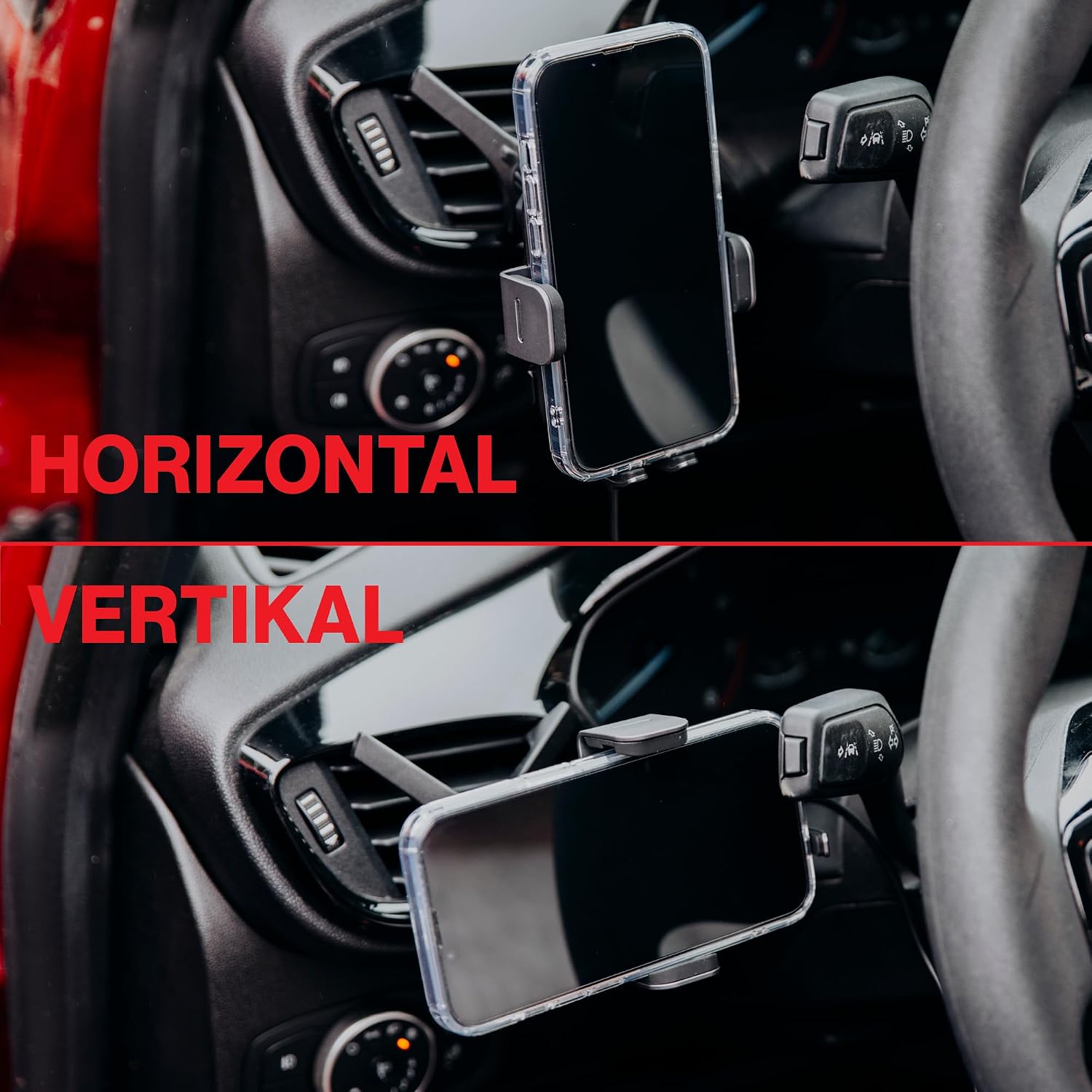
Figure 4: Horizontal and vertical viewing options.
Maintenance
- Cleaning: Use a soft, dry cloth to wipe the surface of the holder. Do not use abrasive cleaners or solvents.
- Suction Cup: If the suction cup loses adhesion, rinse it with warm water and let it air dry. This can restore its stickiness.
- Cable Care: Avoid bending or twisting the USB-C cable excessively to prevent damage.
Troubleshooting
| Problem | Possible Cause | Solution |
|---|---|---|
| Device not charging wirelessly. | 1. Phone not Qi-compatible. 2. Phone not properly aligned. 3. Foreign object on charging pad (FOD activated). 4. Power cable not connected or insufficient power supply. 5. Phone case too thick or contains metal. | 1. Ensure your phone supports Qi wireless charging. 2. Re-position phone to ensure it's centered on the charging pad. 3. Remove any foreign objects (coins, keys, etc.) from the charging surface. 4. Check USB-C cable connection and ensure car charger provides at least 15W (e.g., QC 3.0 or PD). 5. Remove phone case or use a thinner, non-metallic case. |
| Clamping arms not opening/closing automatically. | 1. No power supply. 2. Sensor obstructed. | 1. Ensure the holder is properly powered. 2. Check for any obstructions around the sensor area. |
| Holder feels unstable or falls off. | 1. Mount not securely attached. 2. Suction cup not properly sealed or surface is dirty. 3. Ventilation clip not firmly attached. | 1. Re-tighten the nut on the ball joint. 2. Clean the mounting surface and re-apply the suction cup, ensuring the lever is locked. 3. Re-position the ventilation clip to ensure a firm grip on the vent blade. |
| Phone charges slowly or battery drains while charging. | 1. Insufficient power input. 2. High power consumption by phone (e.g., GPS, screen brightness, multiple apps). 3. Overheating. | 1. Ensure your car charger provides sufficient power (15W, QC 3.0/PD recommended). 2. Reduce phone usage, close unnecessary apps, lower screen brightness. 3. Ensure proper ventilation around the charger. If the device feels excessively hot, temporarily discontinue use. |
Specifications
- Brand: freeVoice
- Model Number: FWP-CC-X3
- Compatible Devices: Cellular Phones (Qi-compatible)
- Wireless Charging Output: 5W / 7.5W / 10W / 15W
- Input: 5V/2A, 9V/2A, 12V/2A (QC3.0 / PD / AFC compatible)
- Output Current: 1 Ampere
- Special Features: Automatic Fixing, Fast Charging, Universal Compatibility, Wireless Charging, Foreign Object Detection (FOD)
- Color: Black
- Material: Plastic
- Power Source: Corded Electric (USB Type C)

Figure 5: Device specifications printed on the back of the charger.
Warranty Information
freeVoice products are manufactured with high-quality materials and undergo rigorous testing. For specific warranty details, please refer to the warranty card included with your purchase or visit the official freeVoice website. Keep your purchase receipt as proof of purchase for any warranty claims.
Support
If you encounter any issues or have questions regarding your freeVoice Car Mobile Phone Holder, please contact freeVoice customer support. Contact information can typically be found on the product packaging or the official freeVoice website.