
1. Introduction
Thank you for choosing the Garvee 6000 BTU Window Air Conditioner. This manual provides essential information for the safe and efficient operation, installation, and maintenance of your new appliance. Please read this manual thoroughly before installation and use, and retain it for future reference.
2. Safety Information
Always follow basic safety precautions when using electrical appliances to reduce the risk of fire, electric shock, and injury. This appliance is for indoor use only. Do not operate the air conditioner with a damaged power cord or plug. Ensure the unit is properly grounded. Do not block air inlets or outlets. Disconnect power before cleaning or servicing.
3. Package Contents
Verify that all items listed below are present in your package:
- Garvee 6000 BTU Window Air Conditioner Unit
- Remote Control
- Top Foam Sealer
- Foam Sealer (Side Panels)
- Mounting Block
- Bubble Level

Image Description: This image displays the Garvee window air conditioner unit alongside its included accessories: a remote control, top foam sealer, foam sealer side panels, a mounting block, and a bubble level. It also illustrates the minimum window opening requirements for installation, including a minimum window opening of 16 inches, a window width range of 24-48 inches, a maximum still depth of 11 inches, a minimum clearance height of 12 inches, and a minimum clearance depth of 8 inches.
4. Setup and Installation
This Garvee window air conditioner is designed for easy installation in compatible windows. No external window bracket is typically required for standard installations.
4.1 Window Requirements
- Window Width Range: 24 to 48 inches
- Minimum Window Opening Height: 16 inches
- Minimum Clearance Height: 12 inches
- Minimum Clearance Depth: 8 inches
- Maximum Still Depth: 11 inches
4.2 Installation Steps (General Guide)
- Prepare the window by cleaning the sill and frame.
- Attach the foam sealers to the top and sides of the unit as instructed to ensure a tight seal and prevent air leakage.
- Carefully place the air conditioner into the window opening, ensuring it is centered and level. Use the included bubble level for accuracy.
- Extend the side panels to fill the window opening completely and secure them.
- Install the mounting block or support brackets as necessary to firmly secure the unit in place.
- Ensure the unit is tilted slightly outwards to allow for proper condensation drainage.
- Plug the unit into a dedicated 115V/60Hz grounded electrical outlet.

Image Description: A woman is shown smiling while interacting with her smartphone, with a Garvee window air conditioner unit visibly installed in a window behind her. The image highlights the concept of 'Safe Installation' and indicates that 'No window bracket needed', suggesting a streamlined installation process.
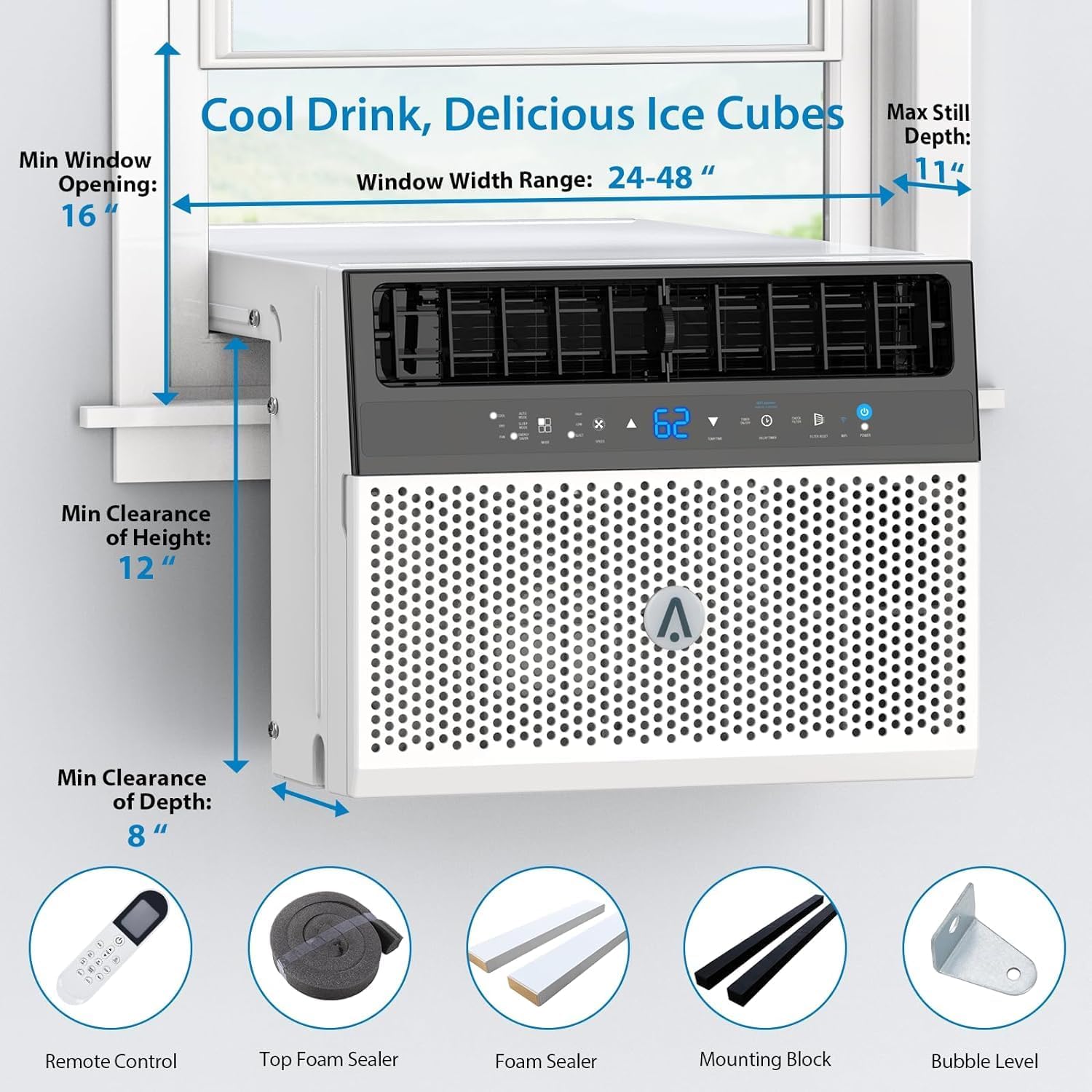
Image Description: This image shows a woman reaching up to open a window directly above a Garvee window air conditioner unit. The text overlay states 'Freedom to open windows for fresh air', indicating that the design of the air conditioner allows for the window to be opened even when the unit is installed, providing flexibility for ventilation.
5. Operating Instructions
Your Garvee air conditioner offers multiple modes and convenient control options for optimal comfort.
5.1 Control Panel and Remote Control
The unit features an intuitive control panel with a digital display and indicator lights. For convenience, a remote control is included, allowing you to adjust settings from a distance.
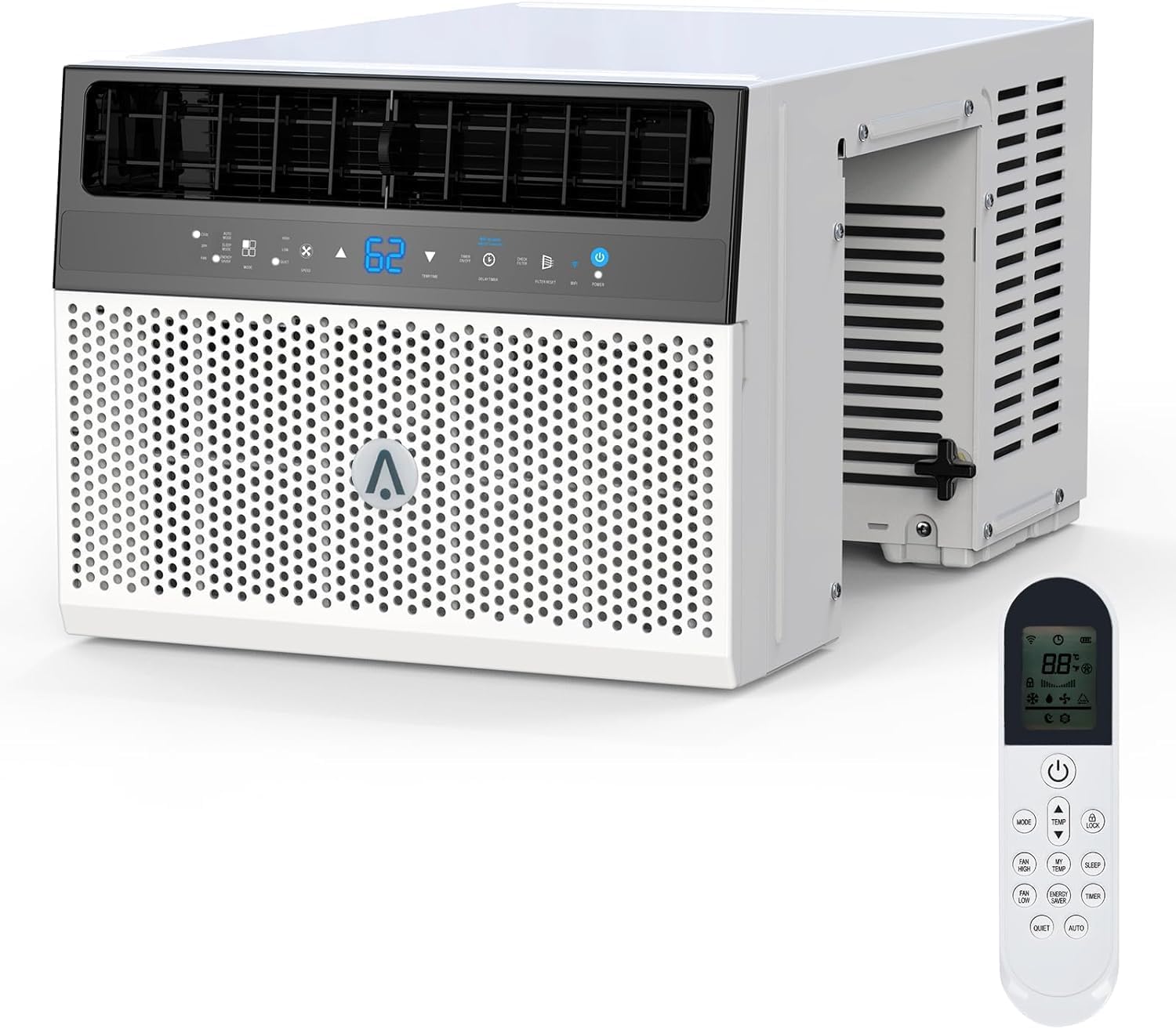
Image Description: A Garvee 6000 BTU window air conditioner unit is shown from a front-side angle, displaying its control panel and air vents. A white remote control with various function buttons is positioned next to the unit.
5.2 Operating Modes
The Garvee air conditioner offers three primary operating modes:
- Cooling Mode: Provides powerful cooling, capable of reaching temperatures down to 62°F.
- Dry Mode (Dehumidification): Removes excess moisture from the air, with a capacity of up to 35 pints per day.
- Fan Mode: Circulates air without cooling, offering Low, Medium, and High fan speed settings.

Image Description: This image illustrates the '3 in 1 Air Conditioner' functionality of the Garvee unit. It shows the air conditioner installed in a window, with three icons representing its modes: a snowflake for 'Cooling' (down to 62°F), a water droplet for 'Dry' (35 Pints/Day), and a fan for 'Fan' (Low/Medium/High). A woman and child are seated on a sofa in the foreground, suggesting a comfortable indoor environment.
5.3 Quiet Operation
The unit is designed for quiet operation, maintaining a noise level of approximately 45 decibels, ensuring minimal disturbance, especially during sleep.

Image Description: The image depicts a Garvee window air conditioner installed in a bedroom window, with cool air flowing into the room where a person is sleeping peacefully. A graphic overlay illustrates 'Quiet Operation' with a sound wave fluctuating between 30dB and 50dB, indicating a low noise level of around 40dB, suggesting the unit runs quietly.
5.4 Smart App Control
For enhanced convenience, the air conditioner can be controlled remotely via a smart application, allowing you to manage settings from virtually anywhere.

Image Description: A woman is seated on a sofa, using a laptop, while simultaneously controlling a Garvee window air conditioner via a smartphone app. The image highlights 'SMART APP CONTROL' and mentions 'Control it from virtually anywhere'. An Amazon Alexa device is also visible, with text indicating 'turn on the air conditioner Amazon Alexa', suggesting voice control capabilities.
6. Maintenance
Regular maintenance ensures optimal performance and longevity of your air conditioner.
6.1 Cleaning the Washable Filter
The Garvee air conditioner is equipped with a washable filter. It is recommended to clean the filter every two weeks, or more frequently depending on usage and air quality. To clean:
- Turn off the unit and unplug it from the power outlet.
- Locate and remove the air filter from the front panel.
- Wash the filter with warm, soapy water. Rinse thoroughly.
- Allow the filter to air dry completely before reinstalling. Do not use heat to dry.
6.2 General Cleaning
Wipe the exterior of the unit with a soft, damp cloth. Do not use harsh chemicals or abrasive cleaners. Ensure no water enters the electrical components.
7. Troubleshooting
Before contacting customer support, please refer to the following common issues and solutions:
| Problem | Possible Cause | Solution |
|---|---|---|
| Unit does not turn on | No power; circuit breaker tripped; power cord not fully plugged in | Check power connection; reset circuit breaker; ensure plug is secure |
| Insufficient cooling | Dirty air filter; blocked air vents; room too large; doors/windows open | Clean air filter; clear obstructions; ensure room size is within capacity; close doors/windows |
| Excessive noise | Loose installation; foreign object inside unit | Re-secure unit in window; inspect for and remove any foreign objects (after unplugging) |
| Water leakage | Unit not tilted correctly; drain plug blocked | Ensure unit is slightly tilted outwards; check and clear drain plug |
8. Specifications
| Feature | Detail |
|---|---|
| Brand | Garvee |
| Model Number | NCA-06C/X1E |
| Cooling Power | 6000 BTU |
| Coverage Area | Up to 269 Square Feet |
| Voltage | 115V/60Hz |
| Wattage | 570W |
| Noise Level | 45 Decibels |
| Item Weight | 73.9 pounds |
| Product Dimensions (D x W x H) | 17 x 15 x 29 inches |
| Efficiency | Moderately Efficient, 4 Star BEE Rating, 13.7 SEER |
| Dehumidification Capacity | 35 Pints/Day |
| Installation Type | Window |
| Special Features | Fast Cooling, Remote Control, Washable Filter, Quiet Operation, Smart App Control |
| Color | White |
9. Warranty and Support
For warranty information and customer support, please refer to the warranty card included with your product or contact Garvee customer service directly. Keep your purchase receipt as proof of purchase for any warranty claims.