
Introduction
This manual provides comprehensive instructions for the installation, operation, and maintenance of your Stalwart Digital Wall Safe, Model 83-DT5915-SM. Please read this manual thoroughly before use to ensure proper functionality and security.
The Stalwart Digital Wall Safe is designed to protect valuable items such as cash, jewelry, documents, and passports. Its robust construction and digital keypad offer a secure and convenient storage solution for your home or office.
Product Contents
Verify that all components are present before proceeding with installation:
- 1 x Stalwart Digital Wall Safe (Model 83-DT5915-SM)
- 2 x Emergency Override Keys
- 4 x AA Batteries (included)
- Mounting Hardware (bolts)
- Instruction Manual (this document)

Image: Close-up view of the safe's digital keypad, emergency keyhole, and secure deadbolts, along with the two manual override keys.
Specifications
| Feature | Detail |
|---|---|
| Brand | Stalwart |
| Model Number | 83-DT5915-SM |
| Product Dimensions (External) | 12.5"D x 6"W x 8.75"H |
| Interior Dimensions | 11.5"L x 5"W x 8"H |
| Lock Type | Electronic Combination Lock |
| Material | Alloy Steel (Cold Rolled Steel) |
| Wall Thickness | 1.5mm |
| Door Thickness | 3mm |
| Item Weight | 12 Pounds |
| Mounting Type | Wall Mount (between studs) |
| Power Source | 4 x AA Batteries |
| Special Feature | Anti-Theft |
| Water Resistance Level | Not Water Resistant |

Image: Diagram illustrating the external and internal dimensions of the Stalwart Digital Wall Safe.
Setup
1. Battery Installation
The safe requires 4 AA batteries for the electronic lock to function. The battery compartment is located inside the safe door.
- Open the safe door using the emergency override key (refer to "Using Emergency Keys" if needed).
- Locate the battery compartment cover on the inside of the door.
- Remove the cover and insert 4 AA batteries, ensuring correct polarity (+/-).
- Replace the battery compartment cover.
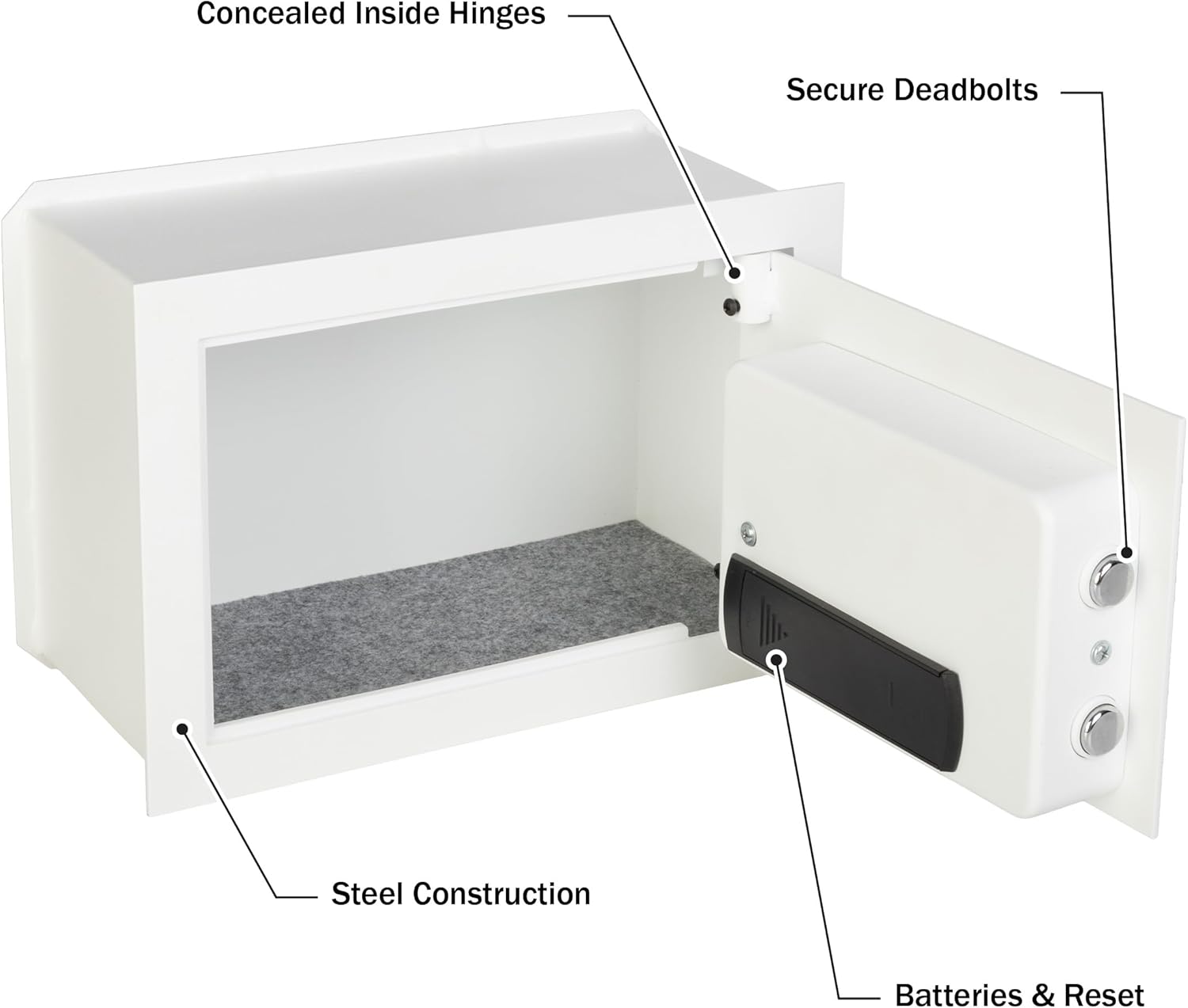
Image: Internal view of the safe door, highlighting the battery compartment and reset button location.
2. Initial Passcode Setting
Upon first use or after battery replacement, you will need to set your personal passcode.
- With the safe door open, locate the red reset button on the inside of the door, near the battery compartment.
- Press the red reset button. You will hear a beep, and the yellow indicator light on the keypad will illuminate.
- Within 5 seconds, enter your desired 3-8 digit passcode on the keypad.
- Press the "#" button to confirm your new passcode. You will hear a confirmation beep.
- Test the new passcode with the door open before closing it.
Important: Keep your passcode confidential and store the emergency keys in a secure location away from the safe.
3. Mounting Instructions
This wall safe is designed for installation between standard wall studs (typically 16 inches on center).
- Select Location: Choose a discreet and secure location within a wall, ensuring there are no electrical wires, plumbing, or other obstructions behind the wall.
- Mark Opening: Carefully measure and mark the opening required for the safe body. The external dimensions are 12.5"D x 6"W x 8.75"H. Ensure the opening is slightly larger than the safe body for a snug fit.
- Cut Opening: Using appropriate tools, cut the marked opening in the drywall or other wall material.
- Insert Safe: Carefully slide the safe body into the prepared opening. The front flange of the safe should sit flush against the wall surface.
- Secure Safe: Use the provided mounting bolts to secure the safe to the wall studs. There are pre-drilled holes inside the safe for this purpose. Ensure the safe is firmly attached and stable.

Image: The Stalwart Digital Wall Safe shown installed flush within a wall, with an inset showing the mounting bolts and the digital keypad.
Operating Instructions
1. Opening the Safe with Digital Passcode
- Enter your 3-8 digit passcode on the keypad.
- Press the "#" button.
- If the passcode is correct, the green indicator light will illuminate, and you will hear a beep.
- Within 5 seconds, turn the knob clockwise to open the safe door.
Note: If an incorrect passcode is entered three times consecutively, the safe will lock for 20 seconds. Further incorrect attempts will increase the lockout duration.
2. Changing the Passcode
You can change your passcode at any time while the safe door is open.
- With the safe door open, press the red reset button on the inside of the door. The yellow indicator light will illuminate.
- Enter your new 3-8 digit passcode.
- Press the "#" button to confirm. You will hear a confirmation beep.
- Test the new passcode with the door open before closing it.
3. Using Emergency Override Keys
The emergency override keys provide manual access to the safe in case of forgotten passcode, battery failure, or electronic malfunction.
- Locate the keyhole cover on the digital keypad panel.
- Remove the cover.
- Insert one of the emergency override keys into the keyhole and turn it counter-clockwise.
- While holding the key turned, rotate the knob clockwise to open the safe door.
- Once the door is open, remove the key.
Warning: Do not store the emergency override keys inside the safe.
Maintenance
1. Battery Replacement
When the batteries are low, the red indicator light on the keypad may flash or the safe may not respond to passcode entry. Replace all 4 AA batteries promptly to ensure continuous operation.
- Open the safe using your passcode or an emergency key.
- Remove the battery compartment cover.
- Replace all four old AA batteries with new ones, observing correct polarity.
- Replace the cover.
- Test the safe operation.
Note: Replacing batteries does not erase your programmed passcode.
2. Cleaning
To maintain the appearance and functionality of your safe:
- Wipe the exterior and interior surfaces with a soft, damp cloth.
- Avoid using abrasive cleaners or solvents, as these can damage the finish or electronic components.
- Ensure the keypad and lock mechanism are free from dust and debris.
Troubleshooting
| Problem | Possible Cause | Solution |
|---|---|---|
| Safe does not open with passcode. | Incorrect passcode entered. Batteries are low or dead. Keypad malfunction. | Re-enter passcode carefully. Replace batteries. Use emergency override key. |
| Keypad does not respond. | Batteries are completely dead. Electronic malfunction. | Replace batteries. Use emergency override key. If issue persists, contact support. |
| Safe is locked out after multiple incorrect attempts. | Security feature activated. | Wait for the lockout period to expire (20 seconds or longer). |
| Emergency key does not open safe. | Key not fully inserted or turned correctly. Lock mechanism obstruction. | Ensure key is fully inserted and turned firmly counter-clockwise while rotating the knob. Check for any obstructions. |
Warranty and Support
For warranty information or technical support, please refer to the documentation provided at the time of purchase or contact Stalwart customer service directly. Keep your purchase receipt as proof of purchase.
Manufacturer: Trademark Global
Model: 83-DT5915-SM
UPC: 197315280927