
1. Introduction
This manual provides detailed instructions for the installation, operation, and maintenance of the YWBL-WH DDS529MR Single-Phase Energy Meter. This device is designed to measure active energy consumption in single-phase AC power systems. It features an LCD digital display for clear readings and is suitable for DIN rail mounting.
2. Safety Information
Please read and understand all safety instructions before installing or operating the energy meter. Failure to follow these instructions may result in electric shock, fire, or damage to the device.
- Installation and maintenance should only be performed by qualified electricians.
- Ensure the power supply is disconnected before any installation or wiring work.
- Do not operate the meter in environments with excessive moisture, dust, or corrosive gases.
- Verify correct wiring connections to prevent damage to the meter or electrical system.
- The meter is designed for indoor use only.
3. Package Contents
Upon opening the package, please verify that all items are present and undamaged:
- 1 x YWBL-WH DDS529MR Single-Phase Energy Meter
- 1 x User Manual
4. Product Overview
The DDS529MR energy meter is a compact and reliable device featuring an LCD display for easy reading of various electrical parameters. It is designed for 35mm DIN rail installation.
4.1 Key Features
- Measures active energy (kWh), voltage (V), current (A), power (W), power factor (PF), and frequency (Hz).
- LCD digital display with backlight for clear visibility.
- Standard 35mm DIN rail mounting for quick installation.
- High reliability and compact design.
- Equipped with RS485 communication interface for enhanced performance (specific models).
4.2 Meter Components and Display

Figure 1: Labeled components of the DDS529MR energy meter. Key parts include the electronic display, power indicator, pulse indicator, and setting buttons.
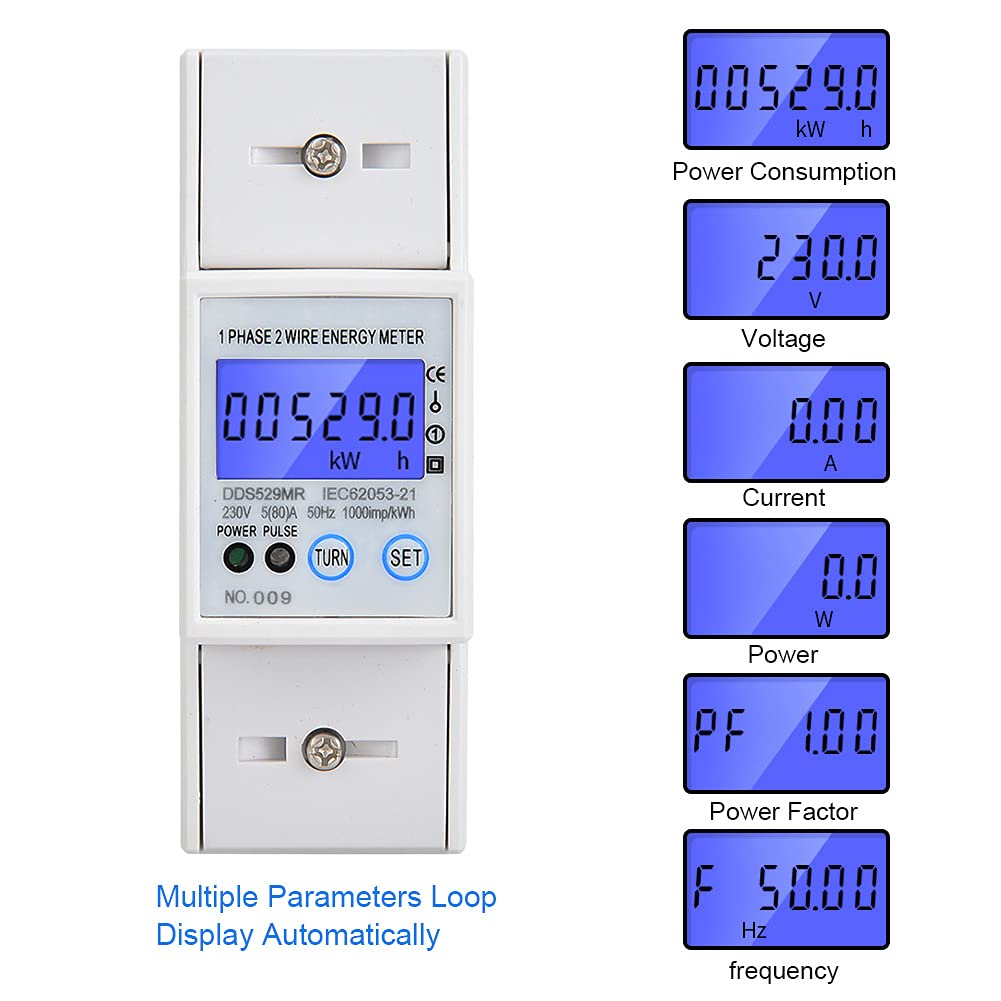
Figure 2: The LCD display automatically cycles through various measurement parameters including Power Consumption (kWh), Voltage (V), Current (A), Power (W), Power Factor (PF), and Frequency (Hz).
5. Setup and Installation
The DDS529MR energy meter is designed for easy installation on a standard 35mm DIN rail.
5.1 DIN Rail Mounting
- Ensure the DIN rail is securely mounted in a suitable electrical enclosure.
- Align the meter's DIN rail clip with the rail.
- Press the meter firmly onto the rail until it clicks into place.

Figure 3: Rear view of the meter illustrating the DIN rail mounting mechanism.
5.2 Wiring Connections
WARNING: Disconnect all power before performing any wiring connections. Incorrect wiring can cause severe damage or injury.
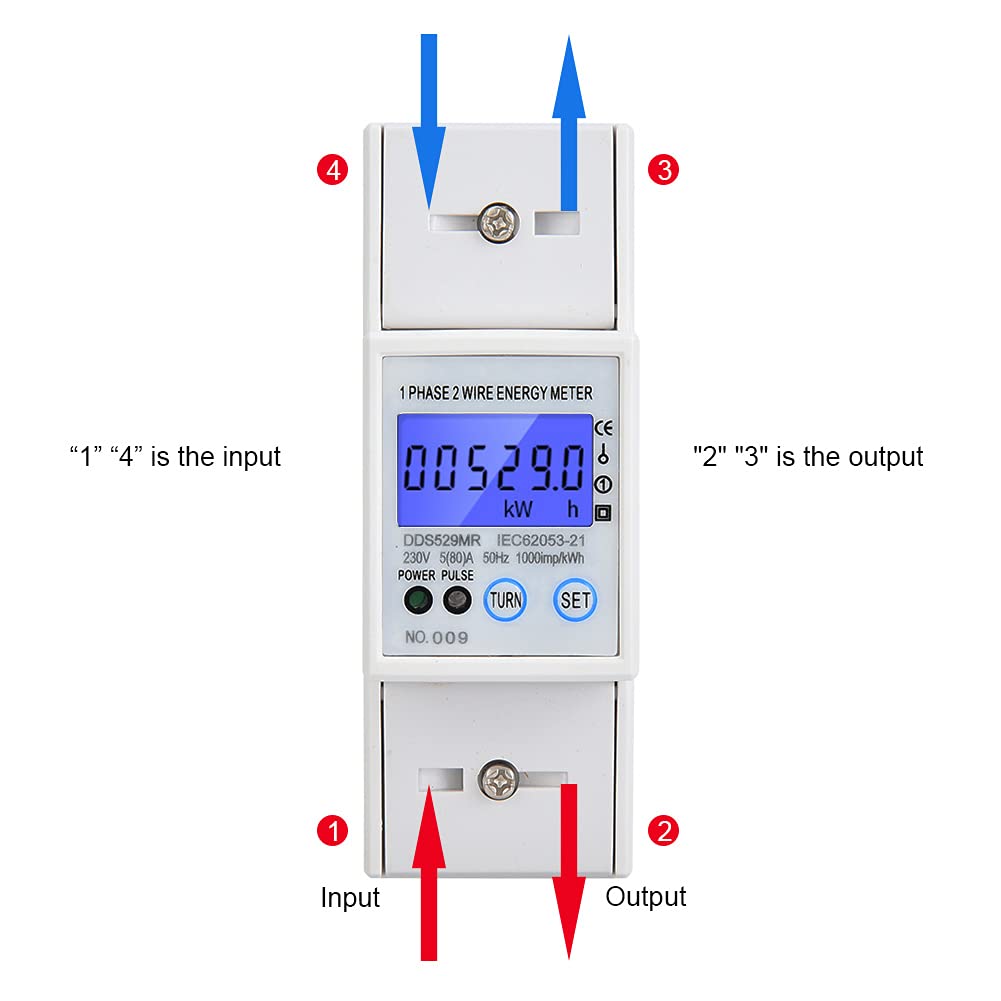
Figure 4: Wiring diagram for the DDS529MR meter. Terminals '1' and '4' are for input, while '2' and '3' are for output. Connect the live and neutral wires according to local electrical codes.
- Connect the incoming live wire to terminal 4 (Input).
- Connect the incoming neutral wire to terminal 1 (Input).
- Connect the outgoing live wire to terminal 3 (Output).
- Connect the outgoing neutral wire to terminal 2 (Output).
- Ensure all connections are tight and secure.
6. Operating Instructions
Once installed and powered on, the DDS529MR meter will automatically begin measuring and displaying electrical parameters.
6.1 Display Modes
The LCD display automatically cycles through the following parameters:
- kWh: Total active energy consumption.
- V: Real-time voltage.
- A: Real-time current.
- W: Real-time active power.
- PF: Power Factor.
- Hz: Frequency.
6.2 Button Functions
The meter features two buttons, typically labeled "TURN" and "SET", for interaction:
- TURN Button: Used to manually cycle through the display parameters, overriding the automatic cycle temporarily.
- SET Button: Used for entering settings menus or confirming selections. Refer to specific model documentation for advanced settings if applicable (e.g., RS485 address, baud rate).
7. Specifications
| Parameter | Value |
|---|---|
| Model | DDS529MR |
| Precision Level | 1 |
| Display Type | LCD Digital Display |
| Measurement Energy Range | 0.0 - 99999.0 kWh |
| Power Supply | AC |
| Rated Voltage | 230V AC |
| Phase Number | Single-phase |
| Pulse Frequency | 1000imp/kWh |
| Rated Current | 5A |
| Maximum Current | 80A |
| Dimensions (L x W x H) | Approx. 100 x 35 x 65 mm (3.9 x 1.4 x 2.6 inches) |
| Mounting | 35mm DIN Rail |
| Manufacturer | YWBL-WH |
| Country of Origin | China |
8. Maintenance
The DDS529MR energy meter requires minimal maintenance to ensure long-term reliable operation.
- Keep the meter clean and free from dust. Use a soft, dry cloth for cleaning.
- Do not use abrasive cleaners or solvents, as these can damage the display or casing.
- Regularly inspect wiring connections for tightness and signs of wear or corrosion.
- Ensure the operating environment remains within the specified temperature and humidity ranges.
9. Troubleshooting
If you encounter issues with your DDS529MR energy meter, refer to the following common troubleshooting steps:
- No Display: Check if the power supply is connected correctly and active. Ensure the meter is securely mounted and wired.
- Incorrect Readings: Verify that the wiring connections match the diagram (Figure 4). Ensure the load is within the meter's specified current and voltage ranges.
- Meter Not Responding to Buttons: Power cycle the device by temporarily disconnecting and reconnecting the power supply. If the issue persists, contact support.
- Pulse Indicator Not Flashing: This indicates no energy consumption. Check the connected load and ensure it is drawing power.
For issues not resolved by these steps, please contact customer support.
10. Warranty and Support
This product is covered by a standard manufacturer's warranty. Please refer to your purchase documentation for specific warranty terms and conditions. For technical support, service, or warranty claims, please contact your retailer or the manufacturer directly.
Please have your product model (DDS529MR) and purchase information ready when contacting support.