
idhhco Display Cabinet
idhhco 5 Tier Curio Display Cabinet Instruction Manual
Model: Display Cabinet
Introduction
Thank you for choosing the idhhco 5 Tier Curio Display Cabinet. This manual provides detailed instructions for the safe and efficient assembly, operation, and maintenance of your new display cabinet. Please read all instructions carefully before beginning assembly and retain this manual for future reference.

Image: Fully assembled idhhco 5 Tier Curio Display Cabinet showcasing various collectibles.
Safety Information
WARNING:
- This product is not suitable for children under 3 years old due to small parts, which can pose a choking hazard.
- To prevent tipping, it is highly recommended to anchor the cabinet to a wall, especially in households with children or pets. Anchoring hardware is typically included or can be purchased separately.
- Do not overload shelves. Ensure weight is distributed evenly. The total weight capacity is approximately 37.48 lbs (17 kg).
- Keep all assembly hardware out of reach of children.
- Assemble on a soft, clean surface to prevent scratching the product.
Package Contents
Before assembly, verify that all parts and hardware are present. If any items are missing or damaged, please contact customer support.
- Bamboo frame components (labeled)
- Acrylic cabinet door panels (with protective film)
- Shelves
- Metal handles
- Assembly hardware (screws, hinges, etc.)
- Assembly tools (e.g., Allen wrench)
- Illustrated instruction manual

Image: Detail of the bamboo material, a primary component of the cabinet frame.
Setup and Assembly
Assembly is designed to be straightforward. It is recommended to have a second person assist with certain steps for ease and safety.
- Unpack and Identify Parts: Carefully unpack all components. Lay them out on a clean, soft surface (e.g., a blanket or carpet) to prevent scratches. Identify each part by its label and cross-reference with the included illustrated instructions.
- Assemble Frame: Follow the step-by-step diagrams in the instruction manual to connect the bamboo frame components. Ensure all screws are tightened securely but do not overtighten.
- Install Shelves: Insert the shelves into the designated slots within the frame.
- Attach Acrylic Panels: Before attaching the acrylic door panels, carefully peel off the protective film from both sides of each panel. Some film may be tucked into seams; gently remove it to ensure clarity. Attach the panels and hinges according to the instructions.
- Install Handles: Secure the metal handles to the acrylic doors.
- Position and Anchor: Once fully assembled, carefully move the cabinet to its desired location. For stability and safety, use the provided anti-tip hardware to anchor the cabinet to a wall.
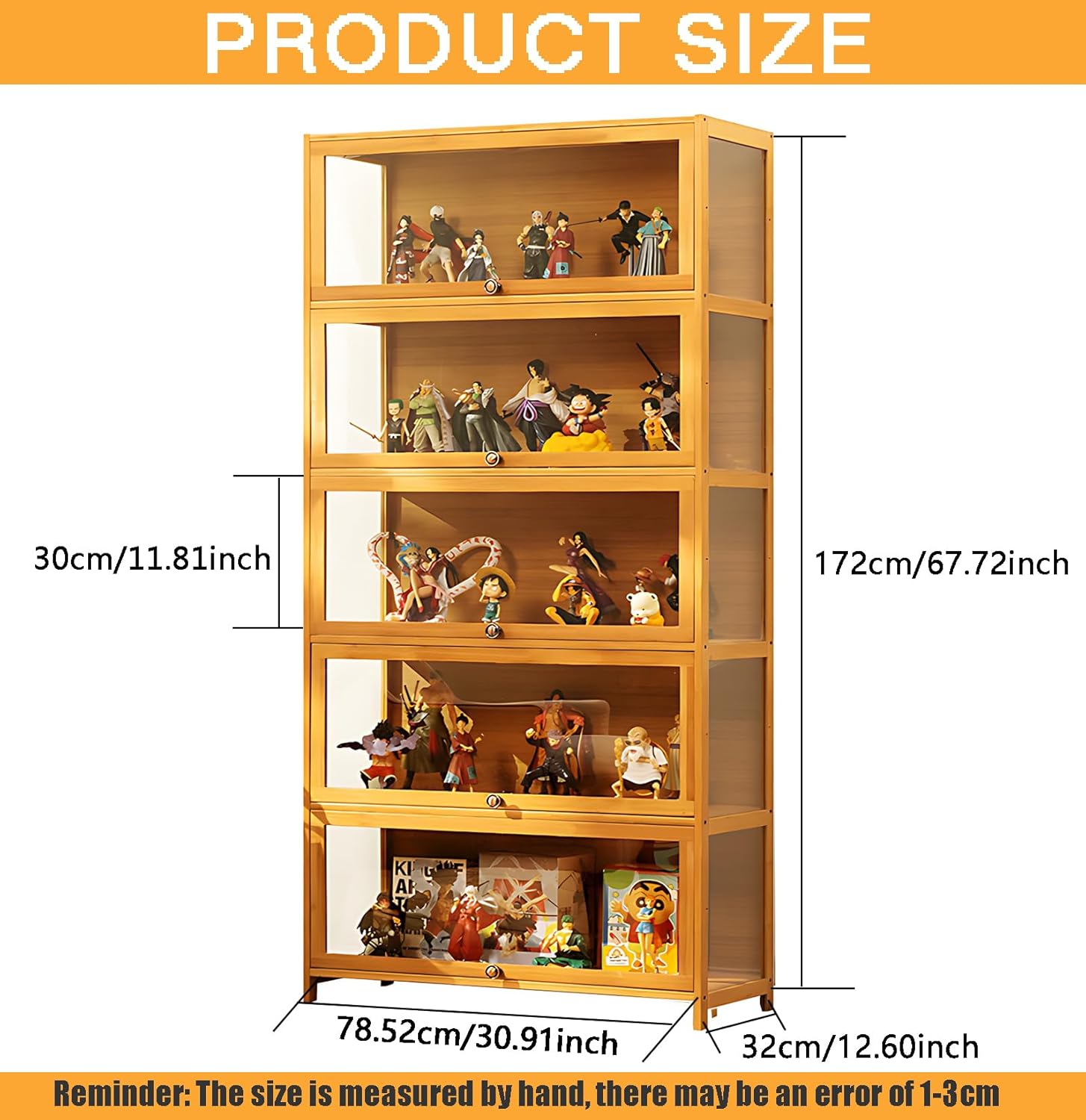
Image: Demonstrates the flip-up door mechanism of the display cabinet.

Image: Detail of the hinge mechanism for the cabinet doors.
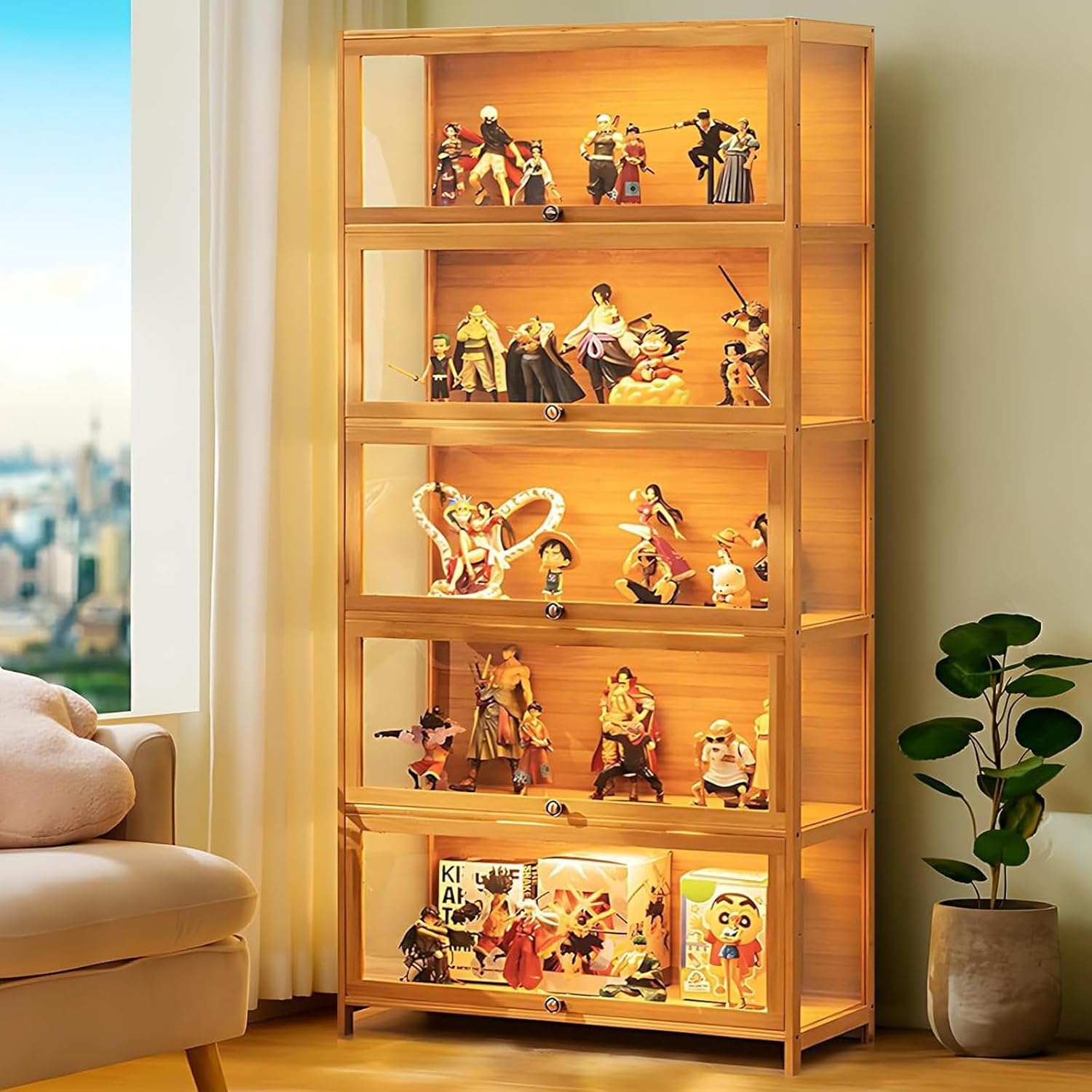
Image: Rear view of the assembled cabinet, illustrating its structural design.
Operating Instructions
The idhhco 5 Tier Curio Display Cabinet is designed for displaying collectibles, books, toys, and other decorative items.
- Opening Doors: Gently pull the metal handle on each acrylic door to open. The "flip door" design allows the door to open upwards and hover, providing easy access to the contents.
- Placing Items: Arrange your items carefully on each of the five tiers. Ensure that items are stable and do not exceed the depth or height of the shelf.
- Closing Doors: Gently push the door downwards until it securely closes. The fully sealed design helps protect contents from dust.

Image: Product details highlighting the flip-up door, rounded handle, dustproof design, and load-bearing strength.
Care and Maintenance
Proper care will ensure the longevity and appearance of your display cabinet.
- Cleaning the Frame: Wipe the bamboo frame with a soft, damp cloth. Avoid abrasive cleaners or harsh chemicals, which can damage the finish. Dry immediately with a clean cloth.
- Cleaning Acrylic Doors: Use a soft, lint-free cloth and a mild, non-abrasive cleaner specifically designed for acrylic or plastic. Avoid paper towels or rough cloths, as they can cause micro-scratches. Do not use ammonia-based cleaners.
- Dusting: Regularly dust the interior and exterior surfaces with a soft, dry cloth.
- Avoid Direct Sunlight: Prolonged exposure to direct sunlight can cause fading or warping of the materials.
- Check Hardware: Periodically check all screws and fittings to ensure they remain tight. Retighten if necessary.

Image: Illustration of cleaning a surface with a soft cloth.
Troubleshooting
If you encounter any issues during or after assembly, please refer to the following common solutions:
- Cabinet is Wobbly:
- Ensure all screws are fully tightened.
- Verify the cabinet is on a level surface.
- Confirm the cabinet is anchored to the wall as recommended in the safety section.
- Pieces Do Not Fit Together:
- Double-check the part labels against the instruction manual to ensure correct orientation and placement.
- Loosen adjacent screws slightly, adjust the pieces, and then retighten.
- Ensure no debris is obstructing the connections.
- Protective Film Difficult to Remove:
- Use a fingernail or a soft plastic tool to gently lift an edge of the film.
- If the film is stuck in seams, carefully use a thin, non-sharp object (like a plastic card) to pry it out.
- Doors Do Not Close Evenly:
- Check hinge alignment and adjust screws if necessary.
- Ensure the cabinet frame is square and level.
Specifications
| Feature | Detail |
|---|---|
| Brand | idhhco |
| Model Name | Curio Display Cabinet |
| Product Dimensions | 12.6"D x 30.91"W x 67.72"H (32cm D x 78.52cm W x 172cm H) |
| Item Weight | 37.5 Pounds (17 kg) |
| Weight Limit (Total) | 37.48 lbs (17 kg) |
| Number of Shelves | 5 |
| Frame Material | Bamboo |
| Door Material | Acrylic Glass |
| Door Style | Flip Door |
| Mounting Type | Floor Mount (Freestanding) |
| Assembly Required | Yes |

Image: Product dimensions diagram.
Warranty and Customer Support
idhhco is committed to providing quality products and excellent customer service.
- After-Sales Service: For any questions or concerns regarding your idhhco display cabinet, please contact our professional after-sales customer service team.
- Contact: Our experienced customer service team will respond within 24 hours. Please refer to your purchase documentation for specific contact details or visit the official idhhco store page.
- Warranty: Specific warranty details may vary. Please retain your proof of purchase for any warranty claims.
Note: This product does not include LED light strips.
Ask a question about this manual
Ask about setup, troubleshooting, compatibility, parts, safety, or missing instructions. Manuals+ will review the question and use this page’s manual context to help answer it.