
TEPU 15 AMP 48Volt Golf Cart Charger
TEPU 48V 15A Golf Cart Battery Charger User Manual
Model: 15 AMP 48Volt Golf Cart Charger
1. Important Safety Instructions
Please read and understand all safety instructions before using this charger. Failure to follow these instructions may result in electric shock, fire, or serious injury.
- Electrical Safety: Always connect the charger to a properly grounded outlet. Do not operate the charger if the power cord or plug is damaged. Avoid using extension cords unless absolutely necessary and ensure they are rated for the charger's power requirements.
- Battery Safety: Batteries can produce explosive gases. Ensure adequate ventilation when charging. Wear eye protection and protective clothing. Avoid sparks or flames near batteries. Do not overcharge batteries; monitor the charging process, especially if the golf cart's On-Board Computer (OBC) is bypassed.
- Environmental Conditions: This charger has an IP67 weather-resistant rating, making it resistant to water and dust. However, avoid submerging the charger in water for extended periods or operating it in extreme temperatures outside its specified range.
- Children and Pets: Keep the charger and golf cart out of reach of children and pets during operation and storage.
- Liquid and Fire: Keep away from spillage liquid and sources of fire.
2. Product Overview
The TEPU 48V 15A Golf Cart Battery Charger is designed to efficiently charge 48-volt golf cart batteries, particularly for Club Car models. It features a robust design with a 3-pin round plug, a 16-foot cable for extended reach, and a 900W output for quick charging.
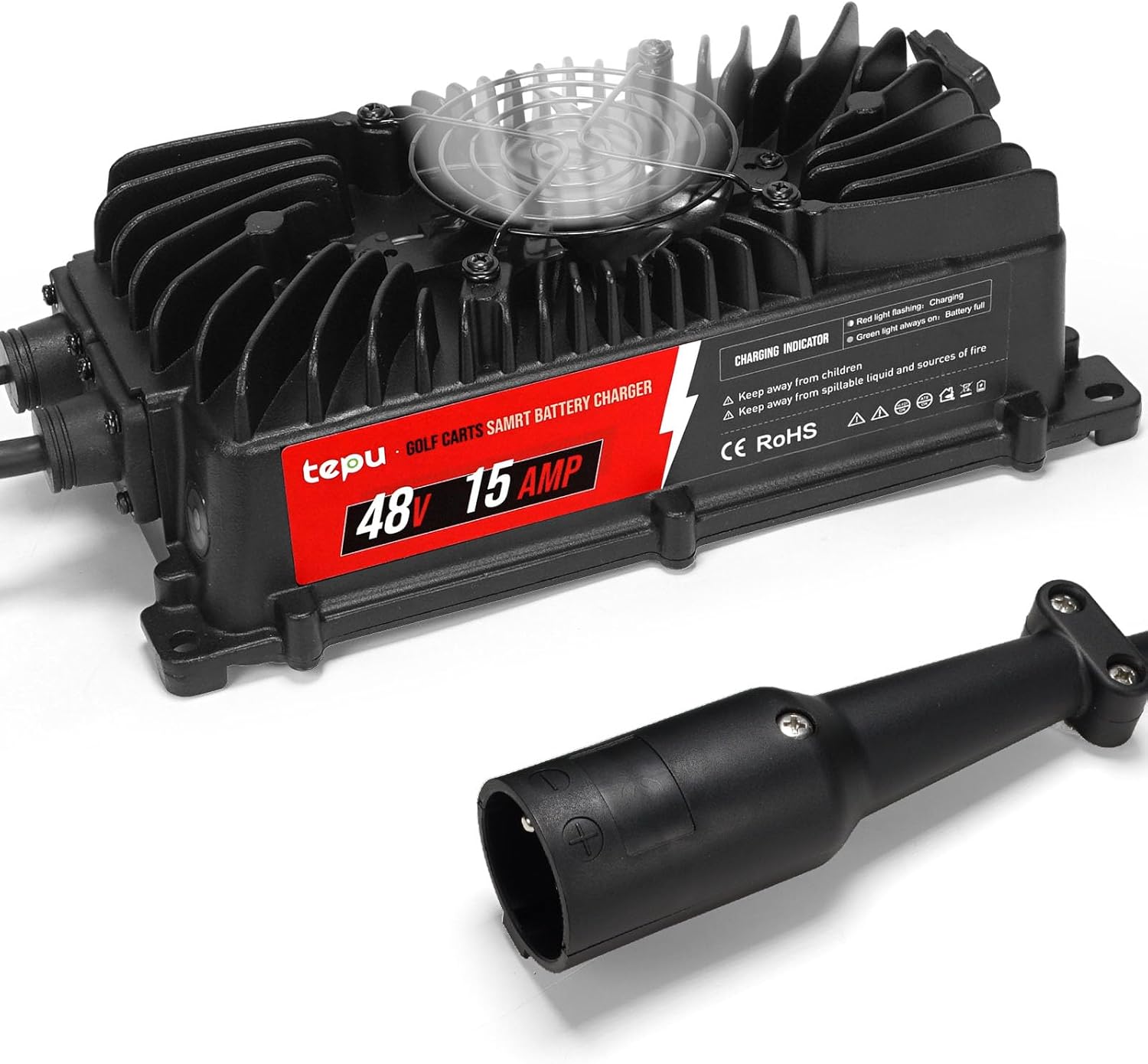
Image 2.1: The TEPU 48V 15A Golf Cart Battery Charger, showcasing the main unit and the 3-pin round charging plug.
Key Features:
- High Power Output: 900W for faster charging.
- Quick Charge: 15 Amp output for efficient battery replenishment.
- Extended Cable: 16-foot cable for flexible charging locations.
- Durable Design: IP67 weather-resistant rating for protection against water and dust.
- Portable: Lightweight design with a soft rubber handle for easy transport.

Image 2.2: Detailed view of the charger's components, including the temperature sensor, 3-pin plug, portable handle, cooling fan, indicator light, and specifications label.
Components:
- Charger Unit
- AC Input Power Cable
- DC Output Cable with 3-Pin Round Plug
- Charging Indicator Light
- Cooling Fan
- Temperature Sensor (integrated)
3. Setup
Pre-Installation Checks:
- Ensure your golf cart uses a 48-volt battery system and is compatible with a 3-pin round plug.
- Inspect the charger, cables, and plug for any signs of damage. Do not use if damaged.
- Verify that the charging area is well-ventilated and free from flammable materials.
Connecting the Charger:
- First, connect the 3-pin round plug of the charger's DC output cable securely into the golf cart's charging receptacle.
- Next, plug the AC input power cable into a standard 120-volt grounded electrical outlet.
- The charging indicator light on the charger will illuminate, typically red, to indicate that charging has begun.

Image 3.1: The TEPU charger connected to both a power outlet and a golf cart, demonstrating proper setup for charging.
Important Note for Club Car Models (OBC Bypass):
Some Club Car golf carts (specifically 1995-2010 48 Volt Club Car DS and 2004-201 48 Volt Club Car Precedent) are equipped with an On-Board Computer (OBC). For this aftermarket charger to function correctly with these models, the OBC function may need to be bypassed.
To bypass the OBC, you will need to connect the black wire from the negative terminal of the battery where the black wire connects to the back of the charging socket. Our products include specific instructions and necessary wiring for this process. The wiring process is not complex and can be completed in a few minutes. Detailed wiring videos may also be available online.

Image 3.2: Visual guide illustrating the OBC bypass procedure for compatible Club Car models, showing the charger and necessary wiring components.
WARNING: If the OBC is bypassed, this charger may not automatically shut off when the batteries are fully charged. It will continue to supply voltage, which can lead to overcharging and damage to your batteries. It is crucial to monitor the charging process and disconnect the charger manually once the batteries reach full charge (typically around 58-59V for a 48V system). Failure to do so can cause batteries to boil over and be permanently damaged.
4. Operating Instructions
Charging Process:
- Ensure the charger is properly connected to both the golf cart and a power outlet as described in the Setup section.
- The charging indicator light will show a red light, indicating that the batteries are actively charging.
- Charging typically takes 4-6 hours, depending on the battery capacity and discharge level.
- Once the batteries are fully charged, the indicator light will turn green.
- After the green light appears, or if you have bypassed the OBC, manually disconnect the charger from the AC power outlet first, then from the golf cart.
Indicator Light Status:
- Red Light Flashing: Charging in progress.
- Green Light Always On: Battery fully charged.
5. Maintenance
Proper maintenance ensures the longevity and optimal performance of your charger and golf cart batteries.
- Cleaning: Periodically wipe the charger's exterior with a dry, soft cloth. Do not use harsh chemicals or abrasive cleaners. Ensure the cooling fan vents are clear of debris.
- Cable Inspection: Regularly check the AC and DC cables, as well as the 3-pin plug, for any cuts, fraying, or damage. Replace damaged cables immediately.
- Storage: Store the charger in a cool, dry place when not in use. Avoid extreme temperatures and direct sunlight.
- Battery Water Levels (for lead-acid batteries): For lead-acid batteries, regularly check and maintain the water levels in each cell according to the battery manufacturer's recommendations. Only add distilled water.
6. Troubleshooting
If you encounter issues with your TEPU golf cart charger, refer to the following common problems and solutions:
| Problem | Possible Cause | Solution |
|---|---|---|
| Charger not turning on / No indicator light | No power from outlet; Loose connections; Damaged cable/plug; Internal fault. | Check power outlet with another device. Ensure all connections are secure. Inspect cables for damage. If problem persists, contact support. |
| Charger light is red but batteries are not charging | Poor connection to golf cart; Battery issue; OBC not bypassed (if applicable). | Ensure the 3-pin plug is fully inserted. Check battery terminals for corrosion. Verify OBC bypass if your cart requires it. |
| Charger gets hot, fan is not running | Fan obstruction; Fan malfunction. | Ensure the fan vents are clear of debris. If the fan is visibly damaged or not spinning, discontinue use and contact support. |
| Batteries are overcharging / boiling | OBC bypassed and charger not manually disconnected; Charger malfunction. | Immediately disconnect the charger. If OBC is bypassed, you must manually monitor and disconnect. If not bypassed, charger may be faulty; contact support. |
| Charging takes too long | Deeply discharged batteries; Battery degradation; Low input voltage. | Allow more time for charging. Consider having batteries tested for capacity. Ensure stable power supply. |
7. Specifications
| Feature | Specification |
|---|---|
| Model Number | 15 AMP 48Volt Golf Cart Charger |
| Input Voltage | 120 Volts |
| Output Voltage | 48 Volts |
| Output Current | 15 Amps |
| Power Output | 900 Watts |
| Cable Length | 16 Feet |
| Product Dimensions | 11.61 x 7.5 x 5.24 inches |
| Item Weight | 7 pounds |
| IP Rating | IP67 (Waterproof and Dustproof) |
| Plug Type | 3-Pin Round Plug |
8. Warranty and Support
For warranty information or technical support, please contact TEPU customer service. Refer to your purchase documentation for specific warranty terms and contact details.
When contacting support, please have your product model number (15 AMP 48Volt Golf Cart Charger) and purchase date available.
Ask a question about this manual
Ask about setup, troubleshooting, compatibility, parts, safety, or missing instructions. Manuals+ will review the question and use this page’s manual context to help answer it.