
GODOX X3-N
Godox X3-N Wireless Flash Trigger User Manual
Model: X3-N
Brand: GODOX
1. Introduction
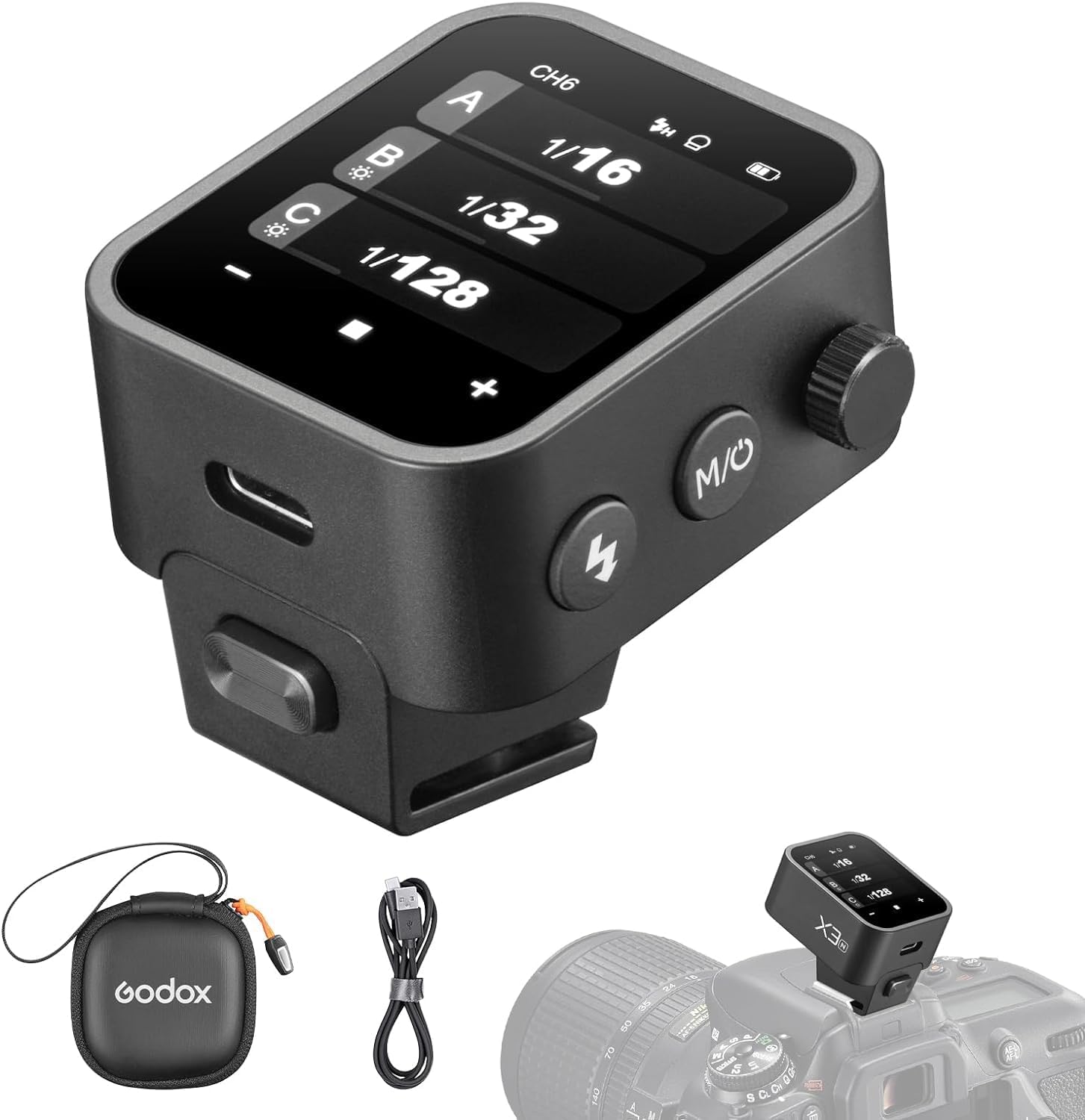
The Godox X3-N is a state-of-the-art touchscreen TTL wireless flash trigger designed for Nikon cameras. It offers advanced features such as 1/8000s High-Speed Sync (HSS), TTL autoflash, and TCM (TTL Convert Manual) function, providing photographers with precise control over their lighting setups. Its compact design, intuitive OLED touchscreen, and built-in rechargeable battery make it an essential tool for both studio and on-location shooting.
2. What's in the Box
- 1 x Flash Trigger (Godox X3-N)
- 1 x USB-C Charging Cable
- 1 x Storage Bag

3. Product Overview
The Godox X3-N features a compact and robust design, integrating an intuitive touchscreen interface with physical controls for versatile operation.
3.1. Key Features
- OLED Touchscreen: High-definition display with high contrast and fast refresh rate. Adjustable brightness for various lighting conditions. Includes a screen lock function to prevent accidental touches.
- Built-in Li-Ion Battery: Charges from 0% to 100% in 2 hours via USB-C port. Supports firmware updates via USB-C.
- Durable Hot-shoe: Easy and quick mounting onto your camera.
- 2.4GHz Godox Wireless X System: Operating distance up to 100 meters. Features spare channel scanning to avoid interference.
- Full TTL Functions: Supports 1/8000s High-Speed Sync, Manual Flash, Flash Exposure Compensation, TCM Function, Modeling Lamp Control, Zooming setting, and Screen brightness control.
- Nikon Compatibility: Compatible with Nikon Z6, Z6II, Z7II, D780, Zfc, D5, D4, D60, D70S, D90, D100, D200, D300S, D300, D500, D610, D700, D750, D800, D810, D3100, D3200, D3300, D5000, D5100, D5200, D5300, D7000, D710.


Video 3.1: Official product overview of the Godox X3 TTL Wireless Flash Trigger, highlighting its key features and compact design.
4. Setup
4.1. Mounting the Trigger
Slide the Godox X3-N onto your camera's hot-shoe until it clicks into place. Ensure it is securely fastened.

4.2. Powering On/Off
To power on the device, press and hold the power button located on the side. To power off, repeat the same action.
4.3. Initial Language Setting
Upon first use or after a reset, you may need to set the language. Swipe down from the top of the screen, select the gear icon (Settings) in the bottom right. Scroll down until you see the globe icon (Language) and select it. You will then have the option to switch to English or other available languages.
5. Operating Instructions
The Godox X3-N offers flexible control via its touchscreen and physical buttons.
5.1. Navigating the Touchscreen
The OLED touchscreen allows for intuitive control. Swipe and tap gestures are used to navigate menus and adjust settings. For fine adjustments or when wearing gloves, the side knob can be used.

5.2. Adjusting Flash Power and Groups
From the main display, you can see and adjust power levels for multiple flash groups (A, B, C, etc.). Tap on a group to enter its individual settings, or use the +/- buttons to adjust all groups simultaneously. The side knob can also be rotated to change values.

5.3. TTL and Manual Mode (TCM Function)
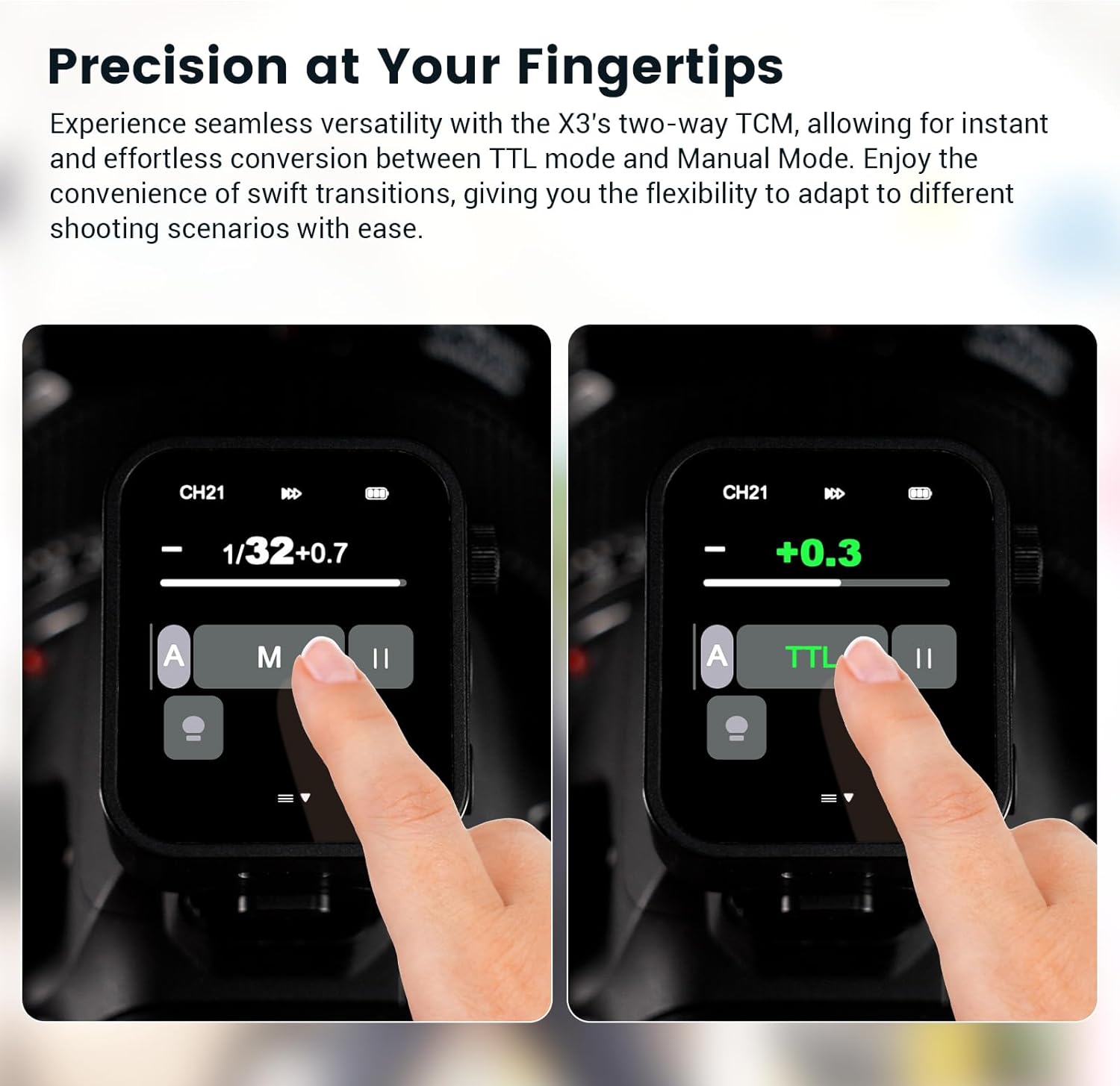
The X3-N supports both TTL (Through-The-Lens) autoflash and Manual flash modes. The TCM (TTL Convert Manual) function allows for quick conversion of a TTL exposure value into a manual power setting, providing flexibility in various shooting scenarios.
5.4. High-Speed Sync (HSS)
The trigger supports High-Speed Sync up to 1/8000s, allowing you to use flash at faster shutter speeds to freeze action or overpower ambient light.

5.5. Screen Brightness and Lock
Adjust the screen brightness by sliding left or right on the screen. To prevent unintentional touches, activate the screen lock function.
Video 5.6: Detailed operation video for the Godox X3 TTL Wireless Flash Trigger, demonstrating various settings and functions.
6. Maintenance
- Keep the device dry. Do not handle with wet hands or immerse in water.
- Clean the screen and body with a soft, dry cloth. Avoid harsh chemicals.
- Store in a cool, dry place away from direct sunlight and extreme temperatures.
- Regularly check for firmware updates via the USB-C port to ensure optimal performance.
7. Troubleshooting
| Problem | Possible Cause | Solution |
|---|---|---|
| Device does not power on. | Low battery. | Charge the device using the provided USB-C cable. |
| Flash not triggering. | Incorrect channel/ID settings. | Ensure the trigger and flash units are set to the same channel and ID. Use the spare channel scanning function. |
| Screen unresponsive. | Screen lock activated. | Tap and hold the screen for 2 seconds to unlock. |
| Incompatible with camera. | Camera model not supported. | Verify your camera model is listed in the compatibility section. |
8. Specifications
- Product Dimensions: 1.61 x 1.54 x 1.85 inches
- Item Weight: 1.69 ounces
- Model Number: X3-N
- Batteries: 1 Lithium Ion battery (included)
- Compatible Mountings: Nikon
- Flash Sync Speed: 1/8000 Sec
- Manufacturer: Godox
- Country of Origin: China
9. Warranty and Support
For warranty information and technical support, please refer to the official Godox website or contact your local distributor. Keep your proof of purchase for any warranty claims.
Related Documents - X3-N
 |
Godox X3 N TTL Wireless Flash Trigger Instruction Manual Comprehensive instruction manual for the Godox X3 N TTL Wireless Flash Trigger, covering setup, operation, settings, troubleshooting, and technical specifications for photographers. Includes safety guidelines, part identification, and compatibility information. |
 |
Godox X3 TTL Wireless Flash Trigger Instruction Manual Discover the capabilities of the Godox X3 TTL Wireless Flash Trigger. This manual details its features, setup, and operation for various camera brands, including TTL, HSS, and advanced wireless control. |
 |
Godox X3 TTL Wireless Flash Trigger Instruction Manual Comprehensive user manual for the Godox X3 TTL Wireless Flash Trigger, detailing its features, operation, setup, compatibility, and safety guidelines for professional photography. |
 |
Godox XProII-N TTL Wireless Flash Trigger User Manual Comprehensive user manual for the Godox XProII-N TTL Wireless Flash Trigger for Nikon cameras, detailing its features, operation, settings, and maintenance. |
 |
Godox X3 TTL Wireless Flash Trigger Instruction Manual Comprehensive instruction manual for the Godox X3 TTL Wireless Flash Trigger, detailing setup, operation, features, and troubleshooting for photographers. |
 |
Godox X3 TTL Drahtloser Blitzauslöser Benutzerhandbuch Umfassende Anleitung für den Godox X3 TTL Drahtlosen Blitzauslöser, inklusive Funktionen, Bedienung, Sicherheit und Kompatibilität für professionelle Fotografie. |
Ask a question about this manual
Ask about setup, troubleshooting, compatibility, parts, safety, or missing instructions. Manuals+ will review the question and use this page’s manual context to help answer it.