
1. Introduction
This manual provides essential information for the safe and effective use of your Dexpt AC Adapter, model TP04-270080U. This adapter is designed to power and charge specific Prettycare Cordless Stick Vacuum Cleaner models. Please read this manual thoroughly before use and retain it for future reference.

Figure 1: Dexpt AC Adapter. This image displays the complete charger unit, including the power brick, connecting cable, and the round tip connector.
2. Compatibility
The Dexpt AC Adapter is specifically designed for the following Prettycare Cordless Stick Vacuum Cleaner models:
- Prettycare W200
- Prettycare W400
- Prettycare W300
- Prettycare W100
- Prettycare P4
- Prettycare P3
- Prettycare P1
Important: This adapter is only compatible with devices requiring an amperage equal to or less than 1A. Ensure your device's charging port matches the round tip connector type of this adapter.
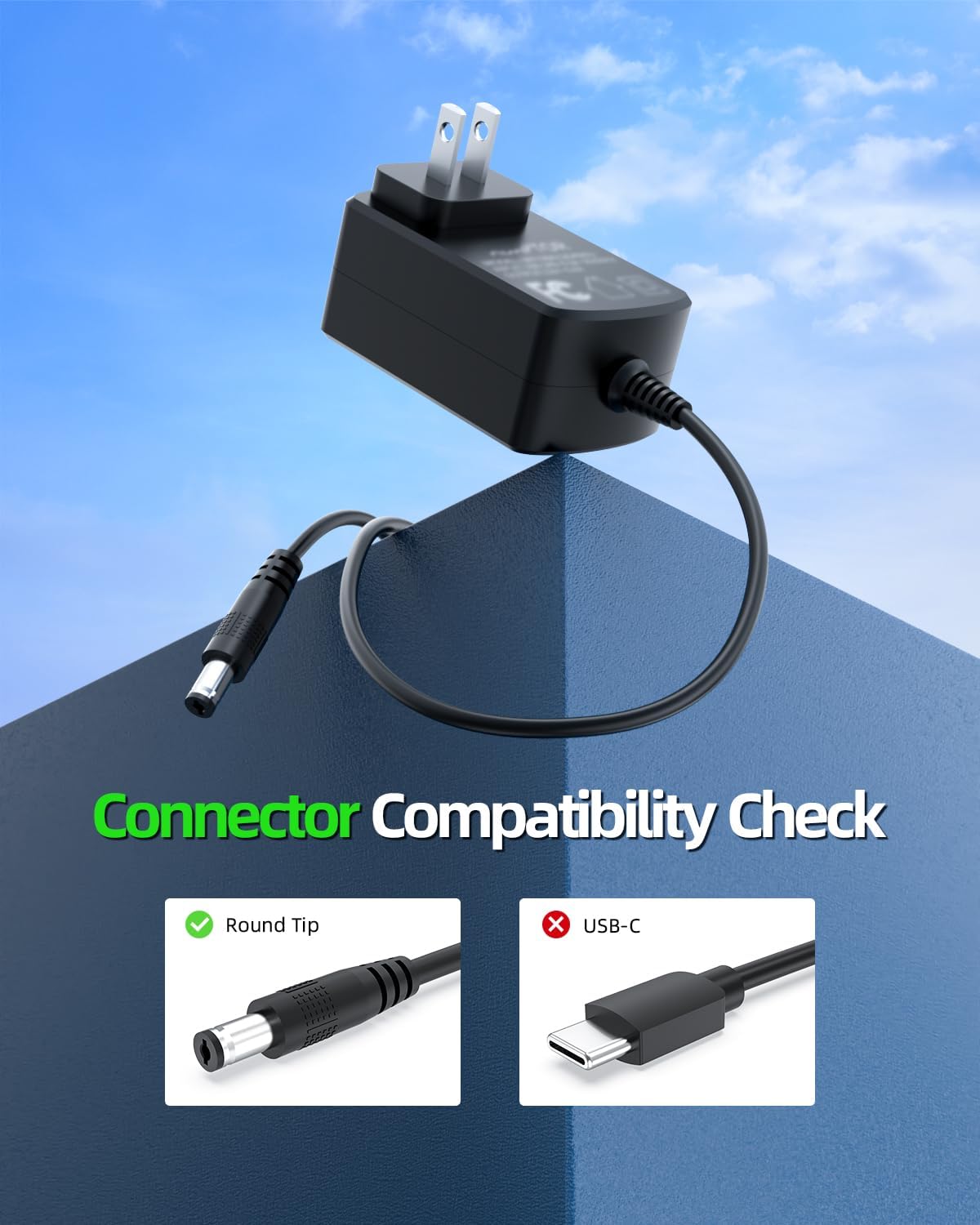
Figure 2: Connector Compatibility. This image shows the round tip connector of the Dexpt adapter, emphasizing its specific design for compatible devices.

Figure 3: Compatibility Check Steps. This diagram guides users through verifying their device's charging port and power requirements against the adapter's specifications.
3. Setup and Connection
- Verify Compatibility: Before connecting, ensure your Prettycare vacuum cleaner model is listed as compatible and its power requirements (voltage and amperage) match the adapter's output.
- Connect to Vacuum: Insert the round tip connector of the AC adapter firmly into the charging port of your Prettycare cordless vacuum cleaner.
- Connect to Power Outlet: Plug the AC adapter into a standard wall power outlet (100-240V).
- Charging Indication: Refer to your vacuum cleaner's instruction manual for specific charging indicators (e.g., LED lights) to confirm that charging has begun.
4. Operation (Charging)
Once connected, the adapter will begin supplying power to your vacuum cleaner. The charging process is automatic. Disconnect the adapter from the vacuum cleaner and the wall outlet once charging is complete or when the vacuum cleaner's battery indicator shows a full charge.

Figure 4: Charging in Progress. This image shows a Prettycare vacuum cleaner connected to the Dexpt AC adapter for charging.
5. Safety Information
This adapter incorporates multiple safety features to protect your device and ensure safe operation:
- Short Circuit Protection: Prevents damage from electrical shorts.
- Overcurrent Protection: Safeguards against excessive current flow.
- Overvoltage Protection: Protects against voltage surges.
- Overheating Protection: Monitors and prevents the adapter from reaching unsafe temperatures.
General Safety Precautions:
- Do not use the adapter if it is damaged or has exposed wires.
- Do not expose the adapter to water or extreme temperatures.
- Use only with compatible devices as specified in this manual.
- Keep out of reach of children.
- Unplug the adapter from the wall outlet when not in use for extended periods.

Figure 5: Internal Safety Features. This image highlights the protective mechanisms built into the adapter's design.
6. Specifications
| Feature | Specification |
|---|---|
| Model Number | TP04-270080U |
| Input Voltage | 100-240V AC |
| Output Voltage | 27V DC |
| Output Amperage | 0.8A |
| Connector Type | Round Tip Connector |
| Package Dimensions | 4.57 x 2.68 x 1.81 inches |
| Item Weight | 4.2 ounces |
| Included Components | 1 x Power Adapter |

Figure 6: Compact Design. This image illustrates the small and portable form factor of the Dexpt AC adapter.
7. Care and Maintenance
- Keep the adapter clean and free from dust. Use a dry, soft cloth for cleaning.
- Avoid bending or crimping the power cord excessively, as this can damage internal wires.
- Store the adapter in a cool, dry place when not in use.
- Do not attempt to open or repair the adapter yourself. Refer to qualified service personnel if maintenance is required.
8. Troubleshooting
If you encounter issues with your Dexpt AC Adapter, consider the following:
- No Power/Charging:
- Ensure the adapter is securely plugged into both the vacuum cleaner and a working wall outlet.
- Verify that the wall outlet is supplying power by testing it with another device.
- Confirm that your vacuum cleaner model is listed as compatible and its power requirements match the adapter.
- Check the adapter cable for any visible damage. If damaged, discontinue use.
- Slow Charging:
- Ensure the adapter's output specifications (27V, 0.8A) meet your vacuum cleaner's requirements. Using an adapter with lower specifications may result in slower charging.
- Avoid charging in extremely hot environments, which can affect charging efficiency.
If problems persist after following these steps, please contact customer support.
9. Warranty and Support
The manufacturer provides the following guarantees for this product:
- 30-Day Replacement Guarantee: A no-questions-asked replacement is offered within 30 days of purchase.
- 360-Day Quality Guarantee: A quality guarantee is provided by the manufacturer for 360 days from the date of purchase.
For technical support or warranty claims, please refer to the contact information provided with your purchase or visit the Dexpt official support channels.

Figure 7: Customer Support Information. This image outlines the available support and warranty policies.