
1. Introduction
Thank you for choosing the JAMELO P10 Wireless Microphone System. This system is designed to provide clear and stable audio transmission for various applications, including singing, home karaoke, weddings, and public speaking. Please read this manual carefully before use to ensure proper operation and to maximize the product's lifespan.
2. Package Contents
The JAMELO P10 Wireless Microphone System package includes the following items:
- 2 x Wireless Microphones
- 1 x USB Rechargeable Receiver
- 1 x USB-A to 3 USB-C Charging Cable
- 1 x 6.35mm Female to 3.5mm Male Stereo Adapter
- 2 x Windscreen Foams
- 2 x Anti-rolling Rings (rubber)
- AA Batteries (included for microphones)
- User Manual (this document)

Image: Components of the JAMELO P10 Wireless Microphone System, showing two microphones, the USB rechargeable receiver, charging cable, and a 6.35mm adapter. The microphone requires 2 AA batteries (included).
3. Product Overview
3.1 Key Features
- Wireless Connectivity: 2.4GHz digital technology for stable transmission up to 100 feet (approximately 30 meters).
- Cardioid Pickup Pattern: Designed to capture sound from the front, reducing background noise.
- Multi-Audio Effects: Features adjustable Echo, Equalizer, Volume (VOL), and Background Music functions.
- Six Reverb Modes: Offers various reverb settings (E0, E1, E2, E3, E4, E5) for different audio environments.
- Durable Construction: Metal body with anti-drop net cover and shockproof shell.
- Rechargeable Receiver: USB-C rechargeable receiver provides 6-8 hours of working time after 2-3 hours of charging.
- Wide Compatibility: Connects to devices with 6.35mm (1/4") or 3.5mm (1/8") microphone inputs, such as powered speakers, amplifiers, karaoke machines, and PA systems.
3.2 Components
Familiarize yourself with the main components of the system:
- Microphone: Features power button, volume controls, echo, equalizer, and reverb mode selection. Requires 2 AA batteries.
- Receiver: Compact unit with a 6.35mm jack, 3.5mm adapter, and USB-C charging port. Connects wirelessly to microphones and plugs into an audio input device.

Image: Detailed view of the JAMELO P10 microphone's internal structure, highlighting the anti-drop net cover, shockproof shell, high-fidelity sound coil, and cardioid pickup pattern for professional audio quality.
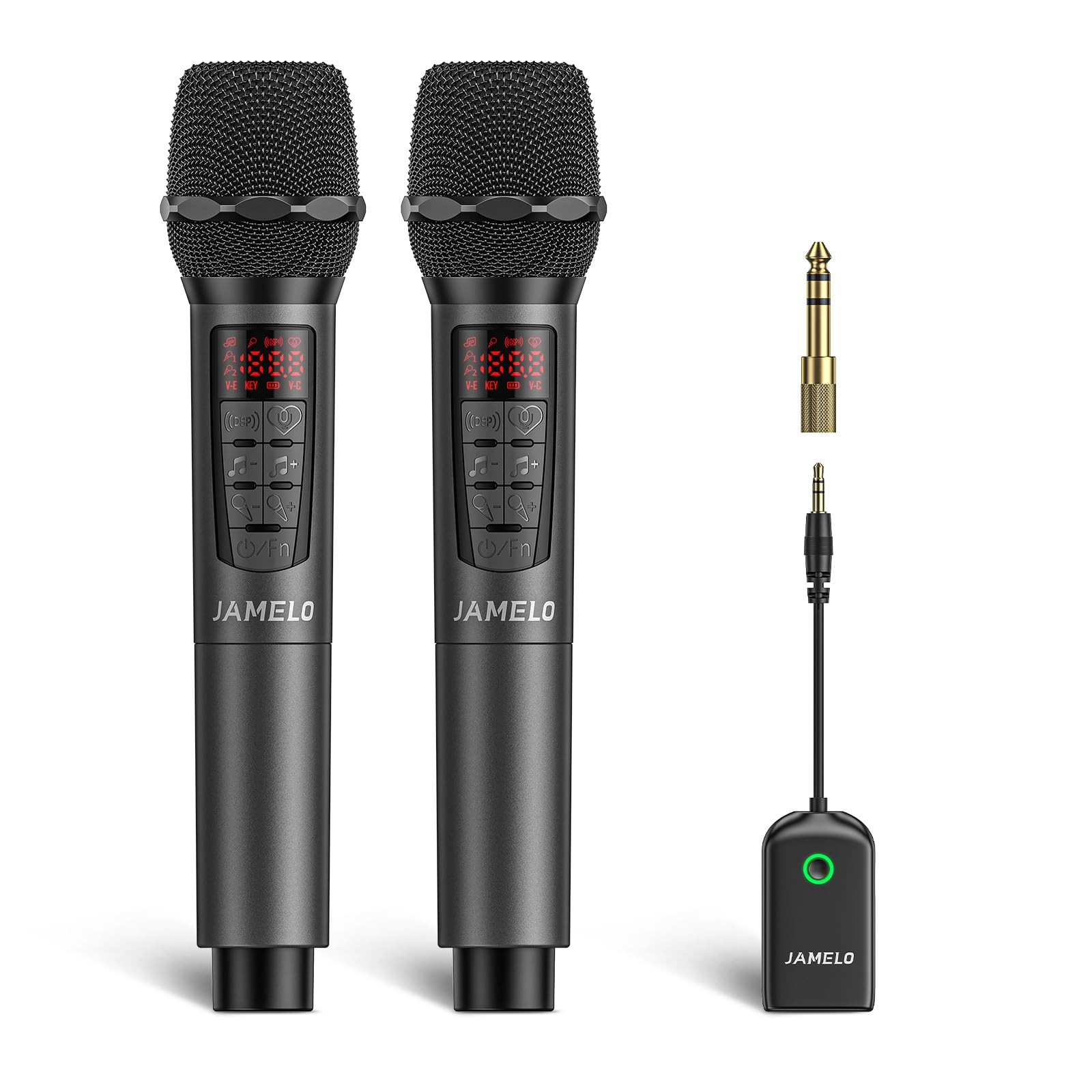
Image: A user singing into the JAMELO P10 microphone, demonstrating the multi-audio effects including Echo, Equalizer, Volume, and Background Music features.
4. Setup Instructions
Follow these steps to set up your JAMELO P10 Wireless Microphone System:
- Insert Batteries into Microphones: Open the battery compartment of each microphone and insert 2 AA batteries (included), ensuring correct polarity.
- Charge the Receiver: Connect the USB-C charging cable to the receiver and a USB power source. The red light around the power button will illuminate during charging and turn off when fully charged. A flashing light indicates low power.
- Turn on the Microphone: Press and hold the power button on the microphone until it turns on.
- Turn on the Receiver: Press and hold the power button on the receiver until it turns on. The indicator light will show its status.
- Connect Receiver to Audio Device:
- For 6.35mm (1/4") input: Plug the receiver directly into the MIC input of your powered speaker, amplifier, karaoke machine, or PA system.
- For 3.5mm (1/8") input: Attach the 6.35mm to 3.5mm adapter to the receiver, then plug it into the AUX IN/LINE IN or MIC input of your audio device.
- Automatic Pairing: The microphones and receiver should automatically pair. If not, refer to the troubleshooting section.

Image: "Play & Plug" setup guide, illustrating the three main steps: 1. Turn on the microphone, 2. Turn on the receiver, 3. Plug the receiver into the speaker.

Image: Compatibility diagram for the JAMELO P10 system, showing that it is compatible with powered speakers, amplifiers, karaoke machines, and PA systems via 6.35mm or 3.5mm inputs. It is not designed for direct connection to phones, PCs, or Bluetooth speakers.
5. Operating Instructions
5.1 Microphone Controls
- Power Button: Press and hold to turn on/off. Short press to cycle through functions.
- Volume Control: Use the '+' and '-' buttons to adjust the microphone's output volume.
- Echo Adjustment: Adjust the echo effect level.
- Equalizer (EQ): Select different equalizer presets to modify the sound characteristics.
- Reverb Modes: Cycle through six reverb modes (E0-E5) to add depth to your vocals.
- Background Music: Some models may feature a dedicated button for background music control.
5.2 Using the System
- Ensure both microphones and the receiver are powered on and paired.
- Adjust the volume on your connected audio device (speaker, amplifier) to a low level before speaking into the microphone.
- Speak or sing into the microphone, adjusting the microphone's volume and effects (echo, EQ, reverb) as desired.
- Gradually increase the volume on your audio device to a comfortable listening level.
- Maintain a suitable distance from the microphone to avoid feedback.

Image: The JAMELO P10 wireless microphone system in use, showing two microphones, the receiver plugged into a speaker, and a smartphone displaying the six available reverb modes (E0-E5).
6. Maintenance
- Cleaning: Wipe the microphones and receiver with a soft, dry cloth. Do not use liquid cleaners or solvents.
- Storage: Store the system in a cool, dry place away from direct sunlight and extreme temperatures.
- Battery Replacement: Replace AA batteries in the microphones when the low power indicator appears or performance degrades.
- Receiver Charging: Ensure the receiver is fully charged before each use for optimal performance.
- Avoid Moisture: Keep the devices away from water and high humidity to prevent damage.
7. Troubleshooting
| Problem | Possible Cause | Solution |
|---|---|---|
| No sound from microphone. |
|
|
| Sound is distorted or unclear. |
|
|
| Short wireless range. |
|
|
8. Specifications
| Model Number | P10 |
| Brand | JAMELO |
| Connectivity Technology | Auxiliary, 2.4 GHz Wireless |
| Connector Type | 6.35 mm Jack, 3.5 mm Jack |
| Special Features | Dynamic Microphone, Reverb Adjustment, Equalizer |
| Compatible Devices | Amplifier, Speaker, Karaoke Machine, PA System |
| Color | Grey |
| Components Included | Receiver, Microphones |
| Polar Pattern | Unidirectional (Cardioid) |
| Impedance | 600 Ohms |
| Microphone Features | Handheld |
| Power Source | Battery Powered (1 Lithium-ion for receiver, AA for microphones) |
| Frequency Response | 2.4 GHz |
| Internal Material | Metal |
| Recommended Uses | Singing, Home Karaoke, Wedding, Church |

Image: The JAMELO P10 wireless microphone system demonstrating its 2.4GHz digital technology for stable transmission up to 100 feet (approximately 30 meters).
9. Warranty and Support
For warranty information or technical support, please refer to the contact details provided with your purchase or visit the official JAMELO website. Keep your purchase receipt as proof of purchase for any warranty claims.
JAMELO aims to provide reliable and personalized products. For any questions or concerns, please contact our customer service team.