
Introduction
Welcome to your new TIQLAB Gaming Desk. This manual provides essential information for the assembly, operation, and maintenance of your 47-inch gaming desk with integrated LED lights. Designed for both gaming and general use, this desk offers a sturdy and feature-rich experience.
Product Features
- Top-Grade Material: Constructed with seamless carbon fiber, boasting a robust static load capacity of 90kg. The carbon fiber coating is waterproof and scratch-resistant, ensuring easy cleaning and maintenance.
- Multi-Functional Use: Primarily designed for gaming, but equally effective for studying or office work, offering flexibility.
- Z-shaped Leg Design: Provides a firmer foundation than standard desks, ensuring stability and a wobble-free setup during intense use.
- Immersive RGB Lighting: Features 366 customizable lighting options, including 20 static colors and 21 dynamic modes, creating an immersive gaming atmosphere.
- Convenient Accessories: Includes a headphone hook and two black cable bushings for organized cable management.
Package Contents
Please ensure all the following components are present before beginning assembly:
- Desktop (Carbon Fiber Surface)
- Z-shaped Leg Frames (Left & Right)
- Crossbars / Support Beams
- LED Light Strips (Pre-installed or separate)
- Wireless Remote Control for LED Lights
- Headphone Hook
- Cable Bushings (2x)
- Adjustable Footpads
- Assembly Hardware (Screws, Allen Wrench, etc.)
- Instruction Manual
Assembly Instructions
Follow these steps carefully for a stable and secure setup. It is recommended to have two people for assembly.
- Unpack and Identify: Carefully unpack all components and lay them out. Identify each part by comparing it with the parts list in this manual.
- Attach Leg Frames: Begin by attaching the Z-shaped leg frames to the underside of the desktop.
- Install Support Beams: Connect the crossbars or support beams between the leg frames to enhance stability.
- Tighten All Screws: Once the entire desk structure is assembled and aligned, securely tighten all screws using the provided Allen wrench.
- Install Accessories: Attach the headphone hook to the desired location under the desktop. Insert the two black cable bushings into the pre-drilled holes on the desktop for cable management.
- Adjust Footpads: Adjust the adjustable footpads at the bottom of the legs to level the desk and prevent wobbling on uneven surfaces.

Image: Easy Assembly Diagram showing desk dimensions and components.
Important: During initial assembly, keep all screws loose. This allows for slight adjustments and ensures all holes align correctly before final tightening.
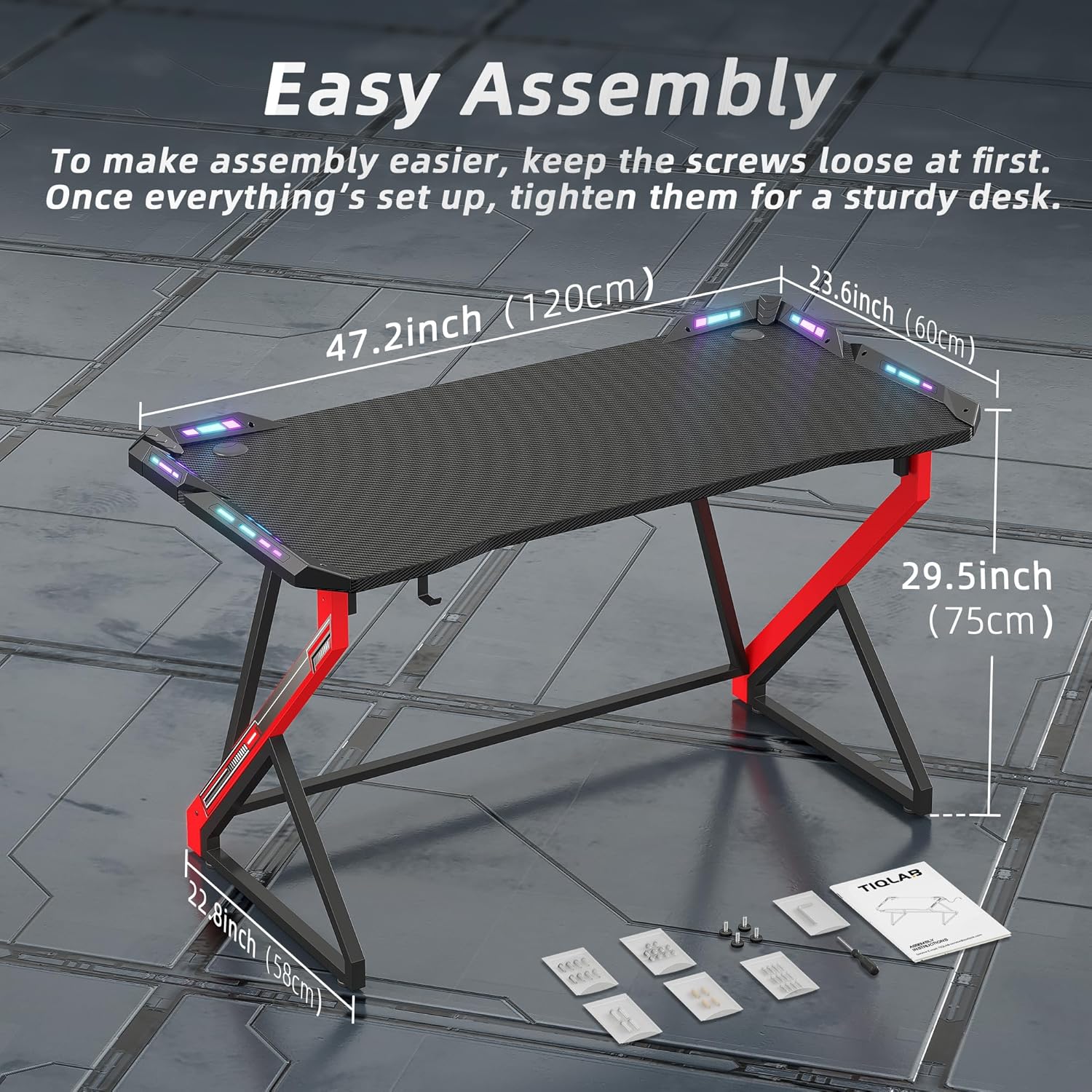
Image: Close-up of the Z-shaped leg design, highlighting stability.

Image: Detailed view of the headphone hook, cable bushings, and the carbon fiber texture of the desktop.
Operating Your Gaming Desk
LED Lighting System
Your TIQLAB Gaming Desk features an immersive RGB lighting system controlled by a wireless remote. The lights are integrated into the desk's design to enhance your gaming experience.

Image: Diagram showing the RGB lighting, remote control, and features like speed control, adjustable brightness, static colors, and dynamic modes.
- Power On/Off: Press the ON or OFF button on the remote to turn the lights on or off.
- Color Selection: Use the colored buttons on the remote to select from 20 static colors.
- Dynamic Modes: Press M+ or M- to cycle through 21 dynamic lighting modes (e.g., flash, strobe, fade).
- Brightness Adjustment: Use the sun icon buttons to increase or decrease the brightness of the lights.
- Speed Control: Adjust the speed of dynamic modes using the S+ or S- buttons.
- Auto Mode: Press the AUTO button for automatic cycling through all dynamic modes.
Headphone Hook
A dedicated headphone hook is provided for convenient storage of your gaming headset, keeping your desktop clear and organized.
Cable Management
The two black cable bushings allow you to neatly route and organize your cables from your monitor, keyboard, mouse, and other peripherals, maintaining a clean and clutter-free gaming setup.
Care and Maintenance
To ensure the longevity and appearance of your TIQLAB Gaming Desk, follow these simple care instructions:
- Cleaning the Desktop: The carbon fiber surface is waterproof and scratch-resistant. Wipe the desktop with a soft, damp cloth and a mild, non-abrasive cleaner. Avoid harsh chemicals or abrasive materials that could damage the finish.
- Spill Management: In case of spills, wipe them immediately with a dry cloth. The waterproof surface makes cleanup easy.
- Stability Check: Periodically check all assembly screws and tighten them if necessary to maintain the desk's stability and prevent wobbling.
- LED Lights: Keep the LED light strips free from dust. If cleaning is needed, use a dry, soft cloth. Do not use liquids directly on the lights.
Troubleshooting
If you encounter any issues with your TIQLAB Gaming Desk, please refer to the following common problems and solutions:
| Problem | Possible Cause | Solution |
|---|---|---|
| Desk is wobbly | Loose assembly screws; uneven floor surface | Ensure all screws are securely tightened. Adjust the footpads at the bottom of the legs to level the desk. |
| LED lights not turning on | Power cable not connected; remote battery dead; remote not paired | Check if the power cable is securely plugged into the desk and a power outlet. Replace the remote battery. Refer to LED light instructions for pairing if applicable. |
| Remote control not responding | Obstruction between remote and receiver; low remote battery | Ensure there is a clear line of sight between the remote and the LED light receiver. Replace the remote battery. |
Product Specifications
| Specification | Detail |
|---|---|
| Brand | TIQLAB |
| Product Dimensions | 23.5"D x 47"W x 29.5"H |
| Color | Black |
| Style | Modern |
| Base Material | Metal |
| Finish Type | Laminated |
| Special Feature | LED Lights |
| Assembly Required | Yes |
| Top Material Type | Engineered Wood (Carbon Fiber Surface) |
| Desk Design | Computer Desk |
Warranty and Customer Support
TIQLAB is committed to providing exceptional customer service and support for your product.
- Dedicated Service: Our team is available 24 hours a day to assist with any inquiries, concerns, or support needs you may have.
- Contact Information: For specific warranty details or to contact customer support, please refer to the contact information provided with your purchase documentation or visit the official TIQLAB store online.