
Introduction
The Snap Circuits Snap 2 It® is a family board game designed to integrate traditional board game play with foundational STEM principles of electricity. This game provides an engaging learning experience for 1-4 players. The objective is to be the first player to create a path of Snap Circuits® parts between their chosen light and the central battery, thereby lighting up their circuit to win the game.
Safety Information
WARNING: CHOKING HAZARD – Small Parts. Not for children under 3 years.
WARNING: Only for use by children aged 8 years and older.
Always ensure proper adult supervision, especially when handling batteries and small components. Do not short-circuit the battery terminals. Do not mix old and new batteries, or different types of batteries.
What's Included
The Snap 2 It® game kit includes all necessary components for immediate play:
- 1 Game Board
- 1 Snap Grid
- 46 Playing Cards
- 40 Game Pieces
- 4 Player Lights
- 1 Battery Pack (requires 2 AA batteries, not included)

Image: All components of the Snap 2 It® Board Game, including the game board, snap grid, playing cards, game pieces, player lights, and battery pack.
Setup
- Prepare the Game Board: Place the game board on a flat, stable surface.
- Insert Batteries: Open the battery pack and insert 2 AA batteries (not included), ensuring correct polarity. Close the battery pack.
- Place the Battery Pack: Position the battery pack in the designated central area of the Snap Grid on the game board.
- Distribute Player Lights: Each player selects a colored light and places it at their designated starting point on the Snap Grid.
- Shuffle and Deal Cards: Shuffle the 46 playing cards thoroughly. Deal three cards to each player. Place the remaining cards face down to form a draw pile.
- Arrange Game Pieces: Place the 40 game pieces (Snap Circuits® parts) in a readily accessible area for all players.

Image: A fully set up Snap 2 It game board with cards, pieces, and player lights in position.
Operating Instructions & Game Play Overview
The game is designed for 1-4 players and typically lasts 10-25 minutes. The core objective is to be the first player to successfully complete an electrical circuit connecting their player light to the central battery pack.
Basic Game Flow:
- Plan Your Path: Review the three cards in your hand. Each card represents a specific Snap Circuits® part or action. Strategize how to use these parts to build a continuous electrical path from your player light to the battery.
- Play a Card: On your turn, play one card from your hand. This card will instruct you to place a specific Snap Circuits® part on the grid, or perform a special action (e.g., 'Wild Card' to steal a piece, 'Lose-a-Turn' card for an opponent).
- Place Game Pieces: If your card instructs you to place a part, snap the corresponding game piece onto the Snap Grid, extending your circuit path.
- Draw a New Card: After playing a card, draw a new card from the draw pile to replenish your hand to three cards.
- Winning the Game: The first player to successfully complete a circuit that connects their player light to the battery, causing their light to illuminate, wins the game!

Image: Visual representation of the game objective and the three core steps of play.
Strategy and Special Cards:
The game involves strategic thinking as players must not only build their own circuits but also anticipate and block opponents. Special cards add an element of surprise and tactical depth:
- Wild Card: Allows you to steal a piece from another player, disrupting their progress.
- Lose-a-Turn Card: Forces an opponent to miss their next turn, giving you an advantage.
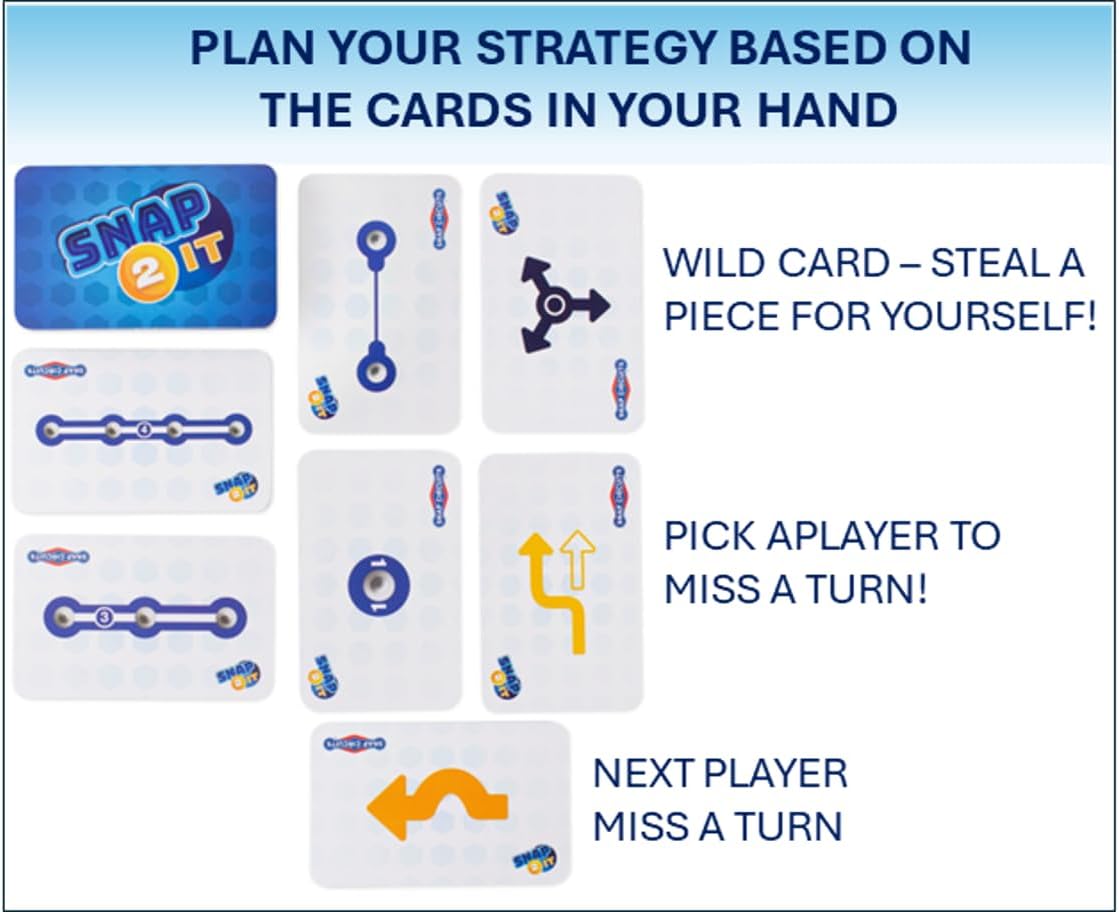
Image: Examples of playing cards, illustrating how to plan strategy based on the cards in hand.
Official Product Videos:
Video: "Snap 2 It - How to" by Elenco. This video provides a detailed guide on how to play the Snap 2 It® board game, demonstrating setup and gameplay.
Video: "Snap 2 It video" by Elenco. This video offers a quick overview of the Snap 2 It® game, highlighting its engaging nature and educational value.
Educational Benefits
The Snap 2 It® game is certified educational and endorsed by kids, parents, and K-12 educators worldwide. It is a favorite in schools, libraries, and homeschool programs due to its ability to teach foundational STEM principles of electricity in a fun and interactive way.
- Cognitive Skills Development: Encourages strategic thinking, problem-solving, and planning.
- Social Skills and Teamwork: Promotes interaction and friendly competition among players.
- Educational Content and Knowledge: Introduces basic concepts of electrical circuits and conductivity.

Image: The educational benefits of the Snap 2 It® game, emphasizing learning through creation.
Maintenance
To ensure the longevity and optimal performance of your Snap 2 It® Board Game, follow these simple maintenance guidelines:
- Cleaning: Wipe down the game board and plastic components with a soft, dry cloth. Avoid using harsh chemicals or abrasive cleaners.
- Storage: Store all game pieces and cards in their original packaging or a suitable container to prevent loss or damage. Keep the game in a cool, dry place away from direct sunlight.
- Battery Care: Remove batteries from the battery pack if the game will not be used for an extended period to prevent leakage.
- Handling: Handle all Snap Circuits® parts with care. Avoid bending or forcing connections to prevent damage.
Troubleshooting
If you encounter issues while playing your Snap 2 It® Board Game, consider the following troubleshooting steps:
- Light Not Illuminating:
- Check all connections: Ensure all Snap Circuits® parts are firmly snapped together, forming a continuous path from the player light to the battery.
- Verify battery installation: Make sure the batteries are correctly inserted with the proper polarity.
- Replace batteries: If the batteries are old or weak, replace them with fresh AA batteries.
- Inspect parts: Check for any visible damage to the Snap Circuits® parts or player lights.
- Game Pieces Not Snapping: Ensure you are aligning the metal snaps correctly. Do not force pieces together.
- Missing Parts: Refer to the "What's Included" section to verify all components are present. If any parts are missing, contact customer support.
Specifications
| Brand Name | Snap Circuits |
| Genre | Educational |
| Number of Players | 1-4 |
| Edition | Standard Edition |
| Estimated Playing Time | 10-25 Minutes |
| Manufacturer Minimum Age | 8 Years |
| Model Number | SCBOARDGAME |
| UPC | 756619014371 |
| Material Type | Plastic |
| Batteries Required | Yes (2 AA, not included) |
| Assembly Required | Yes |
| Educational Objective | STEM |
| Item Dimensions L x W | 12"L x 12"W |
| Item Weight | 1.5 Pounds |
Warranty & Support
For warranty information, replacement parts, or customer support, please visit the official Snap Circuits website or contact Elenco Electronics, LLC directly. Contact information is typically found on the product packaging or the manufacturer's website.
For additional resources and project ideas, visit the Snap Circuits store on Amazon or the Elenco website.

