
1. Introduction
The Qubit Aurora is a spectral reverb Eurorack module designed to process audio signals. It utilizes a phase vocoder audio engine operating at 48kHz, 24-bit, which separates the time and pitch domains of an input signal. This technology allows for the creation of various sonic effects, including time-stretched tails, icy shimmers, and other complex textures. The module's output is highly dependent on the input signal, ensuring unique results with different audio sources. It features true stereo audio input and output.

Figure 1: Front panel of the Qubit Aurora module.
2. Setup
2.1. Installation
The Aurora module is designed for Eurorack systems. Ensure your Eurorack case has sufficient space and power before installation.
- Module Width: 12HP
- Module Depth: 22mm
- Power Consumption: +12V=215mA, -12V=5mA, +5V=0mA
To install, align the power cable's red stripe with the -12V pin on both the module and your Eurorack power bus board. Secure the module to your case using appropriate screws.
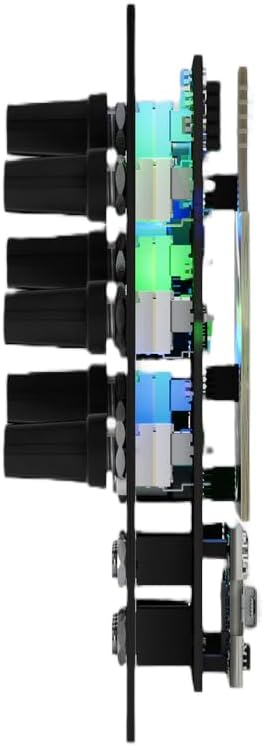
Figure 2: Side view showing module depth.
2.2. Connections
The Aurora features true stereo audio input and output. Connect your audio source to the LEFT and RIGHT input jacks, and connect the LEFT and RIGHT output jacks to your mixer or next module in the signal chain.
A front panel USB port is provided for firmware updates and user options. Use a standard USB cable to connect the module to a computer for these purposes.

Figure 3: Qubit Aurora with USB drive for firmware updates.
3. Operating Instructions
The Aurora module offers a range of controls to shape its spectral reverb effects. Experimentation is encouraged to discover its full sonic capabilities.
3.1. Controls Overview
- TIME: Adjusts the decay length of the reverb effect.
- REFLECT: Controls the amount of signal feedback within the reverb engine.
- REVERSE: Engages or blends a reverse reverb effect.
- FREEZE: Sustains the current audio buffer, creating drones or textures.
- MIX: Balances the dry input signal with the wet reverb effect.
- SHIFT: Controls spectral shifting parameters, altering the pitch characteristics of the reverb.
- ATMOSPHERE: Shapes the density and character of the reverb's ambient qualities.
- WARP: Introduces non-linear manipulation of the time or pitch domains.
- BLUR: Smooths or smears the spectral content, creating diffused textures.
- ATMOS: Provides additional control over the atmospheric texture of the reverb.
3.2. Firmware Updates
The front panel USB port allows for easy firmware updates. Visit the official Qubit website for the latest firmware and instructions on how to update your module. This process typically involves loading a firmware file onto a USB drive and inserting it into the module while powered on, following specific instructions provided by the manufacturer.
4. Maintenance
The Qubit Aurora module requires minimal maintenance. Keep the module free from dust and moisture. Use a soft, dry cloth to clean the front panel. Avoid using liquid cleaners or abrasive materials, as these can damage the finish or internal components. Ensure proper ventilation around the module within your Eurorack case.
5. Troubleshooting
- No Power: Verify that the Eurorack power supply is connected correctly and switched on. Check the ribbon cable connection to the module, ensuring the red stripe aligns with the -12V pin.
- No Audio Output: Confirm that audio input cables are securely connected and that the input signal is present. Check output connections to your mixer or next module. Adjust the MIX knob to ensure a balance between dry and wet signals.
- Unexpected Behavior: If the module behaves unexpectedly, try power cycling your Eurorack system. Ensure the latest firmware is installed. If issues persist, contact customer support.
6. Specifications
- Model Name: Aurora
- Manufacturer: Qubit
- Brand: Geartree
- Item Type: Synthesizer Module
- Material: Metal
- Audio Engine: Phase Vocoder, 48kHz, 24-bit
- Audio I/O: True Stereo
- Width: 12HP
- Depth: 22mm
- Power Consumption: +12V=215mA, -12V=5mA, +5V=0mA
- Connector Type: USB (for firmware updates)
- UPC/GTIN: 634715715364
7. Warranty
The Qubit Aurora module is covered by a Lifetime Warranty. For details regarding warranty claims and service, please refer to the manufacturer's official website or contact customer support.
8. Support
For technical assistance, troubleshooting beyond this manual, or general inquiries, please contact Geartree customer support or visit the Qubit manufacturer's website for additional resources and contact information.