
Introduction
This manual provides comprehensive instructions for the assembly, operation, and maintenance of your SZXKT L-Shaped Desk. Please read this guide thoroughly before beginning assembly or use to ensure proper setup and safe operation. This desk is designed for versatility, offering multiple configurations suitable for home office, gaming, and general work environments.
Safety Information
- Do not overload the desk. The maximum weight capacity is 500 pounds (226 kg).
- Use the desk only for its intended purposes, such as drafting, gaming, working, or writing.
- Follow all assembly instructions carefully to ensure the desk is properly constructed for stability and safety.
- Keep small parts and packaging materials away from children to prevent choking hazards.
- Ensure all connections to the power outlet are secure and comply with local electrical safety standards.
Setup and Assembly
Your SZXKT L-Shaped Desk is designed for straightforward assembly. All necessary hardware and tools are included, and components are clearly labeled. Please refer to the detailed graphical instructions provided in the packaging for step-by-step guidance.
Key Assembly Features:
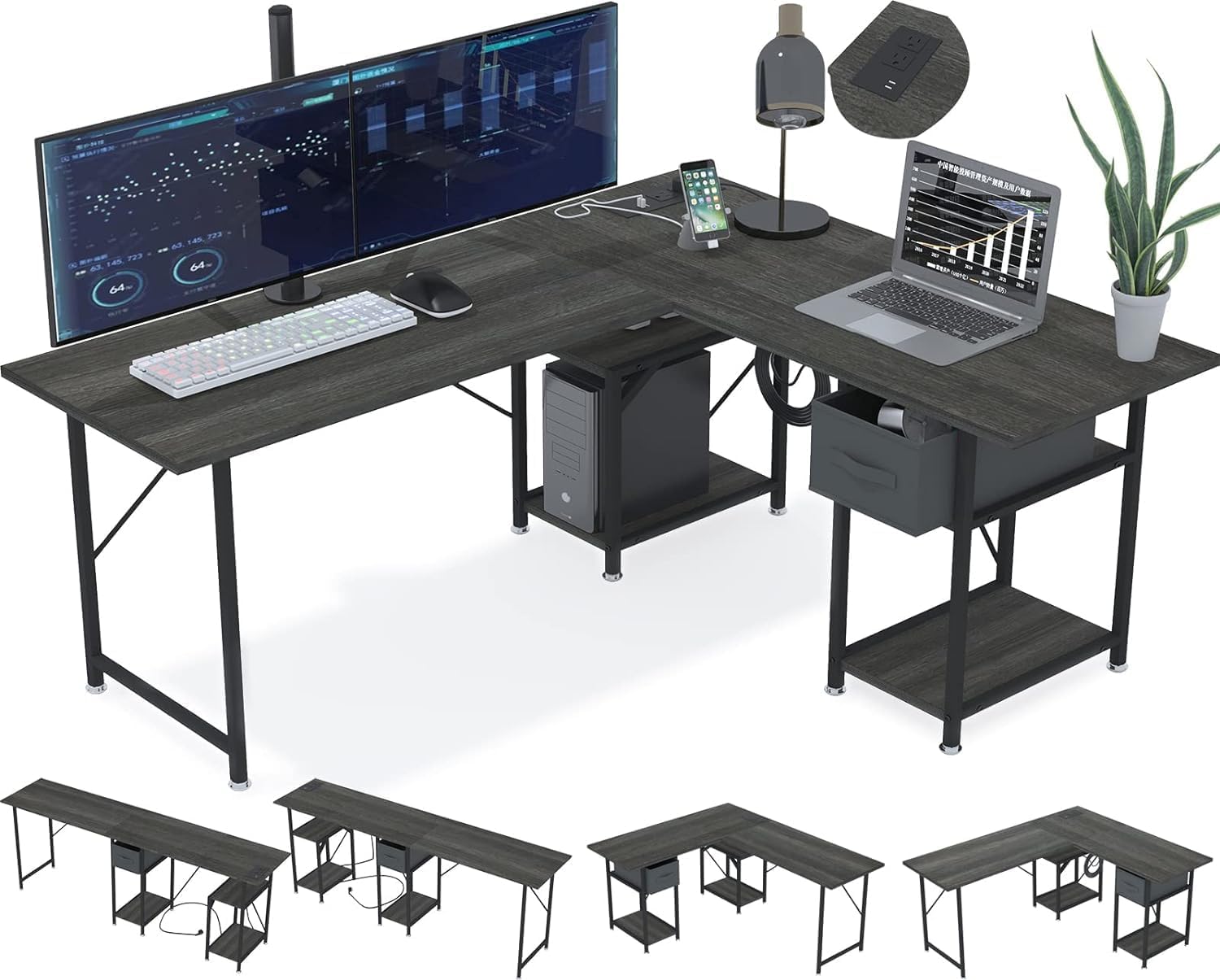
- Reversible Design: The desktop can be configured as an L-shaped corner desk or a long, two-person workstation, allowing you to adapt it to your space and needs.
- Sturdy Construction: Features a thickened iron frame and an X-type stable structure for enhanced durability.
- Adjustable Leveling Feet: Equipped with adjustable feet to ensure stability on uneven surfaces.


Operating Instructions
Integrated Power Outlet:
The desk includes a built-in power strip for convenient access to electrical power and USB charging. It features two 120V/12A AC outlets and two 5V/2A USB ports. The power cord is 59 inches long.
- Connect the desk's power cord to a standard wall outlet.
- Use the AC outlets for devices requiring standard power, such as monitors or laptops.
- Use the USB ports to charge compatible devices like smartphones or tablets.
- Avoid exceeding the maximum electrical load of 12A for the AC outlets.

Storage Drawers:
The desk is equipped with two foldable non-woven storage drawers, providing convenient space for documents, books, and office accessories. These drawers are designed for easy access and organization.

Monitor Stand:
A dedicated monitor stand is included to elevate your display, promoting ergonomic viewing and freeing up desktop space.
Maintenance
The desktop is constructed from MDF (Medium Density Fiberboard), which is waterproof and anti-scratch, making it easy to clean and maintain.
- Cleaning: Wipe the desktop surface with a soft, damp cloth. For stubborn marks, a mild household cleaner can be used, followed by drying with a clean cloth.
- Avoid Harsh Chemicals: Do not use abrasive cleaners or strong chemical solvents, as these may damage the finish.
- Regular Inspection: Periodically check all screws and connections to ensure they remain tight. Tighten as necessary to maintain desk stability.

Troubleshooting
Common Issues and Solutions:
- Desk Instability: Ensure all screws are fully tightened. Adjust the leveling feet on the bottom of the desk legs to compensate for uneven flooring.
- Drawer Handle Misalignment: If a drawer handle does not align perfectly with pre-drilled holes, carefully re-evaluate the handle orientation or contact customer support for assistance. Avoid forcing screws, which could damage the drawer material.
- Power Outlet Not Functioning: Verify that the desk's main power cord is securely plugged into a working wall outlet. Check for any tripped circuit breakers.
If you encounter any issues not covered here, please refer to the support section for contact information.
Specifications
| Brand | SZXKT |
| Model Number | D Grey 75 |
| Product Dimensions (L x W x H) | 56"D x 47.2"W x 29"H |
| Material | Engineered Wood (MDF) desktop, Metal frame |
| Color | Grey |
| Maximum Weight Recommendation | 500 Pounds (226 kg) |
| Number of Drawers | 2 (Foldable non-woven) |
| Tabletop Thickness | 15 Millimeters |
| Power Outlet Specifications | 2 x 120V/12A AC Outlets, 2 x 5V/2A USB Ports |
| Power Cord Length | 59 inches |
| Special Features | Built-In USB Outlet, Office drawer, Reversible, Headphone Hook, Monitor Stand |
Warranty and Support
SZXKT provides lifelong customer support for this product. If you receive an item that is damaged, scratched, or has missing parts, or if you have any questions regarding pre-sales or after-sales service, please do not hesitate to contact us. We are committed to providing a satisfactory solution within 24 hours.
For support, please visit the official SZXKT store or contact our customer service department through the retailer where the product was purchased.