Introduction
Thank you for choosing the YIWENG YYK-Q80 Wireless Earbuds. These earbuds feature Bluetooth 5.3 connectivity, an ergonomic clip-on design, HiFi stereo sound, and CVC noise reduction for a high-quality audio experience. This manual provides detailed instructions for setup, operation, and maintenance to ensure optimal performance and longevity of your device.
Package Contents
Please check the package for the following items:
- 1 Pair of YIWENG YYK-Q80 Wireless Earbuds
- 1 Charging Case
- 1 Charging Cable
- 1 User Manual
Specifications
| Model | YYK-Q80 |
| Bluetooth Version | 5.3 |
| Wireless Range | ≤ 10 meters (33 feet) |
| Standby Time | Approximately 65 hours |
| Playtime | Approximately 6 hours |
| Charging Case Battery Capacity | 350 mAh |
| Special Features | Ergonomic Clip-on Design, CVC Noise Reduction, HiFi Stereo Sound, Automatic Pairing, Waterproof |
| Compatible Devices | Smartphones, Tablets, Laptops, Desktop Computers, Smart Speakers |
| Control Method | Touch Control |
| Material | Plastic |

Image: The YIWENG YYK-Q80 earbuds in their charging case, illustrating the 350mAh battery capacity and indicating up to 36 hours of total battery life with the case.

Image: An illustration highlighting the Bluetooth 5.3 chip within the YIWENG YYK-Q80 earbuds, emphasizing low latency and stable connection.

Image: A visual representation of the YIWENG YYK-Q80 earbuds' internal structure, showcasing the large-diaphragm loudspeaker for HiFi stereo sound quality.

Image: A graph illustrating the effectiveness of the CVC algorithm in the YIWENG YYK-Q80 earbuds, showing a reduction in external noise and clearer call voice after noise reduction is applied.
Setup
1. Initial Charging
Before first use, fully charge the earbuds and the charging case.
- Place both earbuds into the charging case.
- Connect the charging cable to the charging port on the case and a USB power source.
- The indicator lights on the case will show charging status. Once fully charged, the lights will indicate completion or turn off.
2. Pairing with a Device
The YYK-Q80 earbuds feature automatic pairing for convenience.
- Open the charging case. The earbuds will automatically enter pairing mode.
- On your device (smartphone, tablet, etc.), enable Bluetooth.
- Search for "YYK-Q80" in the list of available Bluetooth devices and select it to connect.
- Once connected, you will hear a confirmation tone, and the earbuds will be ready for use.
- For subsequent uses, the earbuds will automatically connect to the last paired device when removed from the case.

Image: An illustration demonstrating the wide compatibility of the YIWENG YYK-Q80 earbuds with various devices such as smartphones, tablets, laptops, desktop computers, and portable gaming consoles.
Operating Instructions
1. Wearing the Earbuds
The YYK-Q80 earbuds are designed with an ergonomic clip-on structure for a comfortable and secure fit.
- Gently place the earbud over your ear, ensuring the clip-on hook rests securely behind your ear.
- Adjust the earbud's position slightly to achieve the best sound quality and comfort. The design allows for minor adjustments to fit different ear shapes.
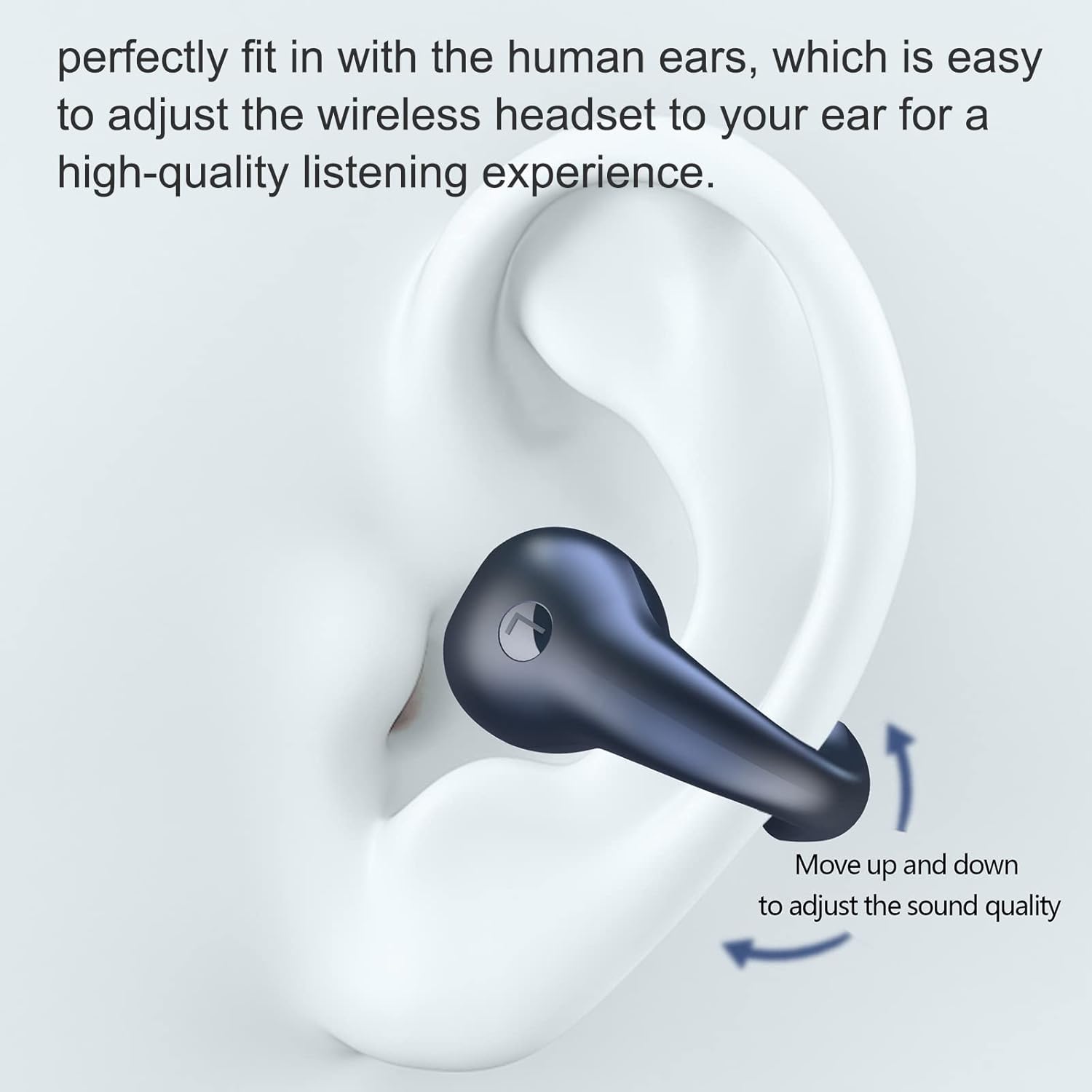
Image: A close-up view of the YIWENG YYK-Q80 earbud being worn, demonstrating how it perfectly fits the human ear and can be adjusted for optimal sound quality and comfort.

Image: A person wearing the YIWENG YYK-Q80 clip-on earbuds, highlighting their secure fit and low risk of falling off during activities.
2. Touch Controls
The YYK-Q80 earbuds feature intuitive touch controls for managing your audio and calls.
- Play/Pause: Touch either earbud twice.
- Answer/End Call: Touch either earbud twice.
- Volume +: Touch the left earbud 3 times.
- Volume -: Touch the right earbud 3 times.
- Next Song: Touch the right earbud for 1 second.
- Last Song: Touch the left earbud for 1 second.
- Activate Voice Assistant (Siri, Google Assistant): Touch either earbud for 5 seconds.

Image: A visual guide detailing the touch control functions for the YIWENG YYK-Q80 earbuds, including play/pause, call management, volume adjustment, track skipping, and voice assistant activation.
Maintenance
To ensure the longevity and optimal performance of your YIWENG YYK-Q80 earbuds, follow these maintenance guidelines:
- Cleaning: Regularly wipe the earbuds and charging case with a soft, dry, lint-free cloth. Do not use harsh chemicals or abrasive materials.
- Storage: When not in use, store the earbuds in their charging case to protect them from dust and damage. Store in a cool, dry place away from direct sunlight and extreme temperatures.
- Charging: Use the provided charging cable and a compatible USB power adapter. Avoid overcharging or completely draining the battery for extended periods.
- Water Resistance: The earbuds are waterproof. However, avoid prolonged submersion in water and ensure they are dry before placing them back in the charging case to prevent damage to the charging contacts.
Troubleshooting
If you encounter any issues with your YIWENG YYK-Q80 earbuds, please refer to the following common solutions:
- Earbuds not pairing:
- Ensure both earbuds are charged.
- Turn off Bluetooth on your device and turn it back on.
- Delete "YYK-Q80" from your device's Bluetooth list and attempt to pair again.
- Place earbuds back in the case, close it, wait a few seconds, then open it again to reset pairing mode.
- No sound or low volume:
- Check the volume level on both your device and the earbuds.
- Ensure the earbuds are properly connected to your device.
- Try playing audio from a different application or source.
- Charging issues:
- Verify the charging cable is securely connected to both the case and the power source.
- Try a different charging cable or USB power adapter.
- Ensure the charging contacts on the earbuds and inside the case are clean and free of debris.
- Earbuds falling out:
- Adjust the position of the clip-on hook and the earbud itself to find a more secure fit for your ear shape.
If the problem persists, please contact customer support for further assistance.