
Introduction
Thank you for choosing the VERSKI LED Desk Lamp JLD-C01. This manual provides detailed instructions for the proper setup, operation, and maintenance of your new desk lamp. Designed with eye-caring technology, dual light sources, and flexible articulation, this lamp is ideal for various tasks in home and office environments.
Package Contents
Please verify that all items are present in your package:
- 1x VERSKI LED Desk Lamp with Clamp
- 1x UL Power Adapter (Cord Length: 71 inches)
- 1x User Manual
Setup Instructions
- Attach the Clamp: Secure the metal clamp to your desk or table edge. The clamp supports desktops up to 2.2 inches thick. Ensure it is tightened firmly to prevent movement. The clamp features rubber padding to protect your desk surface.

Image: The VERSKI LED Desk Lamp clamped to a desk, showcasing its articulated arm and dual light sources.
- Insert the Lamp Body: Insert the base of the lamp body into the opening on the metal clamp. Tighten the screw on the clamp to secure the lamp in place.

Image: A detailed view of the lamp's robust aluminum alloy clamp, designed for secure attachment to various desk thicknesses.
- Unfold the Lamp: Carefully lift the lamp body and fully unfold its articulated arm. The lamp features 6 pivot points for flexible positioning.

Image: A diagram illustrating the lamp's super long swing arm with 6 pivot points, allowing for extensive maneuverability and positioning.
- Connect Power: Plug the UL Power Adapter into a standard wall outlet. Connect the USB-C end of the cable to the port at the base of the lamp.
- Installation Video: For a visual guide on installation, please refer to the video below.
Video: A step-by-step guide on how to correctly install the VERSKI LED Desk Lamp.
Operating Instructions
The VERSKI LED Desk Lamp features intuitive touch controls located on the lamp arm. Refer to the control panel image for button identification.

Image: Detailed view of the 4-key touch control panel on the lamp arm, showing icons for lighting modes, brightness levels, and power/timer functions.
Power On/Off and Timer Function
- Power Button (bottom icon): Press once to turn the lamp On or Off.
- Timer Function:
- Long press the Power Button once to set a 15-minute auto-off timer.
- Long press the Power Button twice to set a 45-minute auto-off timer.
Adjusting Brightness
- Brightness Buttons (+/- icons):
- Press the '+' or '-' button once to cycle through 5 preset brightness levels.
- Long press the '+' or '-' button to steplessly adjust brightness from 10% to 100%.
Changing Color Modes
- Mode Button (gear icon): Press this button once to cycle through 4 preset lighting modes (Working, Learning, Relaxing, Night Light).
- Stepless Color Temperature Adjustment: Long press the Mode Button to steplessly adjust the color temperature from 3000K (warm) to 5500K (cool white).
Dual Light Source Control
- Auxiliary Light: Double-click the '+' button to turn on the auxiliary light source. Double-click the '-' button to turn off the auxiliary light source.
The lamp will remember your last setting (mode and brightness) when you turn it on next time.
Key Features
- Eye-Caring Technology: Features a Fresnel optical lens and an eye protection light source to reduce eye strain. High Color Rendering Index (CRI > 95) ensures accurate color presentation. The lamp is flicker-free and glare-free.

Image: A close-up view highlighting the Fresnel optical lens and the LED light source, designed for eye protection and high color rendering.
- Dual Light Sources: The lamp includes both a main light (2044 Lux) and an auxiliary light (1384 Lux) that can be switched independently or used together for enhanced illumination.
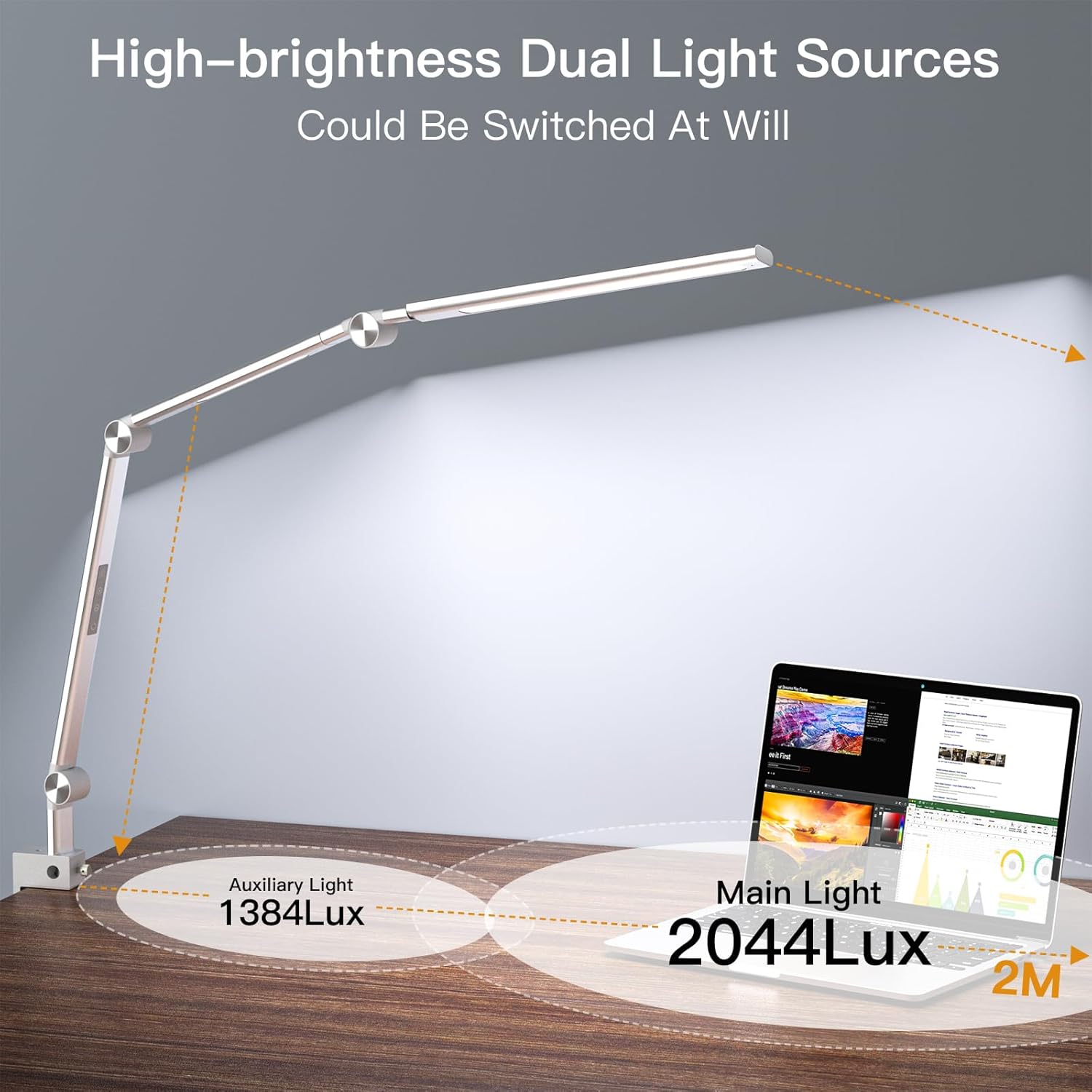
Image: An illustration demonstrating the high-brightness dual light sources, indicating 2044 Lux for the main light and 1384 Lux for the auxiliary light.
- Adjustable Brightness & Color Temperature: Offers 5 brightness levels and 4 preset color modes (3000K-5500K), allowing for customizable lighting environments.

Image: A visual representation of the lamp's 4 preset color temperature modes (from 3000K to 5800K) and 5 brightness levels (from 10% to 100%).
- Robust Construction: Fabricated from aluminum-magnesium alloy material with manganese steel swivels, ensuring durability and a long service life of 100,000 cycles.

Image: A close-up of the lamp's aluminum alloy metal clamp, emphasizing its sturdy and space-saving design.
- Flexible Articulation: The swing arm design with multiple pivot points allows for extensive adjustment and positioning to direct light precisely where needed.
Image: The VERSKI LED Desk Lamp shown in a typical desk setup, demonstrating its flexible positioning over a monitor and keyboard.
Maintenance
- Cleaning: Disconnect the power before cleaning. Use a soft, dry cloth to wipe the lamp. Do not use abrasive cleaners or solvents, as they may damage the finish.
- LED Lifespan: The highly efficient LED light source is designed to last approximately 50,000 hours, eliminating the need for bulb replacement.
- Joint Care: The manganese steel swivels are designed for durability. Avoid excessive force when adjusting the lamp to ensure longevity.
Troubleshooting
| Problem | Solution |
|---|---|
| Lamp does not turn on. |
|
| Brightness or color temperature cannot be adjusted. |
|
| Lamp is unstable on the desk. |
|
Specifications
| Feature | Detail |
|---|---|
| Brand | VERSKI |
| Model Number | JLD-C01 |
| Light Source Type | LED |
| Wattage | 18 watts |
| Brightness | Up to 1600 lumens (Main Light: 2044 Lux, Auxiliary Light: 1384 Lux) |
| Color Temperature | 3000K - 5500K (Adjustable) |
| Color Rendering Index (CRI) | >95 |
| Control Method | Touch Control |
| Material | Aluminum-Magnesium Alloy, Silicone Rubber |
| Product Dimensions | 2.16"D x 1.26"W x 51"H |
| Item Weight | 2.2 pounds (1 Kilogram) |
| Power Source | Corded Electric (UL Power Adapter included) |
| Mounting Type | Tabletop Clamp (supports up to 2.2" desktop) |
| Special Features | Dual Light Source, Eye-caring Fresnel Lens, High CRI>95, Touch Control, Memory Function, 15/45 min Timer |
For more detailed energy information, please visit the EPREL database.
Warranty and Support
The VERSKI LED Desk Lamp comes with a 180-day money-back guarantee and a 36-month worry-free warranty.
For any questions or support needs, please contact our seller support via Amazon. We are committed to responding promptly to assist you.