Introduction
This VEDINDUST HDMI Audio Extractor allows you to separate audio from an HDMI signal, sending video to a display and audio to an external sound system. It supports high resolutions up to 8K@60Hz and offers multiple audio output options, making it a versatile solution for various home entertainment and professional setups.
Key Features
- HDMI Audio Extraction: Extracts audio from HDMI signal to optical, coaxial, L/R, or 3.5mm stereo outputs.
- Ultra HD Resolution: Supports resolutions up to 8K@60Hz, backward compatible with 4K@144Hz, 4K@120Hz, 4K@60Hz, 4K@30Hz, and 1080p@60Hz.
- HDMI 2.1 Support: Features a high transfer rate of up to 48 Gbps.
- EDID Management: Offers 8 different EDID modes for flexible configuration to match your display and audio system needs.
- Audio Formats: Supports LPCM 2CH, DTS5.1, and DD5.1. Note that optical, coaxial, and L/R outputs primarily support PCM 2.0.
- Plug and Play: No driver installation required for easy setup and immediate use.
- Compact Design: Mini size, portable, flexible, and easy to install in any setup.
- Wide Compatibility: Works with a variety of HDMI source devices such as Blu-ray players, Fire TV, PS5, Xbox, PCs, laptops, HD camcorders, and HD DVRs.
Package Contents
Verify that all items are present in your package:

Image: The package includes the HDMI Audio Extractor unit, a Micro USB power cable, and a user manual.
- 1 x VEDINDUST HDMI Audio Extractor
- 1 x Micro USB Power Cable
- 1 x User Manual
Product Overview
Familiarize yourself with the ports and controls of your HDMI Audio Extractor.

Image: Top view showing Audio Out (AUX, R, L, Coaxial, Optical) and bottom view showing USB 5V, HDMI IN, HDMI OUT, and EDID switch.
Front Panel:
- AUX Audio Out: 3.5mm stereo audio output.
- R/L Audio Out: RCA stereo audio outputs (Red for Right, White for Left).
- Coaxial Audio Out: Digital coaxial audio output.
- Optical Audio Out: Digital optical audio output (TOSLINK).
Rear Panel:
- USB 5V: Micro USB port for power supply.
- HDMI IN: Connect to your HDMI source device.
- HDMI OUT: Connect to your display (TV, monitor, projector).
- EDID Switch: Dip switch for EDID mode selection.
Setup and Connection
Follow these steps to connect your HDMI Audio Extractor:
- Connect your HDMI source device (e.g., Blu-ray player, game console, streaming stick) to the HDMI IN port on the extractor using an HDMI cable.
- Connect your display (e.g., TV, monitor, projector) to the HDMI OUT port on the extractor using an HDMI cable.
- Connect your audio receiver, soundbar, headphones, or amplifier to the desired audio output port(s) on the extractor (AUX, R/L, Coaxial, or Optical).
- Connect the Micro USB power cable to the USB 5V port on the extractor and then to a 5V USB power adapter (not always included, but recommended for stable operation, especially with low-power HDMI sources like some PS4 models).
- Ensure all devices are powered on.
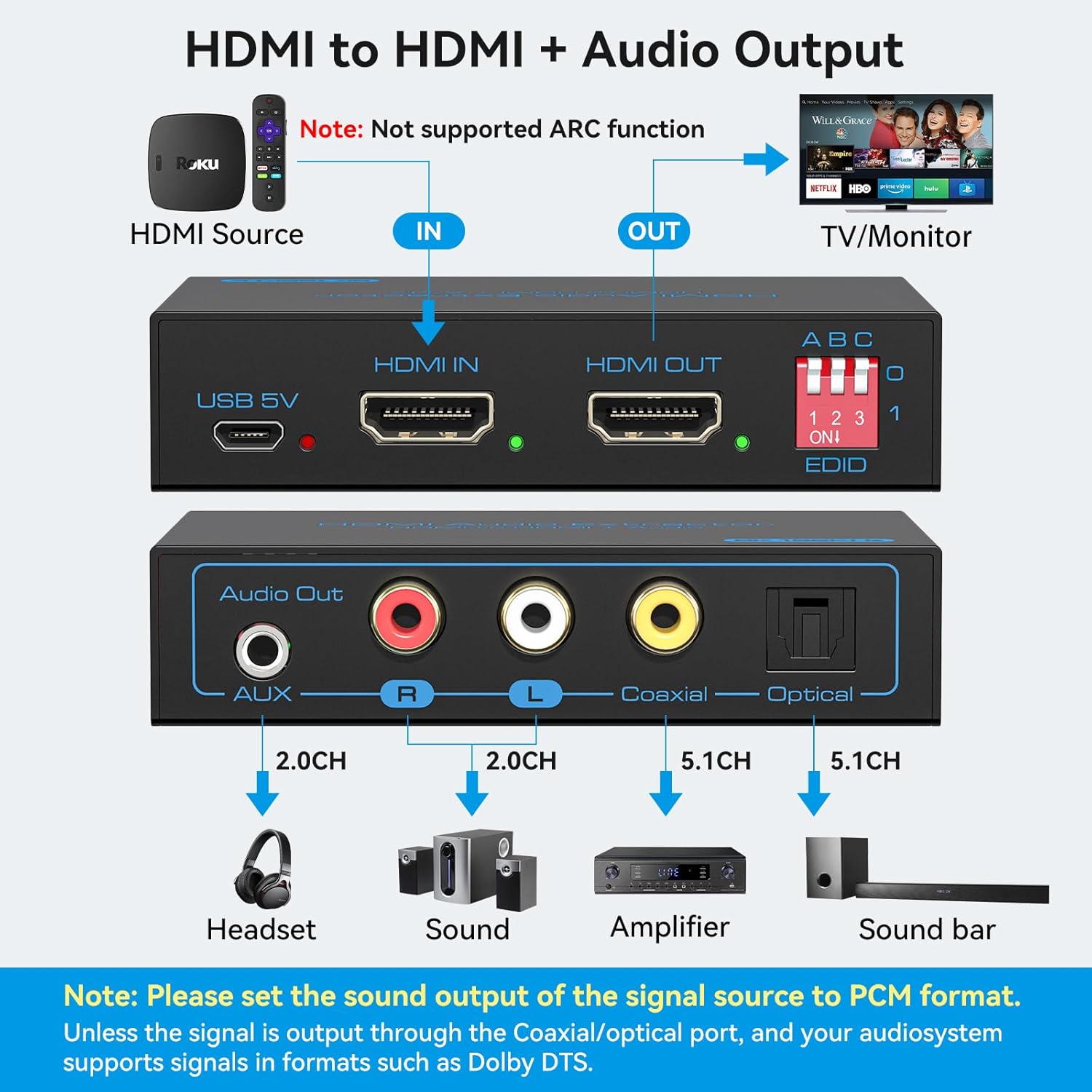
Image: Diagram illustrating connections from an HDMI source to the extractor's HDMI IN, then HDMI OUT to a TV/Monitor, and various audio outputs to a headset, sound system, amplifier, or soundbar. Note: ARC function is not supported. Set signal source audio output to PCM format for optical/coaxial/L/R outputs.
Operating Modes (EDID Management)
The EDID (Extended Display Identification Data) switch allows you to configure the audio extractor's behavior to best suit your setup. There are 8 different EDID modes:

Image: Visual representation of the 8 EDID dip switch settings and their corresponding audio/video modes (Copy EDID 2.0CH, Copy EDID 5.1CH, 4K60Hz 2.0CH, 4K60Hz 5.1CH, 4K120Hz 2.0CH, 4K120Hz 5.1CH, 8K60Hz 2.0CH, 8K60Hz 5.1CH). Notes indicate that 2.0 Channel Mode supports AUX/L/R/Coaxial/Optical simultaneous sound output, while 5.1 Channel Mode only supports Coaxial/Optical sound output.
| Switch Position (1-2-3) | Mode | Description |
|---|---|---|
| 0-0-0 | Copy EDID 2.0CH | Copies EDID from display, forces 2.0 channel audio output. |
| 0-0-1 | Copy EDID 5.1CH | Copies EDID from display, forces 5.1 channel audio output (Coaxial/Optical only). |
| 0-1-0 | 4K60Hz 2.0CH | Fixed 4K@60Hz video, 2.0 channel audio. |
| 0-1-1 | 4K60Hz 5.1CH | Fixed 4K@60Hz video, 5.1 channel audio (Coaxial/Optical only). |
| 1-0-0 | 4K120Hz 2.0CH | Fixed 4K@120Hz video, 2.0 channel audio. |
| 1-0-1 | 4K120Hz 5.1CH | Fixed 4K@120Hz video, 5.1 channel audio (Coaxial/Optical only). |
| 1-1-0 | 8K60Hz 2.0CH | Fixed 8K@60Hz video, 2.0 channel audio. |
| 1-1-1 | 8K60Hz 5.1CH | Fixed 8K@60Hz video, 5.1 channel audio (Coaxial/Optical only). |
Important Notes:
- For 2.0 Channel Mode, AUX, L/R, Coaxial, and Optical outputs can all provide simultaneous sound.
- For 5.1 Channel Mode, only Coaxial and Optical outputs support 5.1 channel audio. The AUX and L/R outputs will not carry 5.1 audio in this mode.
- Ensure your source device's audio output is set to PCM format if you are using the optical, coaxial, or L/R outputs.
Compatibility
The VEDINDUST HDMI Audio Extractor is designed for wide compatibility with various HDMI source devices and audio systems.

Image: Diagram showing various compatible HDMI input devices (Apple TV, Fire TV, Roku TV, PS4/5, Laptop, PC) and audio/video output devices (Headset, Sound, Amplifier, Soundbar for audio; TV, Monitor, Projector for video).
Compatible HDMI Input Devices:
- Blu-ray/DVD/HD Players
- Streaming Devices (e.g., Fire TV, Roku TV, Apple TV)
- Game Consoles (e.g., PS5, PS4, Xbox)
- Personal Computers (PC/Laptop)
- HD Camcorders, HD DVRs
Compatible Audio Output Devices:
- Headsets/Headphones
- Stereo Sound Systems/Speakers
- Amplifiers
- Soundbars
Compatible Video Output Devices:
- Televisions (TVs)
- Monitors
- Projectors
Specifications
| Feature | Detail |
|---|---|
| HDMI Resolution | HDMI 2.1 |
| Supported Resolutions | Up to 8K@60Hz, 4K@144Hz, 4K@120Hz, 4K@60Hz, 4K@30Hz, 1080p@60Hz |
| Max Transfer Rate | 48 Gbps |
| Supported Audio Formats | LPCM 2CH, DTS5.1, DD5.1 (PCM 2.0 for optical/coaxial/L/R outputs) |
| Max Power Consumption | 5 W |
| Power Supply | DC 5V |
| Operating Temperature | -5°C to +45°C (23°F to 113°F) |
| Operating Humidity | 5 to 90% RH (non-condensing) |
| Storage Temperature | -20°C to +60°C (-4°F to 140°F) |
| Dimensions (L x W x H) | 90 x 60 x 21 mm (3.5 x 2.4 x 0.8 inches) |
| Model Number | 831b3dd8-77b8-4b70-8182-46abd2be68e6 |
| ASIN | B0CSYJ2WSF |
Maintenance
To ensure the longevity and optimal performance of your VEDINDUST HDMI Audio Extractor, follow these simple maintenance guidelines:
- Cleaning: Use a soft, dry cloth to clean the exterior of the device. Do not use liquid or aerosol cleaners.
- Ventilation: Ensure the device is placed in a well-ventilated area to prevent overheating. Do not block any ventilation openings.
- Storage: When not in use for extended periods, store the device in a cool, dry place away from direct sunlight and extreme temperatures.
- Handling: Handle the device with care. Avoid dropping it or subjecting it to strong impacts.
- Power: Disconnect the power adapter when the device is not in use or during electrical storms.
Troubleshooting
If you encounter issues with your HDMI Audio Extractor, please refer to the following common problems and solutions:
- No Video Output:
- Ensure all HDMI cables are securely connected.
- Try a different HDMI cable.
- Verify that your display is set to the correct HDMI input.
- Check the EDID switch settings. Try a different mode, especially one that matches your display's capabilities (e.g., 4K60Hz 2.0CH).
- Ensure the extractor is receiving adequate power from the USB 5V port.
- No Audio Output:
- Check all audio cable connections (AUX, R/L, Coaxial, Optical).
- Verify that your audio receiver/sound system is powered on and set to the correct input.
- Ensure the source device's audio output format is compatible with the extractor and your audio system (e.g., set to PCM for 2.0CH outputs).
- Adjust the EDID switch settings. If using 5.1CH mode, ensure you are using Coaxial or Optical outputs.
- Some devices with low-power HDMI ports (like certain PS4 models) may require external 5V power to the extractor for stable audio output. Ensure the USB power cable is connected.
- Intermittent Video/Audio:
- Ensure all cables are high-quality and securely connected.
- Check for interference from other electronic devices.
- Ensure the extractor is receiving stable 5V power.
- Try a different EDID mode.
- Resolution/Refresh Rate Issues:
- Ensure your HDMI cables are rated for the desired resolution and refresh rate (e.g., HDMI 2.1 for 8K@60Hz or 4K@120Hz).
- Adjust the EDID switch to a mode that supports your desired resolution and refresh rate.
- Verify that your source device and display both support the desired resolution and refresh rate.
If the problem persists after trying these steps, please contact VEDINDUST customer support.
Warranty and Support
VEDINDUST is committed to providing high-quality products and customer satisfaction. This product comes with a standard manufacturer's warranty. Please refer to the warranty card included in your package for specific terms and conditions.
For technical assistance, troubleshooting, or warranty claims, please contact VEDINDUST customer support. Our technical team aims to provide assistance within 12 hours.
Contact Information:
- Refer to the contact details provided in your product packaging or on the official VEDINDUST website.


