
1. Introduction
Thank you for choosing the VERSKI LED Desk Lamp, Model JLD-C01. This manual provides essential information for the safe and efficient use of your new desk lamp. Please read these instructions carefully before installation and operation, and retain them for future reference.
2. Safety Instructions
- Ensure the power supply voltage matches the lamp's requirements (120V).
- Do not disassemble or modify the lamp. This may cause damage or electric shock.
- Avoid exposing the lamp to water or high humidity, as it is not water-resistant.
- Keep the lamp away from heat sources and direct sunlight to prevent overheating.
- Use only the provided power adapter.
- Do not look directly into the LED light source for extended periods to prevent eye strain.
- Ensure the clamp is securely fastened to a stable surface before use.
3. Package Contents
Verify that all items are present in the package:
- 1 x VERSKI LED Desk Lamp with Clamp
- 1 x GS Power Adapter (Cable length: 180 cm)
- 1 x User Manual
4. Setup
Follow these steps to set up your VERSKI LED Desk Lamp:
- Secure the Lamp Body: Insert the base of the lamp body into the metal clamp. Ensure it is firmly seated.
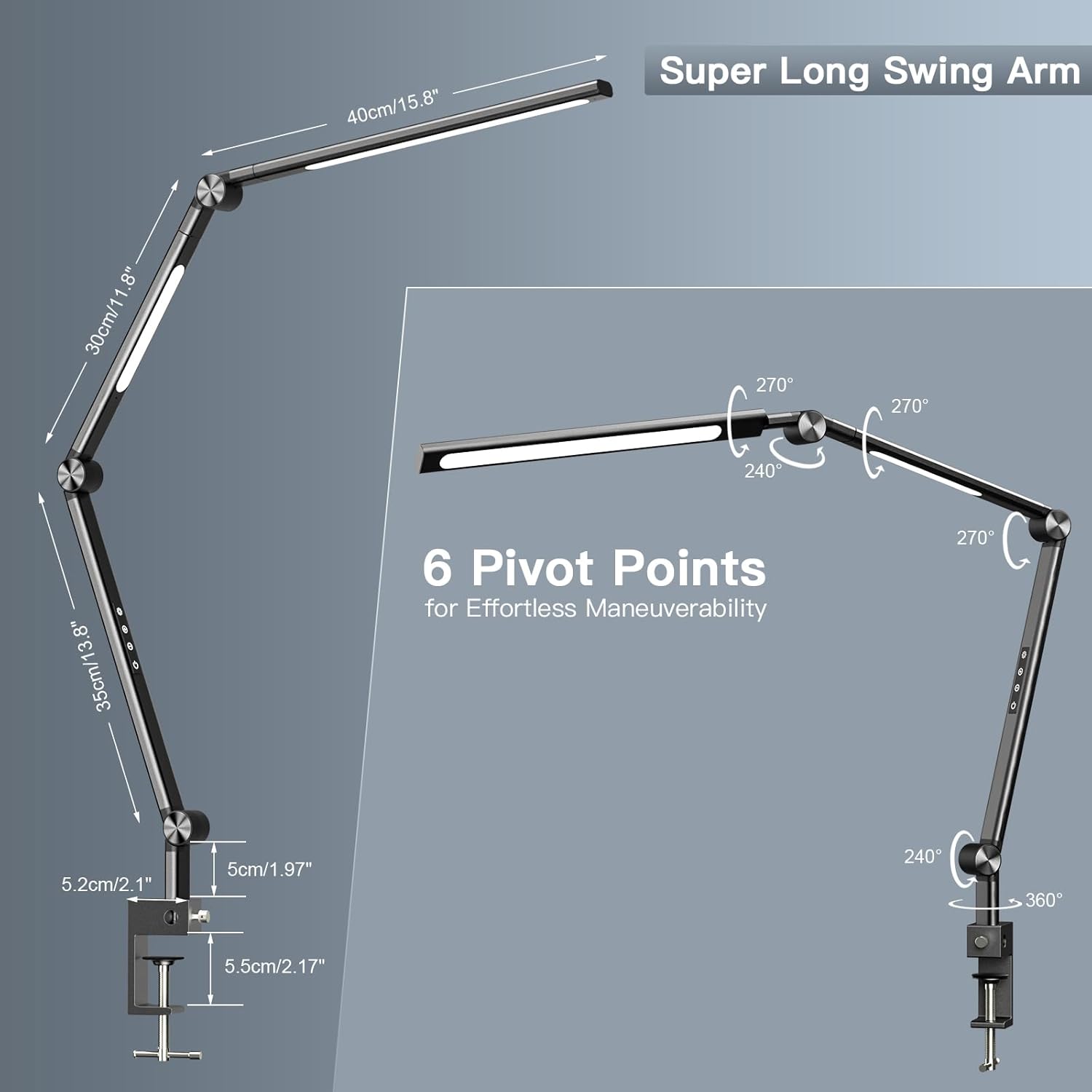
- Attach the Clamp: Securely fasten the metal clamp to a stable desk or table surface. The clamp supports surfaces up to 2.2 inches (approximately 5.5 cm) thick.
- Unfold the Lamp: Carefully lift the lamp body and fully unfold its articulated arm.
- Adjust Lamp Head: Rotate the lamp head 180 degrees along the second axis so that the light source faces the desktop. Adjust the arm at its 6 pivot points for optimal positioning.
- Connect Power: Plug the GS power adapter into a suitable power outlet and connect the other end to the lamp's power input.


5. Operating Instructions
The VERSKI LED Desk Lamp features intuitive touch controls located on the lamp arm.
5.1 Touch Control Panel
The control panel consists of four touch buttons:
- Power Button: Short press to turn the lamp ON/OFF. Long press once to activate a 15-minute timer. Long press twice to activate a 45-minute timer.
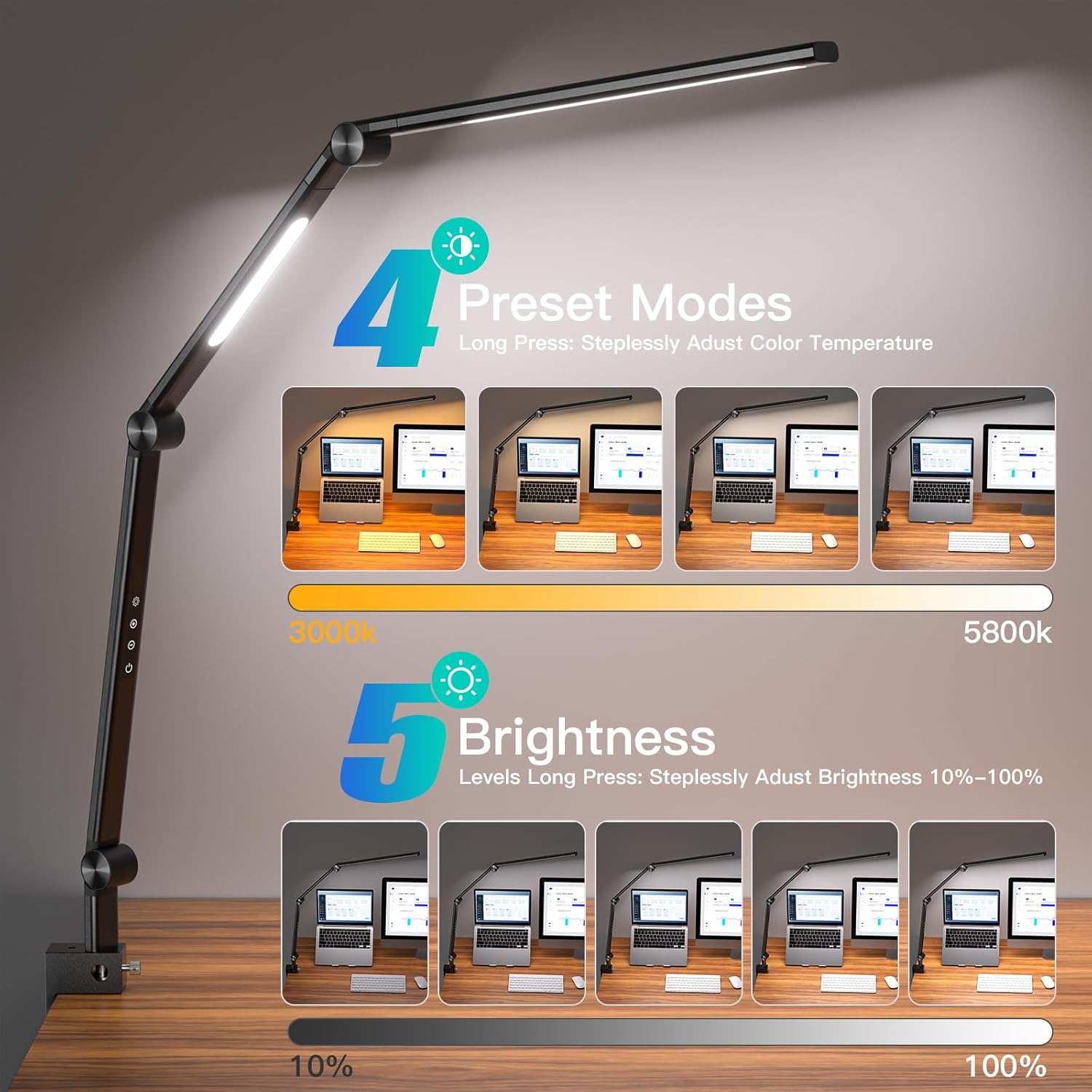
- Brightness Adjustment: Short press to cycle through 5 brightness levels (10% to 100%). Long press for stepless brightness adjustment.
- Color Temperature Adjustment: Short press to cycle through 4 preset color temperatures (3000K to 5800K). Long press for stepless color temperature adjustment.
- Auxiliary Light Control: Short press to turn the auxiliary light ON/OFF.
5.2 Light Source Selection
The lamp features dual light sources (main light and auxiliary light) which can be used individually or together. Use the Auxiliary Light Control button to switch between single and dual light modes as desired.

5.3 Memory Function
The lamp will remember the last brightness and color temperature setting used when it is turned off and then back on, even if controlled via a wall switch or smart plug.
6. Features
- Eye-Caring Illumination: Equipped with advanced lighting technology and a Fresnel optical lens, providing flicker-free and glare-free light. A high Color Rendering Index (CRI > 95) ensures accurate color representation, ideal for detailed tasks.
- Adjustable Brightness and Color Temperature: Offers 5 brightness levels and 4 preset color temperatures (3000K-5800K), with stepless adjustment for both. Maximum brightness of 1600 lumens.
- Durable and Flexible Design: Constructed from high-quality aluminum-magnesium alloy. Features 6 pivot points with rotating manganese steel parts, tested for 100,000 adjustments, allowing for precise and effortless positioning.
- Space-Saving Clamp: The robust aluminum alloy clamp securely attaches to desk surfaces up to 2.2 inches thick, freeing up valuable desktop space.
- Convenient Timer Function: Set the lamp to automatically turn off after 15 or 45 minutes, useful for bedtime or short breaks.
- Energy Efficient and Long-Lasting: Utilizes an efficient LED light source with an estimated lifespan of up to 50,000 hours, reducing the need for frequent bulb replacement.

7. Specifications
| Feature | Detail |
|---|---|
| Brand | VERSKI |
| Model Number | JLD-C01 |
| Product Type | LED Desk Lamp |
| Material | Aluminum Alloy |
| Color | Black |
| Finish Type | Plated |
| Shade Material | Aluminum |
| Light Source Type | LED |
| Number of Light Sources | 2 |
| Wattage | 18W |
| Voltage | 120 Volts |
| Power Source | Corded Electric |
| Switch Type | Touch Control |
| Color Temperature | 3000K - 5800K (Adjustable) |
| Brightness Levels | 5 (10% - 100%) |
| CRI | > 95 |
| Lifespan | Up to 50,000 hours |
| Mounting Type | Clamp Mount (Max 2.2 inch surface thickness) |
| Water Resistance | Not Water Resistant |
| Recommended Use | Reading, Studying, Home Office |
8. Maintenance
- Cleaning: Disconnect the power before cleaning. Use a soft, dry cloth to wipe the lamp. Do not use abrasive cleaners or solvents.
- Storage: If storing the lamp for an extended period, ensure it is clean and dry. Store in a cool, dry place away from direct sunlight.
- Bulb Replacement: The LED light source is integrated and designed for a long lifespan. It is not user-replaceable.
9. Troubleshooting
| Problem | Possible Cause | Solution |
|---|---|---|
| Lamp does not turn on. | No power connection. Faulty power adapter. | Check if the power adapter is securely plugged into both the lamp and the wall outlet. Try a different outlet. If the issue persists, contact support. |
| Light flickers or is dim. | Unstable power supply. Incorrect brightness setting. | Ensure the power connection is stable. Adjust the brightness using the touch controls. If flickering persists, try a different power outlet. |
| Touch controls are unresponsive. | Temporary software glitch. Dirty control panel. | Disconnect the lamp from power for 30 seconds, then reconnect. Clean the touch control area with a dry cloth. |
| Clamp is not holding securely. | Surface too thick or thin. Clamp not tightened properly. | Ensure the desk surface thickness is within the 2.2-inch limit. Tighten the clamp screw firmly. |
10. Warranty
This VERSKI LED Desk Lamp is covered by a manufacturer's warranty against defects in materials and workmanship. Please refer to the product packaging or your purchase receipt for specific warranty terms and duration. The warranty does not cover damage caused by misuse, unauthorized modifications, or failure to follow the instructions in this manual.
11. Support
If you have any questions, encounter issues, or require assistance with your VERSKI LED Desk Lamp, please contact the seller support via Amazon. We aim to respond as quickly as possible to address your concerns.