
1. Introduction
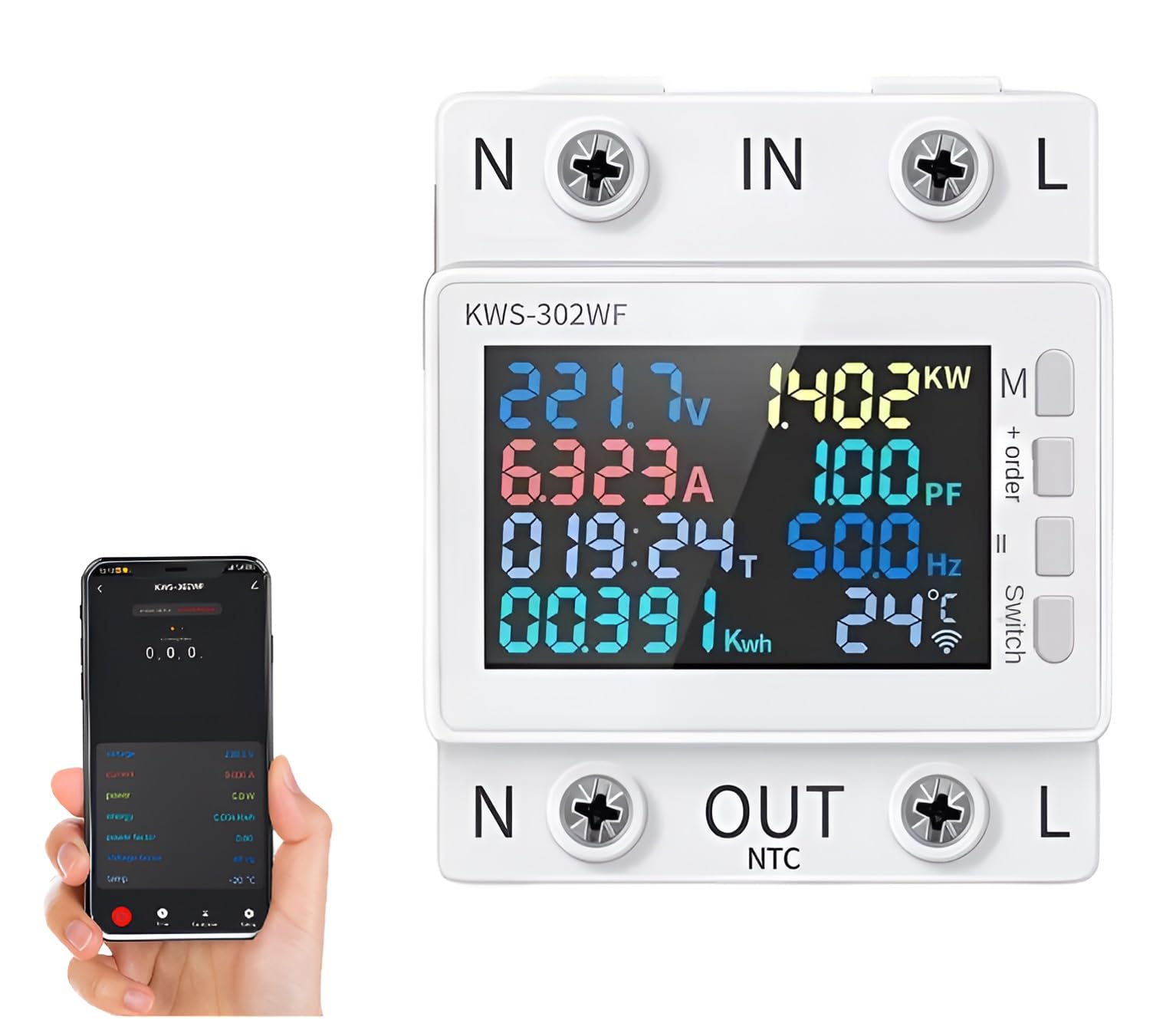
The XPR3SS KWS-302WF is an advanced 8-in-1 parameter display smart switch circuit breaker and energy meter. It integrates multiple functions including voltage, current, power, timing, electric energy, temperature, frequency, and power factor display. With Wi-Fi connectivity, it allows for remote control and monitoring via the Smart Life or Tuya app, providing comprehensive protection against over-voltage, under-voltage, over-current, and power surges.
2. Product Features
- 8-in-1 Parameter Display: Monitors Voltage, Current, Power, Timing, Electric Energy (KWh), Temperature, Frequency, and Power Factor.
- Wi-Fi Enabled Remote Control: Manage and monitor the device from anywhere using the Smart Life or Tuya mobile application.
- Advanced Digital Design: Ensures accurate and reliable readings for all electrical parameters.
- Comprehensive Protection: Includes Over-voltage, Under-voltage, Over-current, Overload, and Overtemperature protection.
- Timed Power Off Settings: Configure schedules for automatic power control.
- Screen Hibernation Setting: Adjust display behavior for energy saving.
- Clear LED Display: Easy-to-read display for quick assessment of electrical parameters.
- Wide Voltage Range: Designed to operate within 170-300V.
- Power Failure Memory: Retains settings and data after a power interruption.
- Automatic Fault Response: Instantly powers off on fault and restarts once parameters are within set limits.
3. Setup and Installation
Safety Warning: Installation should only be performed by a qualified electrician to ensure safety and proper functionality. Incorrect wiring can lead to electrical hazards, device damage, or fire.
- Mounting: The KWS-302WF is designed for wall mount installation. Secure it in a suitable electrical enclosure or panel.
- Wiring: Connect the incoming neutral (N IN) and live (L IN) wires to the respective input terminals. Connect the outgoing neutral (N OUT) and live (L OUT) wires to the load terminals.
- NTC Connection: If temperature monitoring is desired, connect the NTC sensor to the designated NTC terminal.
- Power On: Once all connections are secure, restore power to the circuit. The device display should illuminate.
4. Operating Instructions
4.1. Display Overview
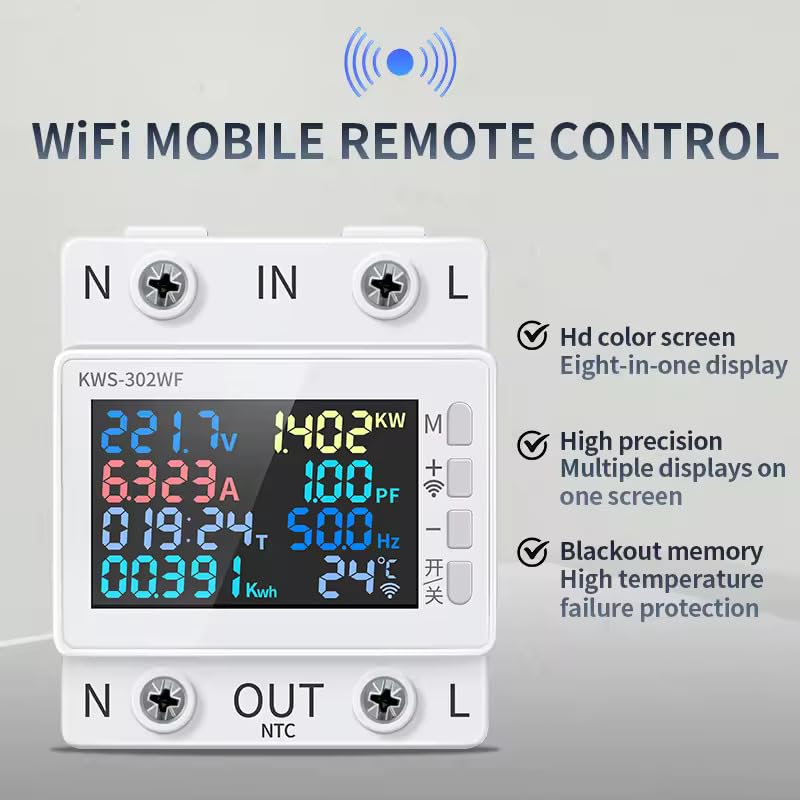
The KWS-302WF features an HD color screen that simultaneously displays up to eight parameters, including voltage, current, power, timing, electric energy, temperature, frequency, and power factor. The display also indicates Wi-Fi connectivity status and protection alerts.
4.2. Wi-Fi Connectivity and Remote Control
The device is Wi-Fi enabled, allowing for remote control and monitoring via a smartphone application. Download the Smart Life or Tuya app from your device's app store.
- Ensure your KWS-302WF device is powered on and within range of your Wi-Fi network.
- Open the Smart Life or Tuya app and follow the in-app instructions to add a new device.
- Once paired, you can remotely monitor parameters, control the power switch, set timers, and adjust protection settings from your smartphone.
4.3. Multi-Person Control
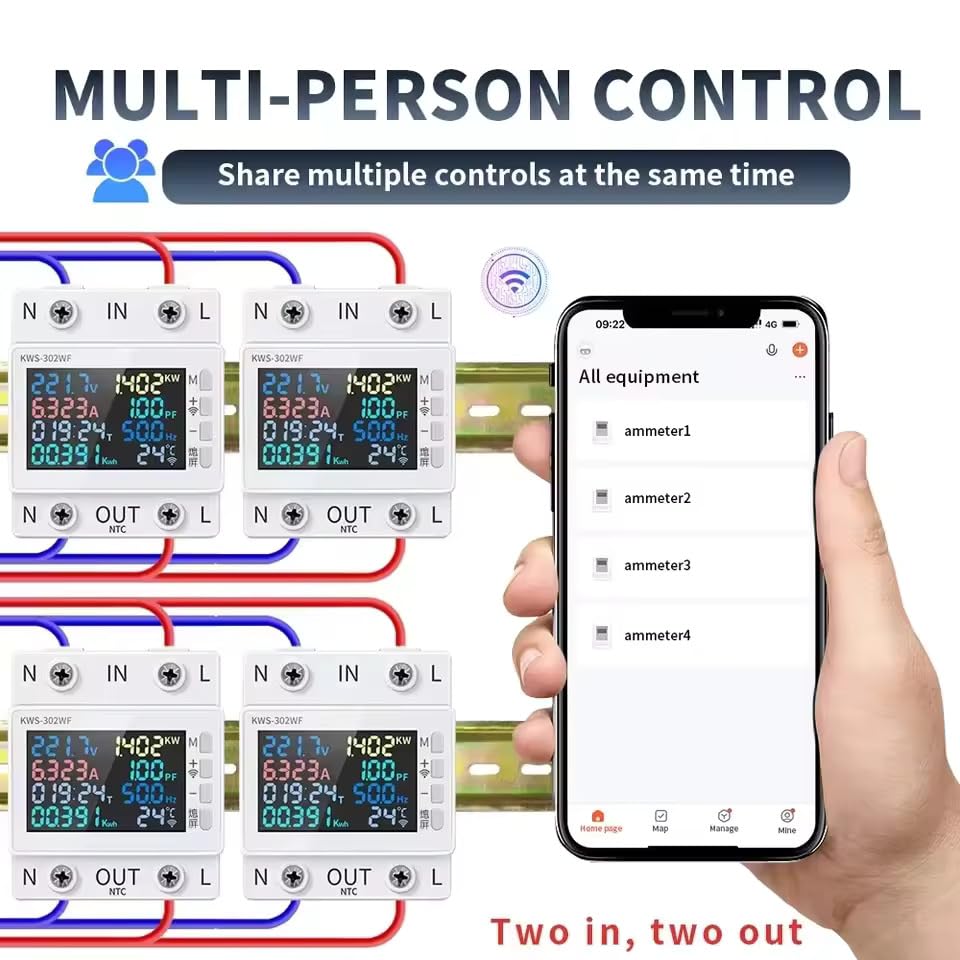
The device supports sharing control with multiple users through the mobile application. This feature is useful for household members or team environments where several individuals need access to monitor and manage the device.
5. Parameter Settings
To enter the settings display, hold down the SET button for 3 seconds. Use the '+' and '-' buttons to adjust values. A short press typically adjusts by a small increment, while a long press allows for quicker adjustments.
5.1. Protection Settings
- Overvoltage Power Off Protection:
Display: 270.0V HI
Adjustment: Press '+' or '-' to adjust by 1V. Long press for quick adjustment.
Default: 270.0V - Undervoltage Power Off Protection:
Display: 170.0V LO
Adjustment: Press '+' or '-' to adjust by 1V. Long press for quick adjustment.
Default: 170.0V - Overcurrent Outage Protection:
Display: 0.000A
Adjustment: Press '+' or '-' to adjust by 0.001A. Long press for quick adjustment.
Default: 0 (Disabled) - Timed Power Off Protection:
Display: 000:00T
Adjustment: Press '+' or '-' to adjust by 30 minutes. Long press for quick adjustment.
Default: 0 (Disabled) - Overload Power Off Protection:
Display: 00000KWH
Adjustment: Press '+' or '-' to adjust by 0.001KWH. Long press for quick adjustment.
Default: 0 KWH (Off) - Power Off Settings (Wattage):
Display: 0W
Adjustment: Press '+' or '-' to adjust by 0.1W. Long press for quick adjustment.
Default: 0W - Overtemperature Power Off Protection:
Display: 50°C
Adjustment: Press '+' or '-' to adjust by 1°C. Long press for quick adjustment.
Default: 50°C


5.2. Screen Sleep Setting
- Screen Sleep Setting:
Display: HO 0
Adjustment: Press '+' or '-' to adjust by 1 minute. Long press for quick adjustment.
Default: 0 (for 1-60 minutes)
Note: All data and parameters displayed are for reference only.
6. Specifications
| Brand | XPR3SS |
| Model Number | KWS-302WF |
| Current Rating | 63 Amps |
| Input Voltage | 170-300V |
| Frequency | 50Hz/60Hz |
| Product Dimensions | 65D x 49W x 35H Millimeters |
| Circuit Breaker Type | Standard |
| Mounting Type | Wall Mount |
| Number Of Poles | 2 |
| Item Weight | 350 g |
| Included Components | Circuit breaker |
7. Troubleshooting
If the device is not functioning as expected, consider the following troubleshooting steps:
- No Display/Power: Check the main power supply and all electrical connections for proper installation and tightness.
- Wi-Fi Connection Issues: Ensure the device is within range of your Wi-Fi router. Verify your Wi-Fi network is stable and the password entered in the app is correct. Try restarting your router and the KWS-302WF device.
- Unexpected Power Off: Review the protection settings (over-voltage, under-voltage, over-current, overload, overtemperature) in the device or app. The device may be triggering a protection mechanism due to parameters exceeding set limits. Adjust thresholds if necessary and safe to do so.
- App Not Responding: Ensure your Smart Life or Tuya app is updated to the latest version. Try force-closing and reopening the app. If the issue persists, unpair and re-pair the device with the app.
- Inaccurate Readings: Verify that the wiring connections are correct and secure.
- General Malfunction: A power cycle (turning off and on the main power to the device) can often resolve minor software glitches.
8. Maintenance
To ensure the longevity and optimal performance of your XPR3SS KWS-302WF, follow these maintenance guidelines:
- Cleaning: Keep the device clean and free from dust and debris. Use a soft, dry cloth for cleaning. Do not use liquid cleaners or solvents.
- Ventilation: Ensure the device is installed in a location with adequate ventilation to prevent overheating.
- Connection Checks: Periodically inspect electrical connections for tightness and signs of wear or corrosion.
- Firmware Updates: Check the Smart Life or Tuya app for any available firmware updates for your device to ensure you have the latest features and bug fixes.
- Professional Service: Do not attempt to open, modify, or repair the device yourself. Refer all servicing to qualified service personnel.
9. Warranty and Support
For detailed warranty information, terms, and conditions, please refer to the documentation included with your product packaging or visit the official XPR3SS website. In case of technical issues or support inquiries, please contact XPR3SS customer service. Keep your purchase receipt as proof of purchase for any warranty claims.