
1. Introduction
This manual provides essential information for the safe and efficient use of your TOOLCRAFT 2389201+2391157 LED Magnifying Lamp. Please read these instructions carefully before operating the device and retain them for future reference. The lamp is designed for detailed work, offering 3x magnification and integrated LED illumination.
2. Safety Instructions
- Ensure the power supply voltage matches the specifications indicated on the lamp.
- Do not look directly into the LED light source for extended periods, as this may cause eye strain.
- Keep the lamp away from water and high humidity.
- Do not attempt to disassemble or modify the lamp. Refer all servicing to qualified personnel.
- Position the lamp on a stable, flat surface to prevent tipping.
- Unplug the lamp from the power outlet before cleaning or when not in use.
3. Package Contents
Verify that all items are present in the package:
- TOOLCRAFT 2389201+2391157 LED Magnifying Lamp Unit
- Power Adapter
- User Manual
4. Setup
Follow these steps to set up your magnifying lamp:
- Carefully remove all components from the packaging.
- Place the lamp base on a stable and level surface.
- Connect the power adapter to the lamp's power input port.
- Plug the power adapter into a suitable electrical outlet.
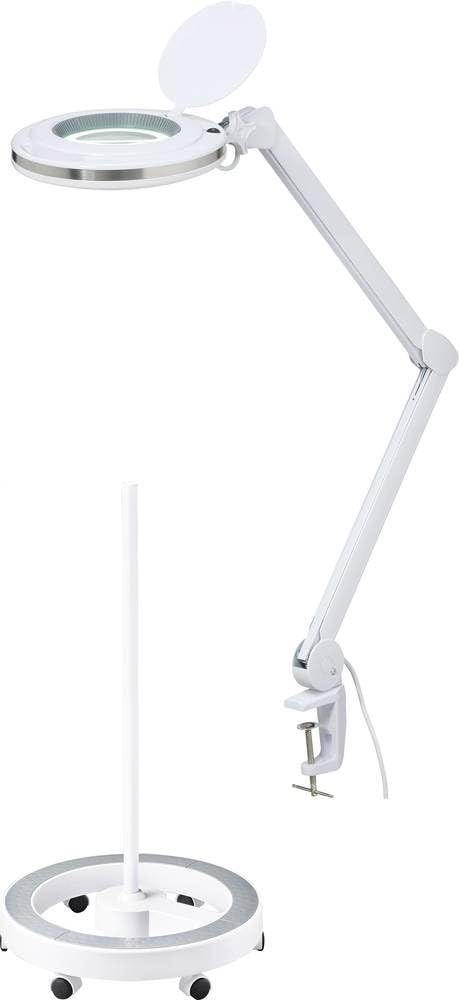
Image 1: The TOOLCRAFT LED Magnifying Lamp, showing its adjustable arm and magnifying head with integrated LEDs.
5. Operating Instructions
To operate your LED Magnifying Lamp:
- Power On/Off: Locate the power switch, usually on the lamp head or base. Press it to turn the LED light on or off.
- Adjusting Light Intensity: If your model features dimmable LEDs, use the designated controls (buttons or a dial) to adjust the brightness to your preference.
- Positioning the Lamp: Use the adjustable arm and swivel head to position the magnifying lens and light source over your work area. Ensure the lamp is stable in its desired position.
- Using the Magnifier: Place the object you wish to examine under the magnifying lens. Adjust the distance between the lens and the object for optimal focus and clarity.
6. Maintenance
Proper maintenance ensures the longevity and performance of your lamp:
- Cleaning: Disconnect the power before cleaning. Use a soft, dry cloth to wipe the lamp's exterior. For the lens, use a specialized lens cleaning cloth and solution to avoid scratches. Do not use abrasive cleaners or solvents.
- Storage: When not in use for extended periods, store the lamp in a clean, dry place, protected from dust and extreme temperatures.
- LED Replacement: The LED lights are integrated and designed for long life. They are not user-replaceable. If the LEDs fail, contact customer support.
7. Troubleshooting
Refer to the table below for common issues and their solutions:
| Problem | Possible Cause | Solution |
|---|---|---|
| Lamp does not turn on | No power supply; loose connection; faulty outlet | Check power adapter connection; ensure outlet is functional; try a different outlet. |
| Light flickers | Unstable power supply; loose connection | Ensure power adapter is securely connected; try a different power outlet. |
| Magnification is blurry | Incorrect distance to object; dirty lens | Adjust the lamp head and object distance for optimal focus; clean the lens with a soft cloth. |
8. Specifications
- Model Number: 2389201+2391157
- Brand: TOOLCRAFT
- Magnification: 3x
- Light Source: Integrated LED
- Energy Efficiency Class: F
9. Warranty and Support
Specific warranty information and detailed support contacts are not provided within this manual. Please refer to the product packaging, the official TOOLCRAFT website, or your point of purchase for warranty details and customer support options.