
s-idee E594-003
s-idee® E594-003 Compact Loader User Manual
Model: E594-003
1. Introduction
Thank you for purchasing the s-idee® E594-003 Compact Loader. This 1:14 scale remote-controlled construction vehicle is designed for realistic operation and is suitable for both indoor and outdoor use due to its optimized weight and robust chassis. This manual provides essential information for setting up, operating, and maintaining your compact loader to ensure a safe and enjoyable experience.

Figure 1: The s-idee® E594-003 Compact Loader with its bucket in a raised position, showcasing its realistic design and robust build.
Important Safety Warnings:
- This product is intended for use only under adult supervision.
- Keep small parts away from children to prevent choking hazards.
- Do not operate the vehicle near water, heat sources, or in hazardous environments.
- Ensure all batteries are correctly installed and charged before operation.
- Avoid direct impact or collisions to prevent damage to the vehicle or injury.
2. Package Contents
Please check the package carefully to ensure all items listed below are included:
- s-idee® E594-003 Compact Loader
- Remote Control (2.4 GHz)
- Rechargeable Lithium-Ion Polymer Battery (for vehicle)
- USB Charging Cable
- User Manual (this document)
- 2 x AA Batteries (for remote control)

Figure 2: All components included in the s-idee® E594-003 Compact Loader package, including the vehicle, remote control, battery, and charging cable.
3. Setup
3.1 Battery Installation
Vehicle Battery:
- Locate the battery compartment on the compact loader, typically at the rear or underside.
- Open the battery compartment cover.
- Connect the rechargeable Lithium-Ion Polymer battery (3.7V) to the vehicle's power connector (SM2P plug).
- Carefully place the battery inside the compartment and close the cover securely.
Remote Control Batteries:
- Locate the battery compartment on the back of the remote control.
- Open the battery compartment cover.
- Insert 2 AA batteries, ensuring correct polarity (+/-).
- Close the battery compartment cover securely.
3.2 Charging the Vehicle Battery
Use the provided USB charging cable to charge the vehicle's Lithium-Ion Polymer battery.
- Connect the battery to the charging cable.
- Plug the USB end of the cable into a standard USB power adapter (e.g., computer USB port, wall charger).
- The charging indicator light on the cable will typically show red during charging and turn off or change color when fully charged.
- Charging time may vary. Do not overcharge the battery.
3.3 Pairing the Remote Control
To establish a connection between the remote control and the compact loader:
- Ensure both the vehicle and remote control have fresh or fully charged batteries.
- Turn on the remote control first.
- Then, turn on the compact loader.
- The remote control and vehicle should automatically pair. A sound signal may indicate successful pairing.
- If pairing fails, turn both devices off and repeat the process.
4. Operating Instructions
4.1 Remote Control Functions
The 2.4 GHz remote control provides full proportional control for realistic operation. Familiarize yourself with the controls before operating the vehicle.
- Left Joystick: Controls forward/backward movement and steering (left/right).
- Right Joystick: Controls the loader arm (up/down) and bucket tilt (dump/scoop).
- Sound Button: Activates/deactivates realistic engine and operation sounds.
- Light Button: Turns the vehicle's lights on/off.
- Speed Button: Toggles between different speed modes (if available).
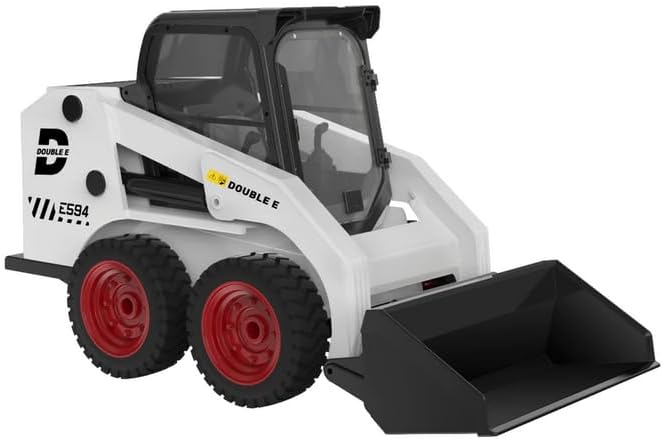
Figure 3: The s-idee® E594-003 Compact Loader with its bucket in the lowered position, ready for scooping material.
4.2 Driving the Compact Loader
- Gently push the left joystick forward to move the loader forward. Pull it backward to reverse.
- Move the left joystick left or right to steer the loader. The compact loader uses skid steering, meaning wheels on one side move differently from the other to turn.
- Practice smooth and controlled movements, especially when operating in confined spaces.
4.3 Operating the Loader Arm and Bucket
- Push the right joystick forward to raise the loader arm. Pull it backward to lower the arm.
- Move the right joystick left to tilt the bucket downwards (dumping action). Move it right to tilt the bucket upwards (scooping action).
- For optimal performance, avoid overloading the bucket. While the model is robust, excessive weight can strain the mechanisms.
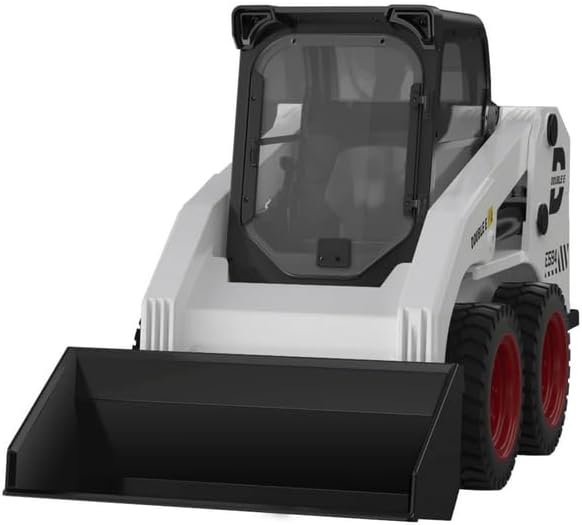
Figure 4: Front view of the compact loader, highlighting the detailed bucket and arm assembly.
5. Maintenance
- Cleaning: After use, especially outdoors, gently wipe the vehicle with a dry or slightly damp cloth to remove dirt and dust. Do not use harsh chemicals or immerse the vehicle in water.
- Storage: When not in use for extended periods, remove all batteries from both the vehicle and the remote control. Store the compact loader and its accessories in a cool, dry place, away from direct sunlight and extreme temperatures.
- Battery Care: Always fully charge the vehicle battery before storage and periodically recharge it if stored for a long time to maintain battery health.
6. Troubleshooting
| Problem | Possible Cause | Solution |
|---|---|---|
| Vehicle does not turn on. | Battery not charged or incorrectly installed. | Ensure vehicle battery is fully charged and correctly connected. Check power switch. |
| Remote control does not respond. | Remote control batteries are low or incorrectly installed. | Replace AA batteries in the remote control, ensuring correct polarity. |
| Vehicle and remote control do not pair. | Incorrect pairing sequence or interference. | Turn off both devices, then turn on the remote control first, followed by the vehicle. Ensure no strong interference sources nearby. |
| Loader arm or bucket not moving smoothly/lacks power. | Overload, low battery, or obstruction. | Reduce load in the bucket. Recharge vehicle battery. Check for any physical obstructions in the arm mechanism. |
| Vehicle moves erratically or has poor control. | Interference or need for fine-tuning. | Operate in an open area away from other 2.4 GHz devices. While the model offers proportional control, some users may find it sensitive; practice to develop fine motor control. |
7. Specifications
| Feature | Detail |
|---|---|
| Model Number | E594-003 |
| Scale | 1:14 |
| Product Dimensions (L x W x H) | 27.6 x 12.7 x 16 cm |
| Material | Plastic |
| Control Frequency | 2.4 GHz |
| Vehicle Battery Type | Lithium-Ion Polymer (3.7V) |
| Remote Control Batteries | 2 x AA batteries (included) |
| Recommended Age | 12 years and up |
8. Warranty and Support
While specific warranty details are not provided in this manual, s-idee® is committed to customer satisfaction. If you encounter any issues with your E594-003 Compact Loader or require technical assistance, please contact s-idee® customer support through their official channels or the retailer where you purchased the product.
For more information or to explore other s-idee® products, please visit the official s-idee® store on Amazon: s-idee® Store.