
1. Introduction
This manual provides detailed instructions for the installation, operation, and maintenance of your Gtrwadd Ridekingz Motorcycle Bluetooth Headset, Model JASGIFVAJKGKFU00. Designed for motorcycle riders, this headset offers clear communication, music streaming, and navigation support while ensuring durability in various riding conditions.
2. Product Features
- HD Sound Quality: Experience clear audio for calls and music.
- Noise Cancellation: Advanced technology reduces ambient noise for crystal-clear communication.
- Intercom Communication: Direct intercom with a range of up to 1000 meters (1km) for communication with a ride buddy.
- Long Battery Life: Up to 48 hours of continuous call time and 80 hours of music playback.
- IPX6 Waterproof: Designed to withstand challenging weather conditions.
- Universal Compatibility: Suitable for all helmet types.
- Bluetooth 5.2 Connectivity: Ensures stable and efficient wireless connection.
- Seamless Multitasking: Easily switch between music, calls, and navigation instructions.
- Voice Assistant Support: Activate your phone's voice assistant for hands-free control.

Figure 1: Gtrwadd Ridekingz Motorcycle Bluetooth Headset main unit.

Figure 2: Two riders utilizing the 1000m direct intercom communication feature.

Figure 3: The headset demonstrating its IPX6 waterproof capability.
3. What's in the Box
The package includes the following items:
- Host Unit (Bluetooth Headset)
- Speaker Microphone Set
- Clip Base for Helmet Mounting
- Type-C Charging Cable
- Instruction Manual
- Installation Package (includes eartips and adhesive pads)

Figure 4: Contents of the Ridekingz Motorcycle Bluetooth Headset package.
4. Setup and Installation
The Ridekingz headset features a host and back clip split design for easy installation and removal. Follow these steps to install the headset on your helmet:
- Attach Speakers: Secure the speaker pads inside your helmet's ear slots using the provided Velcro or adhesive pads. Ensure they are positioned comfortably over your ears.
- Install Microphone: Choose between the boom microphone (for open-face helmets) or the wired microphone (for full-face helmets). Attach it inside the helmet near your mouth using the adhesive.
- Route Cables: Carefully route all speaker and microphone cables underneath the helmet's padding to keep them tidy and secure.
- Mount Clip Base: Attach the clip base to the side of your helmet. This can be done by sliding it between the helmet shell and padding, or by using the adhesive mount provided.
- Connect Main Unit: Plug the speaker/microphone cable into the designated port on the main host unit.
- Attach Host Unit: Slide the main host unit onto the mounted clip base until it clicks securely into place.
Video 1: Installation guide for the Ridekingz Motorcycle Bluetooth Headset. This video demonstrates how to attach the speakers, microphone, and main unit to a helmet, ensuring a secure and functional setup for riding.
5. Operating Instructions
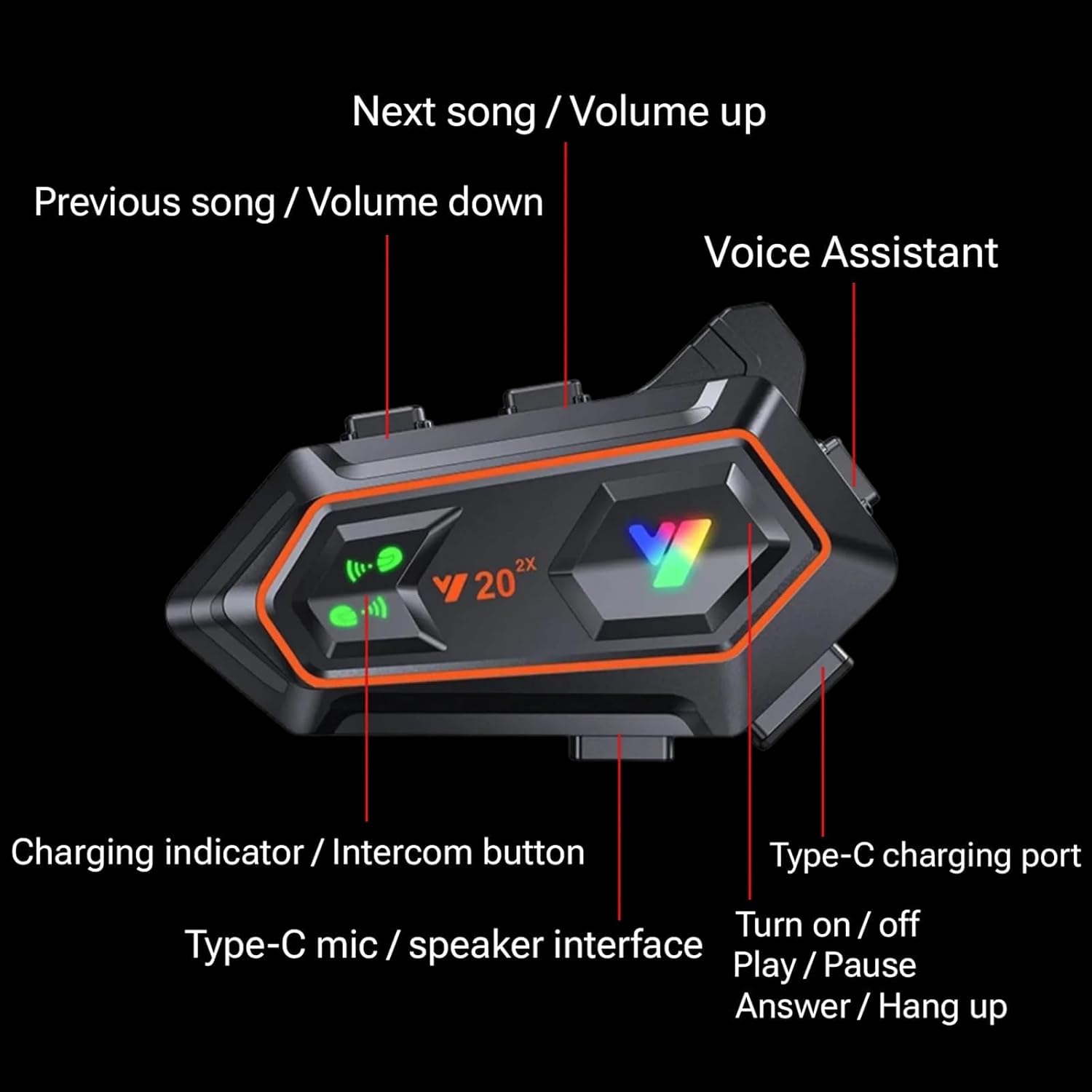
Figure 5: Overview of headset buttons and ports.
5.1. Power On/Off
- Power On: Press and hold the Power/Play/Pause button for approximately 3 seconds until you hear an audible prompt.
- Power Off: Press and hold the Power/Play/Pause button for approximately 5 seconds until the device powers down.
5.2. Bluetooth Pairing
- Ensure the headset is powered off.
- Press and hold the Power/Play/Pause button until the LED indicator flashes blue and red, indicating pairing mode.
- On your mobile device, enable Bluetooth and search for available devices.
- Select "Ridekingz" or "JASGIFVAJKGKFU00" from the list to connect.
- Once connected, the LED indicator will flash blue slowly.
5.3. Music Playback
- Play/Pause: Short press the Power/Play/Pause button.
- Next Song: Short press the "Volume Up / Next Track" button.
- Previous Song: Short press the "Volume Down / Previous Track" button.
- Volume Up: Long press the "Volume Up / Next Track" button.
- Volume Down: Long press the "Volume Down / Previous Track" button.
5.4. Call Management
- Answer Call: Short press the Power/Play/Pause button when a call comes in.
- End Call: Short press the Power/Play/Pause button during a call.
- Reject Call: Long press the Power/Play/Pause button when a call comes in.
5.5. Voice Assistant
- Activate Voice Assistant: Short press the Voice Assistant button (refer to Figure 5).
5.6. Intercom Function
- Start Intercom: Short press the Intercom button (refer to Figure 5) to initiate communication with a paired ride buddy.
- End Intercom: Short press the Intercom button again to end the intercom session.
6. Maintenance
- Cleaning: Use a soft, dry cloth to clean the headset. Avoid using harsh chemicals or abrasive materials.
- Charging: Charge the headset using the provided Type-C charging cable. Ensure the charging port is dry before connecting the cable.
- Storage: Store the headset in a cool, dry place when not in use. Avoid extreme temperatures.
7. Troubleshooting
- No Power: Ensure the headset is fully charged. Connect it to the Type-C charging cable and allow it to charge for at least 2 hours.
- Cannot Pair: Make sure the headset is in pairing mode (LED flashing blue and red). Turn off and on your phone's Bluetooth, then try searching again. Ensure no other Bluetooth devices are interfering.
- Low Volume: Adjust the volume using the headset's volume buttons and your connected device's volume controls. Ensure speakers are correctly positioned over your ears inside the helmet.
- Intercom Not Working: Ensure both headsets are powered on and within the 1000m range. Re-initiate the intercom connection.
- Voice Assistant Not Responding: Verify your phone's voice assistant is enabled and configured correctly. Ensure the headset is properly paired.
8. Specifications
| Feature | Specification |
|---|---|
| Model Name | Motorcycle Bluetooth Headset |
| Item Model Number | JASGIFVAJKGKFU00 |
| Brand | Gtrwadd |
| Connectivity Technology | Wireless (Bluetooth) |
| Bluetooth Version | 5.2 |
| Bluetooth Range | Up to 100 meters (1E+2 Meters) |
| Intercom Range | Up to 1000 meters (1km) |
| Water Resistance Level | IPX6 Waterproof |
| Noise Control | Active Noise Cancellation |
| Battery Life (Continuous Call) | 48 Hours |
| Battery Life (Music Playback) | 80 Hours |
| Charging Time | 2 Hours (as per video, product description states 48 hours which is likely an error) |
| Material | Plastic |
| Ear Placement | In Ear |
| Form Factor | In Ear |
9. Warranty and Support
For warranty information and customer support, please refer to the contact details provided with your purchase or visit the official Gtrwadd website. Keep your proof of purchase for any warranty claims.