
BLACK+DECKER BP01PT
BLACK+DECKER 3-in-1 Personal Portable Air Conditioner User Manual
Model: BP01PT
Introduction
Thank you for choosing the BLACK+DECKER 3-in-1 Personal Portable Air Conditioner. This versatile unit is designed to provide efficient cooling, dehumidification, and fan functions for your personal space. Please read this manual thoroughly before operation to ensure proper use, maintenance, and safety.
This compact unit is ideal for personal cooling in small areas, offering a convenient solution without requiring window installation. Its portability allows for easy movement between different locations.
Safety Information
Always follow basic safety precautions when using electrical appliances to reduce the risk of fire, electric shock, and injury to persons.
- Do not operate the unit with a damaged cord or plug.
- Do not block air openings.
- Do not insert objects into the unit.
- Ensure the unit is placed on a stable, level surface.
- Unplug the unit before cleaning or servicing.
- This appliance uses R-290 refrigerant. Refer to the warning label on the unit for specific handling instructions.
Note: This unit is designed for personal space cooling and is not intended for cooling entire rooms or large spaces.
Product Features
- 3-in-1 Functionality: Air Conditioner, Dehumidifier, and Fan modes.
- Personal Cooling: Compact design suitable for tabletops or standalone floor use.
- Adjustable Speeds: 2 cooling speeds (High/Low) and 3 fan speeds (High/Medium/Low).
- Auto Air Swing: Vertical auto air swing for improved air distribution.
- Electronic Control Panel: Intuitive controls with LED indicator lights.
- Dual Exhaust Hoses: Efficiently directs warm air away from your personal space without needing a window kit.
- Convenience Features: Includes a shut-off timer and casters for easy mobility.
- Water Full Alarm: Alerts when the water tank needs emptying during dehumidification.
Setup and Installation
The BLACK+DECKER Personal Portable Air Conditioner is designed for easy setup. No complex window installation is required.
- Unpacking: Carefully remove the unit and all accessories from the packaging. Ensure all components listed in the "Included Components" section are present.
- Placement: Place the unit on a stable, level surface. Ensure there is adequate space around the unit for proper airflow. The compact size allows for placement on secure tabletops or directly on the floor.
- Exhaust Hoses: Attach the dual exhaust hoses to the designated ports on the unit. Direct the other ends of the hoses away from your personal cooling area to expel warm air. These hoses do not require connection to a window.
- Power Connection: Plug the power cord into a standard 115 Volt (AC) electrical outlet.

Image: The portable air conditioner shown with its dual exhaust hoses connected, illustrating how warm air is directed away from the unit.

Image: A visual representation of the unit's compact dimensions and the integrated casters for easy movement.
Operating Instructions
The unit features an electronic control panel with LED indicator lights for easy operation.
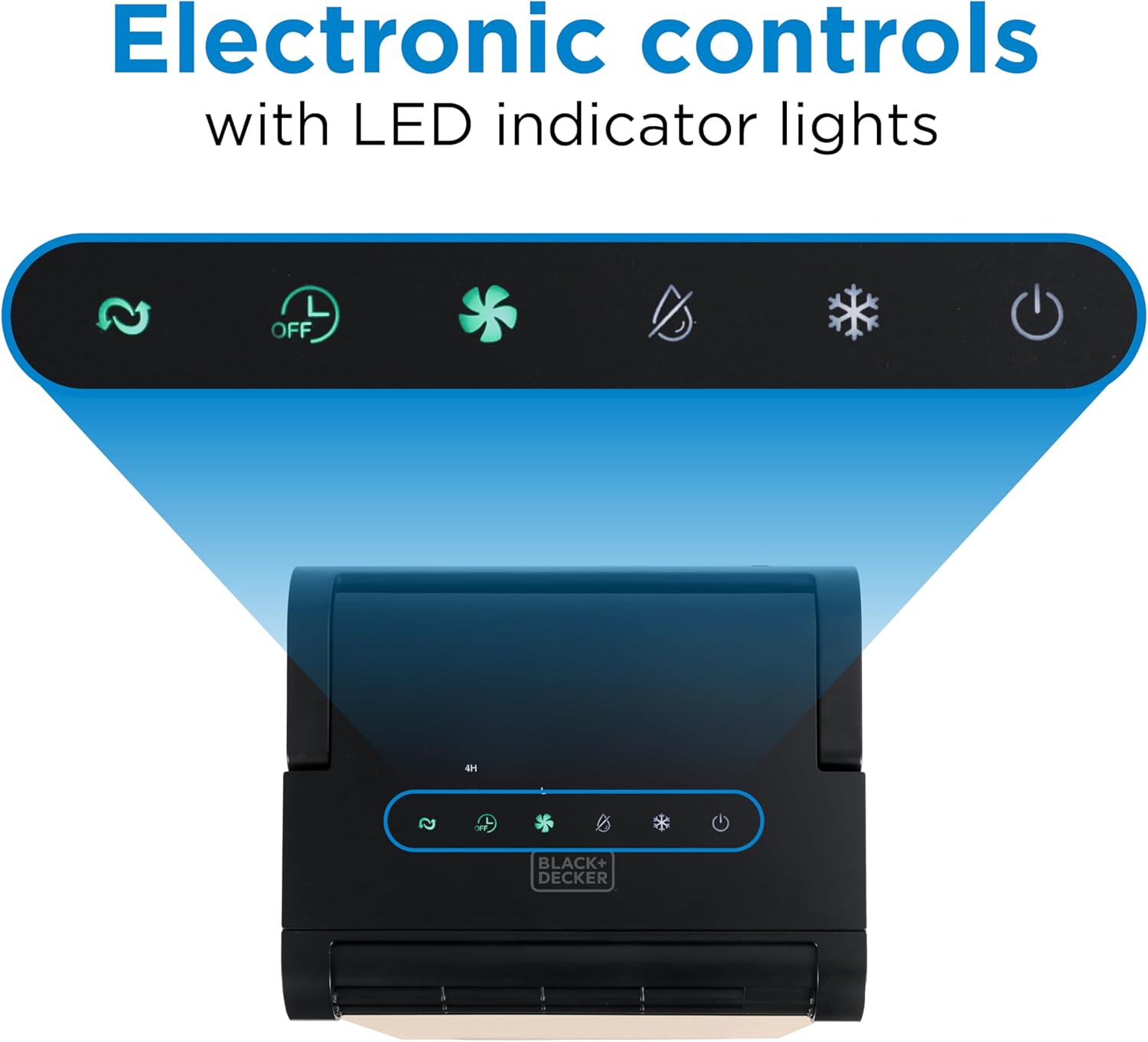
Image: The electronic control panel displaying various function icons and LED indicators.
Control Panel Functions:
- Power Button: Press to turn the unit ON or OFF.
- Mode Button: Cycle through Air Conditioning, Dehumidifier, and Fan modes.
- Fan Speed Button: Adjust fan speed (High, Medium, Low) in Fan mode. In AC mode, select between High and Low cooling speeds.
- Timer Button: Set the auto shut-off timer.
- Auto Air Swing: The unit features automatic vertical air swing for even distribution of air.
Operating Modes:
- Air Conditioning Mode: Select this mode for cooling. Choose between High and Low cooling speeds. The unit will expel warm air through the exhaust hoses.
- Dehumidifier Mode: Use this mode to reduce humidity. The dehumidifier operates on a Low setting. The unit will collect moisture in an internal reservoir, triggering a "Water Full" alarm when full.
- Fan Mode: Circulate air without cooling or dehumidifying. Select from High, Medium, or Low fan speeds.

Image: The portable AC actively cooling, demonstrating its airflow in a personal space.

Image: The unit providing personal cooling in a workspace environment.
Maintenance
Regular maintenance ensures optimal performance and longevity of your unit.
- Cleaning the Exterior: Wipe the unit's exterior with a soft, damp cloth. Do not use harsh chemicals or abrasive cleaners.
- Water Tank Emptying: In Dehumidifier mode, the unit collects water. When the "Water Full" alarm sounds, carefully remove and empty the water tank. Reinsert the tank securely before resuming operation.
- Filter Cleaning: Refer to the full user manual for instructions on cleaning or replacing the air filter. A clean filter ensures efficient operation.

Image: The unit's side panel indicating the water collection area and alarm features.
Troubleshooting
| Problem | Possible Cause | Solution |
|---|---|---|
| Unit does not turn on. | No power, power cord not plugged in, circuit breaker tripped. | Check power connection, ensure outlet is functional, reset circuit breaker. |
| Unit not cooling effectively. | Air filter dirty, exhaust hoses blocked or improperly directed, room too large for unit. | Clean air filter, ensure exhaust hoses are clear and directed away, confirm unit is used in a personal space. |
| "Water Full" alarm is on. | Water tank is full (in Dehumidifier mode). | Empty the water tank and reinsert it securely. |
| Unit is noisy. | Normal operating noise, unit not on a level surface. | Ensure unit is on a stable, level surface. Some operating noise is normal. |
Specifications
| Feature | Detail |
|---|---|
| Model Number | BP01PT |
| Product Dimensions (D x W x H) | 8.23" x 9.84" x 18.98" |
| Item Weight | 28.4 pounds |
| Cooling Power | 1000 BTU (ASHRAE 128) |
| Voltage | 115 Volts (AC) |
| Noise Level | 48 dB |
| Refrigerant | R-290 |
| Included Components | Portable Air Conditioner, User Manual |

Image: The Energy Guide label providing estimated energy consumption details for the unit.
Warranty and Support
This BLACK+DECKER product comes with a 1 Year Manufacturer Warranty. Please retain your proof of purchase for warranty claims.
For technical support, troubleshooting assistance, or warranty inquiries, please contact BLACK+DECKER customer service. Refer to the contact information provided in the full user manual included with your product or visit the official BLACK+DECKER website.
Manufacturer: W APPLIANCE COMPANY LLC
Related documentsBP01PT


Ask a question about this manual
Ask about setup, troubleshooting, compatibility, parts, safety, or missing instructions. Manuals+ will review the question and use this page’s manual context to help answer it.