
1. Introduction and Overview
The Beedove Bluetooth 5.0 3-in-1 Adapter is a versatile device designed to add Bluetooth functionality to various audio systems. It operates as a Bluetooth Transmitter (TX), Bluetooth Receiver (RX), and FM Transmitter (FM), offering wireless audio solutions for home stereos, car audio systems, TVs, PCs, headphones, and speakers. This adapter supports multiple interface types including AUX, RCA, optical, and coaxial, ensuring broad compatibility with existing equipment. Featuring Bluetooth 5.0 + EDR technology, it provides stable and low-latency audio transmission within a 10-meter range.

Image 1.1: Beedove Bluetooth 3-in-1 Adapter with included accessories and remote control.

Image 1.2: The Bluetooth Audio Adapter enabling wireless music streaming to an old wired stereo system.
2. Package Contents
Please verify that all items are present in the package:
- Beedove Bluetooth Adapter (1 unit)
- AUX Audio Cable (1 unit)
- RCA Cable (1 unit)
- Charging Cable (1 unit)
- User Manual (1 unit)
3. Product Features
- 3-in-1 Functionality: Operates as a Bluetooth Transmitter (TX), Bluetooth Receiver (RX), and FM Transmitter (FM).
- Bluetooth 5.0 + EDR: Ensures stable, low-latency audio transmission up to 10 meters.
- Multiple Audio Interfaces: Supports AUX, RCA, optical, and coaxial input/output.
- NFC Pairing: Simplifies connection for NFC-compatible devices with a single tap.
- LED Display Screen: Provides clear indication of current mode and status.
- Built-in Microphone: Enables hands-free calling when connected to a mobile phone.
- Integrated 500 mAh Battery: Offers 8-10 hours of usage and charges in approximately 1 hour. Supports charging while in use.
- Memory Function: Automatically restores the previous mode, signal, or song after power interruption.
- Media Playback: Supports playback of stored songs from TF cards and USB drives.
- Remote Control: Provides convenient control over adapter functions from a distance.
- Compact and Portable Design: Easy to carry and integrate into various setups.

Image 3.1: Bluetooth 5.0 technology provides faster speeds and wider coverage.

Image 3.2: Intelligent compatibility with a variety of devices in both Transmitter (TX) and Receiver (RX) modes.

Image 3.3: The adapter features an intelligent memory function and voice prompts.

Image 3.4: The adapter provides up to 10 hours of battery life.

Image 3.5: Enjoy barrier-free transmission up to 10 meters.

Image 3.6: The adapter's compact and portable design makes it easy to carry.
4. Setup
Before initial use, ensure the adapter is fully charged using the provided charging cable. Connect the charging cable to the DC 5V port on the adapter and a USB power source.
4.1 Connecting Audio Cables
Identify the appropriate audio input/output ports on your source device (e.g., TV, PC, phone) and your target audio system (e.g., headphones, speakers, car stereo). The adapter supports:
- AUX (3.5mm Jack): For standard audio connections.
- RCA: For traditional stereo audio connections (red and white connectors).
- Optical (SPDIF IN): For digital audio input.
- Coaxial (COAXIAL IN): For digital audio input.
Use the included AUX or RCA cables, or your own optical/coaxial cables, to connect the adapter to your devices based on the desired mode (TX, RX, or FM).
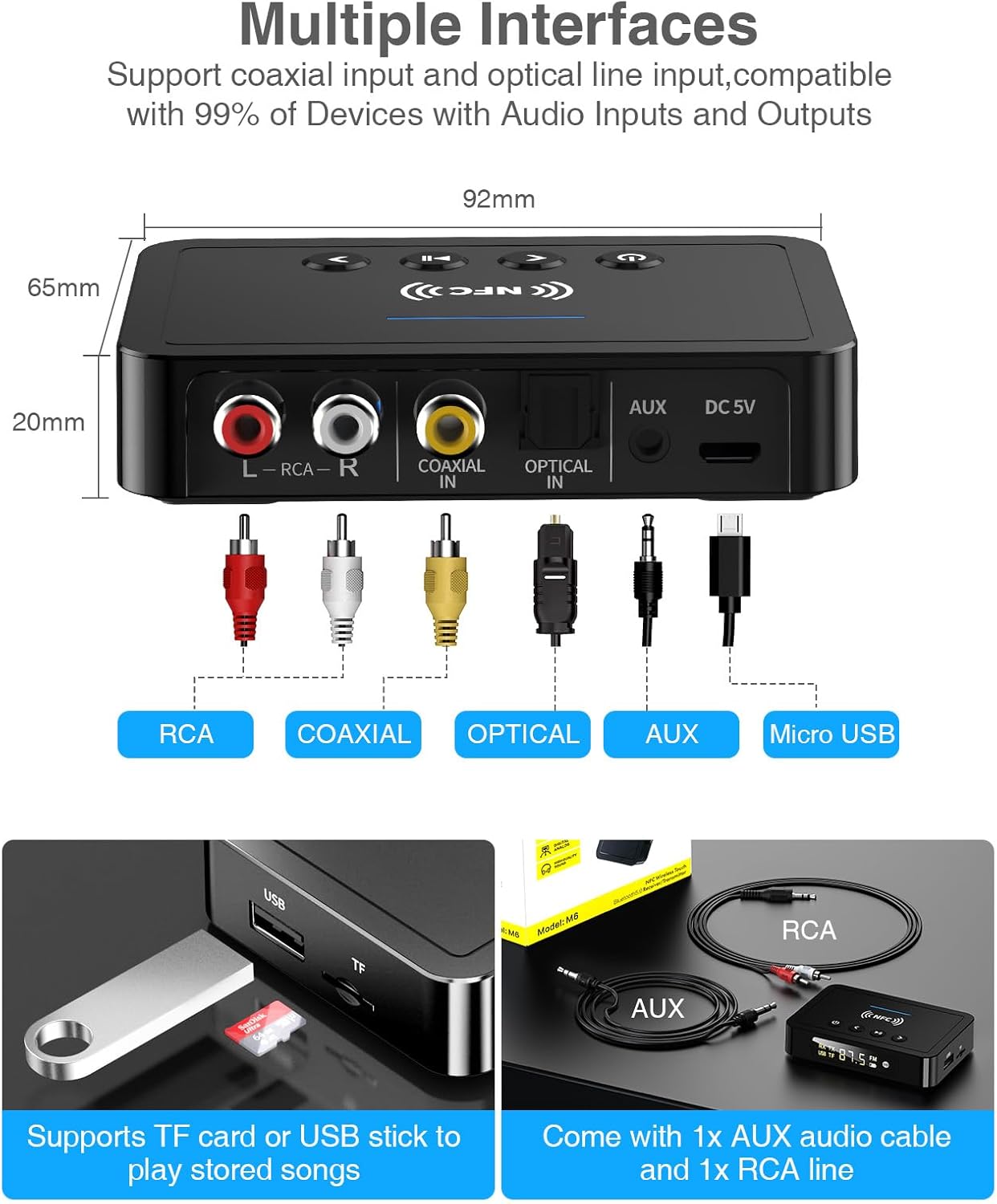
Image 4.1: The adapter features multiple interfaces for broad compatibility.
4.2 Powering On and Mode Selection
- Press and hold the Power button (U) on the adapter or remote control to turn it on.
- The LED display will illuminate. Press the 'MODE' button on the remote or the Power button on the device (short press) to cycle through TX (Transmitter), RX (Receiver), and FM (FM Transmitter) modes.
4.3 NFC Pairing (for RX Mode)
For NFC-compatible devices (e.g., smartphones), simply bring the device close to the NFC area on the adapter. A pop-up window will appear on your device to confirm the connection, eliminating the need for manual Bluetooth pairing.

Image 4.2: Connecting your phone to the car via the adapter for hands-free calls and navigation.
5. Operating Modes
5.1 Transmitter Mode (TX)
In TX mode, the adapter transmits audio from a non-Bluetooth source (e.g., TV, PC) to Bluetooth-enabled receiving devices (e.g., Bluetooth headphones, Bluetooth speakers).
- Connect the adapter's input (AUX, RCA, Optical, or Coaxial) to your audio source (e.g., TV audio output).
- Set the adapter to TX mode. The LED display will show 'TX'.
- Place your Bluetooth receiving device (headphones/speakers) in pairing mode.
- The adapter will automatically search for and connect to nearby Bluetooth devices. Once connected, audio from your source will be streamed wirelessly.
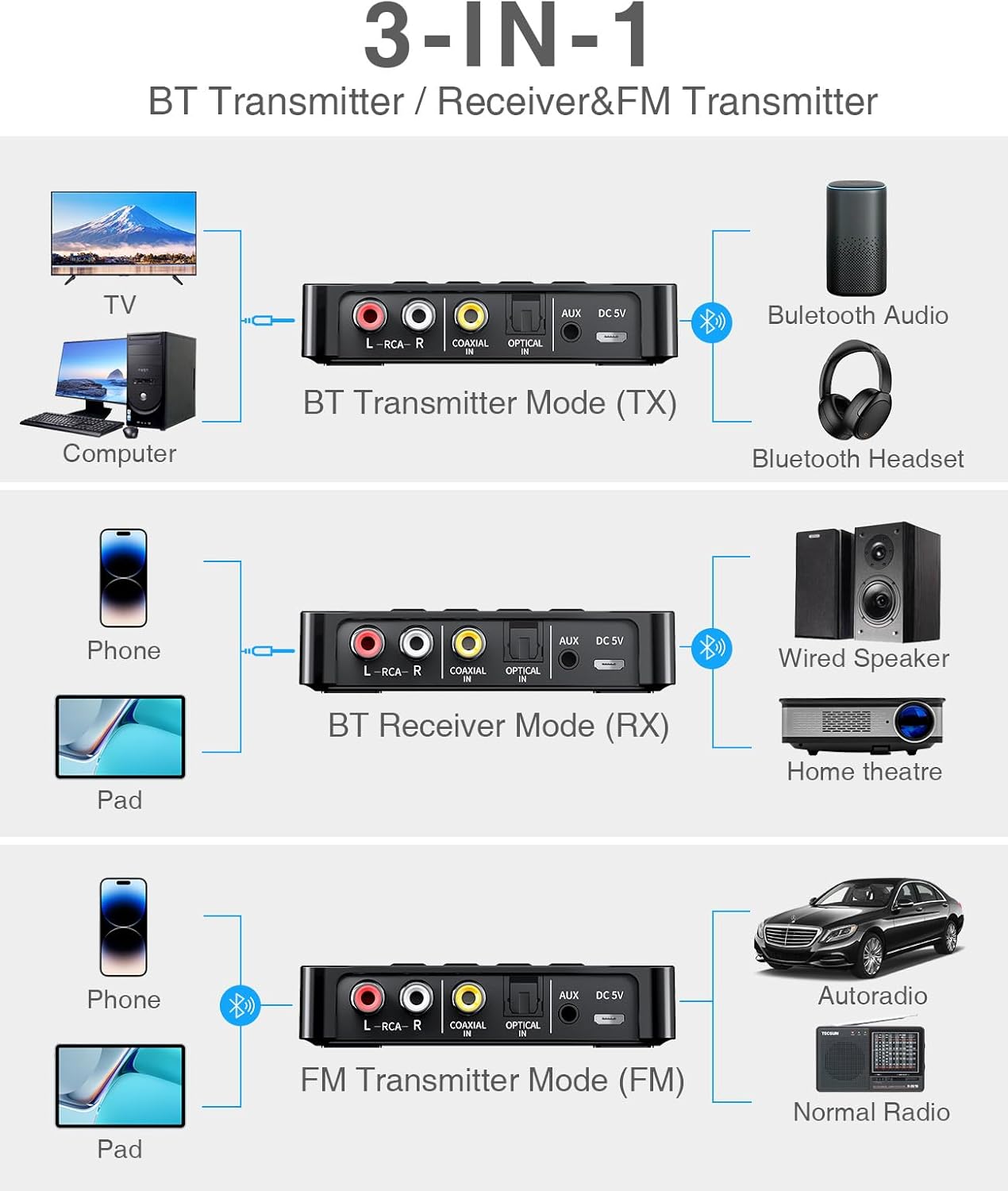
Image 5.1: The adapter's three operating modes: Transmitter (TX), Receiver (RX), and FM Transmitter (FM).

Image 5.2: Using the adapter to connect to wired speakers or for private TV listening with headphones.

Image 5.3: Examples of TX mode (watching TV with headphones) and RX mode (streaming music to a smart speaker).
5.2 Receiver Mode (RX)
In RX mode, the adapter receives Bluetooth audio from a source device (e.g., smartphone, tablet) and outputs it to a non-Bluetooth audio system (e.g., wired speakers, home theater system).
- Connect the adapter's output (AUX or RCA) to your wired audio system's input.
- Set the adapter to RX mode. The LED display will show 'RX'.
- Enable Bluetooth on your smartphone or tablet and search for 'Beedove GH031-KY-EU' (or similar name). Select it to pair.
- Once connected, audio from your smartphone/tablet will play through your wired audio system.
5.3 FM Transmitter Mode (FM)
In FM mode, the adapter transmits audio from a source device (e.g., smartphone, tablet) as an FM radio signal, which can be picked up by an FM radio (e.g., car radio, portable radio).
- Connect your smartphone/tablet to the adapter via Bluetooth (as in RX mode).
- Set the adapter to FM mode. The LED display will show 'FM' and a frequency.
- Tune your FM radio to the same frequency displayed on the adapter.
- Audio from your smartphone/tablet will now play through your FM radio. Adjust the frequency on the adapter if you encounter interference.
5.4 TF Card / USB Disk Playback
The adapter supports playing audio files directly from a TF card or USB disk.
- Insert a TF card into the 'TF' slot or a USB disk into the 'USB' port.
- The adapter will automatically detect the media and begin playback.
- Use the control buttons or remote to navigate tracks and adjust volume.
6. Controls and Display
The adapter features both on-device buttons and a remote control for convenient operation.
6.1 On-Device Buttons

Image 6.1: Multi-function button operation instructions.
- Power Button (U): Long press to power on/off. Short press to switch modes (TX/RX/FM) or switch signal source.
- Previous Track / Volume Down (<): Short press for previous song. Long press for volume down. In FM mode, short press to adjust FM frequency down.
- Next Track / Volume Up (>): Short press for next song. Long press for volume up. In FM mode, short press to adjust FM frequency up.
- Play/Pause / Answer/Hang Up (||): Short press to play/pause music. Short press to answer/hang up calls. Long press to reject calls.
6.2 Remote Control
The included infrared remote control provides full functionality from a distance.

Image 6.2: The adapter features an LED display, NFC connection, and a convenient remote control.

Image 6.3: The infrared remote control allows for convenient operation from a distance.
6.3 LED Display Screen

Image 6.4: The LED display screen clearly indicates the current operating mode (RX, TX, FM) and other status information.
The LED display provides visual feedback on the current operating mode (TX, RX, FM), Bluetooth connection status, battery level, and FM frequency. This allows for clear understanding of the device's status.
7. Maintenance
- Cleaning: Use a soft, dry cloth to clean the device. Avoid liquid cleaners or abrasive materials.
- Storage: Store the adapter in a cool, dry place away from direct sunlight and extreme temperatures.
- Battery Care: For optimal battery life, avoid fully discharging the battery frequently. Charge the device regularly, even if not in use for extended periods.
- Cable Management: Ensure cables are not bent sharply or tangled to prevent damage.
8. Troubleshooting
If you encounter issues with your Beedove Bluetooth Adapter, refer to the following common problems and solutions:
| Problem | Possible Cause | Solution |
|---|---|---|
| No sound or low volume | Incorrect mode selected; volume too low; incorrect cable connection; incompatible audio format. | Ensure the correct mode (TX/RX/FM) is selected. Increase volume on both the adapter and connected devices. Verify all audio cables are securely connected to the correct input/output ports. Check if the audio format is supported. |
| Cannot pair with Bluetooth device | Adapter not in pairing mode; device too far; interference; previously paired device connected. | Ensure the adapter is in the correct mode (TX for transmitting, RX for receiving) and in pairing state. Keep devices within 10 meters. Turn off other Bluetooth devices to reduce interference. Disconnect from any previously paired devices. Try NFC pairing for RX mode if supported. |
| Remote control not working | Battery depleted; line of sight blocked; remote not pointed at adapter. | Replace the remote control battery. Ensure there is a clear line of sight between the remote and the adapter's infrared receiver. Point the remote directly at the adapter. |
| FM transmission static or poor quality | Interference from other FM stations; weak signal. | Try a different FM frequency on the adapter and tune your radio to match. Ensure the adapter is placed in an optimal position for signal transmission. |
| Device not charging or holding charge | Faulty charging cable/adapter; battery issue. | Try a different USB charging cable and power adapter. If the issue persists, contact customer support. |
9. Specifications
| Feature | Detail |
|---|---|
| Model Number | GH031-KY-EU |
| Brand | Beedove |
| Color | Black |
| Connectivity Technology | Bluetooth 5.0 + EDR |
| Wireless Communication Standard | Bluetooth |
| Special Features | Hands-free calling, Built-in microphone, NFC, LED display, Remote control, TF/USB playback |
| Compatible Devices | Headphones, Speakers, Laptops, Smartphones, Car stereo systems, Home stereo systems, Televisions |
| Audio Interfaces | AUX (3.5mm), RCA, Optical (SPDIF IN), Coaxial (COAXIAL IN) |
| Power Source | Battery Powered (Lithium-ion) |
| Battery Capacity | 500 mAh |
| Usage Time | 8-10 hours |
| Charging Time | Approximately 1 hour |
| Product Dimensions | 12L x 12W x 3.5H centimeters |
10. Safety Information
- Be aware of potential interference with other wireless devices.
- Use and store batteries in accordance with local regulations and recommendations.
- Do not expose the device to extreme temperatures, direct sunlight, or moisture.
- Do not attempt to disassemble or modify the device, as this may void the warranty and cause damage.
- Keep out of reach of children.
11. Warranty and Support
The Beedove Bluetooth Adapter comes with a 2-year manufacturer's warranty.
If you have any questions, require technical assistance, or experience issues with your product, please contact Beedove customer support through your Amazon message center. Please provide your order number and a detailed description of the issue for prompt assistance.