
1. Introduction
Thank you for choosing the WNH Smart Watch. This device is designed to enhance your daily life by providing comprehensive health monitoring, fitness tracking, and smart communication features. Please read this manual carefully to understand how to properly set up and operate your new smart watch.

Image: The WNH Smart Watch in black, showcasing its large display with time, date, activity metrics, and examples of its Bluetooth calling interface, including a dial pad and an incoming call screen.
2. What's in the Box
- WNH Smart Watch (IDW25-Pink)
- Watch Band
- Charging Cable
3. Setup Guide
3.1 Charging the Device
Before first use, fully charge your smart watch. Connect the charging cable to the watch's charging port and a USB power source. A full charge takes approximately 2.5 hours. The watch features a 300mAh battery, providing up to 14 days of battery life in standard mode and 7 days under heavy usage.

Image: A close-up of the WNH Smart Watch, with the text '14 Days' prominently displayed, illustrating its extended battery life capability.
3.2 App Installation and Pairing
- Download the companion app: Search for the official WNH app on your smartphone's app store. The watch is compatible with Android 6.0+ and iOS 9.0+ devices.
- Enable Bluetooth: Ensure Bluetooth is enabled on your smartphone.
- Open the app and follow the on-screen instructions to pair your watch. The watch utilizes Bluetooth 5.3 for stable connectivity.
4. Operating Instructions
4.1 Basic Navigation
The WNH Smart Watch features a 1.83-inch HD touchscreen display. Swipe left, right, up, or down to navigate through menus and access various functions. Tap to select an option. The side button typically serves as a home or back button.

Image: A close-up of the WNH Smart Watch's large HD screen, showing a vibrant watch face with heart rate, calorie count, and date, highlighting its clear visibility and detailed display.
4.2 Bluetooth Calling
With Bluetooth 5.3, the watch allows for clear calls directly from your wrist. It is equipped with 60dB loudspeakers and noise-canceling microphones. You can answer, make, and reject calls directly on the watch.

Image: The WNH Smart Watch screen showing an incoming call, with icons for Facebook, SMS, and Gmail floating around it, indicating its notification capabilities.
4.3 Notifications
Receive real-time notifications for emails, texts, and app alerts directly on your watch, keeping you informed without needing to check your phone constantly.
4.4 Customizable Watch Faces
Personalize your watch with over 120 cloud-based watch faces available through the app. You can also use your own photos to create unique watch faces that match your style or mood.
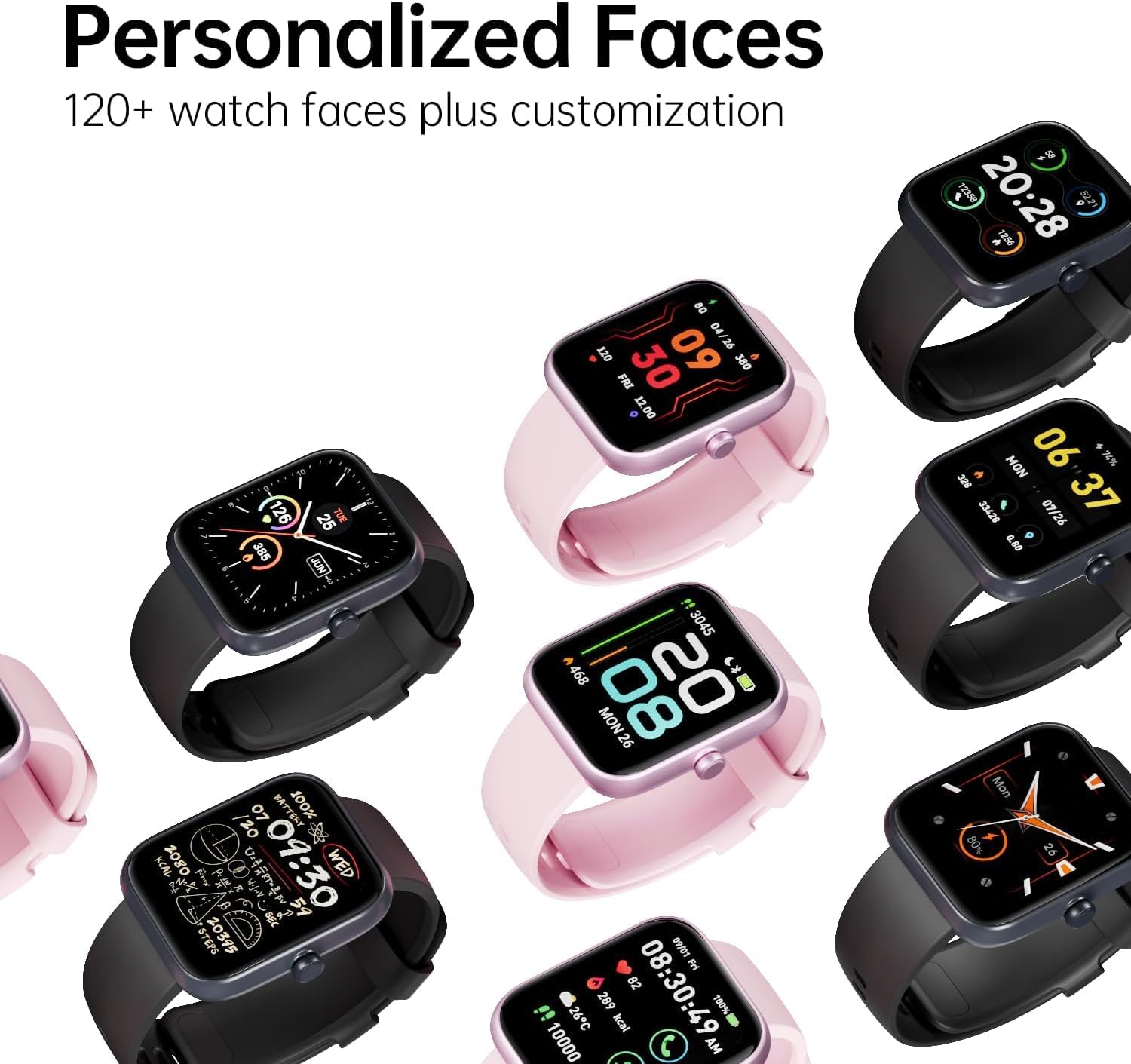
Image: A collection of WNH Smart Watches in both black and pink, each displaying a different personalized watch face, demonstrating the wide range of customization options available.
5. Health Monitoring
The WNH Smart Watch provides continuous health monitoring features. Note: This device is for non-medical use.
- Heart Rate Monitoring: Track your heart rate throughout the day.
- Blood Oxygen (SpO2) Monitoring: Measure your blood oxygen levels.
- Stress Monitoring: Monitor your stress levels.
- Sleep Tracking: Analyze your sleep patterns, including deep and light sleep.
- Menstrual Cycle Tracking: For female users, track and predict menstrual cycles.
The watch integrates state-of-the-art heart rate chips and 3D sensors with sophisticated algorithms for accurate readings across all skin tones.

Image: A visual representation of the WNH Smart Watch's health monitoring capabilities, showing a human figure with overlaid data for heart rate (BPM), SpO2 percentage, stress level, and hours of sleep.
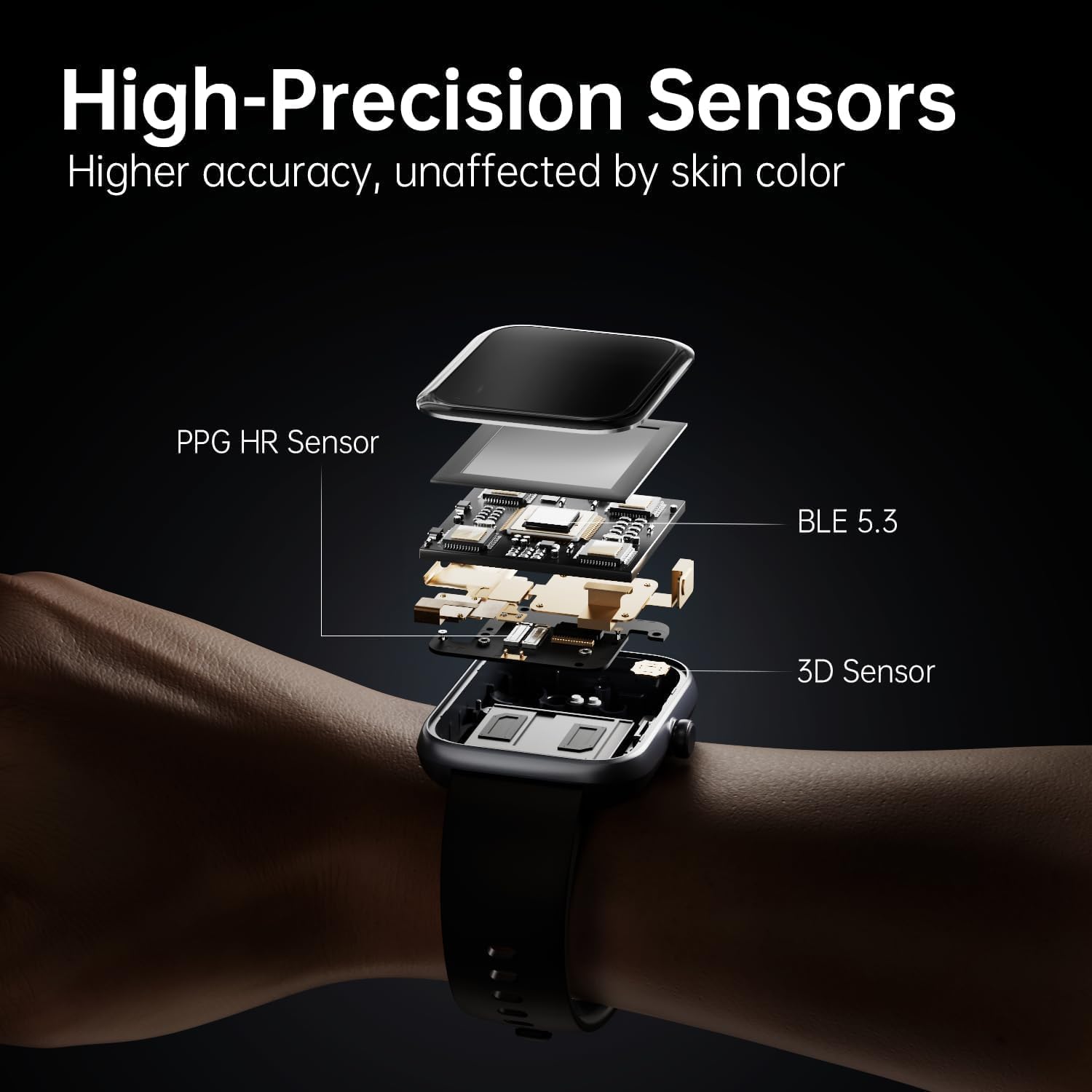
Image: An exploded diagram illustrating the internal components of the WNH Smart Watch, specifically highlighting the PPG HR Sensor, BLE 5.3 module, and 3D Sensor, emphasizing its high-precision tracking technology.
6. Fitness Tracking
Track your workouts and achieve your fitness goals with ease. The watch accurately recognizes over 120 different exercises, capturing data such as distance, speed, and calories burned. It also features built-in GPS for outdoor activity tracking.
- 120+ Workout Modes: Select the appropriate mode for accurate tracking.
- Step Count: Monitor your daily steps.
- Distance & Speed: Track your movement metrics.
- Calorie Burn: Estimate calories expended during activities.

Image: Three athletic men in various poses, one holding a basketball, symbolizing the watch's dynamic fitness tracking and its ability to recognize over 120 workout modes.
7. Durability
The WNH Smart Watch is IP68-rated, making it resilient against water, dust, and sweat. This ensures reliable tracking and performance in various conditions, whether you're working out or caught in the rain.

Image: A swimmer wearing the WNH Smart Watch, with water splashing around, illustrating the device's IP68 water resistance and suitability for aquatic activities.
8. Specifications
| Feature | Detail |
|---|---|
| Model Number | IDW25-Pink |
| Display Size | 1.83 Inches |
| Battery Capacity | 300 mAh |
| Battery Life (Standard) | Up to 14 Days |
| Battery Life (Heavy Usage) | Up to 7 Days |
| Charging Time | Approx. 2.5 Hours |
| Connectivity | Bluetooth 5.3 |
| Compatibility | Android 6.0+, iOS 9.0+ |
| Water Resistance | IP68 |
| Weight | 0.634 ounces |
| GPS | Built-in GPS |
9. Troubleshooting
9.1 Watch Not Turning On
- Ensure the watch is fully charged. Connect it to the charging cable and a power source for at least 30 minutes.
- Press and hold the side button for 5-10 seconds to attempt a forced restart.
9.2 Unable to Pair with Phone
- Make sure Bluetooth is enabled on your phone and the watch is within range.
- Restart both your phone and the watch.
- Ensure the companion app is installed and updated to the latest version.
- Forget the device in your phone's Bluetooth settings and try pairing again through the app.
9.3 Inaccurate Health Data
- Ensure the watch is worn snugly on your wrist, about one finger's width above the wrist bone.
- Keep the sensor area clean and free from debris.
- Note that environmental factors and individual physiology can affect readings. Remember, this device is for non-medical use.
10. Warranty and Support
WNH offers lifetime after-sales service for our valued customers. For any assistance, technical support, or inquiries, please reach out to us via Amazon messages or refer to the contact information provided in the original product packaging.