
Introduction
The OUPARY 60% Wired RGB Gaming Mechanical Keyboard is a compact, 61-key peripheral designed for efficient operation and gaming. It features mechanical red switches for a linear and smooth key feel, vibrant RGB backlighting with customizable effects, and a full anti-ghosting mechanism to ensure accurate keypress registration. The keyboard is equipped with a detachable USB-C cable for enhanced portability and convenience.
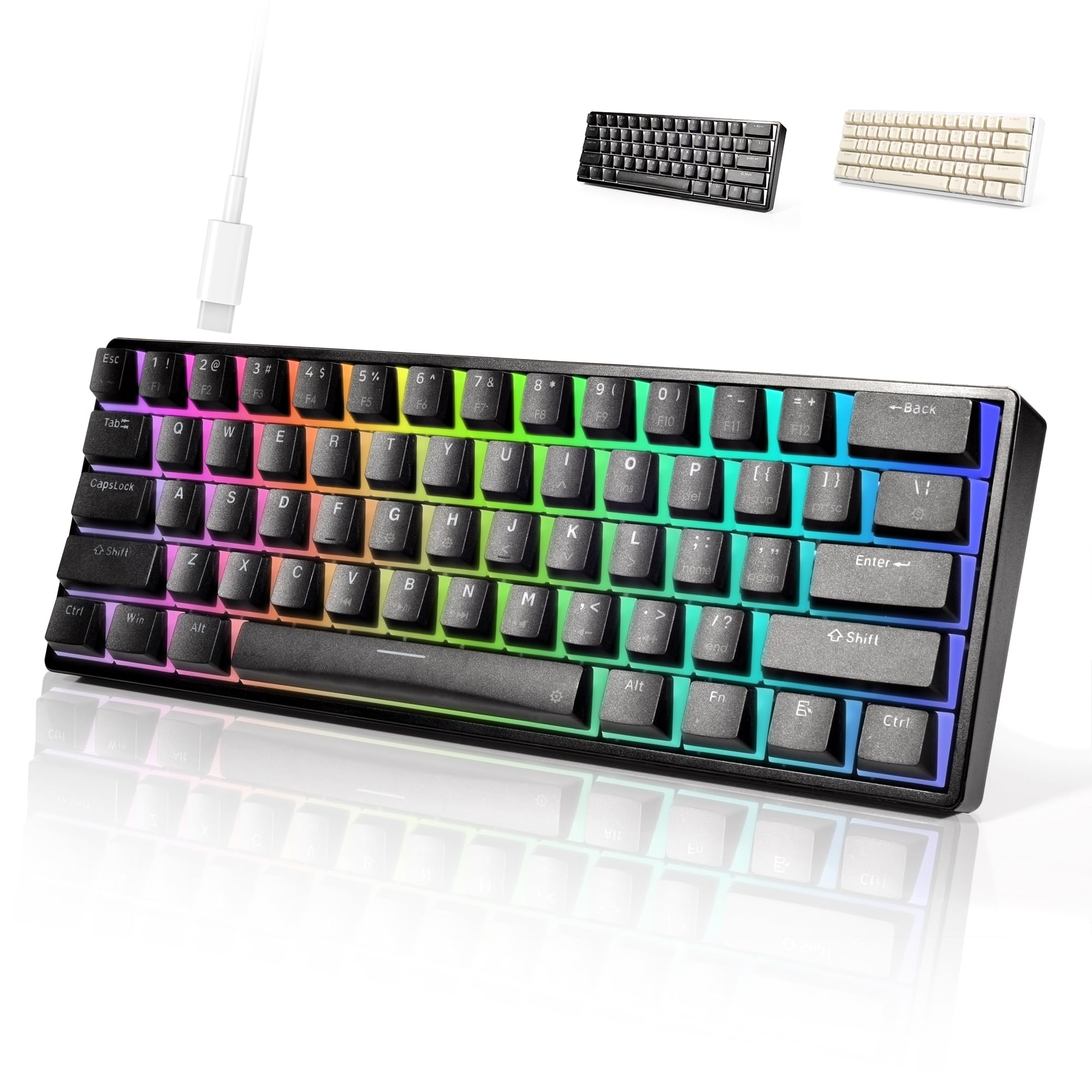
Image: The OUPARY 60% Wired RGB Gaming Mechanical Keyboard in black, positioned on a desk setup with a computer monitor and a digital clock.
Setup
Package Contents
- OUPARY 60% Wired RGB Gaming Mechanical Keyboard
- USB-C Cable
Connecting the Keyboard
- Locate the USB-C port on the back or side of the keyboard.
- Insert one end of the provided USB-C cable into the keyboard's USB-C port.
- Connect the other end of the USB-C cable to an available USB port on your computer.
- The keyboard will be automatically recognized by your operating system and ready for use.

Image: A detailed view of the keyboard's USB-C port and the detachable USB-C cable, illustrating the connection point.
Operation
Basic Key Functions
This 60% keyboard features 61 keys, omitting the dedicated number pad, function row, navigation cluster, and arrow keys found on full-size keyboards. Access to these functions is typically achieved through combinations with the Fn key.
RGB Lighting Control
The keyboard features vibrant RGB backlighting with multiple lighting effects. You can customize the colors, speed, and brightness directly using specific shortcut keys. Refer to the keycap legends for specific Fn key combinations to cycle through modes, adjust brightness, and change colors.

Image: The OUPARY 60% Wired RGB Gaming Mechanical Keyboard illuminated with a spectrum of RGB colors across its keys.
Mechanical Red Switches
The keyboard is equipped with mechanical red switches. These switches are characterized by their linear travel and smooth actuation, requiring minimal force to press. This design is preferred by users who value rapid response and a consistent keypress feel, making them suitable for both gaming and typing.

Image: A close-up shot revealing the red mechanical switches underneath the keycaps, highlighting their design.
Anti-Ghosting
The keyboard incorporates a full anti-ghosting design. This feature ensures that every keypress is registered accurately, even when multiple keys are pressed simultaneously. This is particularly beneficial during fast-paced gaming or high-speed typing, preventing missed inputs and ensuring a reliable experience.
Maintenance
Cleaning
- Disconnect the keyboard from your computer before cleaning.
- Use a soft, dry cloth to wipe down the surface of the keyboard.
- For dust and debris between keys, use compressed air.
- Avoid using harsh chemicals or abrasive materials, as these can damage the finish or keycaps.
Storage
- Store the keyboard in a cool, dry place away from direct sunlight and extreme temperatures.
- If storing for an extended period, consider using the original packaging or a protective cover to prevent dust accumulation.
Troubleshooting
Keyboard Not Responding
- Ensure the USB-C cable is securely connected to both the keyboard and your computer.
- Try connecting the keyboard to a different USB port on your computer.
- Test the keyboard on another computer to determine if the issue is with the keyboard or the computer.
- Restart your computer.
RGB Lights Not Working
- Check if the lighting is turned off or set to the lowest brightness level using the keyboard's shortcut keys.
- Ensure the keyboard is properly connected to your computer.
- If the issue persists, try disconnecting and reconnecting the keyboard.
Key Input Issues
- If a key is not registering, ensure there is no debris or obstruction beneath the keycap.
- For mechanical switches, ensure the switch is properly seated.
- If multiple keys are not registering, check the cable connection.
Specifications
| Brand | OUPARY |
| Model | B0CSSQ9GGL |
| Compatible Devices | PC |
| Connectivity Technology | USB-C |
| Keyboard Description | Mechanical |
| Recommended Uses | Gaming |
| Special Feature | Ergonomic |
| Color | BLACK |
| Style | Contemporary |
| Material | High-Quality Plastic |
| Included Components | USB Cable |
| Power Source | USB |
| Switch Type | Mechanical Red Switches |
| Keyboard Layout | QWERTY |
| Hand Orientation | Ambidextrous |
| Button Quantity | 61 |
| Number of Keys | 61 |
| Manufacturer | OUPARY |
| Enclosure Material | High-Quality Plastic |

Image: A diagram illustrating the physical dimensions of the keyboard, showing its length and width.
Warranty and Support
Warranty Information
This OUPARY keyboard comes with a 1-year manufacturer's warranty from the date of purchase. This warranty covers defects in materials and workmanship under normal use. It does not cover damage caused by misuse, accidents, unauthorized modifications, or external causes.
Customer Support
For technical assistance, warranty claims, or general inquiries, please refer to the contact information provided with your purchase documentation or visit the official OUPARY website for support resources.