
ZHIDUOXING Q18
ZHIDUOXING Q18 Motorcycle Bluetooth Headset User Manual
Model: Q18 | Brand: ZHIDUOXING
Product Overview
The ZHIDUOXING Q18 Motorcycle Bluetooth Headset is designed to enhance your riding experience by providing seamless communication, music playback, and navigation capabilities. Equipped with advanced Bluetooth 5.0 and a dual-core chip, it offers stable connections, clear audio, and efficient power consumption. This headset supports intercom functionality for two riders up to 1000 meters, music sharing, AI voice assistant integration, and automatic call answering.

Image: The main Q18 headset unit, showing its compact design and the included speaker and microphone components.
Key features include CVC+DSP noise reduction for clear audio even at high speeds, IPX6 deep waterproofing for reliable performance in various weather conditions, and a 1000mAh battery providing extended usage times. The Q18 is designed for easy installation on various helmet types and offers the flexibility to connect to two mobile phones simultaneously.

Image: An overview of the Q18 headset's main features, including intercom and music mixing, voice assistant, IPX6 waterproofing, large battery, music sharing, dual-core CPU, and compatibility with iOS and Android devices.
Package Contents
Before proceeding with installation, please verify that all components are present in your package:
- Q18 Host Unit (x1)
- Back Clip Base (x1)
- 3M Adhesive Back Clip (x1)
- Charging Cable (x1)
- Speaker MIC (x2) - Includes both soft and hard microphones
- Velcro Mounting Kit (x1)
- User Manual (x1)

Image: A visual representation of all items included in the Q18 headset package, detailing each component.
Setup and Installation
1. Charging the Device
Before first use, fully charge the Q18 headset. Connect the provided USB charging cable to the Type-C charging port on the device and a suitable USB power source. The charging indicator will show the charging status. A full charge takes approximately 2.5 hours.

Image: An icon representing the charging process of the device.

Image: Visual representation of the Q18's battery performance, indicating charging time and usage duration for music and intercom modes.
2. Mounting the Headset on Your Helmet
The Q18 headset offers two mounting options: a back clip base or a 3M adhesive back clip. Choose the method most suitable for your helmet type and preference.
- Using the Back Clip Base: Slide the back clip base onto the edge of your helmet, ensuring it is securely fastened. This method is ideal for helmets with a removable padding around the bottom edge.
- Using the 3M Adhesive Back Clip: Clean the desired mounting area on your helmet thoroughly. Peel off the protective film from the 3M adhesive back clip and firmly press it onto the helmet surface for at least 30 seconds. Allow sufficient time for the adhesive to bond before attaching the headset.
Once the base is installed, slide the Q18 host unit onto the mounted clip until it clicks into place.
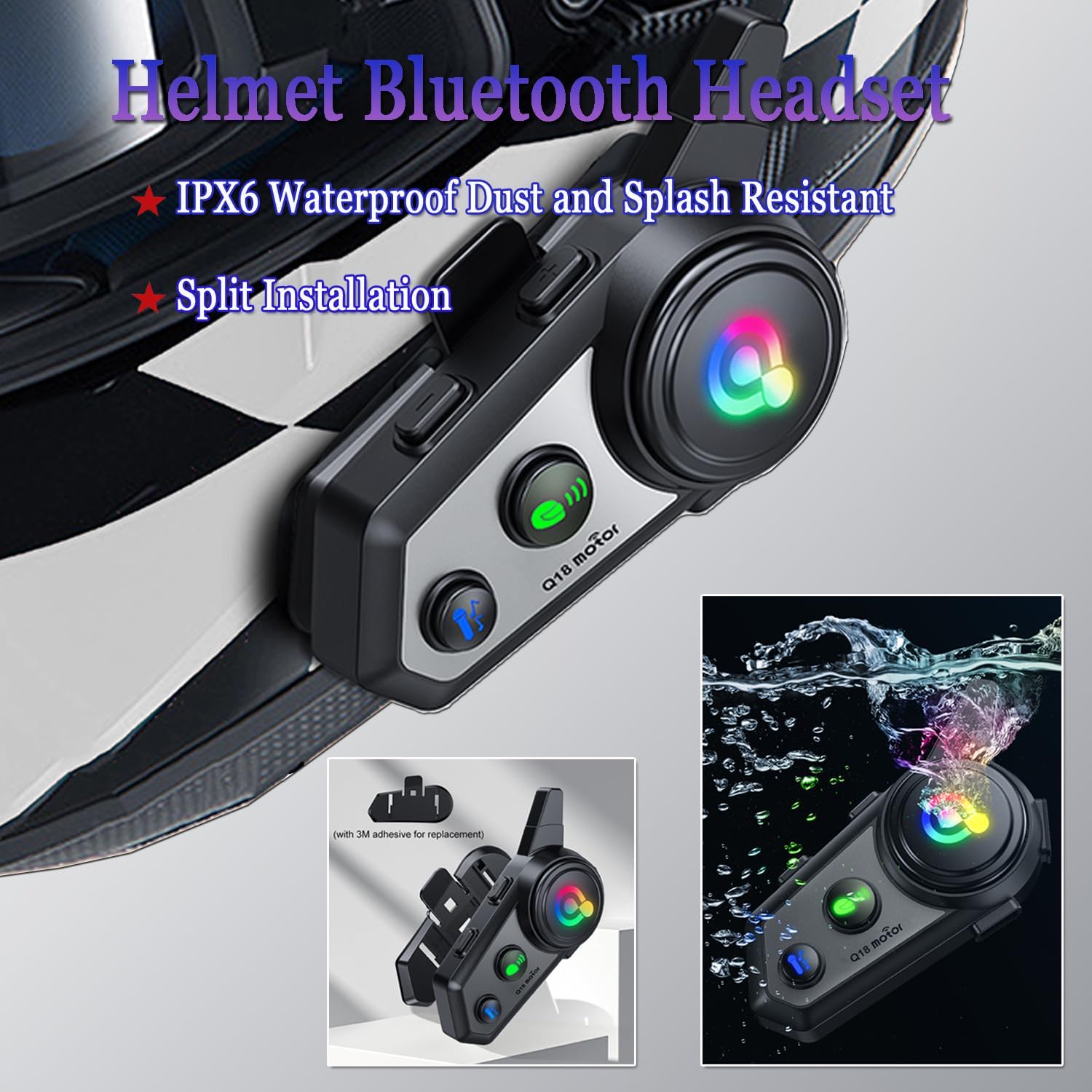
Image: The Q18 headset securely mounted on a motorcycle helmet, demonstrating its split installation design and IPX6 waterproof rating.
3. Installing Speakers and Microphone
The Q18 comes with two types of microphones (soft and hard) to accommodate different helmet designs. Choose the appropriate microphone for your helmet.
- Speaker Placement: Attach the speakers to the inside of your helmet using the provided Velcro pads. Position them directly over your ears for optimal sound quality. Ensure the wires are routed neatly under the helmet liner to avoid discomfort.
- Microphone Placement:
- For full-face helmets, use the soft microphone and position it inside the chin bar, close to your mouth.
- For open-face or modular helmets, use the hard microphone and attach it to the side of the helmet, ensuring it is close to your mouth for clear voice pickup.
- Connecting Components: Plug the speaker and microphone cables into the corresponding Type-C speaker marker connector on the Q18 host unit.

Image: A comprehensive view of all included accessories and the various helmet types compatible with the Q18 headset, illustrating the flexibility of installation.
Operating Instructions
Familiarize yourself with the function buttons on the Q18 headset for optimal use:

Image: A detailed diagram illustrating the location and function of each button and port on the Q18 headset.
1. Power On/Off
- Power On: Long press the Power On/Off button until the indicator light turns on.
- Power Off: Long press the Power On/Off button until the indicator light turns off.
2. Bluetooth Pairing with Mobile Phone
- Ensure the Q18 headset is powered off.
- Long press the Power On/Off button until the Bluetooth indicator light flashes rapidly, indicating pairing mode.
- On your mobile phone, enable Bluetooth and search for "Q18". Select it to connect.
- Once connected, the Bluetooth indicator light will stop flashing and remain solid.
- The Q18 supports connecting two mobile phones simultaneously. Pair the first phone, then repeat the process for the second phone. You can freely switch between devices for music, navigation, or calls.

Image: The Q18 headset's capability to connect with two mobile phones concurrently, allowing seamless switching between devices for various functions.
3. Intercom Function (2 Riders)
The Q18 supports intercom communication between two riders up to 1000 meters.
- Ensure both Q18 headsets are powered on.
- On one of the devices, short press the Intercom button to enter intercom pairing mode. The intercom indicator light will flash quickly, accompanied by an "intercom pairing" prompt.
- The devices will automatically search and connect. Upon successful pairing, a "intercom connection" prompt will be heard, and the intercom indicator light will remain solid.
- To end the intercom call, short press the Intercom button again.

Image: Two riders utilizing the Q18 headset for intercom communication and music sharing, highlighting the 1000m range and shared audio experience.
4. Music Playback and Sharing
- Playing Music: Once connected to your phone via Bluetooth, music will play automatically. Use the Power On/Off button for Play/Pause.
- Volume Adjustment: Short press the "Next song/Volume up" button to increase volume, and "Previous song/Volume down" button to decrease volume.
- Track Control: Long press the "Next song/Volume up" button for the next track, and "Previous song/Volume down" button for the previous track.
- Music Sharing:
- Ensure both Q18 headsets are powered on and one is playing music from a connected phone.
- Short press the Music Sharing button on both devices to enter pairing mode. The indicator light will flash quickly.
- After successful pairing, the indicator light will stay on, indicating successful music sharing. Both riders can now listen to the same music.

Image: Two riders enjoying shared music through their Q18 headsets while riding, illustrating the music sharing feature.
5. AI Voice Assistant
Activate your phone's AI voice assistant (e.g., Siri) directly from the headset.
- Activate: Long press the Voice Assistant button to wake up your phone's voice assistant.
- You can then use voice commands for navigation, calls, music control, and more.

Image: A motorcyclist using the Q18 headset's voice assistant feature, with examples of voice commands for music and navigation.
6. Call Management
- Answer Call: Short press the Power On/Off button when an incoming call rings.
- End Call: Short press the Power On/Off button during a call.
- Reject Call: Long press the Power On/Off button when an incoming call rings.
- Automatic Answer: The headset supports automatic call answering after a few rings.
Maintenance
1. Cleaning
Wipe the headset unit with a soft, damp cloth. Do not use harsh chemicals or abrasive cleaners. Ensure the charging port is dry before charging.
2. Waterproofing
The Q18 headset is IPX6 deep waterproof, meaning it is protected against high-pressure water jets from any direction. While it can withstand rain and splashes, avoid submerging the device in water.

Image: An icon indicating the device's waterproof capability.
3. Battery Care
To prolong battery life, avoid fully discharging the battery frequently. Charge the device regularly, especially if it will not be used for an extended period.
Troubleshooting
| Problem | Possible Cause | Solution |
|---|---|---|
| Device does not power on. | Low battery; incorrect power-on procedure. | Charge the device fully. Ensure you long press the Power On/Off button. |
| Cannot pair with mobile phone. | Device not in pairing mode; Bluetooth off on phone; too many paired devices. | Ensure the headset is in pairing mode (rapidly flashing Bluetooth indicator). Turn phone's Bluetooth off and on. Clear previous Bluetooth connections on your phone. |
| Intercom connection is unstable or drops. | Out of range; interference; low battery. | Ensure riders are within 1000m range. Avoid areas with strong electromagnetic interference. Charge both devices. |
| Music sharing not working. | Incorrect pairing procedure for music sharing; compatibility issues with other brands. | Ensure both devices are in music sharing pairing mode (short press Music Sharing button). Note that full compatibility with all non-ZHIDUOXING devices for music sharing cannot be guaranteed. |
| Poor audio quality or excessive noise. | Improper speaker/mic placement; high wind noise; CVC+DSP not active. | Adjust speaker position for optimal sound. Ensure microphone is correctly placed and not obstructed. The CVC+DSP noise reduction is automatic. |

Image: A visual explanation of the CVC+DSP noise reduction technology, demonstrating its ability to reduce environmental noise for clearer audio.
Specifications
| Feature | Detail |
|---|---|
| Model Name | Q18 |
| Bluetooth Version | 5.0 |
| Battery Capacity | 1000mAh |
| Charging Time | Approx. 2.5 Hours |
| Music Playback Time | Approx. 28 Hours |
| Intercom Time | Approx. 15 Hours |
| Intercom Range | Up to 1000 meters (for 2 riders) |
| Water Resistance | IPX6 (Deep Waterproof) |
| Noise Control | Adaptive Noise Cancellation (CVC+DSP) |
| Connectivity | Wireless (Bluetooth) |
| Headphones Jack | Type-C |
| Control Type | Touch, Voice |
| Material | Plastic |
| Item Weight | 7.8 ounces |
Warranty and Support
ZHIDUOXING is committed to providing high-quality products and customer satisfaction. If you encounter any issues with your Q18 Motorcycle Bluetooth Headset, please do not hesitate to contact our customer support team.
For assistance, please reach out through the Amazon buyer center. Our team aims to provide a satisfactory solution within 24 hours of your inquiry.
Please retain your purchase receipt as proof of purchase for any warranty claims.
Ask a question about this manual
Ask about setup, troubleshooting, compatibility, parts, safety, or missing instructions. Manuals+ will review the question and use this page’s manual context to help answer it.