1. Product Overview
The VAYINATO Aquarium Gravel Cleaner Water Changer, model HXS-01, is an electric device designed to simplify aquarium maintenance. It efficiently cleans gravel, removes waste, and facilitates water changes, contributing to a healthy aquatic environment for your fish.
Key features include:
- 6W Powerful Motor: Provides strong suction for effective cleaning and water changes.
- Multi-functional Design: Supports both pollution absorption and water change modes.
- Easy Assembly: Designed for straightforward installation and disassembly without additional tools.
- Adjustable Flow Control: Allows for precise management of water flow during operation.
- Low Water Level Cleaning: Capable of cleaning tanks with low water levels, provided the pump is adequately submerged.
2. Product Components
Familiarize yourself with the components of your VAYINATO Aquarium Gravel Cleaner:
- Main Body: Houses the motor and control unit.
- Drain Cover: Connects to the water outlet hose.
- Extendable Tube: Allows adjustment of the cleaner's length for various tank depths.
- Sand Washer: Attachment for gravel cleaning.
- Extension Cover: Provides additional length for deeper tanks.
- Removable Mesh Cartridge: Filters debris during cleaning.

3. Setup and Assembly
The gravel cleaner is designed for easy assembly. Follow these steps:
- Unpack all components and ensure they are clean.
- Attach the desired connect heads (e.g., sand washer, extension cover) to the extendable tube based on your cleaning needs and tank depth.
- Connect the extendable tube assembly to the main body of the cleaner.
- Ensure all connections are secure to prevent leaks during operation.
- For sand washing, the sand wash start must be above 15cm from the bottom of the tank.
- The recommended water level depth for operation is a minimum of 8 inches (20 cm) and a maximum of 30 inches (76 cm). The water should cover the pump line as indicated in the operating instructions.

4. Operating Instructions
The VAYINATO Aquarium Gravel Cleaner offers two primary modes of operation: pollution absorption and water change.
4.1 Selecting Operation Mode
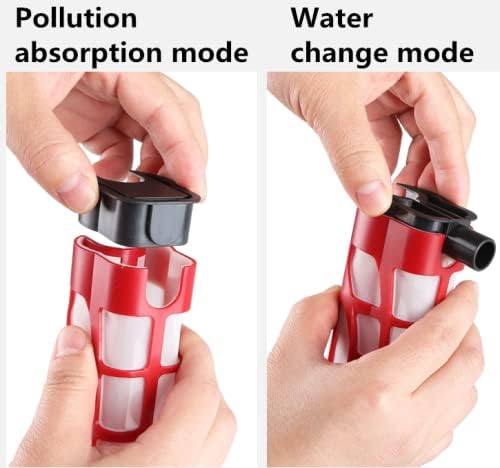
The device can be configured for different functions by adjusting the internal components:
- Pollution Absorption Mode: Configure the internal filter for debris collection. This mode is used for cleaning gravel and removing impurities while retaining water in the tank.
- Water Change Mode: Configure the internal components to allow water to be pumped out of the tank. This mode is used for draining water during water changes.
4.2 General Operation Guidelines
- Always ensure the water pump section of the cleaner is completely submerged in water during operation to prevent damage to the motor.
- Do not submerge the main motor head (top section) in water. Refer to Figure 1 for the non-submersible area.
- Connect the drain hose to the outlet and direct it to a suitable container or drain for water changes.
- Plug the device into a power outlet. The 6W motor provides strong suction.

4.3 Specific Usage Scenarios
- Low Level Water Cleaning: When cleaning at low water levels, ensure the water level is still higher than the water pump section to maintain proper function and prevent motor damage.
- Filling Water In: While the primary function is cleaning and draining, the pump can also assist in filling water. Note that the pump lift is 0.7m.

5. Maintenance
Regular maintenance ensures the longevity and efficient operation of your gravel cleaner.
- Clean the Mesh Cartridge: After each use, or when suction power decreases, remove and clean the super-fine mesh cartridge. This allows you to vacuum debris effectively.
- Disassemble and Rinse: Disassemble the extendable tube and sand washer attachments. Rinse all components thoroughly with clean water to remove any trapped debris or residue.
- Inspect for Blockages: Periodically check the pump inlet and outlet for any blockages that might impede water flow.
- Storage: Store the cleaner in a clean, dry place when not in use.

6. Troubleshooting
If you encounter issues with your VAYINATO Aquarium Gravel Cleaner, refer to the following common troubleshooting steps:
- No Power/Device Not Turning On:
- Ensure the power cord is securely plugged into a functional electrical outlet.
- Check if the power switch on the device is in the 'ON' position.
- Weak Suction:
- Verify that the water pump section is fully submerged in water.
- Check the mesh cartridge for excessive debris and clean it if necessary.
- Inspect the intake nozzle and tubing for any blockages.
- Ensure all connections are tight and there are no air leaks in the system.
- Water Leaking:
- Check all connections between components (tubes, main body, attachments) to ensure they are securely fastened.
- Inspect O-rings and seals for damage or improper seating.
- Unusual Noise:
- Ensure the pump is fully submerged and not running dry.
- Check for any foreign objects caught in the impeller.
If the problem persists after attempting these steps, please contact customer support.
7. Specifications
| Feature | Specification |
|---|---|
| Model Number | HXS-01 |
| Power Supply | Plug In (Direct Insertion) |
| Power | 6 Watt |
| Lift | 0.7 meters |
| Flow Rate | 350 Liters/hour |
| Cable Length | 2.4 meters |
| Product Dimensions (LxWxH) | 75 x 12 x 12 cm |
| Item Weight | 0.1 g |
| Manufacturer | Petzlifeworld |
8. Safety Information
- Always unplug the device from the power outlet before performing any maintenance, cleaning, or assembly.
- Ensure the water pump section is fully submerged in water during operation to prevent motor overheating and damage.
- Do not submerge the main motor head (top part of the cleaner) in water. This section is not waterproof.
- Keep the power cord away from sharp objects, hot surfaces, and moving parts.
- This device is intended for aquarium use only. Do not use it for purposes other than those specified in this manual.
- Keep out of reach of children and pets.
- If the power cord or plug is damaged, do not operate the device. Contact customer support for assistance.
9. Warranty and Support
For warranty information or technical support, please refer to the purchase documentation or contact the seller/manufacturer directly. Keep your proof of purchase for any warranty claims.