
SEDETA 108" L Shaped Desk (B0CSSDJV3K)
SEDETA 108" L Shaped Desk User Manual
Model: B0CSSDJV3K
Introduction
Thank you for choosing the SEDETA 108" L Shaped Desk. This versatile and spacious desk is designed to enhance your home office, gaming setup, or study area with its functional features and modern design. This manual provides essential information for assembly, operation, maintenance, and troubleshooting to ensure you get the most out of your new desk.
Product Features
- Spacious Design: Features a large desktop (65"L x 19"W and 62.2"L x 19"W) that can be configured as an L-shaped or long square desk, accommodating multiple monitors and office equipment.
- Integrated Storage: Includes six large fabric drawers, with one specifically designed as a file cabinet for letter/A4/legal files, and additional storage for printers and scanners.
- Built-in Power Outlet: Equipped with a power strip featuring 4 AC outlets and 2 USB ports, along with an on-off switch for convenient and safe power access.
- Ergonomic Monitor Shelf: A full-size monitor shelf helps maintain correct posture and reduces neck strain during long working or gaming sessions.
- Smart LED Lighting: Comes with an RGB LED light strip offering over 60,000 colors and 29 flashing modes, controllable via APP or key, with music sync and timer functions to create an immersive atmosphere.
- Durable Construction: Made from FSC certified P2 particle board and a stable, thick metal frame for durability and scratch resistance. Adjustable leg pads ensure stability on uneven floors.
Important Safety Information
Caution: Ensure the desk is placed on a stable, level surface and properly anchored to the wall if necessary, especially when multiple devices are placed on the desktop. Do not exceed the recommended weight limit for the desk. Be aware of electrical safety when using the built-in power strip, and always turn off the power when not in use.
Setup and Assembly
Your SEDETA L Shaped Desk requires assembly. All necessary tools and detailed instructions are included in the packaging. Please follow the step-by-step guide provided with your product for a smooth assembly process.
- Unpacking: Carefully unpack all components and verify against the parts list in your assembly manual.
- Configuration Options: The desk can be assembled into an L-shape for corner placement or a long square configuration to suit your space requirements. Plan your desired layout before beginning assembly.
- Assembly Steps: Follow the numbered steps in the provided assembly manual. Ensure all screws and fasteners are tightened securely.

Figure 1: Desk Dimensions and Configuration Options. The desk offers flexible setup as an L-shaped unit or a long straight desk, with detailed measurements provided.
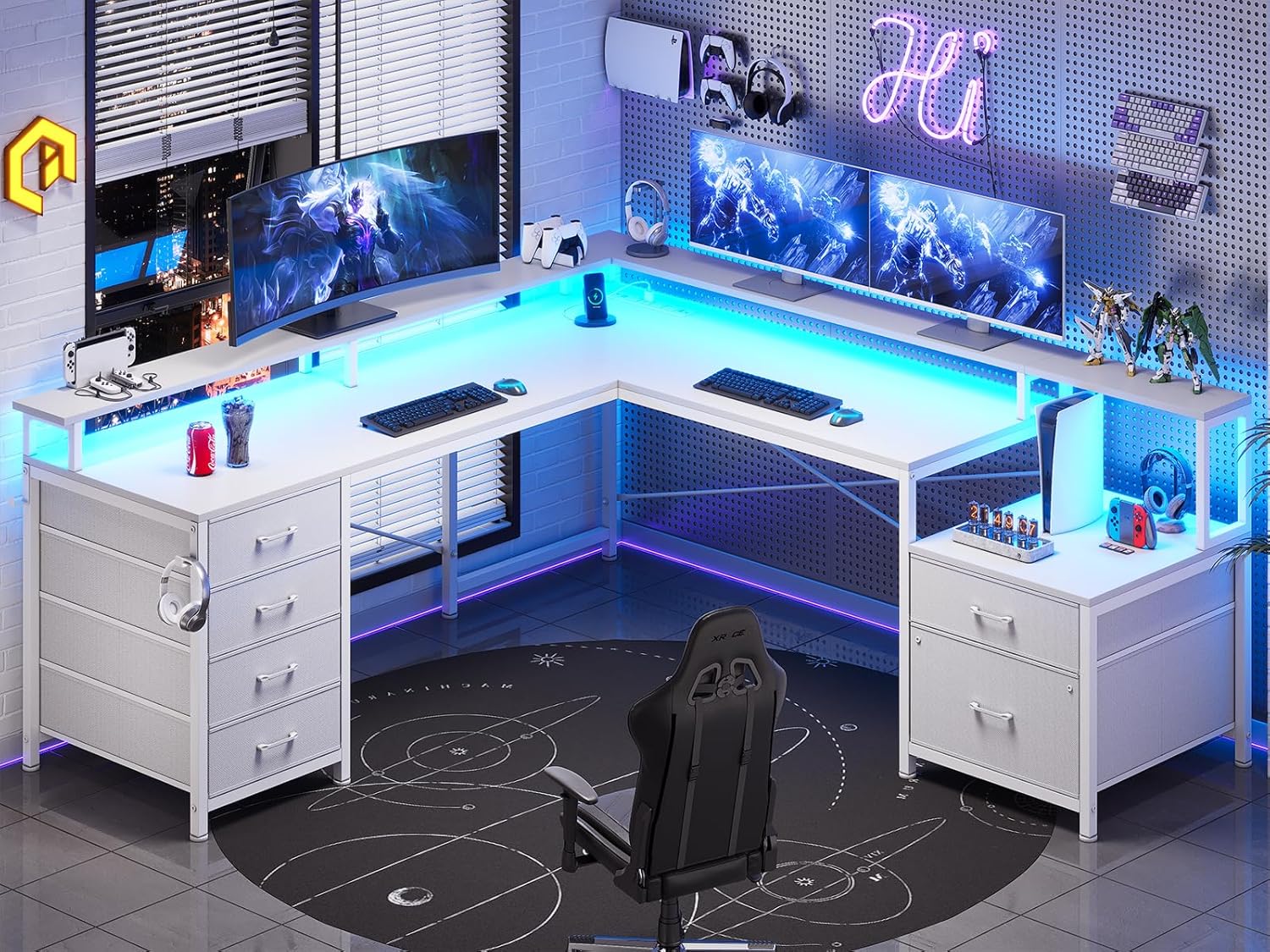
Figure 2: Assembled SEDETA L Shaped Desk in a gaming setup, showcasing its spacious design and integrated LED lights.
Operating Instructions
Using the Built-in Power Outlet
The desk features a recessed power strip for convenient access to power. It includes 4 standard AC outlets and 2 USB ports (5V/2A) for charging devices. An on-off switch is provided for safety and energy saving.
- Connect the desk's main power cord to a wall outlet.
- Plug your devices (monitors, laptops, chargers) into the AC outlets or USB ports.
- Use the integrated on-off switch to control power to all connected devices. Turn off when not in use to conserve energy and enhance safety.

Figure 3: Recessed Power Strip with 4 AC Outlets and 2 USB Ports. This feature provides convenient charging and power access directly on the desk surface.
Controlling LED Lights
The integrated RGB LED light strip offers customizable lighting for your workspace. Control is available via a physical key control or a dedicated mobile application.
- Key Control: Use the provided remote or inline controller to switch the lights on/off, change colors, and select from various flashing modes.
- APP Control: Download the specified mobile application (refer to the LED light manual included with your desk for app details). The app allows for advanced customization, including over 60,000 colors, 29 flashing modes, music sync function (via built-in microphone), and timer settings.
- Ensure the LED strip is properly connected to its power source as per assembly instructions.

Figure 4: Gaming Desk with LED Light Features. The LED strip offers extensive customization via both physical and app controls, including music synchronization.
Utilizing the Monitor Shelf and Storage
- Monitor Shelf: Place your monitors on the elevated shelf to achieve an ergonomic viewing height, reducing strain on your neck and back.
- Fabric Drawers: Organize your office supplies, documents, and personal items in the six fabric drawers. The file cabinet drawer is designed to hold letter, A4, or legal-sized files.
- Headset Hook: Use the convenient headset hook located on the side of the desk to keep your headphones easily accessible and your workspace tidy.

Figure 5: Full Size Monitor Stand for Ergonomic Posture. The elevated monitor shelf promotes a healthier sitting position, reducing neck and back strain.

Figure 6: Fabric Drawers for Organized Storage. These drawers provide ample space for various office items, including dedicated sections for legal and letter/A4 sized files.
Maintenance
- Cleaning: Wipe surfaces with a soft, damp cloth. Avoid harsh chemicals or abrasive cleaners that may damage the finish.
- Hardware Check: Periodically check all screws and connections to ensure they remain tight and secure. Re-tighten if necessary.
- Electrical Components: Ensure the power strip and LED light connections are free from dust and debris. Do not attempt to repair electrical components yourself.
- Adjustable Leg Pads: Verify that the adjustable leg pads are properly set to keep the desk stable and protect your floor.
Troubleshooting
| Problem | Possible Cause | Solution |
|---|---|---|
| Desk is wobbly/unstable. | Uneven floor; loose connections. | Adjust leg pads to level the desk. Check and tighten all assembly screws. |
| LED lights not working. | Power connection loose; remote/app issue; LED strip damage. | Ensure LED strip is properly plugged in. Check remote battery or app connection. If still not working, contact support. |
| Power outlets not functioning. | Desk power cord unplugged; on-off switch off; circuit overload. | Verify desk power cord is securely plugged into wall. Ensure the power strip's on-off switch is in the 'ON' position. Reduce number of high-power devices if overloaded. |
| Drawers are stiff or not sliding smoothly. | Overloaded drawer; debris in runners; improper assembly. | Reduce weight in the drawer. Check for any obstructions in the drawer runners. Ensure drawers were assembled correctly. |
Specifications
| Brand | SEDETA |
| Product Dimensions | 19"D x 108.2"W x 34.4"H |
| Color | White |
| Style | Modern |
| Base Material | Metal |
| Top Material Type | Engineered Wood (P2 Particle Board, FSC Certified) |
| Special Feature | 6 Drawers, Built-in Power Outlet (4 AC, 2 USB), Monitor Shelf, Headphone Hook, LED Lights |
| Room Type | Bedroom, Living Room, Office, Study Room |
| Recommended Uses | Drafting, Gaming, Working, Writing |
| Number of Drawers | 6 (including 1 file drawer) |
| Required Assembly | Yes (All assembly tools included) |
Warranty and Support
The SEDETA 108" L Shaped Desk comes with a Limited Warranty. For specific details regarding warranty coverage, terms, and conditions, please refer to the warranty information provided with your product packaging or contact SEDETA customer support directly.
For any questions, assistance with assembly, or troubleshooting not covered in this manual, please visit the official SEDETA store on Amazon or contact their customer service. You can find contact information on the product packaging or the SEDETA brand store page.
SEDETA Store Link: Visit the SEDETA Store
Ask a question about this manual
Ask about setup, troubleshooting, compatibility, parts, safety, or missing instructions. Manuals+ will review the question and use this page’s manual context to help answer it.