
Minetom 300L-M
Minetom Curtain Lights User Manual
Model: 300L-M
Product Overview
The Minetom Curtain Lights are a versatile lighting solution featuring 300 LED lights designed for indoor and outdoor decorative use. These fairy lights offer 8 distinct lighting modes, a convenient remote control with timer functionality, and adjustable brightness levels. Powered via USB, they are suitable for various settings, including rooms, walls, parties, and holiday decorations.

Image: Minetom Curtain Lights installed, displaying vibrant multicolor illumination in a room setting.
What's Included
The product package contains the following items:
- Curtain Lights (300 LED, Multicolor)
- Remote Control (includes 1 CR2032 battery)
- User Manual
Specifications
| Model Number | 300L-M |
| Light Source | LED |
| Number of LEDs | 300 |
| Light Color | Multicolor |
| Power Source | USB Powered (5V Low Voltage) |
| Wattage | 2.5 watts |
| Control Method | Remote Control |
| Lighting Modes | 8 (Combination, In Waves, Sequential, Slo-glo, Chasing/Flash, Slow Fade, Twinkle/Flash, Steady On) |
| Timer Function | 6 hours On, 18 hours Off |
| Brightness Adjustment | 25%, 50%, 75%, 100% |
| Water Resistance | IP44 (Lights only; USB interface is not waterproof) |
| Material | Copper Wire |
| Dimensions | 9.8ft x 9.8ft (approx. 3m x 3m) |
| Weight | 5.3 ounces |
Setup Instructions
Follow these steps to properly set up your Minetom Curtain Lights:

Image: Visual guide for setting up the curtain lights, illustrating the unwrapping of the main horizontal strand, hanging it, and then releasing the vertical light drops.
- Step 1: Unwrap the Main Strand.
Carefully unwrap the main horizontal cable (the one with the USB plug) from its packaging. Do not untangle the individual vertical strings yet.
- Step 2: Hang the Main Cable.
Hang the unwrapped main horizontal cable in your desired location, such as on a curtain rod or wall. The individual vertical strings should still be bundled.
- Step 3: Unravel Vertical Strands.
Once the main cable is securely in place, carefully unravel each individual vertical copper wire strand from top to bottom. Be gentle to avoid tangling or damaging the wires.
- Step 4: Secure the Middle Part (Optional).
If desired, use the included zip ties to secure the middle part of the main horizontal cable to your rod or mounting surface for added stability.
- Step 5: Connect Power.
Plug the USB connector into a compatible 5V USB power source, such as a USB charger, power bank, laptop, or cellphone adapter.
Important Safety Note:
- ⚠ Do not pull forcefully on the lights to prevent hook soldering damage.
- ⚠ Avoid tangling the copper wire to prevent breakage.
- ⚠ The USB interface is not waterproof. Keep it dry when using the lights in wet or rainy conditions.
Operating Instructions
The Minetom Curtain Lights can be controlled using the included remote control or the control button on the USB plug.
Remote Control Functions:
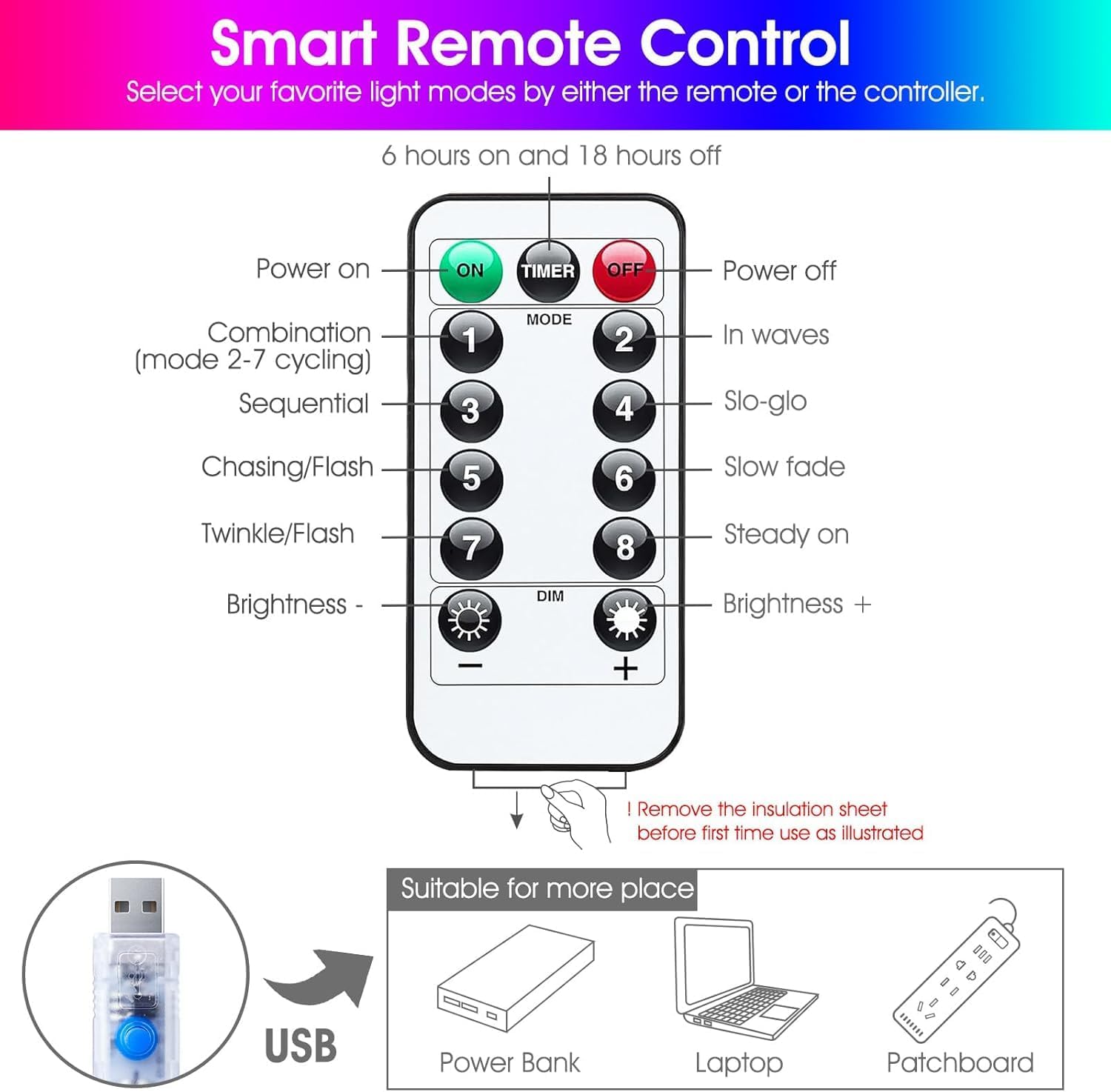
Image: Detailed diagram of the remote control, showing buttons for power, timer, 8 lighting modes, and brightness adjustment.
- ON/OFF: Press to turn the lights on or off.
- TIMER: Activates the timer function. The lights will stay on for 6 hours and then turn off for 18 hours, repeating the cycle.
- MODE Buttons (1-8): Select from 8 different lighting modes:
- Combination (modes 2-7 cycling)
- In Waves
- Sequential
- Slo-glo
- Chasing/Flash
- Slow Fade
- Twinkle/Flash
- Steady On
Memory Function: The lights will remember the last selected mode when turned off and on again.
- DIM +/-: Adjust the brightness level. Available brightness settings are 25%, 50%, 75%, and 100%.
Before First Use: Remove the transparent insulation sheet from the remote control's battery compartment.
USB Control Button:
The small button on the USB plug allows you to cycle through the 8 lighting modes without the remote control. Press the button repeatedly to change modes.
Maintenance
To ensure the longevity and optimal performance of your Minetom Curtain Lights, follow these maintenance guidelines:
- Cleaning: Gently wipe the lights with a soft, dry cloth. Do not use harsh chemicals or abrasive cleaners.
- Storage: When not in use, carefully coil the lights to prevent tangling. Store them in a cool, dry place away from direct sunlight and extreme temperatures.
- USB Port: Always ensure the USB port remains dry, especially if the lights are used in environments where moisture is present.
- Battery Replacement (Remote): If the remote control's range or responsiveness decreases, replace the CR2032 coin cell battery. Ensure correct polarity when inserting the new battery.
Troubleshooting
If you encounter any issues with your Minetom Curtain Lights, refer to the following common problems and their solutions:
| Problem | Possible Cause | Solution |
|---|---|---|
| Lights do not turn on. | No power supply or loose connection. | Ensure the USB plug is securely connected to a working 5V USB power source. Try a different USB port or adapter. |
| Remote control is not working. | Battery depleted or insulation sheet still present. | Remove the clear insulation sheet from the battery compartment. Replace the CR2032 battery if it's old or depleted. Ensure you are pointing the remote directly at the USB receiver. |
| Lights are tangled. | Improper handling during setup or storage. | Carefully untangle the strands one by one. Avoid pulling forcefully. Refer to setup instructions for proper unwrapping. |
| Some LEDs are not lighting up. | Damaged wire or LED. | Inspect the affected section for visible damage. If a section is damaged, it may not be repairable by the user. Contact customer support if the product is under warranty. |
| Timer function not working correctly. | Incorrect activation or power interruption. | Ensure the TIMER button was pressed once. If power is interrupted, the timer cycle may reset. Re-activate the timer. |
Safety Information
- This product operates on a safe 5V low voltage.
- The lights generate low heat and are safe to touch.
- The USB power interface is NOT waterproof. Protect it from water and moisture.
- Do not cut or modify the wires of the light string.
- Keep out of reach of small children to prevent entanglement or ingestion of small parts.
- Unplug the lights from the power source before cleaning or performing any maintenance.
Warranty and Support
Minetom products are manufactured with quality and reliability in mind. For any product-related inquiries, technical support, or warranty claims, please contact Minetom customer service through the retailer where the product was purchased or visit the official Minetom brand store online.
Manufacturer: Linhai Dema Lighting Co., Ltd.
Date First Available: January 19, 2024
For more information, you may visit the Minetom Store on Amazon.
Ask a question about this manual
Ask about setup, troubleshooting, compatibility, parts, safety, or missing instructions. Manuals+ will review the question and use this page’s manual context to help answer it.