1. Introduction and Overview
The Ohniyou 60-inch Industrial Ceiling Fan with Lights is designed for both indoor and outdoor use, offering advanced control features and energy efficiency. It features a durable aluminum alloy construction, dimmable LED lighting with adjustable color temperatures, and a reversible DC motor for year-round comfort. The fan operates quietly and can be controlled via remote or a dedicated mobile application.
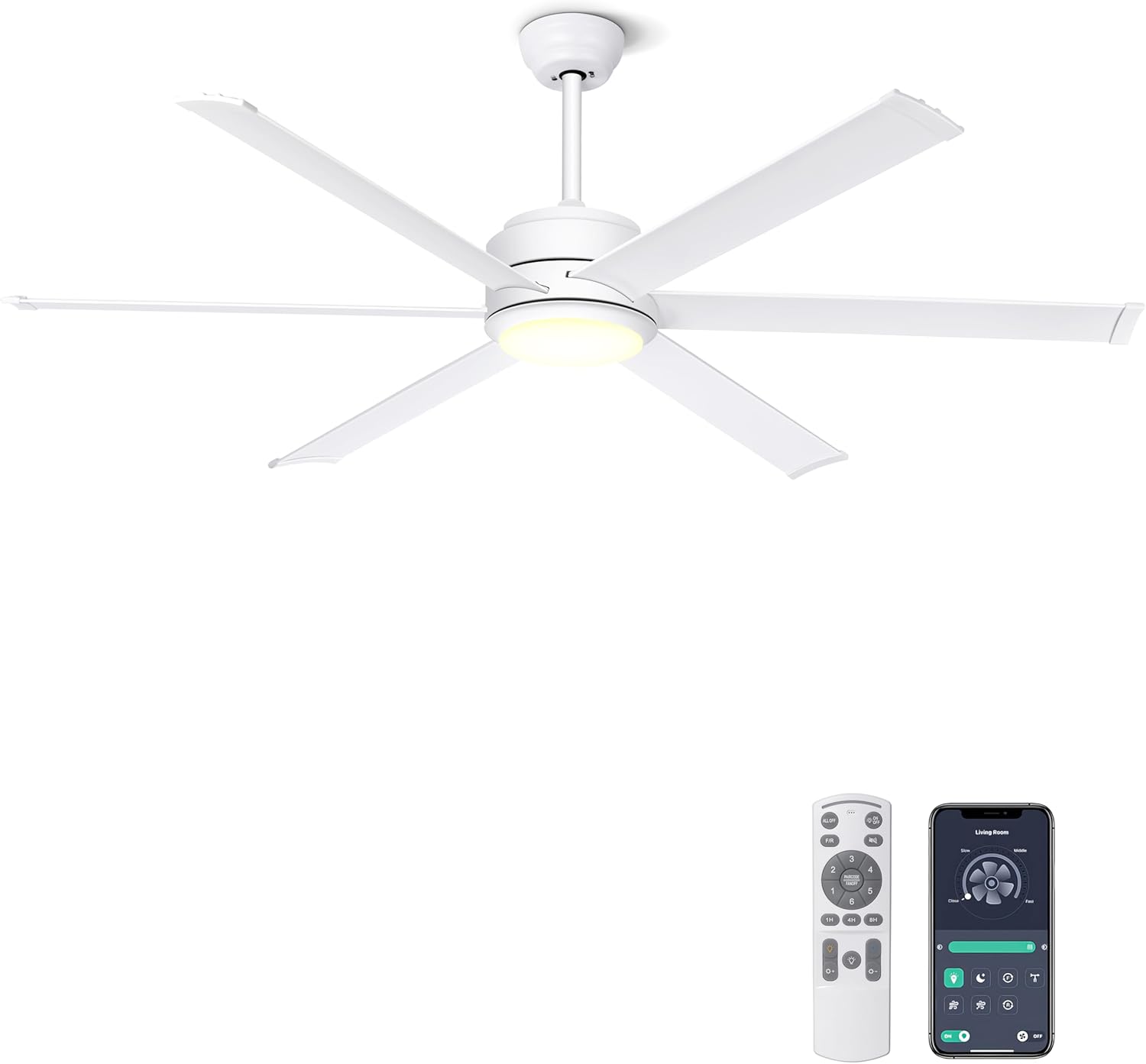
The Ohniyou 60-inch white ceiling fan, showcasing its sleek design and included remote control and mobile app interface.

Key features of the Ohniyou ceiling fan, highlighting its smart control options and versatile functionalities.
2. Safety Information
Please read all instructions carefully before installation and use. Retain this manual for future reference. Always ensure the power supply is disconnected before performing any installation, maintenance, or troubleshooting. Installation should be performed by a qualified electrician. Ensure the mounting structure can support the fan's weight. Do not insert objects into the fan blades while in operation. Keep children and pets away from the fan during operation.
3. Package Contents
Verify that all components are present and undamaged before beginning installation. If any parts are missing or damaged, please contact customer support.
An overview of the components included in the Ohniyou ceiling fan package.
- Motor Body
- Blades (6x)
- Metal Plate + Light Cover
- Blades Arms (6x)
- Mounting Bracket
- Downrods (5-inch and 10-inch)
- Canopy
- Splice Closure
- Balance Kit
- Manual
- Remote Controls
- Receiver
- Installation Package (screws, etc.)
4. Setup and Installation
Follow these steps carefully for proper installation. It is recommended to have two people for installation.
4.1. Install the Fan Blade Edge Cover
- Take out a fan blade and identify its first and last ends. The three holes are for connecting the motor later.
- Install the fan blade edge cover on the end with two holes. Insert the edge cover into the fan blade at an angle.
- Flip the fan blade over and secure it with screws.
- Repeat for all 6 fan blades to complete this step.
4.2. Install the Fan Blades
- Get the motor. Take out all the screws fixing the fan blades inside the motor.
- Insert the 3-hole end of the fan blade into the motor.
- Reinstall the screws you just removed to secure the blade.
- Install all 6 fan blades to the motor step by step.
4.3. Install LED Light Panel
- First, remove one of the screws on the motor.
- Secure the metal plate to the motor. Place the metal plate on the motor, rotate it until the screws slide into the slots, and then tighten the screws.
- Place the LED light panel on the metal plate and connect the light wires.
4.4. Install the Downrod
- Turn the motor over and remove the cross pin and clamp pin.
- Get the length of downrod you need to use, then remove its cross pin and clamp pin.
- Thread the canopy and splice closure through the downrod.
- Pass the wire through the middle of the downrod.
- Finally, secure the downrod to the motor port. Fix the cross pin and clamp pin.
4.5. Fix the Mounting Bracket to the Ceiling
- Secure the mounting bracket to the ceiling using appropriate screws. Ensure it is firmly attached to a structural support.
4.6. Hang the Downrod and Complete Wire Connections
- Hang the downrod assembly onto the mounting bracket.
- Connect the receiver wires: Connect wires of the same color together.
- Connect the ceiling wires to the receiver wires.
- After sorting out all the cables, put them into the mounting bracket together with the receiver.
4.7. Cover the Lampshade
- Cover the mounting bracket and receiver with the canopy. Finally, tighten the screws to secure.
- Cover the lampshade. This completes the ceiling fan installation.
Video: Industrial Ceiling Fan Assembly Guide. This video provides a visual walkthrough of the installation process for the Ohniyou ceiling fan.
5. Operating Instructions
Your Ohniyou ceiling fan offers multiple ways to control its functions for optimal comfort.
5.1. Remote Control Operation
The included remote control allows for convenient adjustment of fan speed, light settings, and other features.

Detailed view of the remote control functions, including light on/off, 3-color switch, color temperature, dimming, reversible motor, and 6-speed fan control.
- Light ON/OFF: Toggle the light.
- 3 Color Switch: Cycle through Warm (3000K), Neutral (4500K), and Cold (6000K) light.
- Dimmer Button: Adjust brightness from 10% to 100%.
- 6 Speed Button: Select fan speed from 1 (low) to 6 (high).
- Reversible Motor: Switch between summer (cooling) and winter (air circulation) modes.
- Timer Setting: Set a 2-hour timer for automatic shut-off.
- Night Light Mode: Activate a low-intensity light setting.
- Pairing Button (SETUP): Long press for 3 seconds to pair the remote.
5.2. Mobile App Control
Control your fan conveniently from your smartphone using the dedicated app.

The mobile application interface for controlling the fan, showing fan speed, light settings, and other options.

Scan the QR code to download the Fan Lamp Pro app or visit http://www.jasonghost.com/fanlamppro/index-en.html. Ensure Bluetooth is enabled on your phone for pairing. Turn the fan light on and off 5 times for app matching.
- Download App: Scan the QR code provided in the manual or search for "FanLamp Pro" in your app store.
- Connect to App: Ensure your phone's Bluetooth is turned on. Turn the ceiling fan light on and off 5 times to enter pairing mode.
- App Functions: Control light color temperature and brightness, wind speed, wind direction (reversible), night light mode, and timing through the app.
5.3. Dimmable Lighting
The integrated LED light offers adjustable brightness and color temperature to suit your preference.

The fan light offers three color temperatures (Warm, Neutral, Cool) and smooth dimming from 10% to 100% brightness.
- Color Temperatures: Choose from Warm Light (3000K), Neutral Light (4500K), and Cold Light (6000K).
- Brightness Adjustment: Smoothly dim the light from 10% to 100%.
5.4. Reversible Function
The reversible DC motor allows for optimal air circulation in both warm and cool seasons.

Illustrates the reversible function for summer cooling (downward airflow) and winter air circulation (upward airflow).
- Summer Mode: Blades rotate counter-clockwise, pushing cool air downwards to create a cooling effect.
- Winter Mode: Blades rotate clockwise, drawing cool air up and pushing warm air down from the ceiling, helping to circulate heat.
5.5. Speed Control and Quiet Operation
The fan offers 6 adjustable wind speeds and operates with minimal noise.

The fan offers 6 speed settings, from gentle breeze to strong cool wind, with a quiet operation of approximately 30dB.
- Speed 1-2: Comfortable wind, suitable for reading and sleeping.
- Speed 3-4: Natural wind, ideal for enjoying family time.
- Speed 5-6: Cool wind, effective for cooling down quickly during exercise.
- Silent Operation: The DC motor ensures quiet operation, rated at 30dB, suitable for bedrooms and quiet environments.
6. Maintenance
Regular maintenance ensures the longevity and optimal performance of your ceiling fan.
- Cleaning: Dust the fan blades and motor housing regularly with a soft, damp cloth. Do not use abrasive cleaners or solvents.
- Blade Inspection: Periodically check that all blade screws are tight. Loose screws can cause wobbling and noise.
- Light Cover: Clean the light cover gently with a soft cloth.
- Motor: The DC motor is designed for long-term, maintenance-free operation. No lubrication is required.
- Power Disconnection: Always disconnect power to the fan before cleaning or performing any maintenance.
7. Troubleshooting
If you encounter issues with your Ohniyou ceiling fan, refer to the following common solutions or contact customer support.
7.1. Remote Control Not Working / Pairing Issues
If your remote control is unresponsive or needs re-pairing:
- Use the wall switch or another method to cut off the power to the fan.
- Wait for 5 seconds.
- Reconnect the power.
- Within three seconds of reconnecting power, long press the "SETUP" (pair) button on the remote. You will hear a "beeping" sound and the light will flash, indicating successful pairing.
Video: How to re-pair the remote control when it doesn't work. This video demonstrates the steps to re-pair your fan's remote control.
7.2. App Connection Issues
If you are having trouble connecting the fan to the mobile app:
- Ensure your phone's Bluetooth is turned on.
- Reset the fan: Turn on the wall switch in your room that controls the power of your fan, and then turn it off. Wait about 5 seconds, then turn it on again.
- Open the "FanLamp Pro" app.
- Hit the pair button on the app about 3 times until you hear a beep from the fan and the light flashes.
- Try to use the app to control the fan.
Video: How to download and connect to the APP. This video guides you through the process of setting up app control for your fan.
7.3. Missing Parts
If your product is missing any parts upon arrival:
- Don't worry, the manufacturer will reissue the parts.
- Please feel free to contact customer support at ohniyou@ledphy.com. They aim to reply within 12 hours.
Video: How to get replacements if the product is missing parts. This video explains the process for obtaining replacement parts if your fan arrives incomplete.
8. Specifications
| Feature | Detail |
|---|---|
| Brand | Ohniyou |
| Model Name | GLX072 |
| Size | 60 inch |
| Color | White |
| Product Dimensions | 60"D x 60"W x 14.96"H |
| Power Source | AC_DC |
| Motor Type | DC Motor |
| Wattage | 22 watts |
| Voltage | 230 Volts |
| Noise Level | 30 dB |
| Number of Blades | 6 |
| Blade Material | Aluminum |
| Light Type | LED |
| Control Method | App, Remote |
| Speed Settings | 6 RPM (speeds) |
| Indoor/Outdoor Usage | Outdoor, Indoor |
| Special Features | Remote Controlled, Dimmable, App Operable, Reversible |
| Assembly Required | Yes |

Detailed dimensions and technical specifications of the Ohniyou 60-inch ceiling fan.
9. Warranty and Support
For any product-related inquiries, missing parts, or technical support, please contact Ohniyou customer service.
- Email: ohniyou@ledphy.com
- Response Time: Customer support aims to reply within 12 hours.
- Warranty Information: Specific warranty details are typically provided with the product packaging or upon registration. Please refer to your purchase documentation for comprehensive warranty terms and conditions.