
Introduction
This manual provides essential instructions for the operation and maintenance of your Minolta XG-1 35mm SLR Film Camera. The Minolta XG-1 is a classic single-lens reflex camera designed for use with 35mm film, featuring a built-in light meter and auto exposure settings. It utilizes the Minolta MD lens mount system and includes a hot shoe for external flash units. This kit comes with a manual focus zoom lens.
Setup
1. Battery Installation
The Minolta XG-1's built-in light meter is powered by two LR44 batteries. To install or replace batteries:
- Locate the battery compartment cover, typically on the bottom of the camera body.
- Unscrew the cover using a coin.
- Insert two fresh LR44 batteries, ensuring correct polarity as indicated inside the compartment.
- Replace the cover and tighten securely.
2. Lens Attachment
The camera uses the Minolta MD lens mount system. To attach the zoom lens:
- Align the red dot on the lens barrel with the red dot on the camera's lens mount.
- Insert the lens into the mount and rotate it clockwise until it clicks into place.
- To remove the lens, press the lens release button on the camera body and rotate the lens counter-clockwise.

Figure 1: Minolta XG-1 camera with the manual focus zoom lens attached. This view highlights the camera body and the extended lens barrel.
3. Film Loading
The Minolta XG-1 uses standard 35mm film. Follow these steps to load film:
- Open the camera back by pulling up the film rewind knob.
- Place a 35mm film cartridge into the film chamber on the left side.
- Pull the film leader across to the take-up spool on the right, inserting the tip into one of the slots.
- Advance the film slightly using the film advance lever to ensure it catches on the take-up spool.
- Close the camera back firmly until it latches.
- Advance the film two frames, pressing the shutter release button each time, to wind past the exposed leader. The frame counter should show '1'.
4. Setting Film Speed (ASA/DIN)
The camera's light meter needs to be set to the correct film speed (ASA or ISO) for accurate exposure readings. This setting is typically found on the back of the camera.

Figure 2: The back of the Minolta XG-1 camera, displaying the ASA and DIN film speed settings. Adjust the dial to match your film's sensitivity.
Rotate the ASA/DIN dial to match the speed of the film you have loaded (e.g., ASA 100, 200, 400).
Operating Instructions
1. Powering On and Metering
To activate the light meter, lightly press the shutter release button. The red LED meter exposure indicator inside the viewfinder will illuminate, showing the recommended shutter speed for the current aperture setting.
2. Exposure Modes
The Minolta XG-1 offers both automatic exposure and manual control:
- Automatic Exposure (A Mode): Set the shutter speed dial to 'A'. The camera will automatically select the appropriate shutter speed based on the light meter reading and your chosen aperture.
- Manual Exposure: Set the shutter speed dial to a specific speed (e.g., 1/125s, 1/60s). You will then need to adjust the aperture ring on the lens until the light meter indicates a correct exposure.

Figure 3: Top view of the Minolta XG-1, illustrating the shutter speed dial (right), film advance lever (right), and the hot shoe for flash (center).
3. Focusing
This kit includes a manual focus zoom lens. To focus:
- Look through the viewfinder.
- Rotate the focusing ring on the lens until your subject appears sharp in the split-image or microprism focusing aid in the center of the viewfinder.
- Adjust the zoom ring to change the focal length as desired.
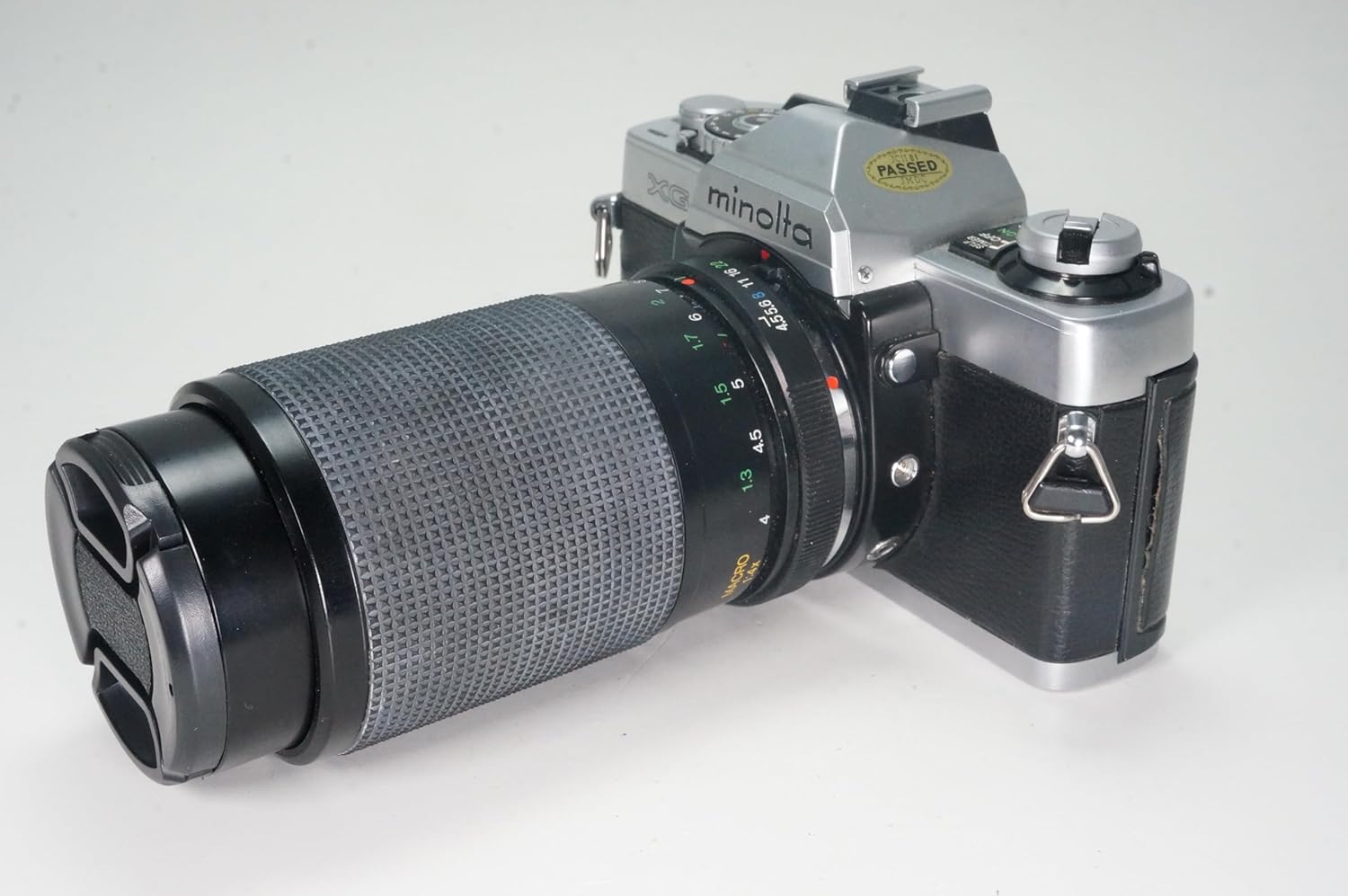
Figure 4: Side view of the Minolta XG-1 camera and its zoom lens. The focus and zoom rings on the lens are visible for manual adjustment.
4. Taking a Picture
Once focus and exposure are set, gently press the shutter release button all the way down to take the picture. After each shot, advance the film using the film advance lever to prepare for the next frame.
5. Using an External Flash
The camera features a hot shoe mount for external flash units. Attach a compatible flash to the hot shoe. Refer to your flash unit's manual for specific operation instructions. Ensure the camera's shutter speed is set to the flash synchronization speed (usually marked with a lightning bolt symbol or a specific speed like 1/60s).
6. Rewinding Film
When the film counter indicates the end of the roll (or you feel resistance when advancing the film), it's time to rewind. Press the film rewind release button (usually on the bottom of the camera) and turn the film rewind knob clockwise until you feel the film leader detach from the take-up spool. Open the camera back and remove the film cartridge.
Maintenance
- Cleaning: Use a soft, lint-free cloth to clean the camera body. For the lens, use a specialized lens cleaning solution and cloth. Avoid touching the lens elements directly.
- Storage: Store the camera in a cool, dry place, away from direct sunlight and extreme temperatures. If storing for an extended period, remove the batteries to prevent leakage.
- Film Chamber: Keep the film chamber clean and free of dust or debris to prevent scratches on the film.
Troubleshooting
- Camera not powering on / Light meter not working: Check battery installation and ensure batteries are fresh. Replace if necessary.
- Film not advancing: Ensure the film leader is properly engaged with the take-up spool. Check if the film rewind release button is accidentally pressed.
- Images are too dark/light: Verify that the film speed (ASA/DIN) is correctly set. In manual mode, ensure the aperture and shutter speed settings align with the light meter's recommendation. In auto mode, check if the scene is too dark or bright for the camera's capabilities.
- Blurry images: Ensure the lens is properly focused. Check for camera shake; use a faster shutter speed or a tripod in low light.
Specifications
| Brand | Minolta |
| Model Name | XG-1 |
| Film Format Type | 35mm |
| Special Feature | Auto Exposure, Manual Focus, Sturdy Design |
| Max Shutter Speed | 1/1000 seconds |
| Shutter Type | Focal Plane Shutter |
| Included Components | Camera Body & Lens |
| Item Weight | 2 Pounds |
| Power Source | 2x LR44 Batteries (for light meter) |
| Lens Mount | Minolta MD |
Warranty and Support
This Minolta XG-1 camera is a renewed product. Specific warranty terms for renewed items are typically provided by the seller. Please refer to the purchase documentation or contact the seller directly for details regarding warranty coverage and support for this specific renewed unit.
For general inquiries or technical assistance, you may also consult online photography forums or resources dedicated to vintage Minolta cameras.


