
Brother NS80E
Brother Innov-is NS80E Computerized Sewing Machine User Manual
Model: NS80E | Brand: Brother
Product Overview
The Brother Innov-is NS80E is a versatile computerized sewing machine designed for both beginners and experienced sewers. It features a wide array of built-in stitches and user-friendly controls to enhance your sewing projects.
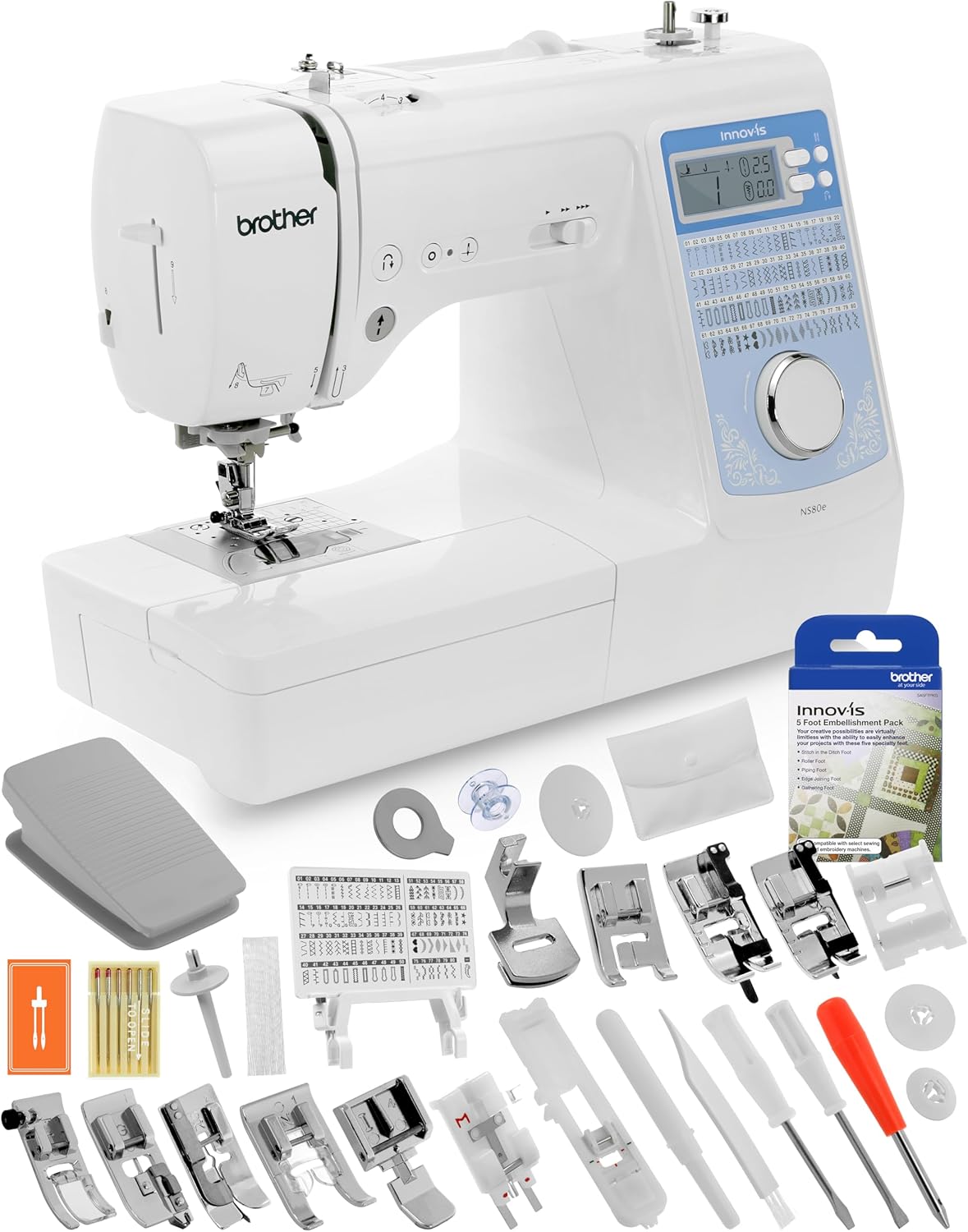
Image: The Brother Innov-is NS80E sewing machine displayed with its comprehensive starter package, including various presser feet, bobbins, and tools.
Key features include:
- 80 Built-in Sewing Stitches: Includes 8 one-step auto-size buttonhole styles, providing a wide range of creative options.
- Electronic Speed Control: Allows for precise control over sewing speed, up to 850 stitches per minute.
- Advanced Built-In Needle Threader: Simplifies the threading process, making it fast and reliable.
- 2.56" LCD Display: Clearly shows the selected stitch, length, and width settings.
- Drop Feed Capability: Ideal for free-motion quilting and darning.
- Aluminum Chassis: Reduces vibration and noise for a smoother sewing experience.
Package Contents
Your Brother Innov-is NS80E comes with a comprehensive set of accessories to get you started:

Image: A close-up view of the included Brother 5 Foot Embellishment Pack and the "Ready, Set, Sew" video guide.
- Genuine Brother 5 Foot Embellishment Pack: Includes Stitch in the Ditch Foot, Roller Foot, Piping Foot, Edge Joining Foot, and Gathering Foot.
- "Ready, Set, Sew" Video Guide: A quick start guide by Mr. Vac & Mrs. Sew, covering threading, needle changes, and stitch adjustments.
- Standard Presser Feet: Zigzag Foot "J", Overcasting Foot "G", Zipper Foot "I", Blind Stitch Foot "R", Buttonhole Foot "A", Monogramming Foot "N".
- Needle Set & Twin Needle
- Bobbins
- Seam Ripper, Lint Brush, Eyelet Punch
- Screwdrivers: Disc-Shaped, Large, Small.
- Spool Accessories: Extra Spool Pin, Spool Cap (Large, Medium, Small), Spool Net.
- Foot Controller
- Accessory Bag
- Stitch Pattern Plate
- Quick Reference Guide & Operation Manual
Setup
Initial Power-Up and Placement
Place the machine on a stable, flat surface. Connect the power cord to the machine and then to a suitable electrical outlet. Ensure the foot controller is connected if you plan to use it.
Threading the Machine
Follow the numbered guides on the machine for proper upper thread tension. The advanced built-in needle threader system assists in quickly threading the needle.

Image: A detailed view of the needle, presser foot, and threading path, illuminated by the LED light.
Winding the Bobbin
The machine features a convenient bobbin winding system located on the top. Place your thread spool on the spool pin, guide the thread as indicated, and engage the bobbin winder. The machine will automatically stop when the bobbin is full.

Image: A close-up of the machine's top-mounted spool pin and bobbin winding mechanism.
Operating Instructions
Stitch Selection and Adjustment
Use the stitch selection dial to choose from the 80 built-in stitches. The 2.56" LCD display will show the selected stitch number, along with its recommended length and width settings. These settings can be adjusted using the plus and minus buttons next to the display.

Image: The clear LCD display showing stitch number, length, and width settings.

Image: The stitch selection dial with a portion of the stitch pattern plate visible, illustrating the variety of available stitches.
Controlling Sewing Speed
The electronic speed control slider allows you to set your desired sewing speed, from slow and precise to up to 850 stitches per minute. You can operate the machine using either the Start/Stop button or the included foot controller.

Image: A close-up of the machine's control buttons, including the needle up/down, reverse, and tie-off stitch buttons.
Using the Free Arm
Remove the accessory storage compartment to reveal the free arm, which is useful for sewing cylindrical items like cuffs, sleeves, and pant hems.

Image: The sewing machine with its accessory storage box detached, revealing the free arm for circular sewing.
Maintenance
Cleaning the Machine
Regular cleaning of the bobbin area and feed dogs is essential for optimal performance. The needle plate detection sensor ensures safer cleaning by preventing operation when the plate is removed.
Use the included lint brush to remove dust and lint from the feed dogs and bobbin case. Refer to the operation manual for detailed cleaning instructions and frequency.
Troubleshooting
For common issues such as skipped stitches, thread breakage, or tension problems, refer to the detailed troubleshooting section in your full operation manual. Ensure proper threading, needle insertion, and bobbin placement as these are frequent causes of issues.
If problems persist, contact Brother customer support or an authorized service center.
Specifications
| Feature | Detail |
|---|---|
| Model Number | NS80E |
| Brand | Brother |
| Product Dimensions | 16.5 x 7.7 x 12.1 inches |
| Item Weight | 18.81 pounds |
| Color | White/Blue |
| Built-in Stitches | 80 (including 8 one-step buttonholes) |
| Max Sewing Speed | 850 stitches per minute |
| Display Type | 2.56" LCD |
| Chassis Material | Aluminum |
| Power Source | Electric |
| Manufacture Year | 2005 |
Warranty and Support
The Brother Innov-is NS80E Computerized Sewing Machine comes with a limited warranty. Please refer to the warranty card included in your package or visit the official Brother support website for detailed information regarding warranty coverage and terms.
For technical assistance, spare parts, or service inquiries, please contact Brother customer support. Contact information can typically be found in your operation manual or on the Brother website.
Online Resources:
- Brother Support Website: www.brother-usa.com/support
- Product Registration: Register your product online to receive updates and support.
Ask a question about this manual
Ask about setup, troubleshooting, compatibility, parts, safety, or missing instructions. Manuals+ will review the question and use this page’s manual context to help answer it.