
1. Important Safety Instructions
Read all instructions carefully before using the appliance. Keep this manual for future reference. Failure to follow these safety instructions may result in electric shock, fire, or injury.
- Do not attempt to operate this oven with the door open as this can result in harmful exposure to microwave energy.
- Do not place any object between the oven front face and the door or allow soil or cleaner residue to accumulate on sealing surfaces.
- Do not operate the oven if it is damaged. It is particularly important that the oven door closes properly and that there is no damage to the: (1) door (bent), (2) hinges and latches (broken or loosened), (3) door seals and sealing surfaces.
- Only qualified service personnel should adjust or repair this oven.
- Ensure the appliance is properly grounded.
- Do not heat liquids or other foods in sealed containers as they are liable to explode.
- Always use oven mitts when handling hot items from the microwave.
2. Product Overview
The Haam Electric HM34CTMW is a built-in microwave oven designed for convenient and efficient cooking. It features a sleek black finish and a user-friendly touch control panel.
- Capacity: 34 Liters
- Power Output: 900 Watts
- Control Type: Touch Screen Digital Display
- Power Levels: 5 adjustable heating levels
- Preset Programs: 8 pre-set cooking programs (e.g., Auto Cook, Defrost, Reheat)
- Timer: Up to 95 minutes operating timer
- Door: Pull-handle door mechanism
- Interior Material: Stainless Steel
- Control Panel Language: Arabic / English
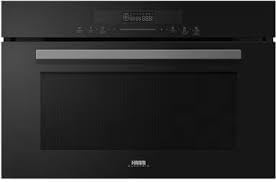
Figure 2.1: Front view of the Haam Electric HM34CTMW Built-in Microwave Oven, showing the digital display and pull-handle door.
3. Installation and Setup
This microwave oven is designed for built-in installation. Proper installation is crucial for safe and efficient operation. Consult a qualified technician for installation if you are unsure.
3.1 Unpacking
- Remove all packaging materials from inside and outside the oven.
- Check the oven for any damage, such as a misaligned or bent door, damaged door seals, or dents in the cavity. Do not operate the oven if it is damaged.
- Retain packaging materials for future transport or disposal.
3.2 Placement and Dimensions
Ensure the installation cabinet meets the required dimensions for a secure fit and proper ventilation.
- Product Dimensions (Depth x Width x Height): 45.6 cm x 38.8 cm x 59.5 cm
- Ensure adequate space for ventilation around the appliance.
- The microwave should be placed on a stable, level surface capable of supporting its weight.

Figure 3.1: Dimensional drawing of the microwave oven, indicating a width of 59.5 cm and a height of 45.6 cm for installation planning.

Figure 3.2: Example of the Haam Electric HM34CTMW Built-in Microwave Oven integrated into a modern kitchen cabinet.
3.3 Electrical Connection
Connect the microwave to a properly grounded electrical outlet. Do not use extension cords or adapters.
4. Operating Instructions
This section explains how to use your microwave oven for various cooking tasks.
4.1 Control Panel Overview
The microwave features a touch screen digital display. The control panel allows you to select cooking functions, set time, and adjust power levels. The language can be set to Arabic or English.
4.2 Basic Microwave Cooking
- Place food in a microwave-safe container and place it in the oven.
- Close the oven door securely.
- Select the desired power level (1-5) using the touch controls.
- Set the cooking time using the timer function (up to 95 minutes).
- Press the Start button to begin cooking.
- The oven will beep when cooking is complete.
4.3 Using Preset Programs
The microwave includes 8 preset programs for common cooking tasks. Refer to the display for specific program options like Auto Cook, Defrost, Reheat, Medium, and High.
- Place food in the oven.
- Select the desired preset program from the touch screen menu.
- Follow any on-screen prompts for weight or quantity if applicable.
- Press Start.
4.4 Defrost Function
The defrost function allows you to thaw frozen food quickly and efficiently.
- Place frozen food in a microwave-safe container.
- Select the 'Defrost' program.
- Enter the weight of the food if prompted.
- Press Start. The oven may pause during defrosting to allow you to turn or separate food items.
5. Maintenance and Cleaning
Regular cleaning and maintenance will ensure the longevity and optimal performance of your microwave oven.
5.1 Cleaning the Exterior
- Wipe the exterior with a damp cloth and mild detergent.
- Avoid abrasive cleaners or scouring pads that could scratch the surface.
5.2 Cleaning the Interior
- Clean the oven cavity after each use to prevent food residue from drying and sticking.
- Use a damp cloth with mild soap. For stubborn stains, place a bowl of water with lemon juice inside and microwave for a few minutes to loosen residue.
- Ensure the door seals and sealing surfaces are clean to maintain proper operation.
- The stainless steel interior can be cleaned with a stainless steel cleaner if necessary, following product instructions.
5.3 Cleaning the Turntable (if applicable)
- Remove the glass turntable and wash it in warm soapy water or in a dishwasher.
- Wipe the turntable support and oven floor clean.
- Ensure all parts are dry before reassembling.
6. Troubleshooting
If you encounter problems with your microwave oven, refer to the following table for common issues and solutions. If the problem persists, contact customer support.
| Problem | Possible Cause | Solution |
|---|---|---|
| Oven does not start | No power; Door not closed properly; Incorrect settings | Check power plug and circuit breaker; Ensure door is fully closed; Re-enter cooking settings. |
| Food not heating evenly | Food not stirred/rotated; Incorrect power level/time | Stir or rotate food during cooking; Adjust power level and time as needed. |
| Light not working | Bulb needs replacement | Contact qualified service personnel for bulb replacement. |
| Excessive steam inside oven | High moisture content in food | This is normal for foods with high moisture. Wipe interior after use. |
7. Specifications
| Feature | Detail |
|---|---|
| Brand | Haam Electric |
| Model Number | HM34CTMW |
| Installation Type | Built-in |
| Capacity | 34 Liters |
| Power Output | 900 Watts |
| Control Type | Touch Control (Touch Screen) |
| Number of Power Levels | 5 |
| Number of Programs | 8 (Auto Cook, Defrost, Reheat, Medium, High) |
| Timer Function | Available (up to 95 minutes) |
| Heating Method | Microwave Radiation |
| Defrost System Type | Defrost |
| Material (Exterior/Interior) | Stainless Steel |
| Color | Black |
| Product Dimensions (D x W x H) | 45.6 cm x 38.8 cm x 59.5 cm |
| Item Weight | 10 kg |
8. Warranty and Support
This product comes with a standard manufacturer's warranty. Please refer to the warranty card included with your purchase for specific terms and conditions, including warranty period and coverage details.
For technical support, service, or warranty claims, please contact Haam Electric customer service. Keep your purchase receipt and model number (HM34CTMW) readily available when contacting support.
For further assistance, you may visit the official Haam Electric website or contact your local authorized service center.