
1. Introduction
The Sony FE 16-35mm f/2.8 GM II Lens (SEL1635GM2) is a high-performance wide-angle zoom lens designed for Sony E-mount cameras. This lens is part of Sony's G Master series, known for its exceptional resolution and beautiful bokeh. It is suitable for a wide range of photographic applications, including landscape, architecture, astrophotography, and general-purpose shooting, offering a consistent f/2.8 aperture across its zoom range for excellent low-light performance and shallow depth of field control.
This manual provides essential information for the proper use, care, and maintenance of your new lens.

Figure 1.1: Sony FE 16-35mm f/2.8 GM II Lens and included accessories, including lens hood, front and rear caps, soft case, and cleaning kit.
2. Setup
2.1 Attaching the Lens to Your Camera
- Ensure both the camera and lens are powered off.
- Remove the rear lens cap from the lens and the body cap from the camera. Avoid touching the lens elements or camera sensor.
- Align the white index mark on the lens barrel with the white index mark on the camera's lens mount.
- Insert the lens into the camera mount and rotate it clockwise until it clicks into place. Do not force the lens.
2.2 Attaching the Lens Hood
The included lens hood (ALC-SH177) helps to block unwanted light and protect the front element of the lens.
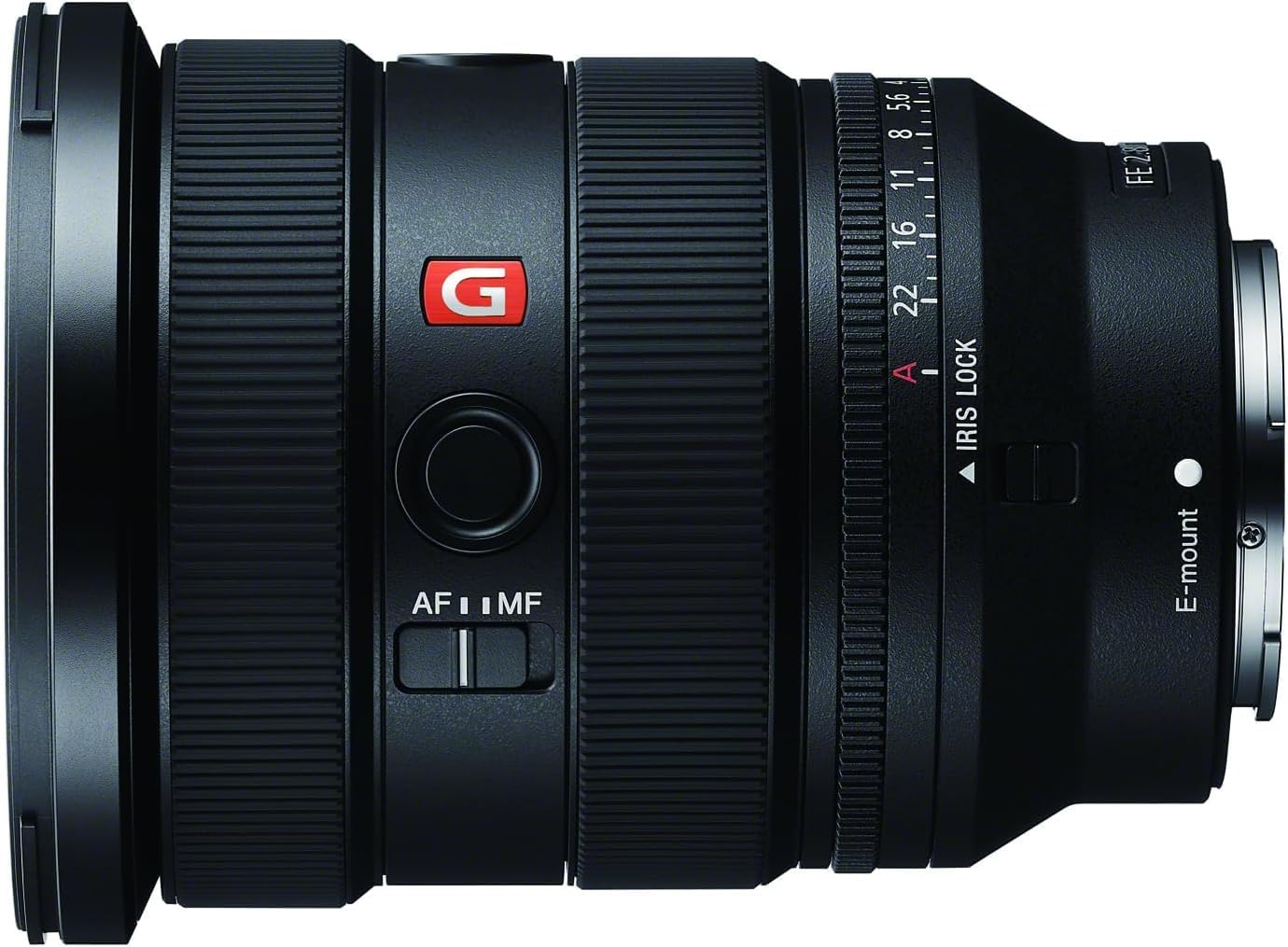
Figure 2.1: The lens with its hood attached, ready for use.
- Align the red dot on the lens hood with the red dot on the front of the lens barrel.
- Insert the hood onto the lens and rotate it clockwise until it locks securely.
- For storage, the lens hood can be reversed and attached to the lens.
2.3 Attaching the 82mm Protection Filter
The 82mm Protection Filter can be screwed onto the front of the lens to provide an additional layer of protection for the front lens element.
- Carefully align the filter's threads with the threads on the front of the lens.
- Gently rotate the filter clockwise until it is finger-tight. Do not overtighten.
3. Operating Instructions
3.1 Focus Mode Switch (AF/MF)
This switch allows you to select between Autofocus (AF) and Manual Focus (MF).

Figure 3.1: Location of the AF/MF switch on the lens barrel.
- AF (Autofocus): The camera automatically focuses on the subject.
- MF (Manual Focus): You manually adjust the focus ring to achieve focus.
3.2 Aperture Ring and Iris Lock
The lens features a dedicated aperture ring for direct control over the aperture setting.

Figure 3.2: The aperture ring with f-stop markings and the Iris Lock switch.
- Rotate the aperture ring to select your desired f-stop.
- The IRIS LOCK switch (labeled "A" and a red dot) allows you to lock the aperture ring in the "A" (Auto) position for camera-controlled aperture, or lock it to a specific f-stop to prevent accidental changes.
- The CLICK ON | OFF switch (not visible in all images, but present on the lens) enables or disables the click stops on the aperture ring. "ON" provides tactile feedback for each f-stop, while "OFF" allows for smooth, silent aperture changes, ideal for video recording.
3.3 Zooming
Rotate the zoom ring to change the focal length between 16mm and 35mm. The focal length markings are clearly indicated on the lens barrel.
4. Maintenance
Proper care and maintenance will extend the life and performance of your lens.
4.1 Cleaning the Lens
Use the provided Pixel Connection Essential Cleaning Kit for best results.
- Dust Removal: Use a blower brush to remove loose dust and debris from the lens surfaces and body.
- Fingerprints/Smudges: For stubborn marks, use a lens cleaning solution applied to a microfiber cloth or lens cleaning paper. Gently wipe the lens surface in a circular motion from the center outwards. Never apply cleaning solution directly to the lens.
- Lens Body: Wipe the lens barrel with a soft, dry cloth.
4.2 Storage
- Always attach the front and rear lens caps when the lens is not in use.
- Store the lens in a cool, dry place, away from direct sunlight and extreme temperatures.
- If storing for extended periods, consider using a dehumidifying agent to prevent mold growth.
5. Troubleshooting
This section addresses common issues you might encounter with your lens.
| Problem | Possible Cause | Solution |
|---|---|---|
| Lens not attaching to camera. | Incorrect alignment; obstruction. | Ensure white index marks are aligned. Check for debris on mount. Do not force. |
| Autofocus not working. | Lens set to MF; camera settings; dirty contacts. | Set lens AF/MF switch to AF. Check camera focus mode. Clean lens and camera contacts with a dry cloth. |
| Aperture ring not responding or stuck. | Iris Lock engaged; "A" position selected. | Disengage the IRIS LOCK switch if you want to manually set aperture. If using "A" position, ensure camera is set to aperture priority or manual mode. |
| Images are blurry. | Incorrect focus; camera shake; dirty lens element. | Verify focus mode and focus point. Use a faster shutter speed or tripod. Clean lens elements. |
6. Specifications
Key technical specifications for the Sony FE 16-35mm f/2.8 GM II Lens.
| Feature | Detail |
|---|---|
| Model Number | SEL1635GM2 |
| Focal Length | 16-35mm |
| Maximum Aperture | f/2.8 |
| Lens Type | Wide Angle Zoom |
| Compatible Mountings | Sony E-mount |
| Product Dimensions | 4.5 x 3.5 x 3.5 inches |
| Item Weight | 1.2 pounds |
| Manufacturer | Sony |
| Date First Available | August 29, 2023 |
7. Warranty & Support
7.1 Warranty Information
The Sony FE 16-35mm f/2.8 GM II Lens comes with a manufacturer's warranty. Please retain your proof of purchase for warranty claims.
Important Note: As stated by the seller, your Sony USA Warranty is valid if purchased from Pixel Connection. For specific warranty terms and conditions, please refer to the documentation included with your product or visit the official Sony support website.

Figure 7.1: Pixel Connection is an authorized dealer for Sony products.
7.2 Customer Support
For technical assistance, service, or further inquiries, please contact Sony customer support or visit their official website:
- Sony Official Support: www.sony.com/electronics/support
- Refer to the contact information provided in your product packaging for regional support details.


