
iKiKin BM6
iKiKin BM6 12V Bluetooth Car Battery Monitor Instruction Manual
Brand: iKiKin | Model: BM6
Introduction
The iKiKin BM6 Bluetooth Car Battery Monitor is a diagnostic tool designed to assess the health and performance of 12-volt vehicle batteries. This device connects to your vehicle's battery and communicates wirelessly via Bluetooth 4.0 with a dedicated mobile application. It provides real-time data and performs various tests to help users understand their battery's condition, cranking power, and charging system efficiency. This manual provides detailed instructions for the proper installation, operation, and maintenance of your BM6 battery monitor.

Image: The iKiKin BM6 Bluetooth Car Battery Monitor is compatible with a wide range of 12V vehicles, including cars, motorcycles, trucks, and electric cars.
Safety Information
Always exercise caution when working with vehicle batteries. Improper handling can lead to serious injury or damage to the vehicle. Please observe the following safety guidelines:
- Wear appropriate personal protective equipment, including safety glasses and gloves.
- Ensure the vehicle's ignition is off before connecting or disconnecting the battery monitor.
- Connect the negative (black) terminal first, then the positive (red) terminal. When disconnecting, remove the positive (red) terminal first, then the negative (black) terminal.
- Avoid short-circuiting battery terminals.
- Keep the device away from excessive heat, moisture, and corrosive substances.
- Do not attempt to open or modify the device.
Package Contents
The iKiKin BM6 12V Bluetooth Car Battery Monitor package includes:
- 1 x iKiKin BM6 Car Battery Tester
- 1 x User Manual
Product Overview
The iKiKin BM6 is a compact and efficient device designed for comprehensive 12V battery system analysis. It offers a range of functions accessible via a smartphone application, providing users with critical information about their vehicle's battery health.
Key Features:
- Wide Compatibility: Compatible with all 12-volt vehicle batteries, including lead-acid and lithium batteries.
- Multi-Language Support: Supports Chinese, English, Spanish, French, Italian, Norwegian, Polish, Romanian, Russian, Slovak, Arabic, Czech, and German.
- Battery Monitoring: Provides real-time voltage, charge, and temperature readings.
- Cranking Test: Evaluates the starting system's performance.
- Charging Test: Assesses the alternator's charging efficiency.
- Trip Monitor: Records driving habits and battery performance over time.
- Automatic Low Voltage Alarm: Notifies the user via the app if the battery voltage drops below a set threshold within Bluetooth range.
- Historical Data Review: Stores and allows review of past test results and battery data.
- Car Location Function: Records parking locations and provides navigation assistance via the app.

Image: The iKiKin BM6 device connected to a battery, with its companion app displaying real-time battery status.
Setup Guide
1. Physical Installation
- Ensure the vehicle's ignition is off and the engine is cool.
- Locate your vehicle's 12V battery.
- Connect the black 'U' terminal of the BM6 monitor to the negative (-) pole of the battery.
- Connect the red 'U' terminal of the BM6 monitor to the positive (+) pole of the battery.
- Ensure connections are secure. The device is designed for continuous connection.
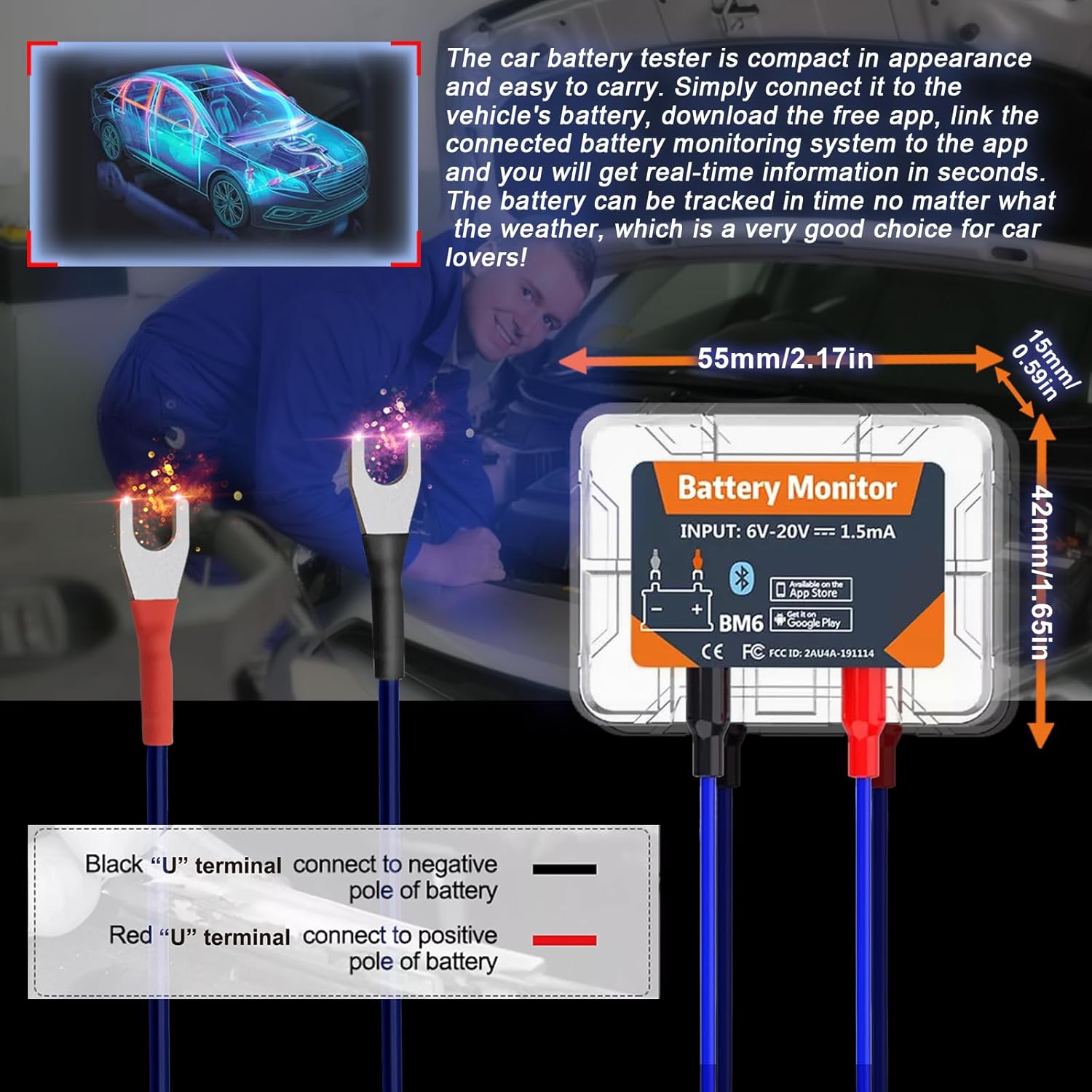
Image: Proper connection of the BM6 monitor to a vehicle battery terminals.
2. App Installation
- Scan the QR code provided on the product packaging or in the user manual, or search for "BM6" in your device's app store (Google Play for Android, App Store for iOS).
- Download and install the "BM6" application.
- The app requires iOS 7.1 or later, or Android 4.3 or later.
3. Device Pairing
- Open the "BM6" app on your smartphone.
- Grant necessary permissions to the app, including Bluetooth and location access, as prompted. Location access is required for scanning nearby Bluetooth Low Energy (BLE) devices.
- The app should automatically detect and connect to the BM6 device. If not, navigate to the device management section within the app and select "Add Device". You may need to scan the serial number barcode on the device.
- Once connected, the app will display real-time battery information.
Video: A demonstration of the iKiKin BM6 Bluetooth Car Battery Monitor, including unboxing, connection to a battery, app installation, and basic app functions like battery monitoring, cranking test, and charging test.
Operating Instructions
1. Battery Monitoring
Upon successful connection, the app's main screen will display real-time battery data, including:
- State of Charge (SoC): Percentage of battery charge.
- Voltage: Current battery voltage.
- Temperature: Battery temperature.
- A graphical representation of voltage over time.
The app will also indicate if the battery status is "OK" or if there are any abnormalities.
2. Cranking Test
The Cranking Test evaluates the vehicle's starting system. Follow the in-app instructions:
- Ensure the engine is off.
- Select "Cranking Test" in the app.
- Start the vehicle's engine as instructed by the app.
- The app will measure the cranking voltage and time, providing an assessment of the starter's performance.
3. Charging Test
The Charging Test assesses the alternator and charging system. This test typically involves three steps:
- Idle Speed Test: With the engine idling, turn on all electrical equipment (headlights, AC, car interior lights, etc.) and follow the app's prompts.
- High Speed Test: Keep the engine at 2500-3000 RPM and follow the app's prompts.
- Diode Ripple Test: With the engine idling, turn off all electrical equipment and follow the app's prompts.
The app will display the idle charging voltage, high-speed charging voltage, and diode ripple voltage, indicating the health of your charging system.

Image: The BM6 app displaying results from cranking and charging system tests.
4. Trip Monitor and Historical Data
The app records battery data during trips, allowing you to review historical performance and driving habits. This feature helps in understanding long-term battery trends and identifying potential issues.
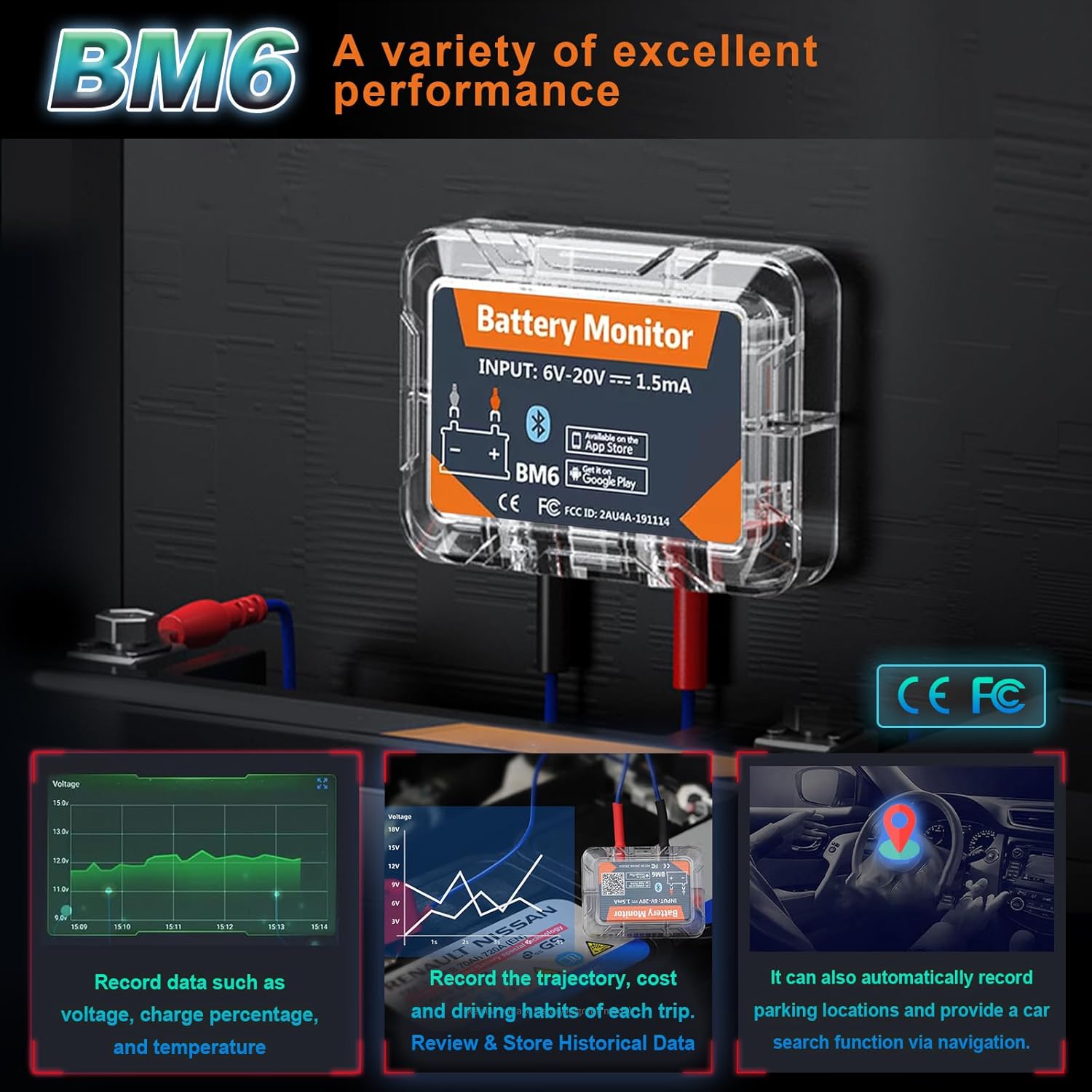
Image: The BM6 monitor's ability to record various data points and assist with car location.
5. Multi-Battery Management
The BM6 app supports monitoring multiple devices simultaneously. You can add and manage several BM6 units from a single app interface, making it suitable for users with multiple vehicles.
Maintenance
To ensure the longevity and accurate performance of your iKiKin BM6 battery monitor:
- Keep the device clean and free from dirt, dust, and moisture.
- Regularly check the connections to the battery terminals to ensure they are secure and free from corrosion.
- Store the device in a cool, dry place if it is removed from the vehicle for an extended period.
- Ensure the app is updated to the latest version for optimal performance and new features.
Troubleshooting
If you encounter issues with your iKiKin BM6 battery monitor, consider the following:
- Device Not Connecting to App:
- Ensure Bluetooth is enabled on your smartphone.
- Verify that the BM6 device is correctly connected to the vehicle battery.
- Check if the app has the necessary permissions (especially location) enabled.
- Restart the app and try reconnecting.
- Ensure the device is within Bluetooth range (typically 10 meters).
- Inaccurate Readings:
- Verify that the battery terminals are clean and the connections are tight.
- Ensure the battery type selected in the app (Lead-Acid or Lithium) matches your vehicle's battery.
- If using a custom battery profile, ensure the voltage corresponding to power settings are accurate.
- App Not Functioning Correctly:
- Update the app to the latest version.
- Clear the app's cache or reinstall the app.
- Ensure your smartphone's operating system is up to date.
- Automatic Alarm Function Not Working:
- Check app notification settings on your phone to ensure they are enabled for the BM6 app.
- Verify that the low voltage threshold is set correctly within the app.
Specifications
| Feature | Detail |
|---|---|
| Brand | iKiKin |
| Model Number | BM6 |
| Compatibility | All 12-volt vehicle batteries (Lead-Acid, Lithium) |
| Connectivity | Bluetooth 4.0 |
| Operating Voltage | 6V - 20V |
| Current Consumption | 1.5mA |
| Supported OS | iOS 7.1 and Later, Android 4.3 and Later |
| Package Dimensions | 6.06 x 4.8 x 0.91 inches |
| Item Weight | 2.4 ounces |
| Manufacturer | iKiKin |
Warranty and Support
For warranty information and technical support, please refer to the contact details provided with your product packaging or visit the official iKiKin website. Keep your purchase receipt as proof of purchase for any warranty claims.
Ask a question about this manual
Ask about setup, troubleshooting, compatibility, parts, safety, or missing instructions. Manuals+ will review the question and use this page’s manual context to help answer it.