
kleankin 834-644V80WT
kleankin Lighted Medicine Cabinet with Mirror User Manual
Model: 834-644V80WT
Important Safety Information
Always follow the assembly instructions carefully. Keep hands and fingers away from the door hinges when opening and closing. Ensure the cabinet is securely mounted to the wall before use. Do not exceed the weight capacity of the cabinet or shelves. Always unplug the USB power source before performing any maintenance or cleaning.
Product Overview
The kleankin Lighted Medicine Cabinet with Mirror is designed to provide convenient storage and smart lighting for your bathroom. It features a two-doored design, adjustable shelves, and USB-powered LED lighting with multiple color options.

Figure 1: kleankin Lighted Medicine Cabinet installed in a modern bathroom setting.
Package Contents
Before beginning assembly, ensure all parts are present and undamaged. Refer to the included parts list in your physical manual for detailed identification.
- Medicine Cabinet Frame (E1 grade MDF board)
- Mirrored Doors (with scatter prevention glass)
- Adjustable Shelves
- Cushioned Hinges
- LED Lighting Strips (USB powered)
- Mounting Hardware (screws, anchors)
- Assembly Instructions (physical copy)
Setup and Assembly
Assembly is required for this product. It is recommended to have two people for safe and efficient assembly and installation due to the weight of the unit.
Tools Required (Not Included):
- Phillips Head Screwdriver
- Drill
- Level
- Measuring Tape
- Pencil
- Stud Finder (recommended for wall mounting)
Assembly Steps:
- Unpack and Identify Parts: Carefully remove all components from the packaging. Lay them out on a clean, soft surface to prevent scratches. Verify all parts against the included parts list.
- Assemble the Cabinet Frame: Follow the numerical sequence in your physical instruction manual to connect the MDF board panels using the provided hardware. Ensure all connections are secure but do not overtighten screws, especially those connecting to plastic insert nuts, to prevent cracking.
- Install Shelves: Insert the adjustable shelves into the desired positions within the cabinet frame. The adjustable design allows for flexible storage configurations.
- Attach Hinges to Doors: Secure the cushioned hinges to the mirrored doors. These hinges are designed for soft and smooth opening and closing.
- Attach Doors to Cabinet Frame: Carefully align the hinges on the doors with the pre-drilled holes on the cabinet frame and secure them. Adjust the hinges as needed to ensure proper door alignment and closure.
- Connect LED Lighting: The LED lighting strips are USB powered. Connect the lighting components as instructed in the manual. Note that a USB power adapter is not included.
Wall Mounting:
This medicine cabinet is designed for wall mounting. It is heavy, so proper installation is crucial for safety and stability.
- Choose Location: Select a suitable wall location, ensuring sufficient space (Reserve Wall Mounting Space: 39.25" W x 9.75" D x 29.5" H). Use a stud finder to locate wall studs for secure mounting. Mounting directly into studs is highly recommended.
- Mark Drilling Points: Hold the cabinet against the wall at the desired height and use a pencil to mark the drilling points for the mounting hardware. Use a level to ensure the marks are perfectly horizontal.
- Drill Pilot Holes: Drill pilot holes at the marked locations. If not mounting into studs, use appropriate wall anchors (not always included, may need to be purchased separately based on wall type).
- Secure Cabinet: With assistance, lift the cabinet and align the mounting holes with the drilled holes. Secure the cabinet to the wall using the provided screws. Ensure the cabinet is firmly attached and does not wobble.

Figure 2: Product dimensions and internal shelf measurements for planning installation.

Figure 3: Adjustable shelves provide flexible storage options within the cabinet.
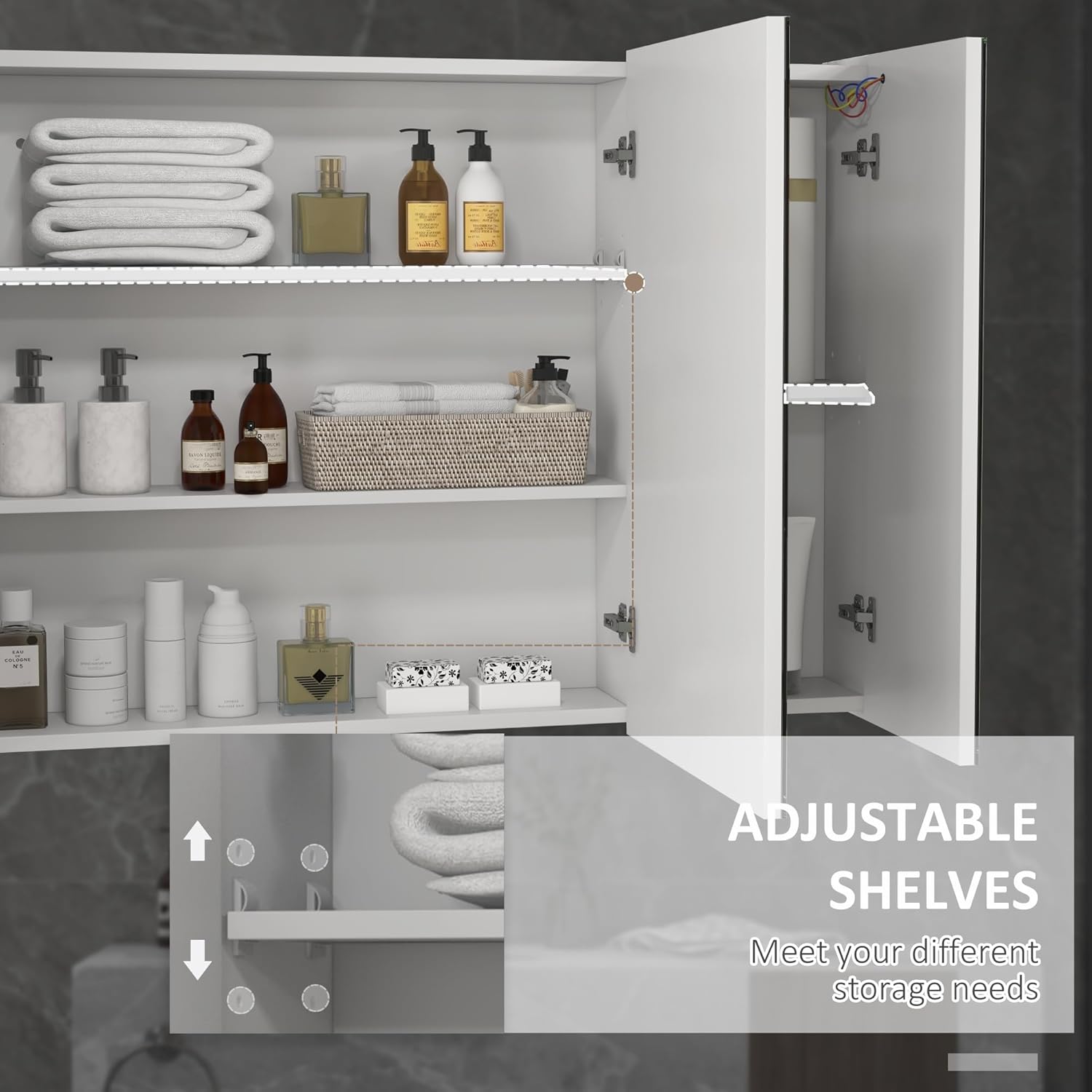
Figure 4: Cushioned hinges ensure smooth and quiet door operation.
Operating Instructions
LED Lighting Operation:
The medicine cabinet features smart LED lighting with a touch sensor for easy control.
- Power On/Off: Gently touch the circular sensor icon on the mirror surface to turn the LED lights on or off.
- Change Light Color: With the lights on, touch and hold the sensor icon to cycle through the three available light colors: white (6500K), warm white (4000K), and yellow (3500K). Release your finger when the desired color is displayed.
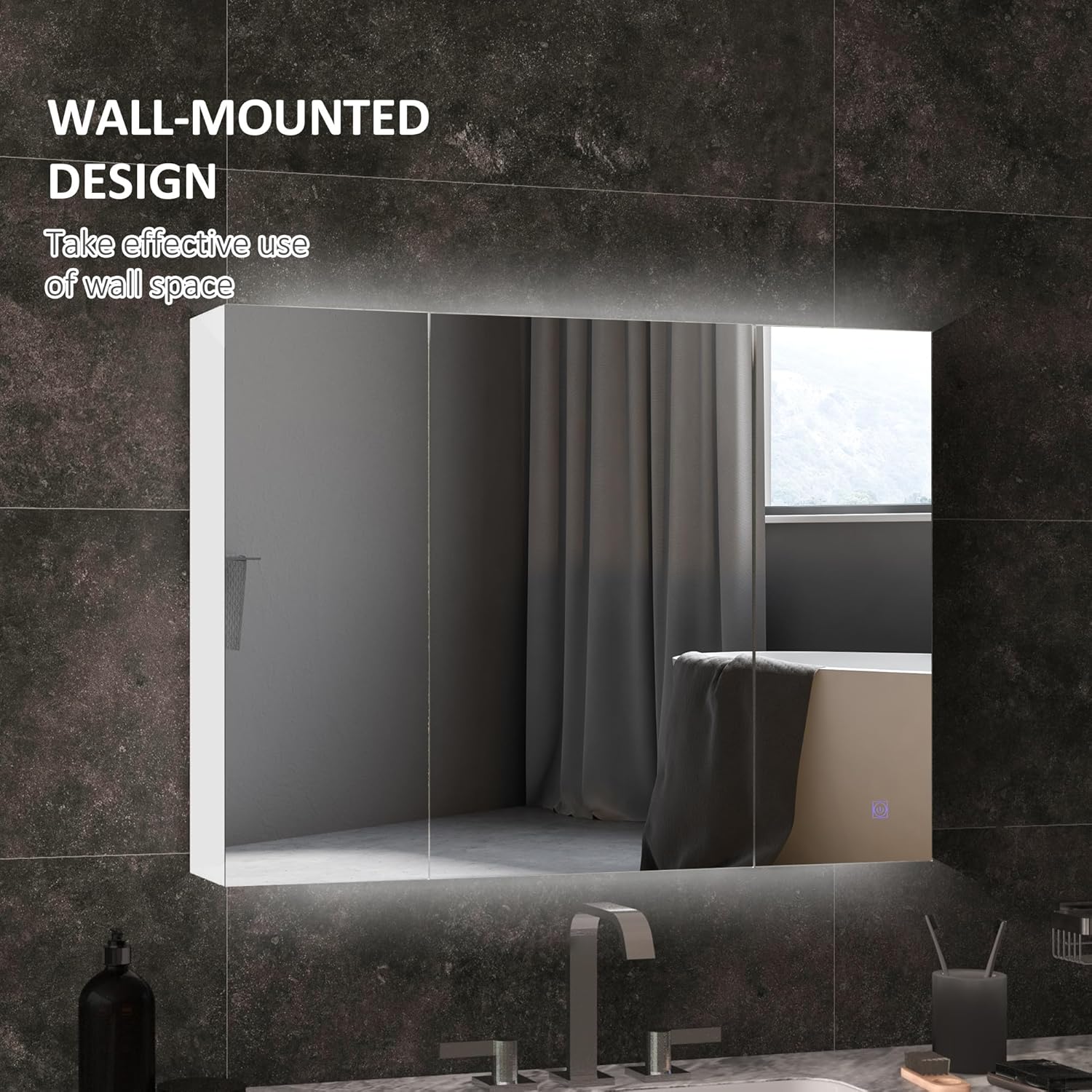
Figure 5: The touch sensor controls the LED lighting, allowing selection of different color temperatures.
Maintenance and Care
- Cleaning: Wipe the cabinet surfaces and mirror with a soft, damp cloth. Use a mild, non-abrasive cleaner if necessary. Avoid harsh chemicals or abrasive materials that could damage the finish or mirror.
- Mirror Care: The mirror features scatter prevention and oxidation prevention. For best results, clean the mirror with a glass cleaner and a lint-free cloth.
- Hinge Maintenance: The cushioned hinges are designed for durability. If doors become misaligned over time, refer to the assembly instructions for hinge adjustment procedures.
- USB Connection: Ensure the USB connection for the LED lighting remains dry and free from debris.
Troubleshooting
| Problem | Possible Cause | Solution |
|---|---|---|
| LED lights do not turn on. |
|
|
| Doors are misaligned or do not close properly. |
|
|
| Cabinet feels unstable after mounting. |
|
|
Specifications
| Feature | Detail |
|---|---|
| Brand | kleankin |
| Model Number | 834-644V80WT |
| Overall Dimensions | 35.5" W x 6" D x 25.5" H |
| Weight Capacity (Total) | 55 lbs |
| Weight Capacity (Shelf) | 11 lbs |
| Material | E1 grade MDF board, Glass |
| Color | High Gloss White |
| Lighting Type | LED (USB Powered) |
| Light Color Temperatures | 6500K (White), 4000K (Warm White), 3500K (Yellow) |
| Special Features | Soft Hinges, Touch Sensor, Two-Door Design, Adjustable Shelf, Scatter Prevention Mirror |
| Assembly Required | Yes |
| Mounting Type | Wall Mount |
| Item Weight | 52.8 Pounds |
| UPC | 196393248720 |
Warranty and Support
For warranty information, product support, or to purchase replacement parts, please refer to the contact details provided in your product packaging or visit the official kleankin website. Keep your proof of purchase for any warranty claims.
You can also visit the kleankin Store on Amazon for more information and products.
Ask a question about this manual
Ask about setup, troubleshooting, compatibility, parts, safety, or missing instructions. Manuals+ will review the question and use this page’s manual context to help answer it.