Introduction
This manual provides essential instructions for the Pioneer Dedicated Home Theater Remote Control, model AXD7731. It covers basic setup, operation, maintenance, and troubleshooting to ensure optimal use with your compatible Pioneer home theater system. Please note that this product is a remote control only, and an instruction manual for the original home theater system or batteries for the remote are not included.
Setup
1. Battery Installation
The remote control requires two AAA batteries (not included). Follow these steps to install them:
- Locate the battery compartment cover on the back of the remote control.
- Slide the cover downwards or press the latch and lift to open.
- Insert two AAA batteries, ensuring the positive (+) and negative (-) terminals align correctly with the markings inside the compartment.
- Replace the battery compartment cover, sliding it back into place until it clicks securely.
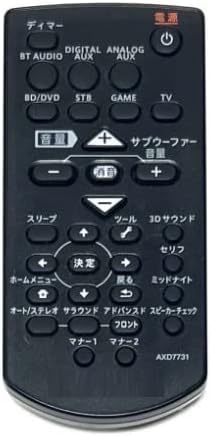
Image: The Pioneer AXD7731 remote control. The battery compartment is typically located on the back, requiring two AAA batteries.
2. Initial Use
Once batteries are installed, the remote control should be ready for immediate use with compatible Pioneer home theater systems. No complex pairing or programming is typically required for dedicated replacement remotes. Point the remote directly at your home theater receiver or device and press the desired function button.
Operating Instructions
This section outlines the general functions of the buttons on your AXD7731 remote control. Button layouts may vary slightly depending on the specific home theater model, but core functions remain consistent.
Image: Front view of the Pioneer AXD7731 remote control, displaying its array of control buttons.
- POWER: Turns the home theater system ON or OFF.
- INPUT SELECTOR: Cycles through available audio/video input sources (e.g., HDMI 1, HDMI 2, Optical, Coaxial).
- VOLUME +/-: Increases or decreases the master volume level.
- MUTE: Silences the audio output. Press again to restore sound.
- MENU / HOME: Accesses the system's main menu or returns to the home screen.
- NAVIGATION (Up/Down/Left/Right) & ENTER: Used to navigate through menus and confirm selections.
- RETURN / BACK: Goes back to the previous menu or screen.
- PLAYBACK CONTROLS (Play, Pause, Stop, Fast Forward, Rewind, Skip): Controls media playback for connected devices (e.g., Blu-ray player, media server).
- SOUND MODE / SURROUND: Selects different audio processing modes or surround sound settings.
- TUNER (AM/FM): Switches to radio tuner mode and allows station selection.
For detailed functions of specific buttons, refer to the original instruction manual of your Pioneer home theater system.
Maintenance
Cleaning the Remote Control
To maintain the remote control's appearance and functionality:
- Wipe the surface with a soft, dry cloth.
- For stubborn dirt, lightly dampen the cloth with water or a mild, non-abrasive cleaner. Do not spray cleaner directly onto the remote.
- Avoid using harsh chemicals, solvents, or abrasive cleaning pads, as these can damage the remote's finish or internal components.
Battery Replacement
Replace batteries when the remote control becomes unresponsive or its range decreases significantly. Always replace both batteries at the same time with new AAA batteries. Do not mix old and new batteries, or different types of batteries.
Storage
When not in use for extended periods, remove the batteries to prevent leakage and potential damage to the remote control.
Troubleshooting
If you experience issues with your remote control, try the following solutions:
| Problem | Possible Cause | Solution |
|---|---|---|
| Remote control does not work. |
|
|
| Some buttons are unresponsive. |
|
|
| Remote works intermittently. |
|
|
Specifications
| Feature | Detail |
|---|---|
| Model Number | AXD7731 |
| Brand | Generic (Dedicated for Pioneer) |
| Compatible Device | Home Theater Systems |
| Color | Black |
| Battery Requirement | AAA x 2 (Not included) |
| Number of Buttons | 25 |
| Package Dimensions | 15 x 12 x 2 cm |
| Item Weight | 100 g |
Warranty and Support
As this product is often sold as a replacement part, specific warranty information or a dedicated support manual may not be included. For warranty details, technical support, or further assistance, please refer to the original documentation provided with your Pioneer home theater system or visit the official Pioneer support website. If purchased from a third-party seller, please consult their return and warranty policies.