
1. Introduction
Thank you for choosing the Suuim Cordless Grass Trimmer. This manual provides essential information for the safe assembly, operation, and maintenance of your new tool. Please read it thoroughly before first use and keep it for future reference.

Image 1: The Suuim Cordless Grass Trimmer, showcasing its overall design and components.
2. Safety Instructions
Always prioritize safety when operating power tools. Failure to follow these instructions may result in injury or damage to the product.
- General Safety:
- Avoid contact with children. Keep the trimmer out of reach of minors.
- Stay away from sources of fire. Do not operate or store near flammable materials.
- Store in a dry environment. Protect the trimmer and battery from moisture.
- Wear appropriate personal protective equipment (PPE), including eye protection, gloves, and sturdy footwear.
- Ensure the work area is clear of debris, rocks, and other objects that could be thrown by the blades.
- Battery Safety:
- Use only the charger provided with the trimmer.
- Do not expose batteries to extreme temperatures or direct sunlight.
- Do not short-circuit battery terminals.
- Dispose of batteries responsibly according to local regulations.
- Blade Safety:
- Always disconnect the battery before changing blades or performing maintenance.
- Handle blades with care; they are sharp.
- Ensure blades are securely fastened before operation.
3. Package Contents
Verify that all items are present in the package:
- 1 x Cordless Grass Strimmer unit
- 2 x Lithium Batteries (42V/18000H or 12V/11000H)
- 1 x Battery Charger
- 2 x 6-inch Circular Saw Blades
- 2 x Airfoil Metal Blades
- 5 x Plastic Blades
4. Assembly
The Suuim Cordless Grass Trimmer requires some assembly before first use. Follow these general steps:
- Attach the Handle: Secure the auxiliary handle to the main shaft at a comfortable position.
- Install the Guard: Fasten the protective guard over the blade area.
- Select and Install Blade: Choose the appropriate blade for your task and securely attach it to the trimmer head. Refer to Section 5.2 for blade types.
- Insert Battery: Once assembly is complete, insert a charged battery into the designated slot.

Image 2: The assembled trimmer with its adjustable length ranging from 95cm (37.4in) to 120cm (47.2in).
5. Operating Instructions
5.1 Powering On/Off
To power on the trimmer, ensure a charged battery is inserted and press the power button. To power off, release the power button.
5.2 Blade Selection and Usage
The trimmer comes with three types of blades, each designed for specific tasks:
- Circular Saw Blades (6-inch): Ideal for cutting bushes, branches, and thicker crops like corn or sorghum.
- Airfoil Metal Blades: Suitable for cutting weeds and maintaining green belts.
- Plastic Blades: Best for trimming lawns and light grass.
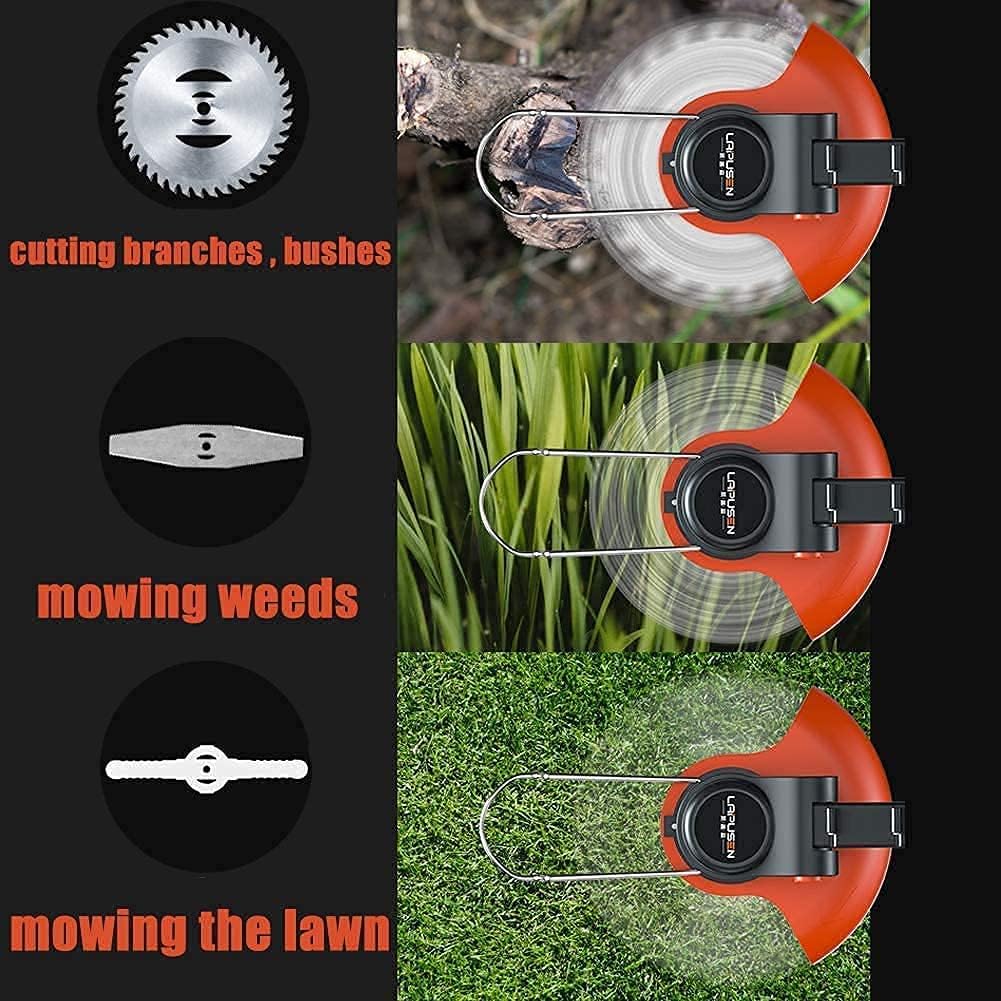
Image 3: Illustration of the three blade types: circular saw blade for branches, airfoil metal blade for weeds, and plastic blade for lawn mowing.

Image 4: Exploded view showing the internal motor components, highlighting the 1800W motor.

Image 5: The trimmer in action, demonstrating its capability to cut through a small tree trunk with the appropriate blade.
5.3 Adjustable Length
The trimmer features an adjustable height mechanism, allowing for comfortable operation at various heights. The length can be adjusted from 2.95 ft (90 cm) to 4.10 ft (125 cm).

Image 6: Diagram illustrating the adjustable length feature of the trimmer, showing how the shaft extends.
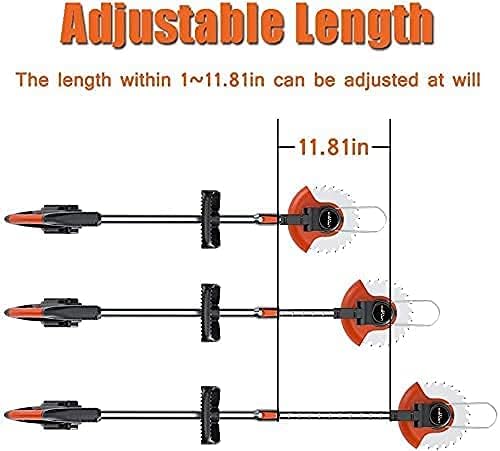
Image 7: A user demonstrating the lightweight design of the trimmer (1.8 kg), highlighting ease of use.
6. Charging the Battery
The trimmer is powered by 42V (or 12V) Lithium batteries. To charge:
- Remove the battery from the trimmer.
- Connect the battery to the provided charger.
- Plug the charger into a standard power outlet.
- A full charge typically takes 1-2 hours.
- Each fully charged battery provides approximately 1.5-2 hours of working time.
7. Maintenance
Regular maintenance ensures optimal performance and extends the life of your trimmer.
- Cleaning: After each use, disconnect the battery and clean the trimmer head, guard, and blades of any grass clippings or debris. Use a damp cloth; do not use harsh chemicals.
- Blade Inspection: Regularly inspect blades for wear, damage, or dullness. Replace worn or damaged blades immediately to maintain cutting efficiency and safety.
- Storage: Store the trimmer in a dry, secure location, out of reach of children. Ensure the battery is partially charged before long-term storage.
8. Troubleshooting
If you encounter issues with your Suuim Cordless Grass Trimmer, consider the following:
- Trimmer not starting: Ensure the battery is fully charged and correctly inserted. Check that the power button is fully depressed.
- Reduced cutting performance: Inspect blades for damage or dullness. Replace blades if necessary. Ensure the correct blade type is used for the material being cut.
- Excessive vibration: Check that the blade is securely fastened and not bent or damaged.
For further assistance, please contact Suuim customer support.
9. Specifications
| Feature | Specification |
|---|---|
| Product Name | Cordless Grass Strimmer |
| Idle Speed | 6000 r/min |
| Motor Power | 1800 watts |
| Weight | 1.8 kg |
| Lithium Battery | 42V(12V)/18000H(11000H) |
| Charging Time | 1-2 hours |
| Working Time (per battery) | 1.5-2 hours |
| Adjustable Height | 2.95 ft ~ 4.10 ft (90 cm ~ 125 cm) |
| Power Source | Battery Powered |
| Assembly Required | Yes |
10. Warranty and Support
For information regarding warranty coverage or technical support, please refer to the documentation included with your purchase or contact Suuim customer service directly. Keep your purchase receipt as proof of purchase.